
Symbols & emoji
Star Symbols — Copy & Paste
Tap to copy star symbols and star emoji — ★ ☆ ✦ ✧ ⭐ ✨ and many more — for bios, captions, ratings, usernames, and messages.
Updated · Free, no sign-up
Tap any symbol to copy it, then paste it anywhere.
Share this tool
Know someone who’d love it?
Copy and paste star symbols
From the classic filled and outline stars (★ ☆) to sparkles (✨) and every decorative star in between, tap any star to copy it instantly.
How to use it
- Tap any symbol in the palette above.
- It is copied to your clipboard automatically.
- Paste it into your bio, caption, username, or message.
Star symbols chart

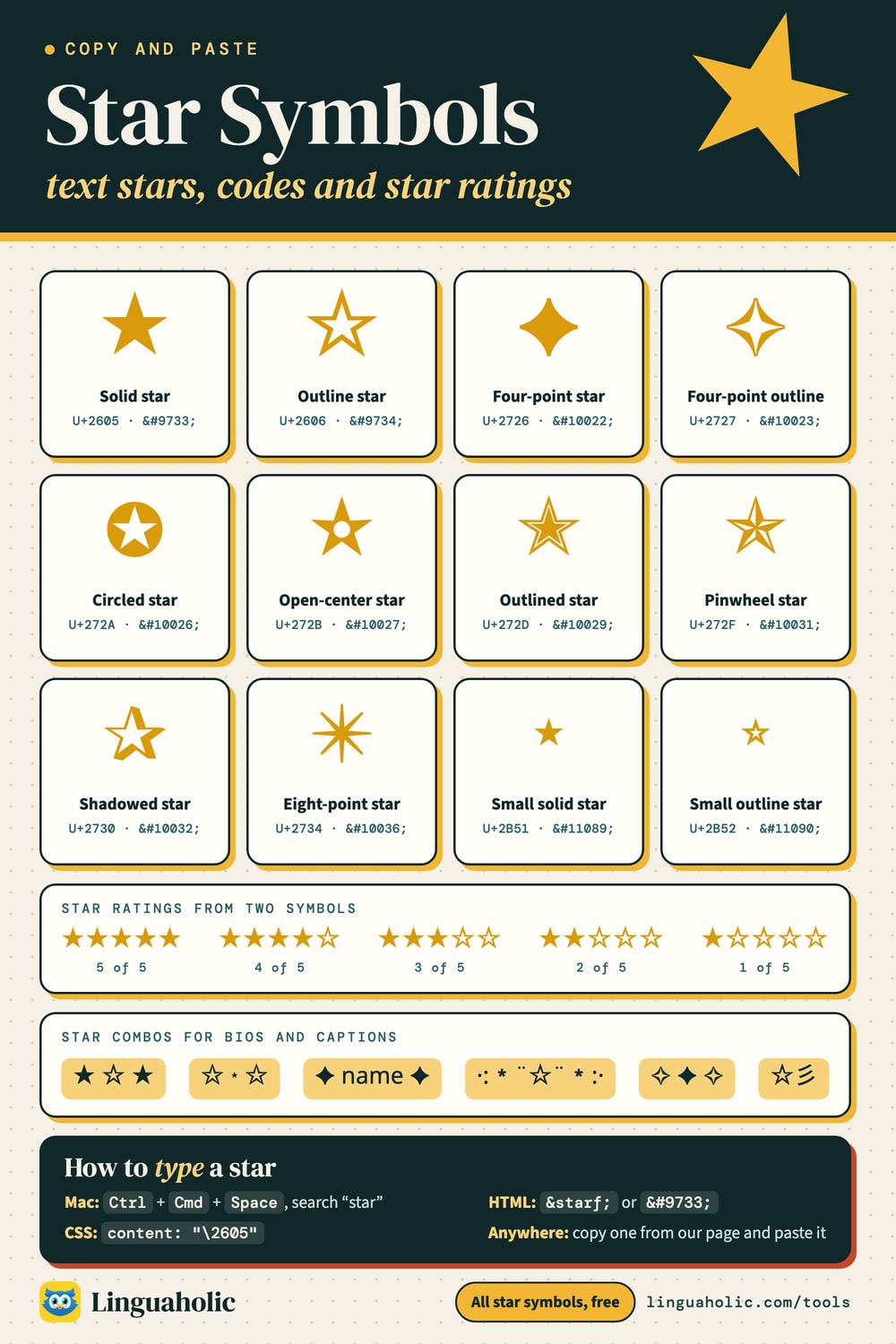
About these symbols
The set includes solid and outline stars, four- and six-pointed stars, twinkles and sparkles, and star emoji like ⭐. The outline (☆) and filled (★) pair is perfect for showing ratings out of five.
Star symbol names and Unicode code points
The table lists all 35 symbols in the star palette above with their official Unicode names and code points.
| Symbol | Unicode name | Code point |
|---|---|---|
| ★ | Black Star | U+2605 |
| ☆ | White Star | U+2606 |
| ✦ | Black Four Pointed Star | U+2726 |
| ✧ | White Four Pointed Star | U+2727 |
| ✩ | Stress Outlined White Star | U+2729 |
| ✪ | Circled White Star | U+272A |
| ✫ | Open Centre Black Star | U+272B |
| ✬ | Black Centre White Star | U+272C |
| ✭ | Outlined Black Star | U+272D |
| ✮ | Heavy Outlined Black Star | U+272E |
| ✯ | Pinwheel Star | U+272F |
| ✰ | Shadowed White Star | U+2730 |
| ⋆ | Star Operator | U+22C6 |
| ⭐ | White Medium Star | U+2B50 |
| 🌟 | Glowing Star | U+1F31F |
| ✨ | Sparkles | U+2728 |
| 💫 | Dizzy Symbol | U+1F4AB |
| 🌠 | Shooting Star | U+1F320 |
| ✴️ | Eight Pointed Black Star | U+2734 U+FE0F |
| ❇️ | Sparkle | U+2747 U+FE0F |
| ❋ | Heavy Eight Teardrop-spoked Propeller Asterisk | U+274B |
| ✳️ | Eight Spoked Asterisk | U+2733 U+FE0F |
| ࿊ | Tibetan Symbol Nor Bu Nyis -khyil | U+0FCA |
| ⍟ | APL Functional Symbol Circle Star | U+235F |
| 🌃 | Night with Stars | U+1F303 |
| 🌌 | Milky Way | U+1F30C |
| ⭑ | Black Small Star | U+2B51 |
| ⭒ | White Small Star | U+2B52 |
| ๑ | Thai Digit One | U+0E51 |
| ☪️ | Star and Crescent | U+262A U+FE0F |
| ✵ | Eight Pointed Pinwheel Star | U+2735 |
| ✷ | Eight Pointed Rectilinear Black Star | U+2737 |
| ❈ | Heavy Sparkle | U+2748 |
| ❉ | Balloon-spoked Asterisk | U+2749 |
| ❊ | Eight Teardrop-spoked Propeller Asterisk | U+274A |
U+FE0F is a variation selector: it asks for the emoji style of the symbol before it.
Where to use star symbols
Ratings and reviews, aesthetic bios and captions, bullet points and dividers, and general decoration.
More symbols to copy and paste
Browse more palettes: hearts, stars, arrows, moons, and flowers. For styled letters, try the Fancy Text Generator.
Free and private
This star symbol palette runs entirely in your browser — free, with no sign-up, and nothing you type is uploaded or stored.
Frequently asked questions
- How do I copy a star symbol?
- Tap any star in the palette and it is copied to your clipboard, ready to paste into a bio, caption, review, or message.
- What are star symbols used for?
- Ratings and reviews, aesthetic bios and captions, bullet points, and decoration. The outline (☆) and filled (★) stars are popular for showing scores out of five.
- Do star symbols work on Instagram and TikTok?
- Yes. The plain Unicode stars work in almost any app, and star emoji like ⭐ and ✨ display on modern devices.
- Is it free?
- Yes — free, no sign-up, and it runs entirely in your browser.
About this page
The Star Symbols is a free tool from Linguaholic, made by Marcel Iseli. It runs in your browser, with no sign-up. Last updated .
Keep exploring
More free tools
 Heart SymbolsCopy-and-paste heart symbols and heart emoji for bios, usernames, and messages.
 Cross SymbolsCopy-and-paste cross symbols for bios, usernames, tributes, and messages.
 Infinity SymbolsTap to copy the infinity sign and its variations for bios and captions.
 Flower SymbolsCopy-and-paste flower symbols and flower emoji for aesthetic bios and captions.
 Arrow SymbolsTap to copy arrow symbols in every direction for documents and messages.
 Crown SymbolsCopy-and-paste crown symbols for bios, gaming names, and messages.