
Fancy text generators
Fancy Text Generator
Type once and copy your text in 55 fancy styles, from cursive and gothic to bubble letters and small caps, for Instagram, Discord, TikTok and X names and bios.
Updated · Free, no sign-up
Mix your own
Combine a font, an effect and a decoration into one style.
Share this tool
Know someone who’d love it?
What is a fancy text generator?
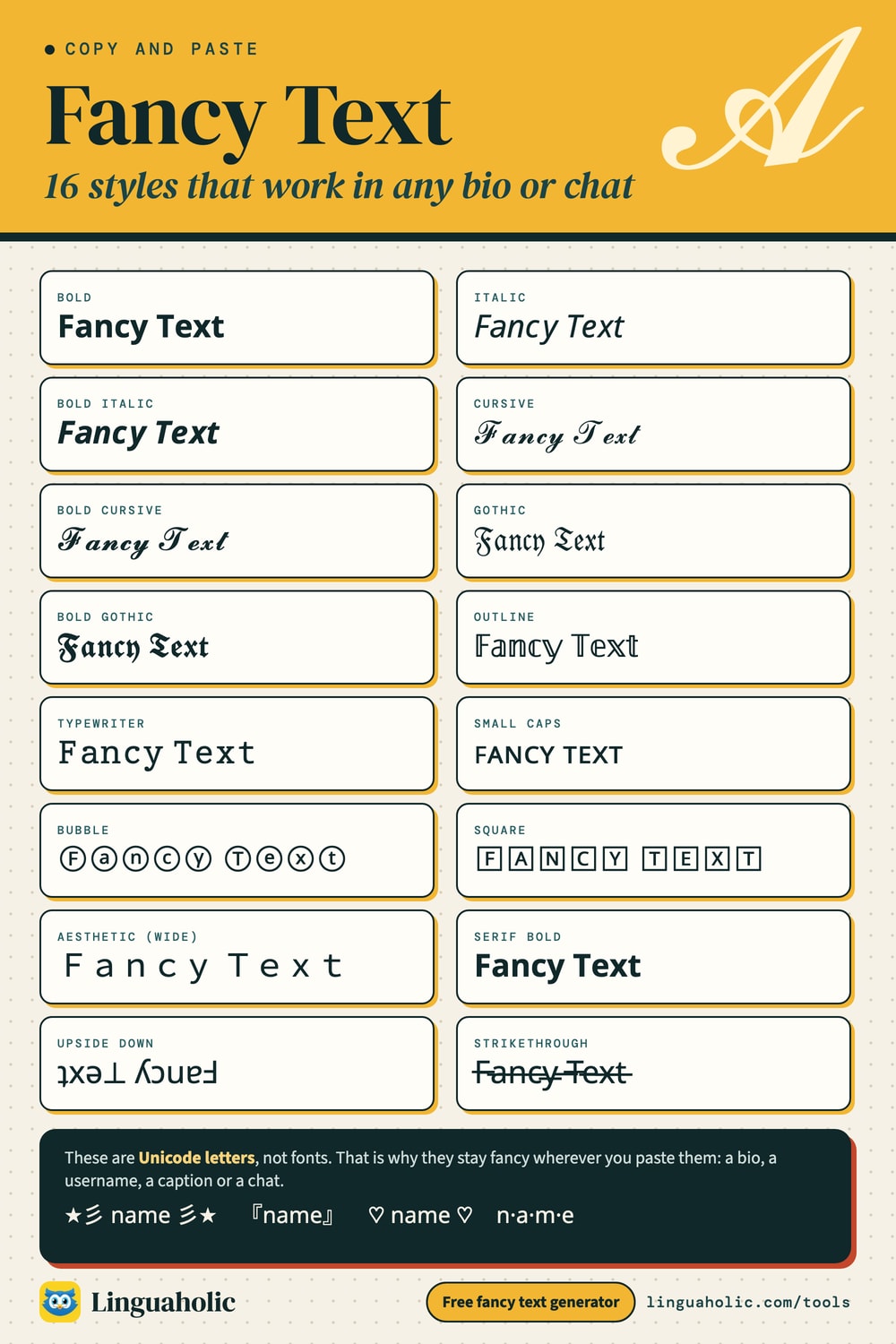
A fancy text generator rewrites plain typing in other Unicode characters that look like a different typeface: 𝓬𝓾𝓻𝓼𝓲𝓿𝓮, 𝔤𝔬𝔱𝔥𝔦𝔠, 𝕠𝕦𝕥𝕝𝕚𝕟𝕖, ⓑⓤⓑⓑⓛⓔ, ꜱᴍᴀʟʟ ᴄᴀᴘꜱ. People call the results cool fonts, Instagram fonts or copy and paste fonts, and they call the tool a font changer or a fancy font generator. Strictly speaking, no font is involved. Every fancy letter is a separate character with its own code point, the same way “A” and “a” are separate characters. Because the look lives in the characters themselves, it survives copy and paste into any box that accepts Unicode text.
Most of these alphabets come from a Unicode block called Mathematical Alphanumeric Symbols, which exists so that a bold 𝐯 and an italic 𝑣 can mean different things in a formula. Bubble letters come from Enclosed Alphanumerics, small caps from phonetic alphabets, and wide “aesthetic” letters from the fullwidth forms. Strikethrough, underline and glitch text are made with combining marks that attach to the letter before them.
How to use the fancy text generator
- Type or paste your text in the box (up to 1,000 characters). Every style updates as you type.
- The 20 most-wanted styles are listed first. Tap Show all 55 styles for the rest, or use the chips to see one category at a time.
- Tap a style, or its Copy button, to copy it.
- Paste it into your bio, name, caption or message.
Fancy text styles chart

Copy and paste fonts: all 55 styles by category
The chips above the list sort the styles into 11 groups. Here is what each one holds, with the sample text exactly as the tool produces it:
| Category | Example and styles |
|---|---|
| Bold & italic (8) | 𝗙𝗮𝗻𝗰𝘆 𝗧𝗲𝘅𝘁Bold, Italic, Bold Italic, Typewriter, Serif Bold, Serif Italic, Serif Bold Italic, Sans-serif |
| Cursive (2) | 𝓕𝓪𝓷𝓬𝔂 𝓣𝓮𝔁𝓽Cursive, Bold Cursive |
| Gothic (2) | 𝔉𝔞𝔫𝔠𝔶 𝔗𝔢𝔵𝔱Gothic, Bold Gothic |
| Bubble & square (6) | Ⓕⓐⓝⓒⓨ ⓉⓔⓧⓣOutline, Bubble, Black Bubble, Square, Black Square, Parentheses |
| Small (3) | ꜰᴀɴᴄʏ ᴛᴇxᴛSmall Caps, Tiny (Superscript), Subscript |
| Lines (6) | F̶a̶n̶c̶y̶ ̶T̶e̶x̶t̶Strikethrough, Underline, Slashed, Wavy Strikethrough, Double Underline, Overline |
| Flipped (5) | ʇxǝ⊥ ʎɔuɐℲUpside Down, Mirror, Backwards, Reversed Word Order, Each Word Backwards |
| Glitch (3) | F̟̔̒a̼͗͌n̻͌̒c͍̓̿y̱͐̀ T͉͋̌e̝͗̇x̪̉̇t̩̋̄Glitch, Light Glitch, Heavy Glitch |
| Aesthetic (3) | Fancy TextAesthetic (Wide), S p a c e d, aLtErNaTiNg |
| Decorated (10) | ★彡 Fancy Text 彡★Stars, Sparkles, Hearts, Flowers, Wings, Corner Brackets, Boxed Letters, Hearts Between, Waves, Dotted |
| Weird alphabets (7) | 千卂几匚ㄚ ㄒ乇乂ㄒFaux Russian, Angular, Curvy, Currency, Faux Greek, Magic, Leet (1337) |
Several categories have a page of their own with extra options and a full alphabet chart: the Cursive Text Generator, Gothic Text Generator, Bubble Text Generator, Small Text Generator, Strikethrough Text Generator, Upside Down Text Generator and Glitch Text Generator.
Favorites and the “Mix your own” text decorator
Tap the star next to any style to save it. Saved styles move into a Your favorites box at the top of the list, so the three or four looks you actually use are always the first thing you see. Favorites are stored in your browser on this device, not in an account, so clearing your browser data removes them.
Mix your own, below the list, works as a text decorator. Pick a font, an optional effect (underline, strikethrough, overline, spacing) and an optional decoration (stars, hearts, sparkles, wings, brackets), and the three are combined into one result. Bold Cursive with Stars gives ★彡 𝓕𝓪𝓷𝓬𝔂 𝓣𝓮𝔁𝓽 彡★. Small Caps with Hearts gives ♡ ꜰᴀɴᴄʏ ᴛᴇxᴛ ♡. The decoration is added last, so its symbols are never restyled or underlined.
Fancy letters to copy and paste
If you only need a single letter or an initial, take it from these charts. Tap a tile to copy that character, or Copy all for the whole alphabet. All four have capitals and lowercase letters. Outline and Bubble also include numbers.
Bold Cursive alphabet
Uppercase
| Letter | Bold Cursive |
|---|---|
| A | |
| B | |
| C | |
| D | |
| E | |
| F | |
| G | |
| H | |
| I | |
| J | |
| K | |
| L | |
| M | |
| N | |
| O | |
| P | |
| Q | |
| R | |
| S | |
| T | |
| U | |
| V | |
| W | |
| X | |
| Y | |
| Z |
Lowercase
| Letter | Bold Cursive |
|---|---|
| a | |
| b | |
| c | |
| d | |
| e | |
| f | |
| g | |
| h | |
| i | |
| j | |
| k | |
| l | |
| m | |
| n | |
| o | |
| p | |
| q | |
| r | |
| s | |
| t | |
| u | |
| v | |
| w | |
| x | |
| y | |
| z |
Bold Gothic alphabet
Uppercase
| Letter | Bold Gothic |
|---|---|
| A | |
| B | |
| C | |
| D | |
| E | |
| F | |
| G | |
| H | |
| I | |
| J | |
| K | |
| L | |
| M | |
| N | |
| O | |
| P | |
| Q | |
| R | |
| S | |
| T | |
| U | |
| V | |
| W | |
| X | |
| Y | |
| Z |
Lowercase
| Letter | Bold Gothic |
|---|---|
| a | |
| b | |
| c | |
| d | |
| e | |
| f | |
| g | |
| h | |
| i | |
| j | |
| k | |
| l | |
| m | |
| n | |
| o | |
| p | |
| q | |
| r | |
| s | |
| t | |
| u | |
| v | |
| w | |
| x | |
| y | |
| z |
Outline alphabet
Uppercase
| Letter | Outline |
|---|---|
| A | |
| B | |
| C | |
| D | |
| E | |
| F | |
| G | |
| H | |
| I | |
| J | |
| K | |
| L | |
| M | |
| N | |
| O | |
| P | |
| Q | |
| R | |
| S | |
| T | |
| U | |
| V | |
| W | |
| X | |
| Y | |
| Z |
Lowercase
| Letter | Outline |
|---|---|
| a | |
| b | |
| c | |
| d | |
| e | |
| f | |
| g | |
| h | |
| i | |
| j | |
| k | |
| l | |
| m | |
| n | |
| o | |
| p | |
| q | |
| r | |
| s | |
| t | |
| u | |
| v | |
| w | |
| x | |
| y | |
| z |
Numbers
| Number | Outline |
|---|---|
| 0 | |
| 1 | |
| 2 | |
| 3 | |
| 4 | |
| 5 | |
| 6 | |
| 7 | |
| 8 | |
| 9 |
Bubble alphabet
Uppercase
| Letter | Bubble |
|---|---|
| A | |
| B | |
| C | |
| D | |
| E | |
| F | |
| G | |
| H | |
| I | |
| J | |
| K | |
| L | |
| M | |
| N | |
| O | |
| P | |
| Q | |
| R | |
| S | |
| T | |
| U | |
| V | |
| W | |
| X | |
| Y | |
| Z |
Lowercase
| Letter | Bubble |
|---|---|
| a | |
| b | |
| c | |
| d | |
| e | |
| f | |
| g | |
| h | |
| i | |
| j | |
| k | |
| l | |
| m | |
| n | |
| o | |
| p | |
| q | |
| r | |
| s | |
| t | |
| u | |
| v | |
| w | |
| x | |
| y | |
| z |
Numbers
| Number | Bubble |
|---|---|
| 0 | |
| 1 | |
| 2 | |
| 3 | |
| 4 | |
| 5 | |
| 6 | |
| 7 | |
| 8 | |
| 9 |
Instagram fonts: name, bio, captions, comments and stories
People often ask how to change fonts on Instagram. You can't change the font itself, because there is no font setting for profiles or posts. What you can do is paste different characters. Used as a font generator for Instagram, the tool works in these places:
- Name field: the name shown above your bio accepts fancy characters, for example 𝓜𝓪𝔂𝓪 or ᴍᴀʏᴀ. Keep in mind that people who search for your name type plain letters, and those won't match.
- Bio: Instagram bio fonts work best on one line or a few words, such as 𝗟𝗶𝗻𝗸 𝗯𝗲𝗹𝗼𝘄. Leave contact details and anything people need to read in plain text.
- Captions and comments: both accept pasted Unicode. Keep hashtags and @mentions plain, or they stop working as links.
- Story text: the story editor has its own text styles, and you can also paste fancy text into it for a look those styles don't offer.
- Username: not possible. The @handle only allows plain letters, numbers, underscores and periods.
Discord fonts: display names, nicknames, channels and messages
Discord name fonts are the most common use. Markdown does not apply to names, so pasted characters are the only way to style them.
- Display name and server nickname: both accept fancy characters, for example 𝕹𝖎𝖌𝖍𝖙 𝕺𝖜𝖑𝖘. The username underneath is different: it only allows lowercase letters, numbers, underscores and periods.
- Server, category and channel names: these accept them too. Text channel names can't contain spaces (Discord turns them into hyphens).
- Messages: for bold, italic, underline and strikethrough, use Discord's built-in Markdown instead. It is real formatting, so it stays searchable and screen readers handle it properly. Save pasted characters for looks Markdown can't do, like cursive or bubble letters.
| You type in Discord | You get |
|---|---|
**text** | Bold |
*text* | Italic |
__text__ | Underline |
~~text~~ | Strikethrough |
`text` | Inline code (monospace) |
The Discord Text Formatter writes this Markdown for you.
TikTok, X, Facebook, LinkedIn and WhatsApp
TikTok fonts
Fancy characters work in your nickname (the display name), bio, captions and comments. The @username is plain text only. Text you add on top of a video uses TikTok's own built-in text styles.
Twitter (X) fonts
Your display name, bio, posts and replies accept them. The @handle does not. One catch: X counts most of these characters as two toward its character limit, so a styled sentence uses up a post roughly twice as fast as a plain one.
Facebook and LinkedIn
Neither has a bold or italic button in its standard post box, so pasted characters are how people add a heading line or emphasis to a post. They also work in comments, a Facebook bio, and the LinkedIn headline and About section. Facebook profile names are a different matter: Facebook expects your real name in plain letters.
WhatsApp has formatting built in: *bold*, _italic_, ~strikethrough~ and ```monospace```. Use that for messages. Pasted characters are for everything else, such as a cursive group name or a bubble-letter About line.
What font does Instagram use? What font does Discord use?
Both apps draw their text in interface fonts chosen by the company, and there is no setting that lets you swap them. Instagram has its own typeface called Instagram Sans, introduced in 2022. Discord uses a custom typeface called gg sans, which replaced Whitney in 2022.
Nothing on this page changes those fonts. When you paste 𝓕𝓪𝓷𝓬𝔂 𝓣𝓮𝔁𝓽 into a bio, the app is still using its normal fonts. You have simply given it different characters to draw. That is also why the result depends on the reader's device: if a phone has no font containing a character, it shows an empty box instead.
Cool, cute and aesthetic fonts: which style to pick
- Cute fonts to copy and paste: Bubble (ⓗⓔⓛⓛⓞ), Tiny (ʰᵉˡˡᵒ) and the Hearts, Flowers and Sparkles decorations.
- Pretty fonts to copy and paste: Cursive (𝒽ℯ𝓁𝓁ℴ) and Bold Cursive (𝓱𝓮𝓵𝓵𝓸), which suit names and wedding or birthday captions.
- Aesthetic fonts to copy and paste: Aesthetic (Wide) (hello), Small Caps (ʜᴇʟʟᴏ) and S p a c e d.
- Cool fonts for gaming names: Bold Gothic (𝖍𝖊𝖑𝖑𝖔), Black Square, Angular and the Glitch styles.
- Easy to read: Bold, Italic, Serif Bold and Typewriter stay legible in longer lines.
Why some letters stay plain or show as boxes
Unicode never set out to provide complete decorative alphabets, so there are gaps:
- Italic, cursive and gothic have no digits. Numbers stay plain in those styles.
- Superscript has no “q” and almost no capitals. Subscript only covers some lowercase letters, so “Fancy Text” comes out as Fₐₙcy ₜₑₓₜ.
- Small caps q and x look like the normal letters.
- Bubble and square styles have letters but no punctuation.
- Accented letters such as é and ñ are left as you typed them.
Empty boxes or question marks mean the device has no font for that character. That happens mostly on older phones and computers. If someone tells you they see boxes, switch to another style. Bubble and Aesthetic (Wide) use some of the oldest characters in Unicode and tend to display on more devices.
Fancy text and accessibility
Screen readers do not treat these characters as ordinary letters. Depending on the software, a styled word may be spelled out one character at a time, announced as mathematical symbols, or skipped entirely. Search has the same problem: in-app search and hashtags will not match fancy letters. Use them for short decorative pieces like a name, a heading or a few words, and keep anything people need to read, find or act on in plain text.
More text tools
For plain emphasis, the Bold Text Generator and Italic Text Generator include full alphabet charts. Add symbols from the heart symbols page, build pictures with Text Art, or find a handle to go with your new display name in the Username Generator.
Is anything I type uploaded?
No. The generator runs entirely in your browser. Your text is converted on your own device and never sent to a server. It is free, and there is no sign-up.
For teachers, bloggers & clubs
Put the Fancy Text Generator on your website
Give your readers this tool right on your page. Copy the code, paste it into your site, done: no sign-up, no account.
- Free for any website
- No ads, no cookies
- Fits phones and sidebars
- Always up to date
Please keep the small credit line under the tool; you may add rel="nofollow" to its link. How it works & the rules

› Show the code
Frequently asked questions
- Can I use fancy text in my Instagram username?
- No. Instagram usernames only allow plain letters, numbers, underscores and periods. Fancy characters work in the name field above your bio, in the bio itself, and in captions and comments.
- Why do I see squares or question marks instead of fancy letters?
- Your device has no font that contains those characters, which happens mostly on older phones and computers. The text itself is fine and will display on devices that do have the font. Try another style if the people you are writing to see boxes.
- Do fancy fonts work in hashtags and @mentions?
- No. A hashtag or mention written in fancy characters is not recognized as a link, and it will not show up in searches for the plain word. Style the words around them and keep the hashtag or @name in normal letters.
- Do fancy letters count as more characters?
- On X, yes: most of these characters count as two toward the post limit. Other apps count in their own ways, so check the app's own counter after pasting. The counter under the text box on this page counts what you typed, not the styled result.
- Which fancy styles include numbers?
- Bold, Serif Bold, Sans-serif, Typewriter, Outline, Aesthetic (Wide), Bubble, Black Bubble, Tiny and Subscript all change digits, for example 𝟮𝟬𝟮𝟲, 𝟚𝟘𝟚𝟞 and ②⓪②⑥. Italic, cursive and gothic styles have no digits in Unicode, so numbers stay plain there.
- Will my favorite styles still be there next time?
- Yes, as long as you come back in the same browser on the same device. Favorites are saved in your browser's local storage, not in an account, so they do not sync between devices and are removed if you clear your browser data.
- Can I combine two styles, like cursive with an underline?
- Yes. Use the Mix your own box under the list: choose a font, an effect such as underline or strikethrough, and a decoration such as stars or hearts. Bold Cursive with Hearts gives ♡ 𝓕𝓪𝓷𝓬𝔂 𝓣𝓮𝔁𝓽 ♡.
- Do I need to install an app or a keyboard to use fancy fonts?
- No. The generator works in the browser on any phone, tablet or computer. Type your text, tap a style to copy it, and paste it into the app you want to use it in.
About this page
The Fancy Text Generator is a free tool from Linguaholic, made by Marcel Iseli. It runs in your browser, with no sign-up. Last updated .
Keep exploring
More free tools
 Bold Text GeneratorCopy-and-paste bold letters for Instagram, Facebook, and Discord.
 Cursive Text GeneratorElegant cursive script letters to copy and paste, in normal and bold.
 Small Text GeneratorTiny small-caps letters to copy and paste into Instagram, TikTok, and Discord.
 Bubble Text GeneratorCircled bubble letters and squared letters to copy and paste into bios.
 Glitch Text GeneratorGlitchy, corrupted text to copy and paste into Discord and usernames.
 Zalgo Text GeneratorCreepy zalgo text to copy and paste into social media and Discord.