
Fancy text generators
Cursive Text Generator
Type your text and copy it in thin or bold cursive script, plain or decorated, ready to paste into Instagram, TikTok, Discord, and bios.
Updated · Free, no sign-up
Will it fit your Instagram name?
Tap any style to copy it. These are Unicode letters, so they keep the cursive look in display names, bios, captions, and messages — but not in @handles. Unicode has no cursive numbers: type a number and pick bold, sans, or double-struck digits above the list.
Fit it and share it
12 characters you can see, which most apps count as 23. Fits in:
- Instagram name (30): fits
- TikTok name (30): fits
- Discord display name (32): fits
- X display name (50): fits
- TikTok bio (80): fits
- Instagram bio (150): fits
- Discord About Me (190): fits
Counted strictly, so a ✓ is safe: text boxes on the web count most cursive letters as two characters (ℬ ℰ ℱ ℋ ℐ ℒ ℳ ℛ ℯ ℊ ℴ as one), and X counts every fancy character and emoji as two. Some apps are more generous, so a ✗ may still fit there.
Works in display names and bios, not in @handles. Usernames on Instagram, TikTok, X, and Discord only take plain letters and numbers (plus _ and sometimes a period).
Single cursive letters and numbers to copy
Tap a letter to copy it — handy for an initial, a monogram, or fixing one letter.
Cursive
Bold Cursive
Bold numbers
Sans numbers
Share this tool
Know someone who’d love it?
What is a cursive text generator?
A cursive text generator rewrites what you type in flowing script letters that you can copy and paste: ℋℯ𝓁𝓁ℴ 𝒲ℴ𝓇𝓁𝒹, or in bold, 𝓗𝓮𝓵𝓵𝓸 𝓦𝓸𝓻𝓵𝓭. Some people call it a cursive generator or a cursive font generator. It is the same thing. You type once and get two kinds of results:
- Copy & paste: 16 versions: thin cursive, bold cursive, a slanted italic, an underlined version, bold first letters, spaced letters, and styles decorated with hearts, stars, sparkles, flowers, wings, and soft aesthetic frames.
- Font images: your text in 12 real script fonts, joined the way handwriting is, in any color, downloadable as a PNG picture for invitations, logos, stickers, and tattoo designs.
No font is involved, which is the whole point. The cursive look is built into the characters themselves, so it works in places where you can't pick a font, like an Instagram bio or a Discord nickname.
How to use the cursive generator
- Type or paste your text into the box (up to 1,000 characters). The styles update as you type.
- Tap the style you like, or its Copy button.
- Paste it into your bio, caption, display name, or message.
- Under Fit it and share it, check which display names and bios your text fits into, tap Make it fit if it's too long, and Send it as a link: whoever opens it sees your exact result.
- For a picture, open Font images, pick a color, background, and effect, and tap Download PNG, or A–Z sheet for the whole alphabet in that font.
Short text works best: a name, a heading, a few words. A whole paragraph in cursive is tiring to read.
Cursive alphabet chart

Thin cursive vs. bold cursive
The first two styles are the same script alphabet in two weights. Thin cursive looks light and elegant at large sizes. Bold cursive has thicker strokes, so it holds up better in a small bio line or on a dark background. If you can't decide, take bold: it is easier to read and its letters match each other better (see the section on odd capitals below).
| Style | Example | Good to know |
|---|---|---|
| Cursive (thin) | 𝒮𝒶𝓋ℯ 𝓉𝒽ℯ 𝒟𝒶𝓉ℯ | Fine, light strokes. The most delicate look, but it can get faint at small sizes. |
| Bold Cursive | 𝓢𝓪𝓿𝓮 𝓽𝓱𝓮 𝓓𝓪𝓽𝓮 | Thicker strokes. Easier to read on a phone and the most even-looking alphabet. |
| Serif Italic | 𝑆𝑎𝑣𝑒 𝑡ℎ𝑒 𝐷𝑎𝑡𝑒 | Slanted instead of looped. Pick it when cursive is too hard to read. |
| Bold Cursive + Underline | 𝓢̲𝓪̲𝓿̲𝓮̲ ̲𝓽̲𝓱̲𝓮̲ ̲𝓓̲𝓪̲𝓽̲𝓮̲ | Bold cursive with a line under every letter, for headings. |
| Bold Cursive + Hearts | ♡ 𝓢𝓪𝓿𝓮 𝓽𝓱𝓮 𝓓𝓪𝓽𝓮 ♡ | Bold cursive wrapped in hearts. |
| Cursive + Stars | ★彡 𝒮𝒶𝓋ℯ 𝓉𝒽ℯ 𝒟𝒶𝓉ℯ 彡★ | Thin cursive between two shooting stars. |
| Bold Cursive + Sparkles | ✧・゚: 𝓢𝓪𝓿𝓮 𝓽𝓱𝓮 𝓓𝓪𝓽𝓮 :・゚✧ | Bold cursive with a sparkle trail on both sides. |
| Bold Cursive + Flowers | ✿ 𝓢𝓪𝓿𝓮 𝓽𝓱𝓮 𝓓𝓪𝓽𝓮 ✿ | Bold cursive between two flowers. |
| Soft frame | ꒰ঌ 𝓢𝓪𝓿𝓮 𝓽𝓱𝓮 𝓓𝓪𝓽𝓮 ໒꒱ | Bold cursive in a soft, rounded frame, the cute look for bios. |
| Heart bow | 𓆩♡𓆪 𝒮𝒶𝓋ℯ 𝓉𝒽ℯ 𝒟𝒶𝓉ℯ 𓆩♡𓆪 | Thin cursive between two little heart bows. |
| Stardust | ˚₊‧ 𝓢𝓪𝓿𝓮 𝓽𝓱𝓮 𝓓𝓪𝓽𝓮 ‧₊˚ | Bold cursive with a light sprinkle of stardust. |
| Starry night | ⋆。°✩ 𝒮𝒶𝓋ℯ 𝓉𝒽ℯ 𝒟𝒶𝓉ℯ ✩°。⋆ | Thin cursive between stars and tiny circles. |
| Wings | ꧁ 𝓢𝓪𝓿𝓮 𝓽𝓱𝓮 𝓓𝓪𝓽𝓮 ꧂ | Bold cursive between two ornate wings, a gaming and display-name favorite. |
| Bold first letters | 𝓢𝒶𝓋ℯ 𝓽𝒽ℯ 𝓓𝒶𝓉ℯ | The first letter of every word in bold, the rest thin, like a monogram. |
| Spaced | 𝓢 𝓪 𝓿 𝓮 𝓽 𝓱 𝓮 𝓓 𝓪 𝓽 𝓮 | Bold letters with a space between them, for short words. |
| Bold Cursive + bold numbers | 𝓒𝓵𝓪𝓼𝓼 𝓸𝓯 𝟐𝟎𝟐𝟔 | Bold cursive with bold numbers, so a year or an age matches the letters. |
Cursive letters to copy and paste
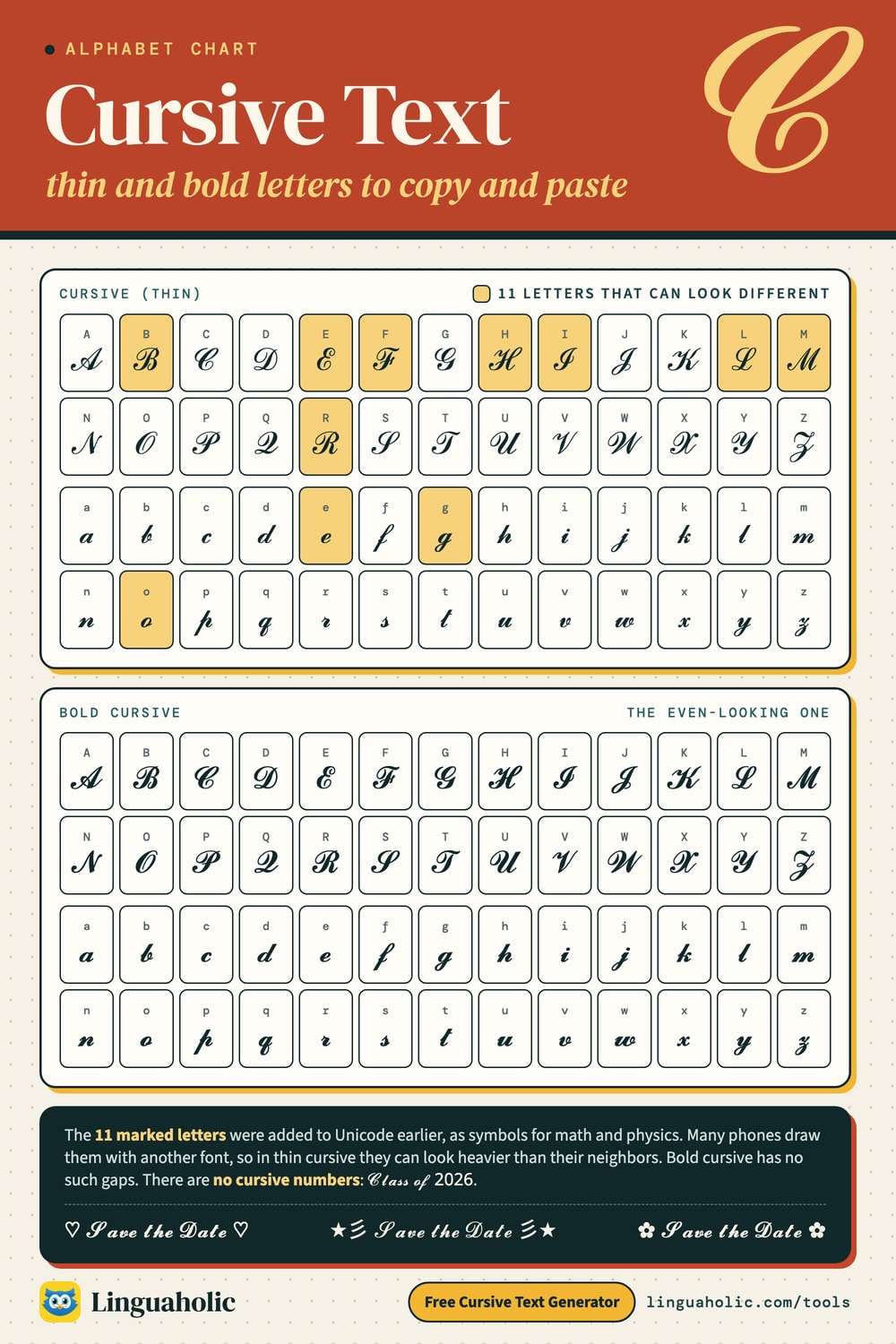
Here is the full cursive alphabet, thin and bold, capitals and lowercase. Tap a single letter to copy it, or use Copy all to grab the whole set. There is no row of numbers because cursive numbers don't exist (more on that below), but the generator can pair your letters with bold or sans numbers.
Cursive alphabet
Uppercase
| Letter | Cursive |
|---|---|
| A | |
| B | |
| C | |
| D | |
| E | |
| F | |
| G | |
| H | |
| I | |
| J | |
| K | |
| L | |
| M | |
| N | |
| O | |
| P | |
| Q | |
| R | |
| S | |
| T | |
| U | |
| V | |
| W | |
| X | |
| Y | |
| Z |
Lowercase
| Letter | Cursive |
|---|---|
| a | |
| b | |
| c | |
| d | |
| e | |
| f | |
| g | |
| h | |
| i | |
| j | |
| k | |
| l | |
| m | |
| n | |
| o | |
| p | |
| q | |
| r | |
| s | |
| t | |
| u | |
| v | |
| w | |
| x | |
| y | |
| z |
Bold Cursive alphabet
Uppercase
| Letter | Bold Cursive |
|---|---|
| A | |
| B | |
| C | |
| D | |
| E | |
| F | |
| G | |
| H | |
| I | |
| J | |
| K | |
| L | |
| M | |
| N | |
| O | |
| P | |
| Q | |
| R | |
| S | |
| T | |
| U | |
| V | |
| W | |
| X | |
| Y | |
| Z |
Lowercase
| Letter | Bold Cursive |
|---|---|
| a | |
| b | |
| c | |
| d | |
| e | |
| f | |
| g | |
| h | |
| i | |
| j | |
| k | |
| l | |
| m | |
| n | |
| o | |
| p | |
| q | |
| r | |
| s | |
| t | |
| u | |
| v | |
| w | |
| x | |
| y | |
| z |
Why do some thin cursive capitals look different?
In thin cursive, the capitals B, E, F, H, I, L, M, and R (ℬ ℰ ℱ ℋ ℐ ℒ ℳ ℛ) and the lowercase e, g, and o (ℯ ℊ ℴ) can look heavier, more upright, or more ornate than the letters around them. That isn't a bug in the generator.
Unicode's script letters were made for math and physics, not for decoration. Those eleven were needed first, as symbols in their own right: ℋ for the Hamiltonian, ℒ for the Laplace transform, ℱ for the Fourier transform. They live in an older part of Unicode called Letterlike Symbols. When the complete script alphabet was added in 2001, in the Mathematical Alphanumeric Symbols block, those eleven letters were not duplicated. Their slots were left empty.
So a word in thin cursive mixes characters from two blocks, and many phones and computers draw the two blocks with different fonts. In ℋℯ𝓁𝓁ℴ, three of the five letters come from the older block. Bold cursive has no gaps. All 52 letters sit in the newer block, so 𝓗𝓮𝓵𝓵𝓸 looks even. If the mismatch bothers you, switch to bold.
Numbers and punctuation stay plain
Unicode has no cursive digits, so numbers come out unchanged: “Class of 2026” becomes 𝒞𝓁𝒶𝓈𝓈 ℴ𝒻 2026. Type a number and the generator shows a Numbers choice above the styles: bold digits suit bold cursive (𝓒𝓵𝓪𝓼𝓼 𝓸𝓯 𝟐𝟎𝟐𝟔), and the lighter sans digits suit thin cursive. Punctuation and alphabets other than Latin stay as you typed them. For numbers drawn in a real script font, use Font images.
| Numbers | Copy and paste |
|---|---|
| Bold | 𝟎𝟏𝟐𝟑𝟒𝟓𝟔𝟕𝟖𝟗 |
| Sans | 𝟢𝟣𝟤𝟥𝟦𝟧𝟨𝟩𝟪𝟫 |
| Double-struck | 𝟘𝟙𝟚𝟛𝟜𝟝𝟞𝟟𝟠𝟡 |
Accented letters in cursive
Unicode has no accented script letters, so the generator builds them: it puts the accent mark on the cursive letter (é becomes 𝓮́) and writes ß as two cursive s. Where phones can't draw an accent on a cursive letter, the plain accented letter stays, so the name is still spelled right. That happens with accents above a capital in every style (Ž, Ö, É), which would otherwise disappear inside the letter or land off to its side; with accents on i and j, where they would run into the dot; and in thin cursive with the small e, g, and o, which keep only ´ and ¨ (e and o) or no accent at all (g).
| You type | Cursive | Bold Cursive |
|---|---|---|
| Zoë | 𝒵ℴℯ̈ | 𝓩𝓸𝓮̈ |
| José | 𝒥ℴ𝓈ℯ́ | 𝓙𝓸𝓼𝓮́ |
| Mañana | ℳ𝒶𝓃̃𝒶𝓃𝒶 | 𝓜𝓪𝓷̃𝓪𝓷𝓪 |
| Françoise | ℱ𝓇𝒶𝓃𝒸̧ℴ𝒾𝓈ℯ | 𝓕𝓻𝓪𝓷𝓬̧𝓸𝓲𝓼𝓮 |
| Łucja | ℒ̸𝓊𝒸𝒿𝒶 | 𝓛̸𝓾𝓬𝓳𝓪 |
| Grüße | 𝒢𝓇𝓊̈𝓈𝓈ℯ | 𝓖𝓻𝓾̈𝓼𝓼𝓮 |
Is this a cursive font?
No. A font changes how a letter is drawn. This tool changes which character is there: each letter is swapped for a different Unicode character that happens to look like script. That is why “cursive fonts copy and paste” works at all. You are copying characters, and characters survive a paste. Fonts don't.
That has a few consequences:
- The letters don't join. Real cursive handwriting and real script fonts connect one letter to the next. These are separate characters that sit side by side.
- The exact shapes depend on the reader's device. Every phone and computer draws these characters with its own font, so the same text looks a little different on an iPhone, an Android phone, and a Windows laptop. Very old devices may show empty boxes.
- There is nothing to download or install. You can't select it from the font menu in Word or a design app.
The Font images tab is the exception: it draws your text with real script fonts and saves it as a picture, with joined letters and matching numbers. A picture can't be pasted as text, but it can go on an invitation, a sticker, a shirt, or to your tattoo artist.
It also isn't handwriting practice. There are no worksheets or stroke guides here, and the shapes follow math-style script, not the cursive taught at school. If you came looking for a calligraphy generator or handwriting fonts to copy and paste, this is as close as plain text gets: elegant script letters, but without pen strokes, joins, or flourishes.
Where cursive text works (and where it doesn't)
- Instagram: the name field, bio, captions, and comments. Not the @username, which only allows plain letters, numbers, periods, and underscores.
- TikTok: the bio, display name, and captions. Not the @handle.
- X: the display name, bio, and posts. X counts each cursive letter as two characters toward its limit, so cursive posts run out of room twice as fast.
- Discord: messages, nicknames, and server and channel names. Not the username.
- WhatsApp, text messages, and Facebook posts: it pastes like normal text and shows up as long as the other person's device has the characters.
It does not work in email addresses, web addresses, or hashtags. A hashtag written in cursive won't link to the normal one, and in-app search won't find cursive words.
Cursive text in usernames, display names, and bios
Cursive letters work where you write freely: display names, nicknames, bios, posts, captions, and messages. They don't work in @handles, the username people type to find you: those take plain characters only, so the app refuses cursive letters there. Put the cursive version in your display name and keep the handle plain.
| App | @handle allows | Cursive fits in | Bio |
|---|---|---|---|
| Letters, numbers, periods, and underscores | Name: 30 | Bio: 150 | |
| TikTok | Letters, numbers, periods, and underscores | Name: 30 | Bio: 80 |
| X (Twitter) | Letters, numbers, and underscores | Display name: 50 | Bio: 160 |
| Discord | Small letters a–z, numbers, _ and . | Display name: 32 | About Me: 190 |
Limits are characters, as of October 2026. Most cursive letters count as two characters in a web text box, and X counts every fancy character as two, so a 30-character name box holds about 15 cursive letters. The Fits in chips in the generator count your result the strict way, and Make it fit shortens it for you: first without the frame, then thin instead of bold, then without the last words.
One more thing to know: Instagram's name field is searchable, so a cursive name is harder to find. Search matches plain letters, and 𝓢𝓸𝓹𝓱𝓲𝓪 is not “Sophia” to it. If people look you up by name, keep your real name in plain letters and use cursive in the bio, or for a nickname next to it.
Tattoos, invitations, and print: use a real font
The copy-and-paste styles are for text you paste. For anything printed, engraved, or inked, such as a tattoo, a wedding invitation, a sign, or a logo, you want a real cursive font. A font gives you joined letters, matching numbers, and control over size and spacing, and it prints the same everywhere. The Unicode letters change from device to device, so the ℒ you like on your phone is not the one your tattoo artist or printer will see.
That is what Font images is for: it sets your text in 12 free script fonts and saves it as a PNG, with a transparent background unless you pick one, and a large size for print. If you want blackletter instead of cursive, the Old English Font Generator does the same with gothic fonts.
Cursive lettering for tattoos
Open Font images and tap Size & tattoo. You get a live preview, a size slider, Mirror (flips the picture for transfer paper), Stencil outline (black outline letters on white, ready to trace), and a preview on skin in light, medium, tan, or deep tones (on screen only).
- Script needs room. Its thin hairlines spread as the ink settles over the years. Keep the small letters at least about ½ inch (1.3 cm) tall.
- Pick a sturdy font for small or fine-line pieces: Pacifico, Alex Brush, Meow Script and Birthstone have even, heavier strokes. Save the delicate ones, like Pinyon Script and Corinthia, for larger designs.
- One capital, then small letters. Script capitals in a row (“ISABELLA”) are hard to read; “Isabella” reads at a glance.
- Check the spelling letter by letter against the font's A–Z sheet, especially swashy capitals, and let your artist adjust the final size and line weight.
Use these cursive fonts in documents and craft projects
Every font in Font images is a free Google Font under the SIL Open Font License, so you can also type with it directly, for personal and commercial projects:
- Google Docs: open the font menu, choose More fonts, search for the font name (for example Great Vibes), and add it.
- Microsoft Word: download the font from its Google Fonts page (below). It comes as a ZIP file: unzip it first, then open the .ttf file and click Install (on a Mac it installs through Font Book). Restart Word and it appears in the font list.
- Cricut Design Space: install the font on your computer the same way and it shows up under System fonts. For cutting, script fonts work best when the letters touch: keep the letter spacing normal and weld the text. Or upload a PNG from the generator as an image.
Newer fonts may not be listed in Google Docs' More fonts yet; if one is missing, install it and use Word, or use a PNG.
| Font | Looks like | Free download |
|---|---|---|
| Great Vibes | Classic formal script — wedding invitations and certificates | Google Fonts |
| Pacifico | Bold retro brush — logos, shirts, and stickers | Google Fonts |
| Ms Madi | Quick handwritten signature | Google Fonts |
| Pinyon Script | Copperplate calligraphy with fine hairlines | Google Fonts |
| Alex Brush | Smooth brush script — easy to read in names | Google Fonts |
| WindSong | Wide, sweeping flourishes for one or two words | Google Fonts |
| Meow Script | Casual, bouncy handwriting | Google Fonts |
| Italianno | Narrow italic calligraphy — fits long names | Google Fonts |
| Birthstone | Modern calligraphy, clean and even | Google Fonts |
| Ballet | High-contrast swashes, like a fashion magazine | Google Fonts |
| Corinthia | Light and airy fine-line script | Google Fonts |
| Lavishly Yours | Romantic loops and long tails | Google Fonts |
Keep the important parts in plain text
Screen readers handle these characters badly. They may read them one letter at a time, announce them as math symbols, or skip them. Use cursive for the decorative bits, and keep dates, prices, and contact details in normal letters.
More text styles
For a slanted look without the loops, try the Italic Text Generator; for emphasis, the Bold Text Generator. The Fancy Text Generator has every style in one list and lets you mix a font with an effect and a decoration. To add your own decorations, copy from the heart symbols and flower symbols collections.
Is anything sent to a server?
No. The cursive text generator runs entirely in your browser. It is free, there is no sign-up, and nothing you type is uploaded or stored. Font images are drawn on your own device.
Credits
Fonts in Font images, all under the SIL Open Font License 1.1 with no Reserved Font Name (each license file checked on October 27, 2026): Great Vibes (© 2015 The Great Vibes Pro Project Authors, license), Pacifico (© 2018 The Pacifico Project Authors, license), Ms Madi (© 2018 The Ms Madi Project Authors, license), Pinyon Script (© 2024 The Pinyon Project Authors, license), Alex Brush (© 2011 The Alex Brush Project Authors, license), WindSong (© 2013 The WindSong Project Authors, license), Meow Script (© 2017 The Meow Script Project Authors, license), Italianno (© 2009 The Italianno Project Authors, license), Birthstone (© 2019 The Birthstone Project Authors, license), Ballet (© 2020 The Ballet Project Authors, license), Corinthia (© 2010 The Corinthia Project Authors, license), Lavishly Yours (© 2014-2021 The Lavishly Yours Project Authors, license).
For teachers, bloggers & clubs
Put the Cursive Text Generator on your website
Give your readers this tool right on your page. Copy the code, paste it into your site, done: no sign-up, no account.
- Free for any website
- No ads, no cookies
- Fits phones and sidebars
- Always up to date
Please keep the small credit line under the tool; you may add rel="nofollow" to its link. How it works & the rules

› Show the code
Frequently asked questions
- How do I get a cursive font on Instagram?
- Instagram has no font setting for bios or captions. Type your text in the generator, copy the cursive version, and paste it into your name field, bio, caption, or comment. It does not work in the @username, which only allows plain letters, numbers, periods, and underscores.
- Are there cursive numbers to copy and paste?
- No. Unicode has no cursive digits, so numbers stay plain: "Class of 2026" becomes 𝒞𝓁𝒶𝓈𝓈 ℴ𝒻 2026. The generator can pair the letters with bold (𝟐𝟎𝟐𝟔), sans (𝟤𝟢𝟤𝟨) or double-struck (𝟚𝟘𝟚𝟞) numbers instead: type a number and pick one above the styles. For numbers in a real script font, use Font images.
- Which is easier to read, thin or bold cursive?
- Bold cursive. Its thicker strokes stay clear at small sizes, and all of its letters come from the same Unicode block, so they look even. Thin cursive is more delicate but can look faint in a small bio line.
- Can I use this cursive text for a tattoo or a wedding invitation?
- Not the copy-and-paste letters: they look different on every device. Use Font images instead, which sets your text in real script fonts with joined letters and saves it as a PNG, with a large size for print and, for tattoos, a mirror, a stencil outline and a skin-tone preview.
- Can I download this as a cursive font?
- The copy-and-paste styles are not a font: each letter is swapped for a Unicode script character, so the look travels with the text but cannot be installed. Font images lets you download your text as a PNG picture, and every font it uses is a free Google Font you can install for Word, Google Docs or Cricut.
- Why does my cursive text show up as boxes or question marks?
- The device displaying it has no font that contains those characters. This mostly happens on older phones and computers. Sending plain text is the only fix for those readers.
- Does the cursive generator work with accented letters or other alphabets?
- Yes for accented Latin letters: é, ñ, ü, ç, ł and the rest become cursive letters with their accent on top, and ß becomes two cursive s. Where phones can't draw an accent on a cursive letter, the plain accented letter stays so the name is still spelled right: accents above a capital (Ž, Ö, É), accents on i and j, and in thin cursive most accents on e, g and o. Punctuation and other alphabets stay as you typed them.
- Can I put cursive text in my Discord or TikTok username?
- Not in the username or @handle, which only accept plain characters. It works in the display name or nickname, the bio, and in messages, captions, and comments.
- Why is my cursive Instagram name harder to find?
- Instagram's name field is searchable, and search matches plain letters. A name written in cursive Unicode letters is a different set of characters, so people who type your name may not find it. Keep your real name in plain letters if you want to be found, and use cursive in your bio.
- My cursive name is too long for Instagram or TikTok. What can I do?
- Most cursive letters count as two characters in a name box, so a 30-character name holds about 15 cursive letters. Under Fit it and share it, the Fits in chips show which boxes your text fits, and Make it fit shortens it: first without the frame, then thin instead of bold, then without the last words.
- How do I send someone my cursive text?
- Tap Send it as a link under Fit it and share it. Whoever opens the link sees your exact result, in the same style and with the same numbers, ready to copy. On Font images, Share link does the same for a picture.
- Which cursive font is best for a tattoo?
- For small or fine-line tattoos, a sturdy script with even strokes such as Pacifico, Alex Brush, Meow Script or Birthstone, because thin hairlines spread as the ink settles. Delicate fonts like Pinyon Script or Corinthia suit larger pieces. Keep small letters at least about half an inch tall and write one capital and small letters.
- Can I use the cursive font images commercially?
- Yes. Every font in Font images is licensed under the SIL Open Font License, which allows personal and commercial use of the pictures you make, on shirts, stickers, invitations or logos. The PNGs are drawn on your device and are yours to use.
About this page
The Cursive Text Generator is a free tool from Linguaholic, made by Marcel Iseli. It runs in your browser, with no sign-up. Last updated .
Keep exploring
More free tools
 Fancy Text GeneratorCopy-and-paste fonts for Instagram, TikTok, and Discord bios.
 Bold Text GeneratorCopy-and-paste bold letters for Instagram, Facebook, and Discord.
 Small Text GeneratorTiny small-caps letters to copy and paste into Instagram, TikTok, and Discord.
 Bubble Text GeneratorCircled bubble letters and squared letters to copy and paste into bios.
 Glitch Text GeneratorGlitchy, corrupted text to copy and paste into Discord and usernames.
 Zalgo Text GeneratorCreepy zalgo text to copy and paste into social media and Discord.