
Fancy text generators
Superscript Generator
Turn numbers and letters into small raised characters like x², 10⁶ and 1ˢᵗ that you can copy and paste where there is no superscript button.
Updated · Free, no sign-up
Share this tool
Know someone who’d love it?
What is a superscript generator?
A superscript generator turns the characters you type into small raised ones, like the ² in x² or the ˢᵗ in 1ˢᵗ. The result is superscript text made of real Unicode characters, not formatting, so you can copy and paste it into places that have no superscript button: an Instagram bio, a Discord message, a form field, a file name.
How to use it
- Type your text the normal way, for example x2 or 10 m2.
- For exponents, use the first row, Numbers only (exponents). It raises the digits and leaves everything else alone, so x2 becomes x² and E = mc2 becomes E = mc².
- Tap the row, or its Copy button, and paste the result where you need it.
The second row, Tiny (Superscript), raises everything you give it. The sample E = mc2 and x2 + y2 comes out as ᵉ ⁼ ᵐᶜ² ᵃⁿᵈ ˣ² ⁺ ʸ² there, with every character raised. That is right for tiny text and wrong for a formula, where only the exponent should be small.
Two more rows sit underneath. Small Caps gives small capitals that stay on the line (numbers and signs are left alone), and Subscript gives the lowered version of whatever you typed.
Superscript numbers and letters chart

Superscript numbers and signs to copy and paste
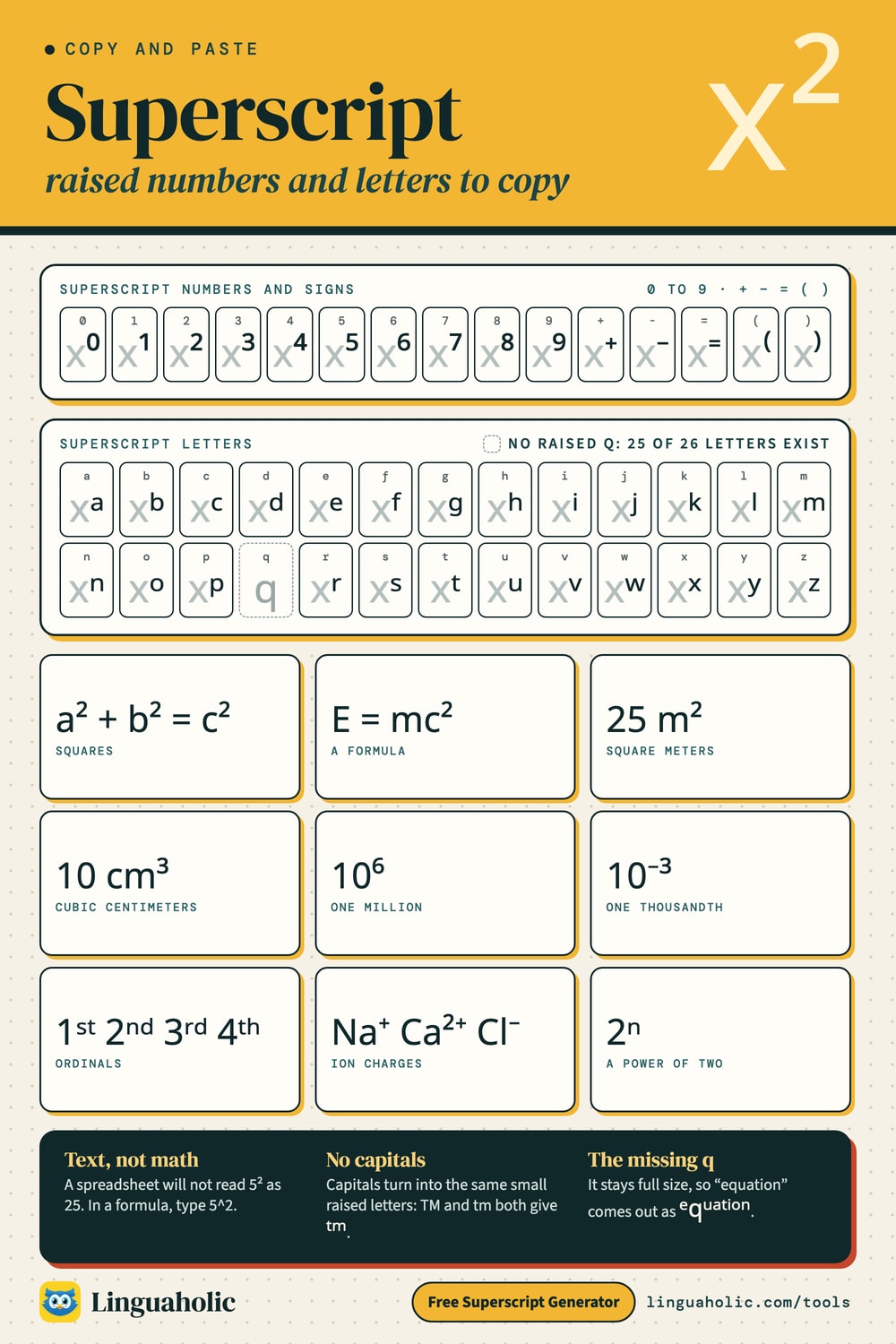
Every digit has a superscript form, and so do five signs and the letter n. These are the characters people look for most, including the squared symbol (²) and the cubed symbol (³). Select one in the table to copy it, or type the digit into the tool.
| You type | Superscript | Where you see it |
|---|---|---|
| 0 | ⁰ | x⁰ = 1 |
| 1 | ¹ | footnote marker¹ |
| 2 | ² | x², m² (the squared symbol) |
| 3 | ³ | x³, cm³ (the cubed symbol) |
| 4 | ⁴ | 10⁴ |
| 5 | ⁵ | 2⁵ = 32 |
| 6 | ⁶ | 10⁶ (one million) |
| 7 | ⁷ | 10⁷ |
| 8 | ⁸ | 2⁸ = 256 |
| 9 | ⁹ | 10⁹ (one billion) |
| + | ⁺ | Na⁺, Ca²⁺ (ion charges) |
| - | ⁻ | 10⁻³, Cl⁻ |
| = | ⁼ | rare; used when a whole equation is raised |
| ( | ⁽ | a⁽ⁿ⁺¹⁾ |
| ) | ⁾ | a⁽ⁿ⁺¹⁾ |
| n | ⁿ | xⁿ, 2ⁿ (the general exponent symbol) |
On a Windows keyboard with a number pad you can type three of them directly: hold Alt and type 0185 for ¹, 0178 for ² and 0179 for ³. Those three come from an older character set than the rest, which is why they sometimes look a little different in size next to ⁴ to ⁹.
Superscript letters: which ones exist
The tool has 25 superscript letters, every one except q. No raised q is widely supported by the fonts on phones and computers, so a q stays full size: “equation” comes out as ᵉqᵘᵃᵗⁱᵒⁿ. The letters are lowercase only. Unicode has raised forms for only some capital letters, so the tool turns capitals into the lowercase set to keep words even. Typing TM or tm both give ᵗᵐ.
Punctuation is limited to the five signs in the table above. Periods, commas, question marks and apostrophes stay full size, and so do accented letters such as é.
Most of these letters were added to Unicode for phonetic notation, where linguists write things like ʰ for a puff of air after a consonant. They were never designed as a matching alphabet, so in some fonts a few sit slightly higher or look slightly heavier than their neighbors.
Tiny (Superscript) alphabet
Letters
| Letter | Tiny (Superscript) |
|---|---|
| a | |
| b | |
| c | |
| d | |
| e | |
| f | |
| g | |
| h | |
| i | |
| j | |
| k | |
| l | |
| m | |
| n | |
| o | |
| p | |
| q | |
| r | |
| s | |
| t | |
| u | |
| v | |
| w | |
| x | |
| y | |
| z |
Numbers
| Number | Tiny (Superscript) |
|---|---|
| 0 | |
| 1 | |
| 2 | |
| 3 | |
| 4 | |
| 5 | |
| 6 | |
| 7 | |
| 8 | |
| 9 |
What superscript is used for
- Squares, cubes and units: x², a² + b² = c², 25 m², 500 ft², 10 cm³.
- Exponents and scientific notation: 10⁶, 10⁻³, 2ⁿ, 6.02 × 10²³.
- Footnote markers: a small number after a claim¹ that points to a note below.
- Ordinals: 1ˢᵗ, 2ⁿᵈ, 3ʳᵈ, 4ᵗʰ.
- Trademark-style marks: a raised ᵗᵐ after a joke brand name. The real trademark sign, ™, is its own character.
- Ion charges in chemistry: Na⁺, Ca²⁺, Cl⁻. The numbers that go below the line, as in H₂O, come from the Subscript Generator.
- Tiny text: whole words in raised letters, like ᵗⁱⁿʸ ᵗᵉˣᵗ, for bios and nicknames. The Small Text Generator has more tiny styles.
How to type superscript in Word, Google Docs and HTML
In a real document you don't need special characters. Select the text and use the program's own superscript command:
| Where | Windows | Mac |
|---|---|---|
| Microsoft Word and PowerPoint | Ctrl + Shift + = | Cmd + Shift + = |
| Google Docs | Ctrl + . (period) | Cmd + . (period) |
| HTML | x<sup>2</sup> | |
| LaTeX | x^{2} inside math mode | |
Press the same shortcut again to go back to normal text. In Google Docs the command is also under Format, then Text, then Superscript. In Excel, select the characters inside the cell, open Format Cells with Ctrl + 1 and tick Superscript. Where none of this is available, the plain-text convention is a caret: x^2.
Unicode superscript or real formatting?
Use real formatting in documents, school work and academic writing. It can raise any character, including q and capitals. The text underneath stays normal, so search, spell check and screen readers still work, and citation styles expect it. Its weakness is that it lives in the document. Paste x² from Word into a plain-text box and it arrives as x2.
Use Unicode superscript where formatting can't follow: social media bios and captions, chat messages, comments, display names, spreadsheet labels, plain-text notes. The raised characters are part of the text itself, so they stay raised after copy and paste.
Limits to know about
- They are text, not numbers. A spreadsheet or calculator won't read 5² as 25. In a formula, use the caret instead:
=5^2. - Search may miss them. Someone searching for “m2” won't always find “m²”, and hashtags written in raised letters don't join the normal hashtag.
- Screen readers are uneven. Some announce ² properly; others read raised letters one by one or skip them. Keep important information in normal text.
- Usernames: Instagram, TikTok and X handles only accept plain letters, numbers, underscores and periods. Superscript works in the name field and bio, not in the @handle.
- Old devices can show an empty box for the rarer letters. The digits are the safest.
More text tools
For lowered characters and chemical formulas, use the Subscript Generator. The Small Text Generator puts tiny text and small caps side by side, and the Fancy Text Generator shows every style at once. To cross text out instead, try the Strikethrough Text Generator.
Is anything sent to a server?
No. The superscript generator runs entirely in your browser. Nothing you type is uploaded or stored, and it is free with no sign-up.
For teachers, bloggers & clubs
Put the Superscript Generator on your website
Give your readers this tool right on your page. Copy the code, paste it into your site, done: no sign-up, no account.
- Free for any website
- No ads, no cookies
- Fits phones and sidebars
- Always up to date
Please keep the small credit line under the tool; you may add rel="nofollow" to its link. How it works & the rules

› Show the code
Frequently asked questions
- How do I type the squared symbol on a phone?
- The quickest way is to copy ² from this page and paste it. If you use it often, save it as a text shortcut in your phone's keyboard settings so that typing a short code inserts it.
- Why is there no superscript q?
- The raised letters were added to Unicode a few at a time for phonetic notation, not as a complete alphabet, and no raised q is widely supported by the fonts on phones and computers. The tool leaves q at normal size so it never turns into an empty box.
- Can I make superscript capital letters?
- Not with this tool. Unicode has raised forms for only some capital letters, so capitals are converted to the lowercase superscript set. Typing TM gives ᵗᵐ. If you need raised capitals, use the superscript formatting in Word or Google Docs.
- Is superscript text the same as tiny text?
- Yes. What tiny text generators produce is the superscript letters used for whole words, such as ᵗⁱⁿʸ ᵗᵉˣᵗ. They sit above the line and are smaller than normal letters.
- Will a spreadsheet calculate with superscript numbers?
- No. A superscript digit is a text character, so 5² in a cell is treated as text, not as 25. Use the caret for calculations, as in =5^2, and keep superscript characters for labels and headings.
- What is the difference between superscript and subscript?
- Superscript sits above the line, as in x² or 10⁶, and is used for exponents, footnote markers and ordinals. Subscript sits below the line, as in H₂O, and is used for chemical formulas and numbered variables.
- Can I use superscript in an Instagram bio or username?
- In the bio and the name field, yes. The @username only accepts plain letters, numbers, underscores and periods, so superscript characters are rejected there.
- How do I write 1st, 2nd or 3rd with raised letters?
- Type only the letters (st, nd, rd or th), copy the superscript result and paste it after the number: 1ˢᵗ, 2ⁿᵈ, 3ʳᵈ, 4ᵗʰ. If you type the number as well, it is raised too.
About this page
The Superscript Generator is a free tool from Linguaholic, made by Marcel Iseli. It runs in your browser, with no sign-up. Last updated .
Keep exploring
More free tools
 Fancy Text GeneratorCopy-and-paste fonts for Instagram, TikTok, and Discord bios.
 Bold Text GeneratorCopy-and-paste bold letters for Instagram, Facebook, and Discord.
 Cursive Text GeneratorElegant cursive script letters to copy and paste, in normal and bold.
 Small Text GeneratorTiny small-caps letters to copy and paste into Instagram, TikTok, and Discord.
 Bubble Text GeneratorCircled bubble letters and squared letters to copy and paste into bios.
 Glitch Text GeneratorGlitchy, corrupted text to copy and paste into Discord and usernames.