
Fancy text generators
Strikethrough Text Generator
Put a line through, under, or over your text and copy it for Instagram, TikTok, X, and other places that have no strikethrough button.
Updated · Free, no sign-up
Share this tool
Know someone who’d love it?
What is a strikethrough text generator?
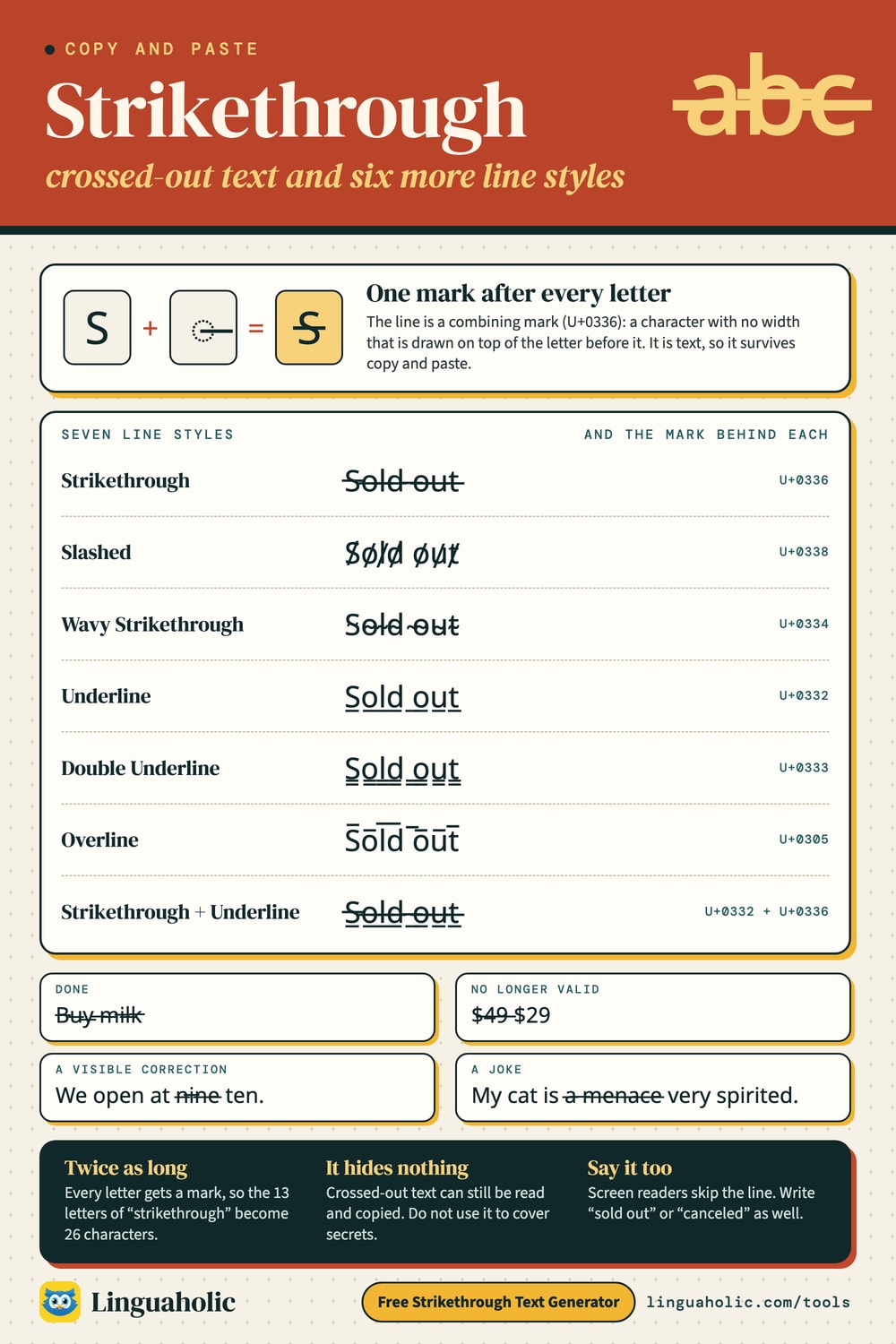
A strikethrough text generator draws a line through your letters, l̶i̶k̶e̶ ̶t̶h̶i̶s̶, and gives you the result as plain text that you can copy and paste. It is for the places that have no strikethrough button: an Instagram bio, a TikTok caption, a post on X or LinkedIn. Besides the classic crossed-out text, this generator makes six related line styles: slashed, wavy, underline, double underline, overline, and strikethrough with underline.
How to use it
- Type or paste your text into the box (up to 1,000 characters).
- Tap the style you want, or its Copy button.
- Paste it where you need it.
To cross out only part of a sentence, convert just those words and type the rest normally around them after pasting.
Strikethrough text chart

The seven line styles
| Style | Example | Unicode mark |
|---|---|---|
| Strikethrough | S̶o̶l̶d̶ ̶o̶u̶t̶ | U+0336 |
| Slashed | S̸o̸l̸d̸ o̸u̸t̸ | U+0338 |
| Wavy Strikethrough | S̴o̴l̴d̴ ̴o̴u̴t̴ | U+0334 |
| Underline | S̲o̲l̲d̲ ̲o̲u̲t̲ | U+0332 |
| Double Underline | S̳o̳l̳d̳ ̳o̳u̳t̳ | U+0333 |
| Overline | S̅o̅l̅d̅ ̅o̅u̅t̅ | U+0305 |
| Strikethrough + Underline | S̶̲o̶̲l̶̲d̶̲ ̶̲o̶̲u̶̲t̶̲ | U+0336 + U+0332 |
The slashed style skips the spaces between words. The other styles run their line through the spaces too, so a phrase reads as one crossed-out block.
How to strikethrough text in Discord, WhatsApp, Google Docs, Word, and Excel
Many apps have strikethrough built in. Where that is the case, use it. The text stays normal underneath, so it remains searchable and takes up no extra characters.
| App | How to cross out text |
|---|---|
| Discord | Two tildes on each side: ~~text~~ |
One tilde on each side: ~text~ | |
| Slack | One tilde on each side: ~text~ |
Two tildes on each side: ~~text~~ | |
| Google Docs | Alt+Shift+5 on Windows, Cmd+Shift+X on a Mac, or Format, then Text, then Strikethrough |
| Word | The strikethrough button on the Home tab ( |
| Excel | Ctrl+5 on Windows, Cmd+Shift+X on a Mac |
| Gmail | In the compose window, open Formatting options (the A next to Send) and choose the strikethrough button |
In the chat apps the tildes disappear once you send the message, and the words between them show up crossed out. For Discord, the Discord Text Formatter adds the tildes for you, along with spoilers, headers, and colored text.
Strikethrough on Instagram, TikTok, X, Facebook, and LinkedIn
These have no strikethrough option. Instagram bios and captions, TikTok bios and captions, posts on X, Facebook posts, and LinkedIn posts are plain text boxes with no formatting toolbar. Typing tildes there just shows tildes. The Unicode version from this generator is the way to do it: copy the crossed-out text here and paste it in. It also works in display names, but not in @usernames and handles, which only accept plain letters, numbers, periods, and underscores.
How copy-and-paste strikethrough works
Unicode contains combining marks: characters that have no width of their own and are drawn on top of the character before them. They are the same mechanism that puts an accent on a letter. The generator places one mark after every letter you type:
- U+0336 (long stroke overlay) for strikethrough: t̶e̶x̶t̶
- U+0332 (low line) for underline: t̲e̲x̲t̲
- U+0305 (overline) for a line on top: t̅e̅x̅t̅
- U+0338 (long solidus overlay) for a slash through each letter: t̸e̸x̸t̸
The wavy style uses U+0334 (tilde overlay), and the double underline uses U+0333 (double low line).
Because the line is made of characters and not formatting, it survives copy and paste. It is not a font, and nothing has to be installed. How smooth it looks depends on the font of the app you paste into. In some fonts the strokes join into one clean line. In others you see small gaps between letters, or the line sits a little too high or too low.
Underline and overline text
The same trick gives you an underline text generator. Use it where there is no underline button: R̲e̲a̲d̲ ̲t̲h̲i̲s̲ ̲f̲i̲r̲s̲t̲ in an Instagram caption or a WhatsApp message (WhatsApp formats bold, italic, and strikethrough, but not underline). In Word, Google Docs, and Gmail, Ctrl+U or Cmd+U is the better choice, and Discord underlines with __text__.
The underline can collide with letters that hang below the line, such as g, p, and y. An overline is rarer in everyday text. In math, a bar over a letter marks an average, as in x̅, and a bar over a Roman numeral multiplies it by 1,000, which the Roman Numeral Converter uses for large numbers.
What does strikethrough mean in writing?
- A visible correction. Crossing a mistake out, in place of deleting it, shows readers what was changed. Edited blog posts do this, and contract drafts show removed wording struck through so both sides can see what came out.
- Done. On to-do and shopping lists, a line through an item means it is finished: B̶u̶y̶ ̶m̶i̶l̶k̶.
- No longer valid. An old price next to the new one ($̶4̶9̶ $29), a sold-out item, a canceled date.
- A joke. Online, the “deleted” words are often the ones you are meant to read. The crossed-out part is what the writer really thinks, and the polite version follows: “My cat is a̶ ̶m̶e̶n̶a̶c̶e̶ very spirited.”
Limits of crossed-out text
- It doubles the character count. Every letter gets a mark, so the 13 letters of “strikethrough” become 26 characters. In a bio or post with a character limit, crossed-out text uses up the limit twice as fast. The combined strikethrough and underline style stacks more marks on each letter and is longer still.
- Search won't find it. The marks sit between the letters, so a search for the plain word usually misses the crossed-out one. Hashtags break for the same reason.
- Screen readers don't announce the line. Someone listening may hear the crossed-out words as if they were normal, or hear garbled letters. Don't rely on strikethrough alone for anything that matters. Write “canceled” or “sold out” as well.
- Some apps strip combining marks. If the line vanishes after you paste, the app removed it, and there is no way around that.
- It hides nothing. Crossed-out text is still readable and can be copied. To cover words completely, use the Redacted Text Generator.
Related text tools
The Glitch Text Generator stacks many combining marks on each letter for a distorted look. The Bold Text Generator and Italic Text Generator cover the other formatting that social apps lack, and the Fancy Text Generator lets you combine a line effect with any font style.
Is anything sent to a server?
No. The strikethrough text generator runs entirely in your browser. It is free, there is no sign-up, and nothing you type is uploaded or stored.
For teachers, bloggers & clubs
Put the Strikethrough Text Generator on your website
Give your readers this tool right on your page. Copy the code, paste it into your site, done: no sign-up, no account.
- Free for any website
- No ads, no cookies
- Fits phones and sidebars
- Always up to date
Please keep the small credit line under the tool; you may add rel="nofollow" to its link. How it works & the rules

› Show the code
Frequently asked questions
- How do I strikethrough text on Instagram?
- Instagram has no strikethrough button. Type your text in the generator, copy the crossed-out version, and paste it into your bio, caption, or comment.
- What is the keyboard shortcut for strikethrough?
- In Google Docs it is Alt+Shift+5 on Windows and Cmd+Shift+X on a Mac. In Excel it is Ctrl+5 on Windows and Cmd+Shift+X on a Mac. In Word, use the strikethrough button on the Home tab, or press Alt, then H, then 4 on Windows.
- How do I cross out text on Facebook?
- Facebook posts have no strikethrough option, so use the copy-and-paste version: generate the crossed-out text here and paste it into your post.
- How do I remove strikethrough from text I pasted?
- Pasted Unicode strikethrough is made of characters, not formatting, so a clear-formatting button will not remove it. Delete the text and type it again. Strikethrough applied by Word or Google Docs itself comes off by selecting the text and pressing the same shortcut again.
- Why does the line look broken or uneven?
- Each letter carries its own short stroke, and the font of the app you paste into decides how the strokes line up. Some fonts join them into one clean line; others leave small gaps or draw the line slightly too high or too low.
- Does strikethrough text use more characters?
- Yes. A combining mark is added after every letter, so the text is twice as long: a 13-letter word becomes 26 characters. That matters in bios and posts with a character limit.
- Can I cross out just one word in a sentence?
- Yes. Put only that word into the generator, copy it, and paste it into your sentence, for example: I am v̶e̶r̶y̶ a little tired.
- Is crossed-out text hidden from readers?
- No. The words stay readable and can still be copied. Strikethrough signals that something was changed, finished, or meant as a joke. To cover text completely, use a redacted text generator.
About this page
The Strikethrough Text Generator is a free tool from Linguaholic, made by Marcel Iseli. It runs in your browser, with no sign-up. Last updated .
Keep exploring
More free tools
 Fancy Text GeneratorCopy-and-paste fonts for Instagram, TikTok, and Discord bios.
 Bold Text GeneratorCopy-and-paste bold letters for Instagram, Facebook, and Discord.
 Cursive Text GeneratorElegant cursive script letters to copy and paste, in normal and bold.
 Small Text GeneratorTiny small-caps letters to copy and paste into Instagram, TikTok, and Discord.
 Bubble Text GeneratorCircled bubble letters and squared letters to copy and paste into bios.
 Glitch Text GeneratorGlitchy, corrupted text to copy and paste into Discord and usernames.