
Text tools
Word Counter
Count words, characters, sentences, paragraphs, and pages in real time — plus a readability checker (Flesch, Gunning Fog and more), a plain-English writing check, reading and speaking time, word frequency, and live character limits.
Updated · Free, no sign-up
Counts characters the way you read them, like Word and Google Docs — the right choice for essays, articles, and posts (compound emoji also count as 1).
Not sure? For a Word document, essay, or post, keep Visible — it matches what Word and Google Docs show. Switch to UTF-16 only when a system enforces a strict limit (an API, a database field, or a form’s max length).
- Reading speed
- Speaking speed
- Speaking time
- 0 sec
- Pages (approx.)
- 0
- Lines
- 0
- Unique words
- 0
- Avg. word length
- 0
Type or paste some text above to see the analysis.
Share this tool
Know someone who’d love it?
What is a word counter?
A word counter is a free online tool that tells you exactly how many words and characters your text contains. As you type or paste, it counts words, characters (with and without spaces), sentences, paragraphs, and lines, and estimates reading time, speaking time, page count, and keyword density — all in real time. It is useful for essays, articles, social media posts, meta descriptions, cover letters, and any writing with a length limit.
How to use this word counter
- Type directly into the box above, or paste text you already have.
- Every count updates instantly — there is no button to press.
- Read the live totals, the extra stats (pages, lines, unique words), the character-limit panel, and the top-words (keyword density) panel.
- Use Clear to start over or Copy text to grab your text again.
A word is anything between spaces or line breaks: hyphenated words, contractions, numbers, and emoji each count as one. A dash, bullet, or other mark standing on its own (as in “yes — no”) is not counted as a word. Sentences follow the same rules as the sentence counter, so “Dr.”, “U.S.” and “3.5” do not end a sentence.
Words to pages and minutes chart

How many pages is your word count?
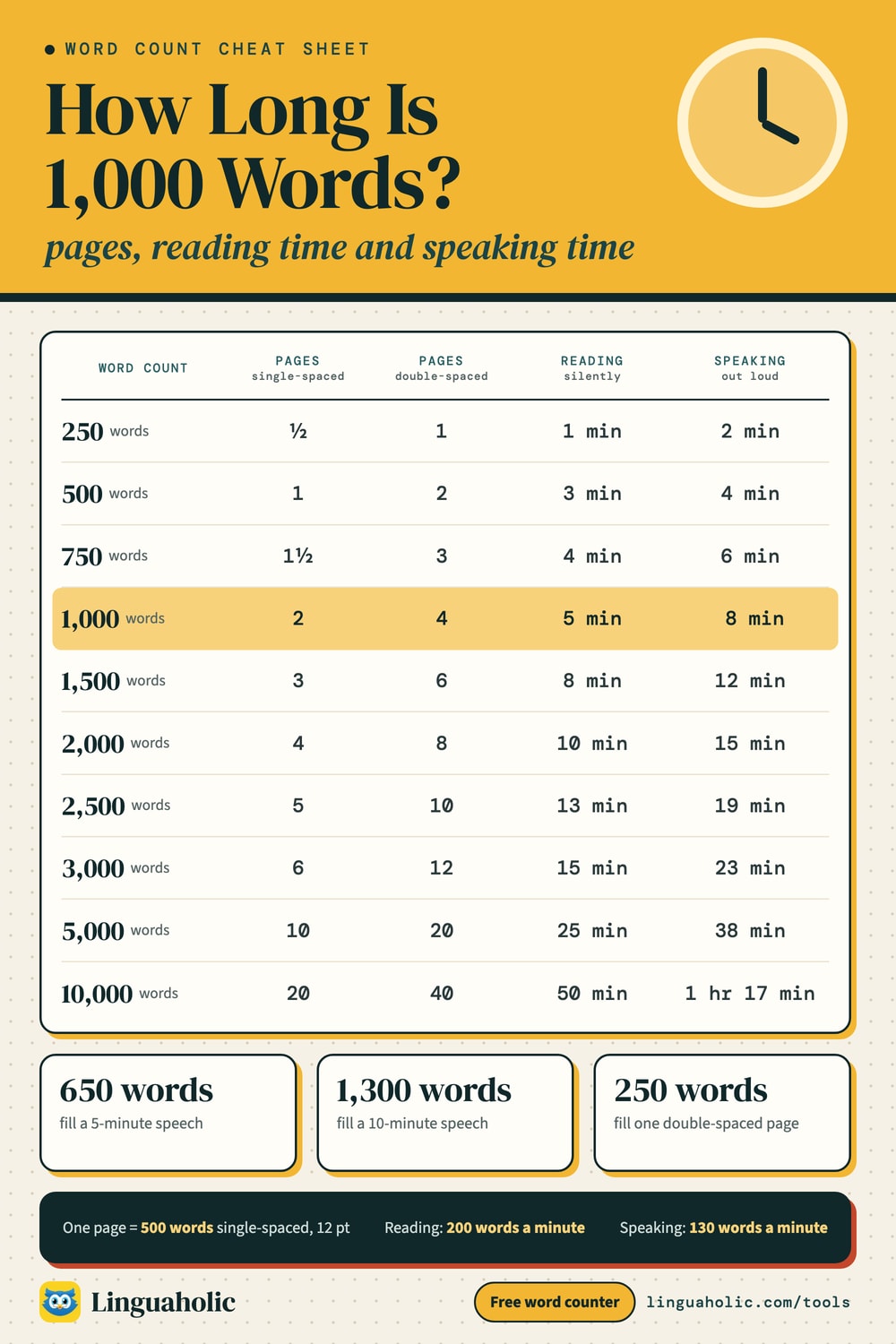
A frequent question is how many pages a word count fills. As a rough guide at 12pt in a standard font:
- Single-spaced: about 500 words per page
- Double-spaced: about 250 words per page
So 1,000 words is roughly 2 single-spaced or 4 double-spaced pages. The tool shows an approximate page count as you type. Your real page count depends on font, size, spacing, and margins.
Word counter for essays and assignments
Most essays and assignments come with a strict word limit. Common targets are 250, 300, 500, 1,000, and 2,500 words. Paste your draft to see the live word count and stay within the limit — many markers allow roughly ±10% of the target. The reading time also helps when you are preparing a talk or presentation.
Character counter and social media limits
For social media and SEO it is the character count that matters. The character-limit panel checks your text live against the most common limits:
- X (Twitter) post: 280 characters
- Instagram caption: 2,200 · Instagram bio: 150
- TikTok caption: 2,200 · LinkedIn post: 3,000
- SEO title tag: ~60 · Meta description: ~160 · SMS: 160
Reading time and speaking time (words to minutes)
Reading time is estimated from your word count at an average silent reading speed of 200 words per minute; speaking time uses 130 words per minute, a comfortable presentation pace. Both speeds are adjustable — pick slow, average, fast, or skimming for reading, and slow, presentation, or conversational for speaking. Use it to check how long a speech, presentation, podcast script, or video voiceover will take.
| Speech length | Words (slow, 100 wpm) | Words (presentation, 130 wpm) | Words (conversational, 160 wpm) |
|---|---|---|---|
| 1 minute | 100 | 130 | 160 |
| 2 minutes | 200 | 260 | 320 |
| 3 minutes | 300 | 390 | 480 |
| 5 minutes | 500 | 650 | 800 |
| 10 minutes | 1,000 | 1,300 | 1,600 |
| 15 minutes | 1,500 | 1,950 | 2,400 |
| 20 minutes | 2,000 | 2,600 | 3,200 |
| 30 minutes | 3,000 | 3,900 | 4,800 |
Readability checker: how easy is your text to read?
The Readability tab scores your text with the six standard readability formulas and turns them into one plain answer — for example “Plain English, about US grade 8”. Syllables are counted with a pronouncing dictionary of more than 50,000 words rather than guessed from spelling, so the scores are more accurate than most online checkers.
| Formula | What it measures | Good target |
|---|---|---|
| Flesch reading ease | Sentence length and syllables per word, on a 0–100 scale (higher is easier) | 60–70 for general readers |
| Flesch–Kincaid grade | The same inputs, as a US school grade | Grade 7–9 |
| Gunning Fog index | Sentence length plus the share of complex (3+ syllable) words | Under 12 |
| SMOG index | Words with 3+ syllables — popular for health information | Under 10 (needs 30+ sentences) |
| Coleman–Liau index | Letters per word and sentences per 100 words (no syllables) | Grade 7–9 |
| Automated Readability Index | Characters per word and words per sentence | Grade 7–9 |
Most newspapers aim for grade 8–10, and plain-language guidelines for public information aim for grade 8 or below. Shorter sentences and everyday words are the quickest ways to make text easier to read. The scores are most reliable for 100 words or more.
Writing check: long sentences, passive voice, and wordy phrases
The Writing check tab highlights what makes text harder to read, right in your text:
- Hard sentences (20+ words, yellow) and very hard sentences (30+ words, red) — try splitting them in two.
- Passive voice — “the report was written by the team” is usually clearer as “the team wrote the report”.
- Adverbs — words like “quickly” or “extremely”; a stronger verb often works better.
- Filler words — very, really, just, basically, actually — which can usually be cut.
- Simpler alternatives — “utilize” → “use”, “in order to” → “to”, “approximately” → “about”.
Hover over (or tap) any highlight to see why it was flagged. These are suggestions for clear, plain English, not grammar errors — use your judgment.
Word frequency, keyword density, and vocabulary level
The Word frequency tab lists every word in your text with its count and density — or switch to 2- and 3-word phrases to find repeated expressions. Common words like “the” and “and” are hidden unless you include them, and you can download the full list as a CSV file. It is handy for SEO keyword density, for spotting repetition, and for studying a text’s vocabulary.
The Vocabulary level tab shows how many different words you use (your lexical variety) and how your words split between everyday, common, advanced, and rare vocabulary — a quick way to see whether a text suits beginners or advanced readers, and to spot the harder words in it.
Counting words in Chinese, Japanese, and Korean
Languages such as Chinese and Japanese do not put spaces between words, so a traditional word count is not meaningful for them — the character count is the standard measure instead. If you are counting CJK text, read the “Characters” figure rather than “Words”. For more on writing systems, see the Linguaholic Japanese guides.
Using it with Google Docs, Word, and PDFs
You can count words from any source: copy the text from a Google Doc, Microsoft Word file, or PDF and paste it into the box. The counts update instantly, and because everything runs in your browser, the content is never uploaded or stored.
Is my text private?
Yes. This word counter runs entirely in your browser using JavaScript. Your text never leaves your device and is never stored or transmitted, so you can safely count confidential documents and drafts. It even works offline.
Learning English? Explore more grammar and vocabulary guides on the Linguaholic English blog.
For teachers, bloggers & clubs
Put the Word Counter on your website
Give your readers this tool right on your page. Copy the code, paste it into your site, done: no sign-up, no account.
- Free for any website
- No ads, no cookies
- Fits phones and sidebars
- Always up to date
Please keep the small credit line under the tool; you may add rel="nofollow" to its link. How it works & the rules

› Show the code
Frequently asked questions
- How does the word counter count words?
- It counts a word as any sequence of characters separated by spaces or line breaks. Numbers, hyphenated words, and contractions each count as one word; a dash or bullet standing on its own is not counted. The count updates instantly as you type or paste text.
- Is my text sent to a server?
- No. All counting happens locally in your browser using JavaScript. Your text never leaves your device and is never stored or transmitted, so it is completely private.
- How is reading time calculated?
- Reading time is your word count divided by a reading speed — 200 words per minute by default, a widely used average for adults reading English silently. You can switch to slow (150), fast (250), or skimming (300) words per minute. Speaking time works the same way, at 130 words per minute by default.
- How many words is a 5-minute speech?
- At a presentation pace of about 130 words per minute, a 5-minute speech is roughly 650 words. Slow speakers (100 wpm) need about 500 words and fast, conversational speakers (160 wpm) about 800. Set the speaking speed in the tool to see the time for your own text.
- How does the readability checker work?
- It scores your text with six standard formulas — Flesch reading ease, Flesch–Kincaid grade level, Gunning Fog, SMOG, Coleman–Liau, and the Automated Readability Index — and averages the grade levels into one result. Syllables are counted with a 50,000-word pronouncing dictionary, which makes the scores more accurate than spelling-based estimates. Scores are most reliable for 100 words or more.
- What is a good Flesch reading ease score?
- For general audiences, aim for 60–70 (plain English), which most 13- to 15-year-olds can read easily. Scores of 80 and above are very easy; scores under 30 are best suited to academic or specialist readers.
- Can it find passive voice and long sentences?
- Yes. The Writing check tab highlights sentences of 20+ and 30+ words, passive voice, adverbs, filler words such as 'very' and 'really', and wordy phrases with simpler alternatives like 'utilize' → 'use'. Hover or tap a highlight to see why it was flagged.
- Does it count characters with or without spaces?
- Both. The tool shows characters including spaces and characters excluding spaces separately, so you can use whichever your assignment, form, or platform requires.
- Can I use the word counter for essays and social media limits?
- Yes. It is useful for essay and assignment word limits, meta descriptions, and social media character limits such as posts and bios. The tool shows a live character-limits panel for X (Twitter), Instagram, SMS, SEO titles, and meta descriptions so you can see how many characters you have left.
- How many pages is my word count?
- As a rough guide, one single-spaced page holds about 500 words and one double-spaced page about 250 words, at 12pt in a standard font. This tool shows an approximate page count based on 500 words per page. Actual pages depend on font, size, spacing, and margins.
- What is keyword density and how is it measured?
- Keyword density is how often a word appears relative to the total word count. The tool lists your most-used words (ignoring common filler words like 'the' and 'and') with their count and percentage, and the Word frequency tab shows every word or 2- and 3-word phrase, which you can download as a CSV file.
- How do I count words in Chinese, Japanese, or Korean?
- Languages such as Chinese and Japanese do not separate words with spaces, so for these scripts the character count is usually the meaningful measure rather than the word count. Use the 'Characters' figure when counting CJK text.
- Does it count words in a PDF or Google Doc?
- Yes — copy the text from your PDF, Google Doc, or Word document and paste it into the box. The counts update instantly. Because everything runs in your browser, the pasted content is never uploaded anywhere.
About this page
The Word Counter is a free tool from Linguaholic, made by Marcel Iseli. It runs in your browser, with no sign-up. Last updated .
Syllable counts for the readability scores come from the CMU Pronouncing Dictionary. Licenses and notices.
Keep exploring
More free tools
 Case ConverterTitle case by APA, MLA, Chicago or AP, sentence case, upper, lower and code cases.
 Sentence CounterCount sentences and words per sentence, and spot sentences that run too long.
 Invisible CharacterCopy blank text and invisible characters, or find and remove hidden ones.
 Discord Text FormatterDiscord markdown with a live preview, plus a timestamp generator and colored text.
 Text RepeaterRepeat text or emoji up to 10,000 times, numbered or in patterns, then copy or download.
 Remove Line BreaksRemove or add line breaks, keep paragraphs, and fix text pasted from PDFs and emails.