
Text tools
Text Repeater
Repeat any word, sentence or emoji up to 10,000 times, with new lines, spaces, commas or numbers, then copy it or download it as a .txt file.
Updated · Free, no sign-up
Between copies
Result
Share this tool
Know someone who’d love it?
How to use the text repeater
The text repeater copies a word, a sentence, an emoji or a whole paragraph as many times as you want, in one go. You choose the number, how the copies are separated and whether they are numbered, and the result is ready to copy or download. Everything happens in your browser, so it works on a phone as well as on a computer.
- Type or paste your text. Tap one of the emoji or symbols under the box to add it, or paste your own.
- Choose how many times to repeat it. Type any number from 1 to 10,000, or tap 10, 50, 100, 500 or 1,000.
- Pick what goes between the copies: a new line, a space, a comma, nothing at all, or your own separator.
- Add numbers or a pattern if you like. Numbering turns the copies into a numbered list. Patterns build lines that grow, shrink or form a pyramid.
- Copy or download. The line above the result shows how many copies, characters, words and lines you made, and whether it fits in a text message.
Separators: new line, space, comma or your own
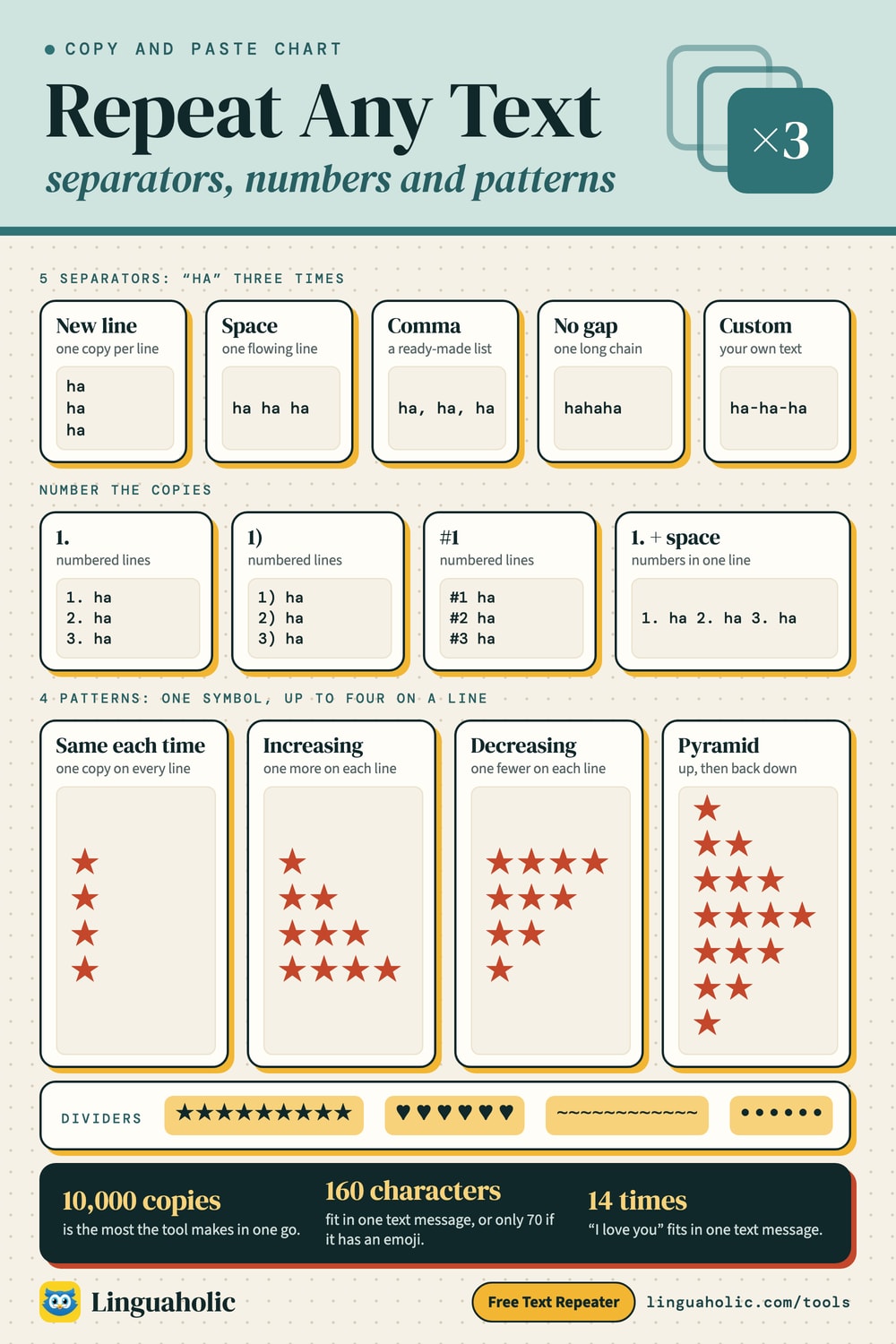
The separator is what sits between two copies. It changes the shape of the result more than anything else. Here is the word hi repeated three times with each option (↵ marks a line break):
| Separator | Result | Good for |
|---|---|---|
| New line | hi ↵ hi ↵ hi | Lists, one item per line, filling a column in a spreadsheet |
| Space | hi hi hi | A sentence that keeps going, chat messages, word practice |
| Comma | hi, hi, hi | Comma-separated lists, test data, tags |
| No gap | hihihi | Emoji strings, dividers and bars made of one symbol |
| Custom ( | ) | hi | hi | hi | Anything else: a slash, a dash, a blank line between copies |
A custom separator can be anything up to 40 characters, and spaces count: a bar with a space on each side gives hi | hi | hi, a bar on its own gives hi|hi|hi. To put a blank line between copies, type \n\n: the tool reads \n as a line break and \t as a tab.
Text repeater chart

Repeat text with numbers
Turn on Numbering to put a running number in front of every copy. It is handy for a numbered list you want to fill in, for counting lines, or when you need to see at a glance how many copies there are. The three styles look like this:
| Style | First three copies of “Task” |
|---|---|
| 1. | 1. Task ↵ 2. Task ↵ 3. Task |
| 1) | 1) Task ↵ 2) Task ↵ 3) Task |
| #1 | #1 Task ↵ #2 Task ↵ #3 Task |
Numbers work with every separator. With a space or a comma you get one long line such as #1 go, #2 go, #3 go, which is useful for labels or test data.
Increasing, decreasing and pyramid patterns
A pattern repeats your text a different number of times on each line. Increasing starts with one copy and adds one per line, Decreasing does the opposite, and Pyramid grows to your number and shrinks back to one. The number you type is the number of copies on the longest line (up to 500 for patterns). Words get a space between copies; emoji and symbols sit side by side.
Increasing: ha × 4
ha
ha ha
ha ha ha
ha ha ha ha
Decreasing: ★ × 4
★★★★
★★★
★★
★
Pyramid: ❤️ × 4
❤️
❤️❤️
❤️❤️❤️
❤️❤️❤️❤️
❤️❤️❤️
❤️❤️
❤️
Patterns make simple text art for a card or a post, a countdown, or a laugh that keeps building. Combine them with numbering to label each line.
Repeat emoji and symbols
Emoji and symbols repeat exactly like words. Tap one of the quick picks under the text box, or paste any emoji, heart or star, then choose No gap so the copies sit next to each other. Ten ❤️ in a row look like this:
❤️❤️❤️❤️❤️❤️❤️❤️❤️❤️
One thing to know: an emoji looks like one character but is often stored as several. Those ten hearts are 10 characters to your eye but 20 units of text inside the computer, because each ❤️ is a heart symbol plus an invisible marker that asks for the colored version. That is why a form or a text message can fill up faster than you expect with emoji. The counter above the result shows the characters you see; the text message line counts the way phones do.
For more to repeat, browse the heart symbols or the kaomoji (Japanese text faces), or style your words first with the fancy text generator and repeat the result.
Repeat text 100 or 1,000 times
Some numbers come up again and again: 10 for a quick list, 100 for a message like “I love you” 100 times, and 1,000 or 10,000 for test data. All of them are one tap or one number away. For example, I love you repeated 100 times, one per line, makes 1,099 characters and 300 words on 100 lines. As a text message that would be 8 parts.
How far you can go depends on the length of your text. The tool builds up to 10,000 copies and up to 1,000,000 characters in total (about a megabyte, several hundred printed pages), whichever comes first. If a request would be bigger, it tells you the largest number that fits and offers to use it.
| What you repeat | Most copies, one per line |
|---|---|
| A short word (5 characters) | 10,000 |
| A sentence (40 characters) | 10,000 |
| A long sentence (100 characters) | 9,901 |
| A paragraph (500 characters) | 1,996 |
| A page of text (3,000 characters) | 333 |
Very long results are shown in part in the result box to keep the page quick, but Copy and Download .txt always give you the whole thing. Downloading is the safer choice for anything over a few thousand lines.
How many copies fit in one text message?
A single text message (SMS) holds 160 characters when it uses only the basic set of letters, digits and punctuation that phones send in their compact format. A single emoji, or another character outside that set, switches the whole message to a wider format that holds 70 characters. Longer messages are split into parts of 153 or 67 characters, because each part needs a little room to say how the pieces fit back together. Many phones join the parts again on screen, and some send long texts as a picture message (MMS) instead.
The text repeater checks this for you. Here is how many copies fit in one message:
| Text and separator | Copies in one SMS |
|---|---|
| I love you (new line) | 14 |
| I love you (space) | 14 |
| ha (no gap) | 80 |
| Happy birthday! (new line) | 10 |
| ❤️ (no gap) | 35 |
| 😂 (no gap) | 35 |
Chat apps and social sites set their own, much larger limits, and they differ from app to app. If a long paste gets cut off, check the character count above the result and trim the number of copies.
Repeat text in a spreadsheet or in code
If the repeated text has to live inside a spreadsheet or a program, you can build it there too. The idea is the same everywhere: give the text and the number of times.
| Where | How to repeat “ha” 5 times |
|---|---|
| Excel and Google Sheets | =REPT("ha", 5) |
| Spreadsheet, with a space between | =TRIM(REPT("ha ", 5)) |
| JavaScript | "ha".repeat(5) |
| Python | "ha" * 5 |
| Python, one per line | "\n".join(["ha"] * 5) |
All of these give hahahahaha (or the spaced and stacked versions). For a one-off, the text repeater is quicker: no formula to remember, and numbering, separators and patterns are already built in.
What people use a text repeater for
- Test data. Developers and testers fill forms, tables and databases with repeated rows to see how a page handles long content. Numbered copies (
#1 test,#2 test…) make every row unique. - Checking character limits. Repeat one character 280 or 500 times to see where a field, a bio or a caption cuts off, then read the exact count above the result.
- Writing lines. A sentence copied 50 or 100 times, one per line, the way lines are written out by hand.
- Messages with a wink. “I love you” 100 times, a row of 50 hearts on a birthday, or “ha” that grows into a pyramid.
- Dividers and borders. A line of dashes, dots or stars with no gap makes a clean divider for plain text, notes and emails:
———————————— - Practice lists. Spelling words, vocabulary or handwriting drills, numbered so you can tick them off.
Tips for better results
- Watch the spaces. A space at the end of your text adds to the separator, so “ha ” with the Space separator gives two spaces between copies. The tool shows the result live, so a stray space is easy to spot.
- Mind the people on the other end. A wall of the same message is fun once. Sent again and again to a group, it reads as spam, and many apps limit or flag repeated messages.
- Count before you paste. The character and word counts above the result tell you whether it fits. For a deeper look, paste it into the word counter.
- Tidy the other way. If you need to turn a repeated list back into one line, or join lines with commas, use Remove Line Breaks.
The text repeater is free, needs no sign-up, and runs entirely in your browser: nothing you type is uploaded or stored.
For teachers, bloggers & clubs
Put the Text Repeater on your website
Give your readers this tool right on your page. Copy the code, paste it into your site, done: no sign-up, no account.
- Free for any website
- No ads, no cookies
- Fits phones and sidebars
- Always up to date
Please keep the small credit line under the tool; you may add rel="nofollow" to its link. How it works & the rules

› Show the code
Frequently asked questions
- How do I repeat text multiple times?
- Type or paste your text, enter how many times to repeat it, and choose what goes between the copies: a new line, a space, a comma, nothing, or your own separator. The result builds instantly; tap Copy or Download .txt.
- Can I repeat text 1,000 or 10,000 times?
- Yes. You can repeat text up to 10,000 times, as long as the result stays under 1,000,000 characters. If a long text would go over that, the tool tells you the largest number that fits and lets you use it with one tap.
- How do I put each copy on a new line?
- Choose New line as the separator. Each copy then starts on its own line. To leave a blank line between copies, choose Custom and type \n\n.
- How do I number the repeated text?
- Pick a style under Numbering: 1., 1) or #1. Every copy gets a running number in front, which turns the result into a numbered list.
- Can I repeat emoji and symbols?
- Yes. Tap one of the quick picks under the text box or paste any emoji or symbol, then choose No gap so the copies sit side by side. Increasing, decreasing and pyramid patterns work with emoji too.
- How many characters fit in one text message?
- A single SMS holds 160 characters of plain letters, digits and basic punctuation, or 70 characters if it contains an emoji or another special character. The text repeater shows how many message parts your result would need.
- How do I repeat text in Excel or Google Sheets?
- Use the REPT function: =REPT("ha", 5) gives hahahahaha. For a space between copies, use =TRIM(REPT("ha ", 5)).
- Is the text repeater free and private?
- Yes. It is free with no sign-up, and it runs entirely in your browser, so nothing you type is uploaded or stored.
About this page
The Text Repeater is a free tool from Linguaholic, made by Marcel Iseli. It runs in your browser, with no sign-up. Last updated .
Keep exploring
More free tools
 Word CounterCount words, characters, sentences, and paragraphs as you type.
 Remove Line BreaksRemove or add line breaks, keep paragraphs, and fix text pasted from PDFs and emails.
 Heart SymbolsCopy-and-paste heart symbols and heart emoji for bios, usernames, and messages.
 Fancy Text GeneratorCopy-and-paste fonts for Instagram, TikTok, and Discord bios.
 Kaomoji1,400+ kaomoji and emoji combos to copy: cute faces, cats, shrug, table flip, sparkles.
 Case ConverterTitle case by APA, MLA, Chicago or AP, sentence case, upper, lower and code cases.