
Text tools
Remove Line Breaks
Remove line breaks from pasted text, keep paragraphs, fix PDF and email copy-paste, replace breaks with commas, or add line breaks, then copy or download.
Updated · Free, no sign-up
Every line break becomes one space: wrapped lines turn into one flowing paragraph.
Result
Share this tool
Know someone who’d love it?
How to remove line breaks from text
Remove Line Breaks takes text that is broken into short lines and joins it back into normal, flowing paragraphs. It is made for text copied from PDFs, emails, websites and code, where a line break often sits at the end of every visible line instead of only at the end of a paragraph. It can also do the opposite and add line breaks where you want them.
- Paste your text into the box. Nothing is uploaded; the cleanup runs in your browser.
- Choose how to remove the line breaks: replace them with spaces, keep paragraphs, remove them completely, replace them with commas or with your own text, or only remove the empty lines.
- Pick the cleanup you need. Trimming and collapsing extra spaces are on by default. Turn on Fix text copied from a PDF for words broken with a hyphen, and Remove email quote marks for replies.
- Check the counts and copy. The tool shows how many line breaks it removed and the character, word and line counts before and after. Copy the result, download it as a .txt file, or move it back to the input to clean it again.
Six ways to remove line breaks
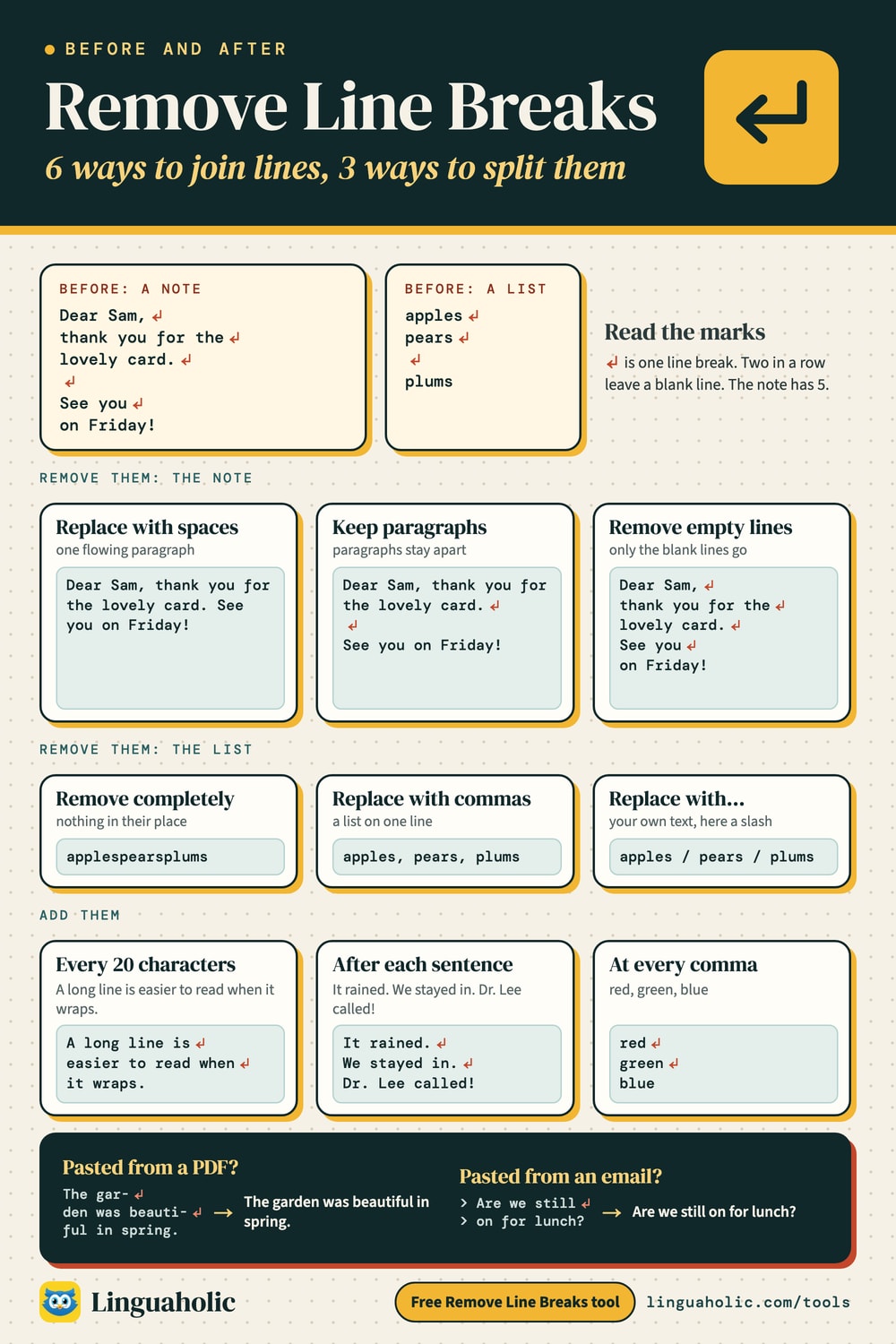
Each mode suits a different job. Here is the same short note, with a line break in the middle of each sentence and a blank line between the two paragraphs, run through every mode (↵ marks a line break):
Pack a warm coat,
good boots and a hat.

The trail starts at
the north gate.
| Mode | Result |
|---|---|
| Replace with spaces Every line break becomes one space: wrapped lines turn into one flowing paragraph. | Pack a warm coat, good boots and a hat. The trail starts at the north gate. |
| Keep paragraphs Joins the lines inside each paragraph and keeps one blank line between paragraphs. | Pack a warm coat, good boots and a hat. ↵ ↵ The trail starts at the north gate. |
| Remove completely Deletes line breaks with nothing in their place, so the lines run straight into each other. | Pack a warm coat,good boots and a hat.The trail starts atthe north gate. |
| Replace with commas Turns a list with one item per line into one line: apple, pear, plum. Blank lines are skipped. | Pack a warm coat, good boots and a hat. The trail starts at, the north gate. |
| Replace with… Puts your own text between the lines, such as a slash, a semicolon or <br>. | Pack a warm coat, / good boots and a hat. / The trail starts at / the north gate. |
| Remove empty lines Keeps every line where it is and only deletes the blank lines between them. | Pack a warm coat, ↵ good boots and a hat. ↵ The trail starts at ↵ the north gate. |
Replace with spaces is the right choice most of the time: it turns any number of lines into one clean paragraph without gluing words together. Remove completely leaves nothing between the lines, which is what you want for a long code, a link or a number that was split over several lines, but it joins ordinary words (“hat.The”), so use it with care.
Line break chart

Remove line breaks but keep paragraphs
Keep paragraphs joins the lines inside each paragraph and keeps one blank line between paragraphs. It works by looking for empty lines: anything separated by a blank line is a new paragraph, anything else is joined. Several blank lines in a row become one, so the result is evenly spaced.
If your text has no blank lines between paragraphs (some PDFs and web pages give you none), the tool cannot tell where a paragraph ends and joins everything. In that case, put the cursor at the end of each paragraph in the input box, press Enter once to add a blank line, and the paragraphs will stay apart.
Fix text copied from a PDF
A PDF stores text the way it looks on the page, line by line, so copying from it gives you a line break at the end of every printed line. Long words that were split at the edge of a column come with a hyphen, and some letter pairs arrive as a single joined character called a ligature (fi instead of f and i, fl instead of f and l). The text looks fine, but search, spell check and word counts trip over it.
The first map of the val-
ley was drawn in a sin-
gle afternoon.  Every
bridge and field was marked
by hand.
The first map of the val- ley was drawn in a sin- gle afternoon. Every bridge and field was marked by hand.
The first map of the valley was drawn in a single afternoon. Every bridge and field was marked by hand.
The PDF fix joins a word back together when a line ends with a letter and a hyphen and the next line starts with a lowercase letter. It also removes invisible soft hyphens and spells out the ff, fi, fl, ffi and ffl ligatures. In the example the text went from 5 lines and 22 words to 1 line and 20 words, because the split words count as one again.
The option is off by default for a reason: a word that is supposed to have a hyphen, such as “well-known”, loses it if the line happened to break right at the hyphen. Dashes with a space in front (“word -”) and capitalized names after a hyphen are left alone. For a long document, skim the result for joined compound words.
Clean up text from emails
Plain-text email has long been wrapped at short line lengths: the email standard asks for lines of no more than 78 characters, so email programs that send plain text wrap long paragraphs into short lines. Replies add a > at the start of each quoted line, two of them (>>) for a reply to a reply. Turn on Remove email quote marks and choose Keep paragraphs to get readable text back:
> Thanks for sending the photos. Could you
> also share the guest list before Friday so
> we can plan the seating?
Thanks for sending the photos. Could you also share the guest list before Friday so we can plan the seating?
Replace line breaks with commas
A list with one item per line, copied from a spreadsheet column or a note, often needs to become one line: apples, pears, plums, cherries. Choose Replace with commas. Blank lines are skipped and a comma already at the end of a line is not doubled. For a different separator, such as a semicolon, a pipe or <br> for a web page, choose Replace with… and type it.
To go back the other way, switch to Add line breaks and choose At a character. With a comma, apples, pears, plums, cherries becomes 4 lines again: apples ↵ pears ↵ plums ↵ cherries.
Add line breaks: every N characters, after each sentence, or at a character
The Add line breaks side of the tool breaks text up instead of joining it.
Every N characters
Choose a line length from 10 to 500 characters. With Keep words whole on, each line breaks at the last space that fits, so no word is cut in half; a single word longer than the line gets a line of its own. Turn it off for a hard cut every N characters, which is useful for long codes and keys. 72 is a common width for plain-text email and commit messages, and 80 for code. At 40 characters:
Plain text emails, commit messages and
code comments read best when every line
stays short enough to fit on a narrow
screen.
After each sentence
Puts each sentence on its own line, which makes long paragraphs easy to edit, translate or compare. A sentence ends at a period, question mark or exclamation mark followed by a space and a capital letter or number. Common abbreviations (Dr., Mr., e.g., a.m.) and initials do not end a sentence:
It rained all night.
Dr. Lee checked the roof at 6 a.m. and found a leak!
Was it the old pipe?
Nobody knew.
No rule catches every case: an abbreviation at the very end of a sentence, or a sentence that starts with a lowercase word, may need a manual touch.
How to remove line breaks in Word, Excel and Google Sheets
Pasting into the tool and back is often quickest, but you can also remove line breaks where the text lives.
| Program | How |
|---|---|
| Word | Open Replace (Ctrl+H). In Find what, type ^p for paragraph marks (Enter) or ^l for manual line breaks (Shift+Enter). Put a space in Replace with and choose Replace All. |
| Word, keeping paragraphs | Replace ^p^p with a placeholder such as ###, then ^p with a space, then ### with ^p^p. |
| Excel | Open Find and Replace (Ctrl+H), click in Find what and press Ctrl+J to enter a line break (the box looks empty). Type a space in Replace with and choose Replace All. |
| Excel or Google Sheets formula | =SUBSTITUTE(A1, CHAR(10), " ") replaces each line break in cell A1 with a space. =CLEAN(A1) removes them with nothing in their place. |
In Excel a line break inside a cell is typed with Alt+Enter on Windows, and it is stored as character 10, which is why CHAR(10) finds it.
Remove line breaks in code
Not every line break is the same character. Windows ends lines with two characters, a carriage return and a line feed; Linux and macOS use a line feed alone; and very old Mac files used a carriage return alone. Text from web pages and PDFs can also contain the Unicode line and paragraph separators. The tool recognizes all of them, so a file from any system cleans up the same way.
| Line break | Written as | Where you meet it |
|---|---|---|
| Line feed (LF) | \n, U+000A | Linux, macOS, most code and the web |
| Carriage return + line feed (CRLF) | \r\n | Windows text files, email |
| Carriage return (CR) | \r, U+000D | Mac files from before OS X |
| Line separator, paragraph separator | U+2028, U+2029 | Some PDFs and web pages |
| Next line (NEL) | U+0085 | Older mainframe text |
To do it in a program, match both kinds of ending:
- JavaScript:
text.replace(/\r?\n/g, " ") - Python:
text.replace("\r\n", " ").replace("\n", " "), or" ".join(text.split())to collapse every run of spaces and line breaks into one space - Most code editors: open Find and Replace, turn on regular expressions, search for
\r?\nand replace with a space
Line breaks and paragraph breaks: what’s the difference?
A paragraph break ends a paragraph: in a word processor it is what Enter does, and it usually adds space below. A line break (also called a soft return or manual line break) starts a new line inside the same paragraph: Shift+Enter in most editors. In plain text there is no difference; both are line break characters, and a paragraph is simply shown with an empty line in between. That is the convention this tool follows.
On a web page, line breaks in the HTML source are shown as ordinary spaces. To force a new line you need the <br> tag, and paragraphs go in <p> tags. Replace with… and <br> turns pasted lines into HTML line breaks in one step.
Quoting a poem inside a sentence works the other way: the line breaks become slashes. MLA style uses a slash with a space on each side between lines and a double slash between stanzas. Choose Replace with… and type / to do it in one go.
More text tools
Fix capital letters with the case converter, check the length of the cleaned text in the word counter or the sentence counter, and build repeated lists with the text repeater. Like every tool here, Remove Line Breaks is free, needs no sign-up, and keeps your text on your device.
For teachers, bloggers & clubs
Put the Remove Line Breaks on your website
Give your readers this tool right on your page. Copy the code, paste it into your site, done: no sign-up, no account.
- Free for any website
- No ads, no cookies
- Fits phones and sidebars
- Always up to date
Please keep the small credit line under the tool; you may add rel="nofollow" to its link. How it works & the rules

› Show the code
Frequently asked questions
- How do I remove line breaks from text?
- Paste your text and choose Replace with spaces. Every line break becomes a single space, so wrapped lines turn back into one flowing paragraph. Copy the result or download it as a .txt file.
- How do I remove line breaks but keep paragraphs?
- Choose Keep paragraphs. The lines inside each paragraph are joined, and one blank line is kept between paragraphs. Paragraphs need a blank line between them in your text for the tool to tell them apart.
- How do I fix text copied from a PDF?
- Choose Keep paragraphs or Replace with spaces and turn on Fix text copied from a PDF. It rejoins words split with a hyphen at the end of a line, removes soft hyphens and spells out ligatures such as fi and fl. Check hyphenated words like well-known afterwards.
- How do I replace line breaks with commas?
- Choose Replace with commas. A list with one item per line becomes one line, such as apples, pears, plums. Blank lines are skipped. For another separator, choose Replace with… and type it.
- How do I remove line breaks in Word?
- Open Replace with Ctrl+H, type ^p (paragraph mark) or ^l (manual line break) in Find what, put a space in Replace with, and choose Replace All.
- How do I remove line breaks in Excel?
- Open Find and Replace with Ctrl+H, click in Find what and press Ctrl+J to enter a line break, type a space in Replace with, and choose Replace All. A formula also works: =SUBSTITUTE(A1, CHAR(10), " ").
- How do I add line breaks every N characters or after each sentence?
- Switch to Add line breaks. Every N characters wraps text at the length you choose without cutting words, After each sentence puts every sentence on its own line, and At a character starts a new line at each comma or another character.
- What is the difference between a line break and a paragraph break?
- A paragraph break (Enter) ends a paragraph, while a line break (Shift+Enter in most editors) starts a new line inside the same paragraph. In plain text both are line break characters, and paragraphs are shown with a blank line between them.
- Is my text uploaded anywhere?
- No. The tool runs entirely in your browser, so your text stays on your device. It is free and needs no sign-up.
About this page
The Remove Line Breaks is a free tool from Linguaholic, made by Marcel Iseli. It runs in your browser, with no sign-up. Last updated .
Keep exploring
More free tools
 Word CounterCount words, characters, sentences, and paragraphs as you type.
 Case ConverterTitle case by APA, MLA, Chicago or AP, sentence case, upper, lower and code cases.
 Text RepeaterRepeat text or emoji up to 10,000 times, numbered or in patterns, then copy or download.
 Sentence CounterCount sentences and words per sentence, and spot sentences that run too long.
 Invisible CharacterCopy blank text and invisible characters, or find and remove hidden ones.
 Discord Text FormatterDiscord markdown with a live preview, plus a timestamp generator and colored text.