
Text tools
Invisible Character (Copy & Paste Blank Text)
Copy invisible characters and blank text for empty names, messages and spacing, or paste text to find and remove hidden characters.
Updated · Free, no sign-up
1. Pick a blank character
The classic blank-name character: a Korean filler letter that shows as a wide empty space. Because it is a letter, not a space, apps that trim spaces usually keep it.
Blank names: Often worksBlank messages: Often worksNot a space (survives trimming)
2. How many
What you are copying
HF
As it really looks, between the brackets: [ㅤ]
Every app decides which characters it accepts. If one is removed or rejected, try another kind. Please don’t use blank names or messages to pretend to be someone else, to dodge a ban or to spam: most communities treat that as against their rules.
Share this tool
Know someone who’d love it?
What is an invisible character?
An invisible character is a real Unicode character that shows up as nothing: no letter, no mark, just empty space or no space at all. You can copy it, paste it and send it like any other text, which is why people use it for blank names, empty-looking messages and spacing that an app would otherwise remove. The same characters also hide inside ordinary text by accident, where they break searches, passwords and code. This page does both jobs: it copies blank text, and it finds and removes hidden characters.
How to copy an invisible character
- Stay on Copy blank text and pick a character. The Hangul Filler (U+3164) is selected to start with, because it is the one that works in the most places.
- Choose how many: tap 1, 3, 5, 10, 50 or 100, or type any number up to 2,000.
- Choose In a row for one blank stretch, or One per line for a column of empty-looking lines.
- Tap the big Copy button, then paste into a name field, a bio or a message. The box under the button shows each character you copied as a small label, since the real thing is, of course, invisible.
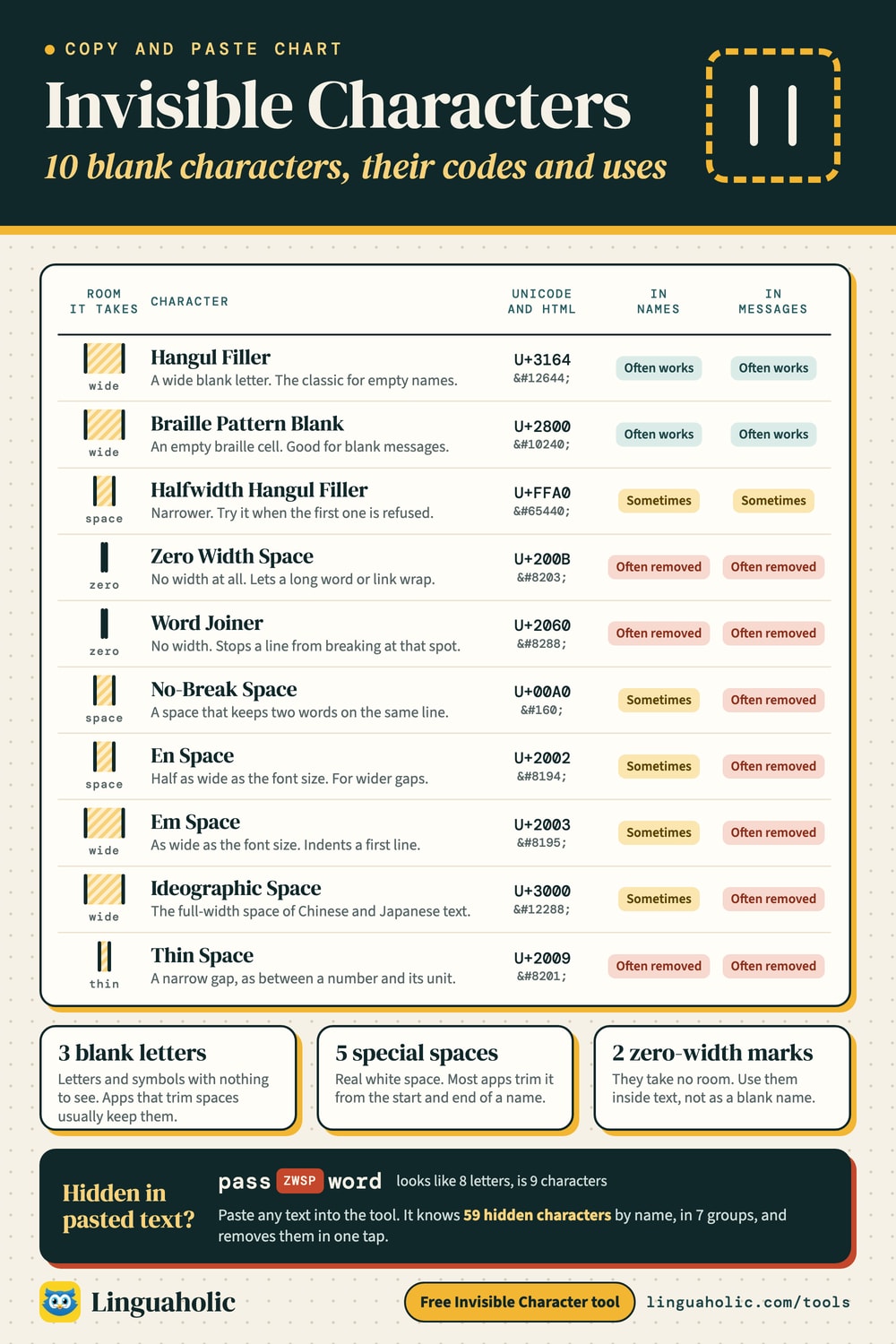
Invisible characters chart

Blank text: copy and paste empty characters
“Blank text” is simply text made of invisible characters. It is useful whenever an app insists on something in a box but you want it to look empty:
- A blank message. Most chat apps refuse to send an empty message or one made only of spaces. A single Hangul Filler or Braille Pattern Blank usually goes through and arrives as an empty bubble.
- Long blank text. Set the count to 100 or more to push the next message out of view, or to leave a large gap in a post.
- Empty lines in a bio or caption. Many profile and post fields squeeze several blank lines into one. Put a blank character on each empty line (use One per line) and the lines usually stay.
- Indents and wide gaps. Normal spaces are collapsed into one in many places. An em space or ideographic space keeps its width, so it can indent the first line of a paragraph.
Which invisible character should I use?
It depends on where you paste it. The key difference is whether a character counts as a space. Apps trim spaces from the start and end of names and messages, so a name made only of spaces, even special ones, is often rejected. Blank letters such as the Hangul Filler and the Braille Pattern Blank are not spaces in Unicode, so they survive that trimming. Zero-width characters take up no room at all, so many apps treat a name made of them as empty.
| Character | Code point | Width | Blank names | Blank messages |
|---|---|---|---|---|
| Hangul Filler | U+3164 | Wide | Often works | Often works |
| Braille Pattern Blank | U+2800 | Wide | Often works | Often works |
| Halfwidth Hangul Filler | U+FFA0 | Space-sized | Sometimes | Sometimes |
| Zero Width Space | U+200B | None | Often removed | Often removed |
| Word Joiner | U+2060 | None | Often removed | Often removed |
| No-Break Space | U+00A0 | Space-sized | Sometimes | Often removed |
| En Space | U+2002 | Space-sized | Sometimes | Often removed |
| Em Space | U+2003 | Wide | Sometimes | Often removed |
| Ideographic Space | U+3000 | Wide | Sometimes | Often removed |
| Thin Space | U+2009 | Thin | Often removed | Often removed |
These ratings describe what typically happens, not a promise for any one app. Every game, chat app and social site picks its own rules, and they change. If one character is rejected, go down the list and try the next.
Invisible characters for blank names and usernames
A blank name is a name that looks empty. Most sign-up forms and name fields don’t allow that on purpose, so whether it works depends on the platform. A few tips that help:
- Start with the Hangul Filler. It is the classic blank-name character because it is a letter that happens to have no shape.
- Try two or three. Some fields have a minimum length; three blank characters often pass where one does not.
- Mix in one visible character when a fully blank name is refused: a single dot or an apostrophe next to blanks still looks almost empty.
- Use it for a display name, not a login. Usernames you sign in with are usually limited to letters, numbers and a few symbols, and a blank one would be hard to type later anyway.
Please keep it fun. Don’t use blank names or messages to pretend to be someone else, to get around a ban, or to flood a chat. Moderators can see these characters, and most communities treat that as against their rules. If you just want a short, unusual name, the Username Generator and the Gamertag Generator have thousands of ideas.
How to send a blank text message
Copy one blank character, paste it into the message box and send. On a phone, long-press the message box and choose Paste. If the send button stays gray, the app has trimmed the character away: switch to the Braille Pattern Blank or paste two characters instead of one. A Zero Width Space on its own usually doesn’t work for this, because it has no width and many apps strip it.
Find and remove invisible characters
Hidden characters also turn up where nobody wanted them. Text copied from web pages, PDFs, spreadsheets and chat assistants can carry no-break spaces, zero-width spaces or a byte order mark. You can’t see them, but they make a search miss, a password fail, a spreadsheet formula break, or code stop working with a confusing error.
Open Find & remove and paste your text. Every hidden character appears as a small colored label in its exact position, and a table counts each kind with its name and code point. Then choose what to remove:
- Zero-width and formatting characters: zero width spaces, joiners, the byte order mark, soft hyphens and invisible tags.
- Blank letters: the Hangul fillers and the braille blank.
- Text direction marks: the marks and overrides that change whether text runs left to right or right to left.
- Control characters: leftovers such as the bell character or the object replacement character; line and paragraph separators become ordinary line breaks.
- Unusual spaces: turned into normal spaces (the default), removed, or kept.
Keep emoji intact is on by default. Some emoji are built from several characters glued together by a zero width joiner, and many get their color form from a variation selector. The checker marks those as part of an emoji and leaves them alone, so a family emoji doesn’t fall apart into three people.
Two cautions. In Persian and several Indian scripts the zero width non-joiner is part of correct spelling, and Arabic or Hebrew text may use direction marks on purpose; untick those boxes for such text. And a hidden character proves nothing about who wrote a text: no-break spaces come from word processors and websites all the time, and a clean result doesn’t prove a person wrote it either.
Hidden messages in tag characters
Unicode has a block of invisible “tag” characters, one for each letter, digit and punctuation mark. Their proper use is inside a few flag emoji. Strung together elsewhere, they can spell out a whole sentence that no reader sees, which is a known way to sneak instructions into text that a program will read. When the checker finds tag characters outside a flag, it decodes them and shows you the hidden message in plain letters.
Table of invisible characters and code points
These are all the hidden characters the checker recognizes, apart from the long ranges of variation selectors, tag characters and old control codes, which it reports too. The HTML code works in any web page.
| Name | Code point | HTML code | Kind |
|---|---|---|---|
| Hangul Choseong Filler | U+115F | ᅟ | Blank letter |
| Hangul Jungseong Filler | U+1160 | ᅠ | Blank letter |
| Braille Pattern Blank | U+2800 | ⠀ | Blank letter |
| Hangul Filler | U+3164 | ㅤ | Blank letter |
| Halfwidth Hangul Filler | U+FFA0 | ᅠ | Blank letter |
| Soft Hyphen | U+00AD | ­ | Zero width |
| Combining Grapheme Joiner | U+034F | ͏ | Zero width |
| Khmer Vowel Inherent Aq | U+17B4 | ឴ | Zero width |
| Khmer Vowel Inherent Aa | U+17B5 | ឵ | Zero width |
| Mongolian Vowel Separator | U+180E | ᠎ | Zero width |
| Zero Width Space | U+200B | ​ | Zero width |
| Zero Width Non-Joiner | U+200C | ‌ | Zero width |
| Zero Width Joiner | U+200D | ‍ | Zero width |
| Word Joiner | U+2060 | ⁠ | Zero width |
| Function Application | U+2061 | ⁡ | Zero width |
| Invisible Times | U+2062 | ⁢ | Zero width |
| Invisible Separator | U+2063 | ⁣ | Zero width |
| Invisible Plus | U+2064 | ⁤ | Zero width |
| Zero Width No-Break Space (byte order mark) | U+FEFF |  | Zero width |
| Interlinear Annotation Anchor | U+FFF9 |  | Zero width |
| Interlinear Annotation Separator | U+FFFA |  | Zero width |
| Interlinear Annotation Terminator | U+FFFB |  | Zero width |
| No-Break Space | U+00A0 |   | Space |
| En Quad | U+2000 |   | Space |
| Em Quad | U+2001 |   | Space |
| En Space | U+2002 |   | Space |
| Em Space | U+2003 |   | Space |
| Three-Per-Em Space | U+2004 |   | Space |
| Four-Per-Em Space | U+2005 |   | Space |
| Six-Per-Em Space | U+2006 |   | Space |
| Figure Space | U+2007 |   | Space |
| Punctuation Space | U+2008 |   | Space |
| Thin Space | U+2009 |   | Space |
| Hair Space | U+200A |   | Space |
| Narrow No-Break Space | U+202F |   | Space |
| Medium Mathematical Space | U+205F |   | Space |
| Ideographic Space | U+3000 |   | Space |
| Arabic Letter Mark | U+061C | ؜ | Direction |
| Left-to-Right Mark | U+200E | ‎ | Direction |
| Right-to-Left Mark | U+200F | ‏ | Direction |
| Left-to-Right Embedding | U+202A | ‪ | Direction |
| Right-to-Left Embedding | U+202B | ‫ | Direction |
| Pop Directional Formatting | U+202C | ‬ | Direction |
| Left-to-Right Override | U+202D | ‭ | Direction |
| Right-to-Left Override | U+202E | ‮ | Direction |
| Left-to-Right Isolate | U+2066 | ⁦ | Direction |
| Right-to-Left Isolate | U+2067 | ⁧ | Direction |
| First Strong Isolate | U+2068 | ⁨ | Direction |
| Pop Directional Isolate | U+2069 | ⁩ | Direction |
| Inhibit Symmetric Swapping | U+206A |  | Direction |
| Activate Symmetric Swapping | U+206B |  | Direction |
| Inhibit Arabic Form Shaping | U+206C |  | Direction |
| Activate Arabic Form Shaping | U+206D |  | Direction |
| National Digit Shapes | U+206E |  | Direction |
| Nominal Digit Shapes | U+206F |  | Direction |
| Next Line | U+0085 | … | Separator / control |
| Line Separator | U+2028 | 
 | Separator / control |
| Paragraph Separator | U+2029 | 
 | Separator / control |
| Object Replacement Character | U+FFFC |  | Separator / control |
The groups match the checkboxes in the remover: blank letters, zero-width and formatting characters, unusual spaces, text direction marks, control and separator characters.
How to type an invisible character on a keyboard
Copying is the easy way, but a few blanks can be typed directly:
- Windows: hold Alt and type 0160 on the number pad for a no-break space.
- Mac: Option + Space types a no-break space with the standard US keyboard layout.
- HTML: named codes include
(no-break space), and (en and em space), (thin space),‌and‍(zero width non-joiner and joiner),‎and‏(direction marks) and­(soft hyphen). Any other character works with its number, such asㅤfor the Hangul Filler. - Code: most programming languages accept an escape such as
for the zero width space orㅤfor the Hangul Filler.
A no-break space counts as a space, so it is trimmed in most name fields. For blank names, copy the Hangul Filler or the braille blank instead.
Why do invisible characters exist?
None of them were made for blank names. Each has a real job in writing systems and typesetting. The Hangul Filler and its relatives stand in for a missing part of a Korean syllable. The braille blank is the empty cell of the braille block, needed to write braille with spaces in it. Zero width joiners and non-joiners control how letters connect in scripts such as Arabic and the Indian scripts, and they also build compound emoji. Direction marks keep mixed English and Arabic or Hebrew text in the right order. The many spaces come from typesetting, where an em space, a thin space and a figure space each have a set width.
More text tools
Want to repeat a word or an emoji many times instead of a blank? Use the Text Repeater. For names that stand out rather than disappear, try the Fancy Text Generator. And to count the characters in a name or post, including hidden ones, paste it into the Word Counter.
Free and private
Everything happens in your browser. The text you paste into the checker is never uploaded or stored, so you can safely check code, documents and private messages.
For teachers, bloggers & clubs
Put the Invisible Character on your website
Give your readers this tool right on your page. Copy the code, paste it into your site, done: no sign-up, no account.
- Free for any website
- No ads, no cookies
- Fits phones and sidebars
- Always up to date
Please keep the small credit line under the tool; you may add rel="nofollow" to its link. How it works & the rules

› Show the code
Frequently asked questions
- What is an invisible character?
- A real Unicode character that shows as nothing, such as the Hangul Filler (U+3164), the braille blank (U+2800) or the zero width space (U+200B). You can copy, paste and send it like normal text, but it looks empty.
- How do I copy and paste an invisible character?
- Pick a character, choose how many you need (1 to 2,000) and tap Copy. Then paste it into a name field, bio or message like any other text.
- What is blank text?
- Text made only of invisible characters. It looks empty but counts as text, so you can use it for blank messages, empty-looking names, extra empty lines in a bio, or wide gaps that normal spaces can't make.
- Which invisible character works best for a blank name?
- The Hangul Filler (U+3164) often works, because it is a letter rather than a space and isn't trimmed. If it is rejected, try the braille blank (U+2800) or the halfwidth Hangul Filler. Every app sets its own rules.
- How do I send a blank message?
- Copy one Hangul Filler or braille blank, paste it in the message box and send. If the send button stays gray, the app removed it; try the other character or paste two.
- Why doesn't my blank name or message work?
- Many apps trim spaces and remove zero-width characters, and some block known blank characters on purpose. Try another kind, use two or three characters, or add one small visible character such as a dot.
- How can I see invisible characters in text?
- Open Find & remove and paste the text. Every hidden character shows up as a small label in its exact position, with a table of each kind, its code point and how many there are.
- How do I remove invisible characters from text?
- Paste the text into Find & remove, choose what to remove (zero-width characters, blank letters, direction marks, control characters, unusual spaces) and copy the clean text. Emoji stay intact by default.
- What is the Unicode code for an invisible character?
- Common ones are U+3164 (Hangul Filler), U+2800 (braille pattern blank), U+200B (zero width space), U+00A0 (no-break space) and U+FEFF (zero width no-break space). The table on this page lists them all with HTML codes.
- How do I type an invisible character on a keyboard?
- On Windows, hold Alt and type 0160 on the number pad for a no-break space; on a Mac, Option + Space types one. For blank names, copying the Hangul Filler works better, because a no-break space counts as a space.
About this page
The Invisible Character is a free tool from Linguaholic, made by Marcel Iseli. It runs in your browser, with no sign-up. Last updated .
Keep exploring
More free tools
 Text RepeaterRepeat text or emoji up to 10,000 times, numbered or in patterns, then copy or download.
 Fancy Text GeneratorCopy-and-paste fonts for Instagram, TikTok, and Discord bios.
 Discord Text FormatterDiscord markdown with a live preview, plus a timestamp generator and colored text.
 Username GeneratorUsername ideas with your name in 12 styles, sized for each app’s rules, plus a rule checker.
 Word CounterCount words, characters, sentences, and paragraphs as you type.
 Case ConverterTitle case by APA, MLA, Chicago or AP, sentence case, upper, lower and code cases.