
Text tools
Discord Text Formatter
Format Discord messages with a live preview, make timestamps that show in every reader's own time zone, and build colored text with ANSI code blocks.
Updated · Free, no sign-up
- Board games
- Card games
- bring your own deck
!join to sign up. Prize: A close match to how Discord shows the message. Code blocks appear without their syntax colors, and links in the preview are not clickable. Tap a spoiler to reveal it.
Text color
Warning: the server restarts at 8.
Show the code
```ansi
\u001b[0;1;31mWarning: \u001b[0m\u001b[0;33mthe server restarts at 8.\u001b[0m
```
Each \u001b stands for the invisible escape character that Copy puts in for you; you can’t type it in Discord, which is why you copy it from here.
Colored text shows on Discord for desktop and in the browser. The mobile apps usually show it as plain text. The exact shades depend on your Discord theme.
Share this tool
Know someone who’d love it?
How to use the Discord text formatter
Discord formats messages with markdown: a few symbols around your words make them bold, italic, underlined, crossed out or hidden as a spoiler. This formatter has three parts, one per tab:
- Format. Type your message, select a word or a line, and tap a button: B for bold, I for italic, U for underline, S for strikethrough, Spoiler, code, headers, small text, quotes, lists, code blocks and links. Tap the same button again to undo it. The preview below shows the message the way Discord displays it, in the dark or light theme. Then tap Copy message and paste it into Discord.
- Timestamps. Pick a date and time (and its time zone) to get a
<t:…>code in all nine styles, each previewed in your own local time. Copy one, or tap Add to put it in your message. - Colored text. Give each piece of text its own color, background, bold or underline, or turn a whole line into rainbow letters. The tool writes the
ansicode block that Discord turns into color.
The counter under the message box keeps an eye on Discord’s limit of 2,000 characters per message (4,000 with Nitro). Everything runs in your browser: your message is not sent anywhere until you paste it into Discord yourself.
Discord markdown cheat sheet
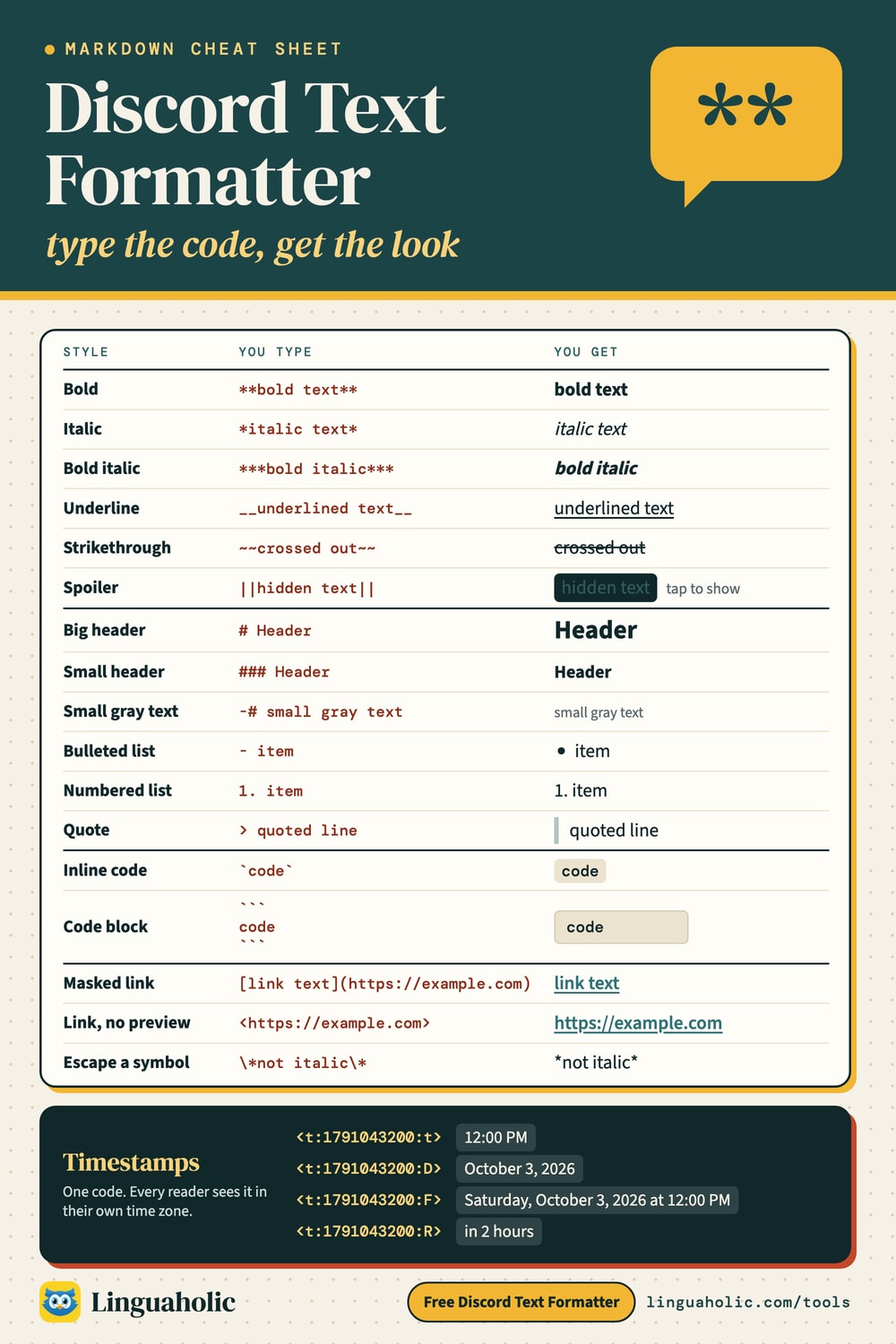
The formatting codes Discord understands in chat messages, in four short tables. Type the symbols exactly as shown, or let the formatter add them for you.
Text styles
| Style | Type this | Notes |
|---|---|---|
| Bold | **bold text** | Two asterisks on each side. |
| Italic | *italic text* | One asterisk or one underscore: _italic text_. |
| Bold italic | ***bold italic*** | Three asterisks. |
| Underline | __underlined text__ | Two underscores on each side. |
| Underline italic | __*underline italic*__ | Styles can be nested. |
| Strikethrough | ~~crossed out~~ | Two tildes on each side. |
| Spoiler | ||hidden text|| | Readers click or tap to reveal it. |
Headers, small text, lists and quotes
| Style | Type this | Notes |
|---|---|---|
| Big header | # Header | At the start of a line, with a space after #. |
| Medium header | ## Header | Two hash signs. |
| Small header | ### Header | Three hash signs; #### is not a header. |
| Subtext (small text) | -# small gray text | Dash, hash, space at the start of a line. |
| Bulleted list | - item | A dash or an asterisk and a space. |
| Nested list item | - sub-item | Indent with a space or two. |
| Numbered list | 1. item | A number, a period and a space. |
| Quote one line | > quoted line | Greater-than sign and a space. |
| Quote the rest | >>> everything after | Quotes every line to the end of the message. |
Code and colored text
| Style | Type this | Notes |
|---|---|---|
| Inline code | `code` | Backticks; no formatting happens inside. |
| Code block | ```
code
``` | Three backticks above and below. |
| Code with colors | ```js
let x = 1;
``` | A language name after the opening backticks. |
| Colored text | ```ansi
…
``` | ANSI codes; build them with the Colored text tab. |
Links, timestamps and symbols
| Style | Type this | Notes |
|---|---|---|
| Masked link | [link text](https://example.com) | Shows the text instead of the address. |
| Link without preview | <https://example.com> | Angle brackets stop the embed. |
| Timestamp | <t:1791043200:R> | Shows in each reader’s own time zone. |
| Escape a symbol | \*not italic\* | A backslash shows the symbol itself. |
Markdown cheat sheet

How to bold, italicize, underline and cross out text in Discord
Wrap the words in the same symbols on both sides, with no space between the symbols and the words:
- Bold: two asterisks,
**like this**. - Italic: one asterisk,
*like this*, or one underscore,_like this_. - Underline: two underscores,
__like this__. - Strikethrough (cross out): two tildes,
~~like this~~.
The styles combine. ***text*** is bold italic, __**text**__ is underlined bold, and __***text***__ is all three. The order of the outer symbols doesn’t matter as long as each pair closes in reverse order. If a style doesn’t appear, check for a space right inside the symbols: ** bold** stays as plain text with asterisks.
Underscores inside a word are left alone, so snake_case_name stays as typed. To show an asterisk or underscore without formatting, put a backslash in front of it: \*not italic\*. The formatter’s \* button does that for a whole selection.
How to spoiler text on Discord
Put two vertical bars on each side: ||the butler did it||. The words show up as a solid block, and each reader taps or clicks it to reveal them. This works the same on desktop, in the browser and in the mobile apps, because it is part of the message text. On a phone keyboard the vertical bar is usually on the symbols page. You can hide a single word in the middle of a sentence, several separate parts of one message, or a whole message.
Spoilers are also the way to hide or black out text in Discord, for example a quiz answer, a plot twist or a word some readers would rather not see. The text is still in the message, so it is a courtesy, not a secret: anyone can reveal it. The preview in the formatter shows spoilers as blocks too; tap one to check what is under it.
How to make text small in Discord
Start a line with a dash, a hash sign and a space: -# your text. Discord shows that line as subtext: smaller and in a muted gray, good for footnotes, credits, “edited” notes and small print under an announcement. Each small line needs its own -# at the start, and it has to be at the very beginning of the line. In the formatter, select the lines and tap Small.
Subtext is the only built-in small text. If you want tiny letters that work everywhere, including in a nickname or a profile, the Small Text Generator turns letters into small Unicode characters instead.
How to make text bigger in Discord
Use a header. A hash sign and a space at the start of a line makes it big:
# Big headeris the largest size, good for an announcement title.## Medium headeris a step smaller, for sections.### Small headeris bold and only slightly larger than normal text.
There are only three sizes; #### stays as plain text. The space after the hash signs is required, and the header has to start the line. You can still format words inside a header, such as # Game night is **on**.
Lists and block quotes
Start lines with - or * for a bulleted list, or with 1. , 2. and so on for a numbered list. Indent a line with a space or two to make it a sub-item. Use > to quote one line, and >>> to quote everything from that point to the end of the message, which is handy for quoting a long passage without marking every line.
Code blocks and syntax highlighting
Wrap a word in single backticks for `inline code`. For several lines, put three backticks on their own line above and below:
```js
const greeting = "hello";
console.log(greeting);
```
The word after the first three backticks is the language. Discord colors the code for common language names such as js, py, css, html, json, sql and diff. Nothing inside a code block is formatted, so it is also the safe place for text full of asterisks and underscores. The backtick key is usually at the top left of a keyboard, next to the 1; on a phone it is on the symbols page.
Discord timestamp generator
A Discord timestamp is a code that shows a date and time in each reader’s own time zone. Write it as <t:UNIX:STYLE>, where UNIX is the number of seconds since January 1, 1970 (UTC) and STYLE is one letter. When you post <t:1791043200:t>, a reader in New York sees 12:00 PM, a reader in Los Angeles sees 9:00 AM, and a reader in London with British English sees 17:00. Nobody has to convert time zones for an event, a deadline or a game night.
Here are all the styles for October 3, 2026 at 12:00 PM in New York, as a reader there with US English sees them:
| Style | Code | Shows as |
|---|---|---|
| Short time | <t:1791043200:t> | 12:00 PM |
| Medium time | <t:1791043200:T> | 12:00:00 PM |
| Short date | <t:1791043200:d> | 10/03/2026 |
| Long date | <t:1791043200:D> | October 3, 2026 |
| Long date, short time (default) | <t:1791043200:f> | October 3, 2026 at 12:00 PM |
| Full date, short time | <t:1791043200:F> | Saturday, October 3, 2026 at 12:00 PM |
| Short date, short time | <t:1791043200:s> | 10/03/2026, 12:00 PM |
| Short date, medium time | <t:1791043200:S> | 10/03/2026, 12:00:00 PM |
| Relative time | <t:1791043200:R> | “in 3 days”, “in 2 hours”, “5 minutes ago”: counts live |
Leave out the letter, as in <t:1791043200>, and Discord uses the long date with short time. The relative style (R) is the one for countdowns: it keeps updating, so “in 2 hours” becomes “in 5 minutes” and then “5 minutes ago” without anyone editing the message. Pair it with a full date for clarity: Starts <t:1791043200:F> (<t:1791043200:R>).
How to make a timestamp in Discord
- Open the Timestamps tab above.
- Pick the date and the time. If the time you have in mind is in another time zone, for example an event announced for 8 PM in Chicago, choose that zone in Time zone of this date.
- Find the style you want in the list; each one shows how it looks for you.
- Tap Copy and paste the code into your message. It turns into the date when you send it.
You can also paste a Unix timestamp, a timestamp in milliseconds, or a Discord message ID. Every Discord ID has the moment it was created built in, so pasting the ID of a message gives you the time it was sent: the ID 175928847299117063, for example, dates from April 30, 2016. To copy an ID, turn on Developer Mode in Discord’s Advanced settings, then right-click (or long-press) a message and choose Copy Message ID.
How to make colored text in Discord
Discord has no color button, but it colors the text inside a code block marked ansi. ANSI codes are an old way for terminals to color text: an invisible escape character, a bracket, numbers and the letter m. You can’t type the escape character in Discord, which is why people copy colored text from a generator. In the Colored text tab, type your text, pick colors and copy. The block looks like ```ansi followed by your colored line and a closing ```.
Discord supports eight text colors and eight background colors. The two sets don’t match: background 41 is orange, not red, and most backgrounds are muted blues and grays. Code 30, black in a terminal, shows as gray.
| Color | Text code | Background code | Background color |
|---|---|---|---|
| Gray | 30 | 40 | Dark blue |
| Red | 31 | 41 | Orange |
| Green | 32 | 42 | Marble blue |
| Yellow | 33 | 43 | Grayish turquoise |
| Blue | 34 | 44 | Gray |
| Pink | 35 | 45 | Indigo |
| Cyan | 36 | 46 | Light gray |
| White | 37 | 47 | White |
Two more codes change the style: 1 for bold and 4 for underline, and 0 resets everything back to plain. Codes can be combined with semicolons, so bold red on a dark blue background is the escape character followed by [0;1;40;31m. The exact shades depend on your Discord theme, and the color swatches above follow the dark theme.
Colored text works on desktop and in the browser. The Discord mobile apps usually show an ansi block as plain text in a code box, so if many of your readers are on phones, keep the important part readable without color. Colors only work inside the code block, so they always appear in the block’s monospaced font.
Masked links and link previews
A masked link shows your own words instead of a long address: [the rules](https://example.com/rules) appears as “the rules”, colored like a link. Discord still lets readers check the real address before it opens. To post a link without the big preview card, wrap it in angle brackets: <https://example.com>. In the formatter, select the words and tap Link, then replace the example address with yours.
Where Discord formatting doesn’t work
Markdown works in messages, replies, threads, forum posts and, for the most part, in your About Me. It doesn’t work in usernames, display names, server nicknames or channel names, which show the symbols as typed. For those, use Unicode letters that look styled on their own: the Bold Text Generator, the Fancy Text Generator or the Strikethrough Text Generator. For a blank space that Discord won’t trim, copy one from the Invisible Character page.
Free and private
The Discord text formatter is free and runs entirely in your browser. Nothing you type is uploaded or stored. Linguaholic is not affiliated with Discord; this is an independent helper for writing messages.
For teachers, bloggers & clubs
Put the Discord Text Formatter on your website
Give your readers this tool right on your page. Copy the code, paste it into your site, done: no sign-up, no account.
- Free for any website
- No ads, no cookies
- Fits phones and sidebars
- Always up to date
Please keep the small credit line under the tool; you may add rel="nofollow" to its link. How it works & the rules

› Show the code
Frequently asked questions
- How do I format text in Discord?
- Discord uses markdown: **bold**, *italic*, __underline__, ~~strikethrough~~, ||spoiler|| and `code`. Type your message here, select words, tap a button, check the preview and copy the result into Discord.
- How do I make text small in Discord?
- Start the line with a dash, a hash sign and a space: -# your text. Discord shows it as subtext, smaller and gray. Each small line needs its own -# at the very start.
- How do I spoiler text on Discord?
- Put two vertical bars on each side, like ||hidden text||. Readers tap or click to reveal it. It works the same on desktop and in the mobile apps.
- How do I make text bigger in Discord?
- Start a line with # and a space for a big header, ## for a medium one or ### for a small one. There are only three sizes, and the header must start the line.
- How do I cross out text in Discord?
- Wrap it in two tildes on each side: ~~crossed out~~. Select the words in the formatter and tap S to add them.
- How do I make colored text in Discord?
- Discord colors text inside a code block marked ansi, using ANSI escape codes. Use the Colored text tab to pick text and background colors, then copy the block. It shows on desktop and in the browser; the mobile apps usually show plain text.
- How do Discord timestamps work?
- Write <t:UNIX:STYLE>, where UNIX is seconds since January 1, 1970 (UTC) and STYLE is a letter such as t, d, f, F or R. Discord shows the time in each reader's own time zone. The Timestamps tab builds the code for any date.
- What does R mean in a Discord timestamp?
- R is the relative style. It shows how far away the time is, such as in 2 hours or 3 days ago, and keeps updating, which makes it ideal for countdowns.
- How do I make a masked link in Discord?
- Write the text in square brackets followed by the address in parentheses: [link text](https://example.com). Wrap a plain link in angle brackets, <https://example.com>, to hide its preview.
- Why doesn't formatting work in my Discord name?
- Markdown only works in messages and posts, not in usernames, display names, nicknames or channel names. For those, use styled Unicode letters from a fancy text or bold text generator.
About this page
The Discord Text Formatter is a free tool from Linguaholic, made by Marcel Iseli. It runs in your browser, with no sign-up. Last updated .
Keep exploring
More free tools
 Invisible CharacterCopy blank text and invisible characters, or find and remove hidden ones.
 Small Text GeneratorTiny small-caps letters to copy and paste into Instagram, TikTok, and Discord.
 Bold Text GeneratorCopy-and-paste bold letters for Instagram, Facebook, and Discord.
 Strikethrough Text GeneratorCrossed-out text with a line through it for Instagram, Facebook, and Discord.
 Fancy Text GeneratorCopy-and-paste fonts for Instagram, TikTok, and Discord bios.
 Word CounterCount words, characters, sentences, and paragraphs as you type.