
Fancy text generators
Small Text Generator
Turn your text into small caps, tiny raised letters, or tiny lowered letters, then copy and paste it into bios, display names, and messages.
Updated · Free, no sign-up
Share this tool
Know someone who’d love it?
What is a small text generator?
A small text generator turns normal letters into tiny ones that you can copy and paste. This one makes three kinds at once: small caps (ꜱᴍᴀʟʟ ᴛᴇxᴛ), tiny raised letters (ˢᵐᵃˡˡ ᵗᵉˣᵗ), and tiny lowered letters (ₛₘₐₗₗ ₜₑₓₜ). You may also know it as a tiny text generator or little text generator. All three names mean the same tool.
The letters are not shrunk with a font size. Each one is a separate Unicode character that was designed small, so it stays small wherever you paste it, including apps with no formatting options at all.
How to use it
- Type or paste your text into the box (up to 1,000 characters).
- Look at the three results and tap the one you want, or its Copy button.
- Paste it into your bio, display name, caption, or message.
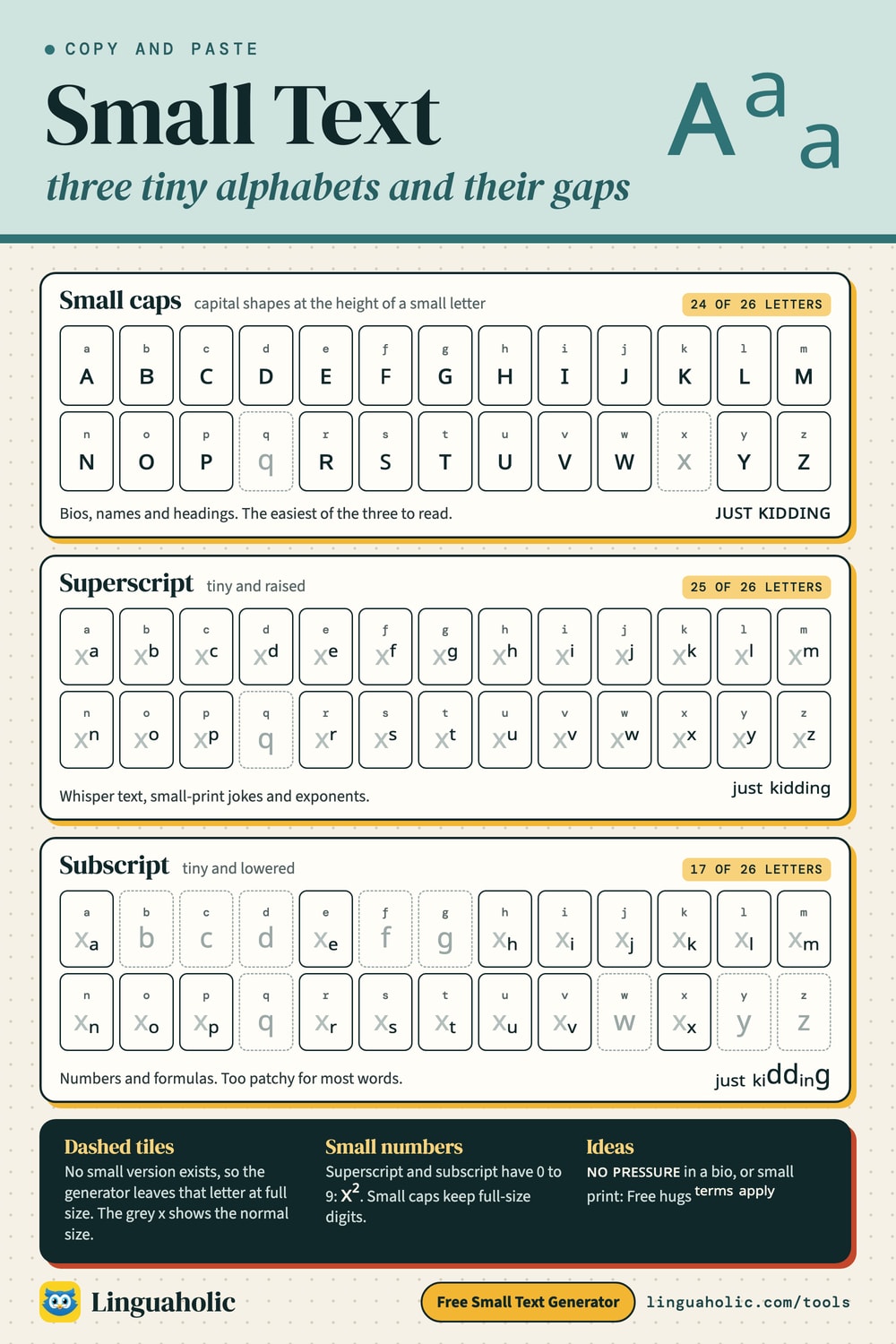
Small text alphabets chart

The three kinds of small text
| Style | Example | Which letters exist | Best for |
|---|---|---|---|
| Small caps | ᴊᴜꜱᴛ ᴋɪᴅᴅɪɴɢ | Every letter except q and x. No small numbers. | Bios, display names, and headings. The easiest of the three to read. |
| Superscript (tiny, raised) | ʲᵘˢᵗ ᵏⁱᵈᵈⁱⁿᵍ | Every lowercase letter except q, plus 0 to 9 and + - = ( ). | Whisper text, footnote-style jokes, exponents like x². |
| Subscript (tiny, lowered) | ⱼᵤₛₜ ₖᵢddᵢₙg | Only a, e, h, i, j, k, l, m, n, o, p, r, s, t, u, v, and x, plus 0 to 9 and + - = ( ). | Numbers and chemical formulas like H₂O. Too patchy for most words. |
If you want the smallest text, pick superscript or subscript. Those are the smallest letters Unicode has, about the size of a footnote number. Small caps are bigger: they are capital shapes drawn at the height of a lowercase x. None of the three can be made smaller still, because the size is part of the character. They scale with whatever text size the app uses.
Small letters to copy and paste
The full alphabets for all three styles. Tap any letter to copy it, or use Copy all. A letter that looks normal in the chart is one that has no small version.
Small Caps alphabet
Letters
| Letter | Small Caps |
|---|---|
| a | |
| b | |
| c | |
| d | |
| e | |
| f | |
| g | |
| h | |
| i | |
| j | |
| k | |
| l | |
| m | |
| n | |
| o | |
| p | |
| q | |
| r | |
| s | |
| t | |
| u | |
| v | |
| w | |
| x | |
| y | |
| z |
Tiny (Superscript) alphabet
Letters
| Letter | Tiny (Superscript) |
|---|---|
| a | |
| b | |
| c | |
| d | |
| e | |
| f | |
| g | |
| h | |
| i | |
| j | |
| k | |
| l | |
| m | |
| n | |
| o | |
| p | |
| q | |
| r | |
| s | |
| t | |
| u | |
| v | |
| w | |
| x | |
| y | |
| z |
Numbers
| Number | Tiny (Superscript) |
|---|---|
| 0 | |
| 1 | |
| 2 | |
| 3 | |
| 4 | |
| 5 | |
| 6 | |
| 7 | |
| 8 | |
| 9 |
Subscript alphabet
Letters
| Letter | Subscript |
|---|---|
| a | |
| b | |
| c | |
| d | |
| e | |
| f | |
| g | |
| h | |
| i | |
| j | |
| k | |
| l | |
| m | |
| n | |
| o | |
| p | |
| q | |
| r | |
| s | |
| t | |
| u | |
| v | |
| w | |
| x | |
| y | |
| z |
Numbers
| Number | Subscript |
|---|---|
| 0 | |
| 1 | |
| 2 | |
| 3 | |
| 4 | |
| 5 | |
| 6 | |
| 7 | |
| 8 | |
| 9 |
Which small letters are missing?
None of the three alphabets is complete. When a letter is missing, the generator leaves it at full size.
- Small caps: q and x stay as ordinary lowercase letters. The x blends in, since a lowercase x already looks like a small capital. The q is the one that sticks out: ᴛʜᴇ qᴜɪᴇᴛ ᴏɴᴇ. Capitals and lowercase both become small caps, so the difference between them is lost. For the classic look with a full-size first letter, copy the result and retype the first letter as a normal capital: Lɪᴋᴇ ᴛʜɪꜱ.
- Superscript: q has no tiny version that phones reliably display, so “quick fox” becomes qᵘⁱᶜᵏ ᶠᵒˣ. Unicode's set of raised capitals is incomplete, so the tool uses the tiny lowercase letters for capitals too.
- Subscript: there is no b, c, d, f, g, q, w, y, or z. “Small text” happens to work in full, but “sorry” comes out as ₛₒᵣᵣy. Check your word before you commit to this style.
Punctuation stays normal in all three, apart from + - = ( ), which have tiny raised and lowered forms. Small caps have no small digits, so numbers stay full size there.
Is small text a tiny font?
No. Searches like “tiny font generator” or “small fonts copy and paste” describe the result well, but no font is involved. A font can't be copied from one app to another. Characters can, and that is what you are copying here.
So why does Unicode contain tiny letters at all? Almost all of them were added for phonetic alphabets, the notation linguists use to write down speech sounds:
- Several small caps are symbols of the International Phonetic Alphabet. There, ɪ is the vowel in “kit” and ʀ is the throaty r made at the back of the mouth. Most of the others were added for the Uralic Phonetic Alphabet, which is used for Finnish, Hungarian, and related languages.
- Raised letters mark how a sound is pronounced. In the IPA, a raised h means a puff of air: the p in “pin” is written pʰ.
- Raised and lowered digits were made for math and chemistry: x², H₂O. Lowered letters were only added where some notation needed them, which is why that alphabet has so many holes.
Nobody designed these as a matching set. The generator lines them up into the closest thing to one.
What to use small text for
- Bios and display names. Small caps give a neat, even line: ɴᴏ ᴘʀᴇꜱꜱᴜʀᴇ.
- Whisper text. Tiny raised letters read as a mumble or an aside: ᵖˡˢ ʰᵉˡᵖ.
- Footnote-style jokes. Put the small print after a bold claim: “Best cook in the house ⁽ⁿᵒᵗ ʳᵉᵃˡˡʸ⁾” or “Free hugs ᵗᵉʳᵐˢ ᵃᵖᵖˡʸ”.
- Exponents and formulas. Convert only the part that should be small. For that job the Superscript Generator and the Subscript Generator are the better pages.
Where small text works, and where it doesn't
- Instagram and TikTok: the name field, bio, captions, and comments. Not the @username, which only allows plain letters, numbers, periods, and underscores.
- X: the display name, bio, and posts, but not the handle. X counts most of these characters as two toward its limit.
- Discord: messages, nicknames, and server and channel names, but not the username. Discord also has its own small text for messages: start a line with
-#and a space. The Discord Text Formatter builds it for you. - WhatsApp, text messages, and Facebook posts: it pastes as normal text.
Whether the letters show up depends on the fonts on the reader's device. Recent phones and computers have them. An old device can show an empty box for a letter it doesn't know. The small caps ꜰ and ꜱ joined Unicode later than the rest, so they are the most likely to fail.
Real small caps, superscript, and subscript in Word and Google Docs
In a document you don't need special characters. Use the app's own formatting, which keeps the text searchable and works for every letter:
- Word: small caps with Ctrl+Shift+K, superscript with Ctrl+Shift+=, subscript with Ctrl+=.
- Google Docs: superscript with Ctrl+. and subscript with Ctrl+, (both also under Format, then Text). Docs has no small caps button, so pasting small caps from this page is one way to get them there.
Keep it short
Screen readers may spell these characters out one by one, read them as phonetic symbols, or skip them. In-app search and hashtags won't match them either. Use small text for a name, a tagline, or a punchline, and keep anything people need to read or find in normal letters.
More text tools
For the opposite effect, the Bold Text Generator makes letters heavier. The Case Converter switches between real uppercase and lowercase, and the Fancy Text Generator has every style in one list.
Is anything sent to a server?
No. The small text generator runs entirely in your browser. It is free, there is no sign-up, and nothing you type is uploaded or stored.
For teachers, bloggers & clubs
Put the Small Text Generator on your website
Give your readers this tool right on your page. Copy the code, paste it into your site, done: no sign-up, no account.
- Free for any website
- No ads, no cookies
- Fits phones and sidebars
- Always up to date
Please keep the small credit line under the tool; you may add rel="nofollow" to its link. How it works & the rules

› Show the code
Frequently asked questions
- How do I make tiny text on Instagram or TikTok?
- Neither app lets you change the text size. Type your text in the generator, copy the small caps or tiny superscript version (ˡⁱᵏᵉ ᵗʰⁱˢ), and paste it into your bio, name field, or caption.
- How do I type small text on Discord?
- You can paste small text from this generator into any message or nickname. Discord also has built-in small text for messages: start the line with -# followed by a space.
- Which small text style is the easiest to read?
- Small caps. The letters are capital shapes at lowercase height, so they stay clear even in a short bio line. Superscript and subscript are much smaller and work best for a few words.
- Why does the letter q stay big?
- There is no small q that phones reliably display, in small caps or in superscript, so the generator leaves it at normal size: qᴜᴇᴇɴ, qᵘᵉᵉⁿ. Rewording to avoid the q is the only fix.
- Can I make small numbers?
- Yes, in two of the three styles. Superscript gives raised digits (⁰¹²³⁴⁵⁶⁷⁸⁹) and subscript gives lowered digits (₀₁₂₃₄₅₆₇₈₉). Small caps have no small digits, so numbers stay full size there.
- Can I make the text even smaller?
- No. Superscript and subscript are the smallest letters Unicode has. The size is part of each character, so it cannot be reduced further; it only scales with the text size of the app you paste into.
- How do I get small caps in Google Docs or Word?
- In Word, select the text and press Ctrl+Shift+K. Google Docs has no small caps button, so you can paste small caps from this generator instead.
- Can I use small text in a username?
- Not in the @handle on Instagram, TikTok, or X, and not in a Discord username. Those only accept plain characters. Small text works in the display name or nickname and in the bio.
About this page
The Small Text Generator is a free tool from Linguaholic, made by Marcel Iseli. It runs in your browser, with no sign-up. Last updated .
Keep exploring
More free tools
 Fancy Text GeneratorCopy-and-paste fonts for Instagram, TikTok, and Discord bios.
 Bold Text GeneratorCopy-and-paste bold letters for Instagram, Facebook, and Discord.
 Cursive Text GeneratorElegant cursive script letters to copy and paste, in normal and bold.
 Bubble Text GeneratorCircled bubble letters and squared letters to copy and paste into bios.
 Glitch Text GeneratorGlitchy, corrupted text to copy and paste into Discord and usernames.
 Zalgo Text GeneratorCreepy zalgo text to copy and paste into social media and Discord.