
Fancy text generators
Subscript Generator
Turn numbers and letters into small lowered characters for chemical formulas like H₂O and CO₂ or math like x₁, ready to copy and paste.
Updated · Free, no sign-up
Share this tool
Know someone who’d love it?
What is a subscript generator?
A subscript generator turns the characters you type into small ones that sit below the line, like the ₂ in H₂O or the ₁ in x₁. The result is subscript text made of real Unicode characters, not formatting. You can copy and paste it into places with no subscript button, such as a social media caption, a chat message or a form field.
How to use it
- Type your text the normal way, for example H2O, Ca2+ or a whole equation.
- For chemistry, use the first row, Smart formula. It knows which numbers to lower: the counts after an element (H2O becomes H₂O), not the number in front (2H2O becomes 2H₂O). It also raises charges (Ca2+ becomes Ca²⁺) and turns
->into an arrow. - The second row, Numbers only (formulas), simply lowers every digit and leaves the letters alone, which is what you want for x1, a2 or a list of numbered labels.
- Tap the row, or its Copy button, and paste the result where you need it.
The second row, Subscript, lowers every character that has a subscript form, letters included. The sample H2O and CO2 comes out as ₕ₂ₒ ₐₙd Cₒ₂ there: the h, o, a and n drop down, while C and d, which have no subscript form, stay full size. That row is for tiny lowered text, not for formulas.
The third row, Tiny (Superscript), gives the raised version of the same text. You need it for ion charges such as Ca²⁺, where the charge goes above the line.
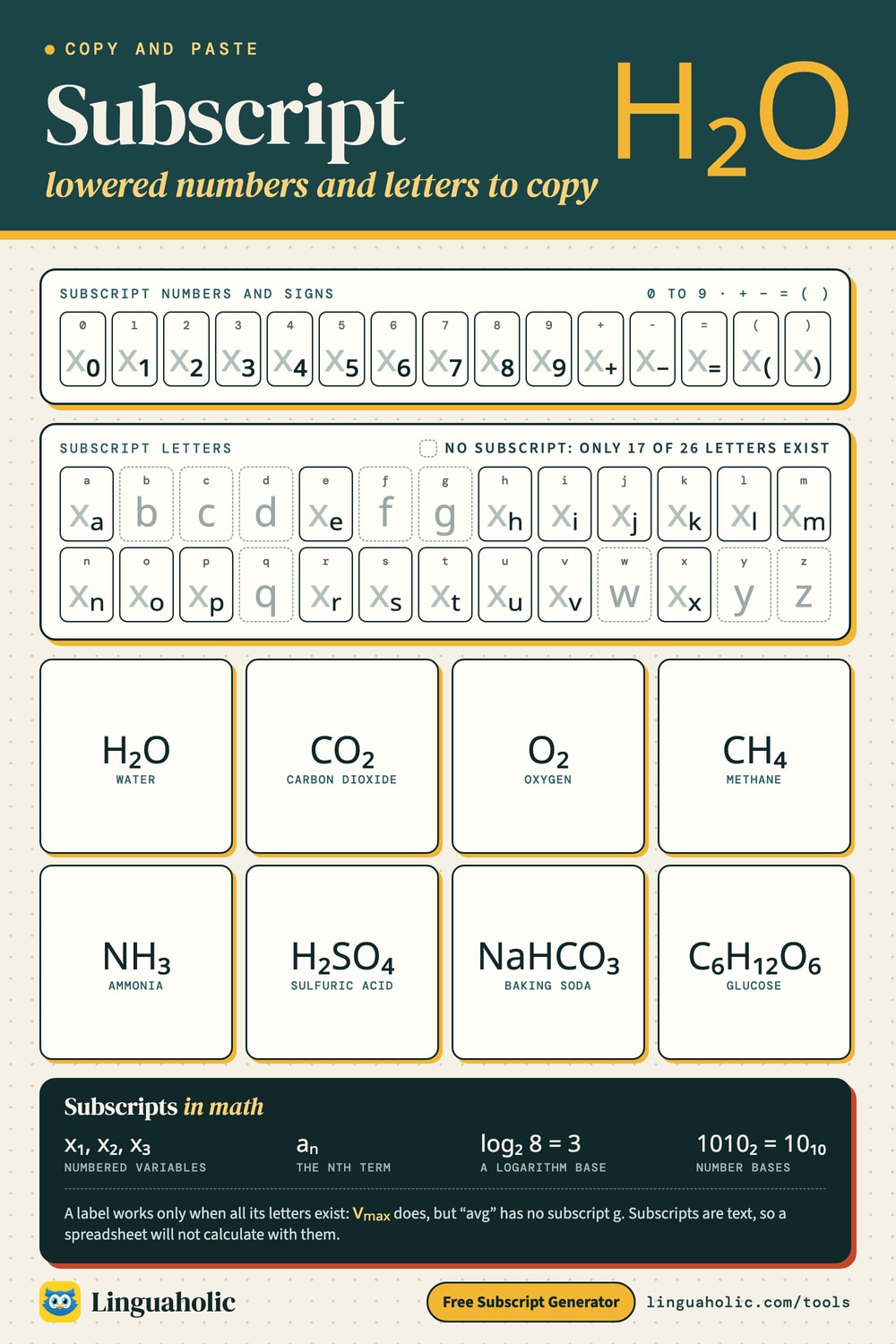
Subscript numbers and letters chart

Write a whole equation in one go
The Smart formula row reads what you type the way a chemistry teacher would. A few plain-keyboard shortcuts tell it what you mean:
| You type | You get | Rule |
|---|---|---|
C6H12O6 | C₆H₁₂O₆ | Numbers after an element are lowered |
2H2 + O2 -> 2H2O | 2H₂ + O₂ → 2H₂O | A number in front stays full size; -> becomes an arrow |
Ca(OH)2 | Ca(OH)₂ | Numbers after a bracket are lowered |
Fe3+ and Cl- | Fe³⁺ and Cl⁻ | A charge at the end of an ion is raised |
NH4+ | NH₄⁺ | The count stays lowered, the sign is raised |
SO4^2- | SO₄²⁻ | ^ raises what follows it |
CuSO4*5H2O | CuSO₄·5H₂O | * or a dot between parts becomes · |
N2 + 3H2 <=> 2NH3 | N₂ + 3H₂ ⇌ 2NH₃ | <=> becomes the equilibrium arrow |
^14C | ¹⁴C | Mass numbers for isotopes |
x_1 + x_2 | x₁ + x₂ | _ lowers what follows it (letters too) |
One case needs the ^: an ion made of several atoms with a charge bigger than one. In SO42- the tool can't tell whether the 2 is a count or the charge, so write SO4^2- and you get SO₄²⁻. A single element (Fe3+) and a complex ion in square brackets ([Fe(CN)6]3-) work without it.
Subscript numbers to copy and paste
All ten digits have a subscript form, along with plus, minus, equals and both parentheses. The one people want most is subscript 2 (₂), for H₂O and CO₂.
| Normal | 0 | 1 | 2 | 3 | 4 | 5 | 6 | 7 | 8 | 9 | + | - | = | ( | ) |
|---|---|---|---|---|---|---|---|---|---|---|---|---|---|---|---|
| Subscript | ₀ | ₁ | ₂ | ₃ | ₄ | ₅ | ₆ | ₇ | ₈ | ₉ | ₊ | ₋ | ₌ | ₍ | ₎ |
Chemical formulas with subscripts
In a chemical formula the subscript counts atoms: H₂O is two hydrogen atoms and one oxygen atom. Written as H2O it is still understood, but it isn't correct notation. Here are some of the most common formulas, ready to copy:
| Substance | Formula | Typed without subscripts |
|---|---|---|
| Water | H₂O | H2O |
| Carbon dioxide | CO₂ | CO2 |
| Oxygen | O₂ | O2 |
| Sulfuric acid | H₂SO₄ | H2SO4 |
| Glucose | C₆H₁₂O₆ | C6H12O6 |
| Baking soda (sodium bicarbonate) | NaHCO₃ | NaHCO3 |
| Methane | CH₄ | CH4 |
| Ammonia | NH₃ | NH3 |
| Table salt (sodium chloride) | NaCl | NaCl |
| Hydrochloric acid | HCl | HCl |
| Ethanol | C₂H₅OH | C2H5OH |
| Sucrose (table sugar) | C₁₂H₂₂O₁₁ | C12H22O11 |
| Calcium carbonate (chalk, limestone) | CaCO₃ | CaCO3 |
| Hydrogen peroxide | H₂O₂ | H2O2 |
| Ozone | O₃ | O3 |
| Nitrogen | N₂ | N2 |
| Iron(III) oxide (rust) | Fe₂O₃ | Fe2O3 |
| Caffeine | C₈H₁₀N₄O₂ | C8H10N4O2 |
Common ions with their charges
| Ion | With charge | Typed plainly |
|---|---|---|
| Sodium ion | Na⁺ | Na+ |
| Calcium ion | Ca²⁺ | Ca2+ |
| Iron(III) ion | Fe³⁺ | Fe3+ |
| Chloride ion | Cl⁻ | Cl- |
| Hydroxide ion | OH⁻ | OH- |
| Ammonium ion | NH₄⁺ | NH4+ |
| Nitrate ion | NO₃⁻ | NO3- |
| Carbonate ion | CO₃²⁻ | CO32- |
| Sulfate ion | SO₄²⁻ | SO42- |
| Phosphate ion | PO₄³⁻ | PO43- |
Keep the capital letters exact. Element symbols are case-sensitive: CO is carbon monoxide, while Co is the metal cobalt.
Two things in a formula are not subscripts. A number in front, as in 2H₂O, counts whole molecules and stays full size. A charge goes above the line: the sulfate ion is SO₄²⁻, with a lowered 4 and a raised 2−. Get the raised part from the Superscript Generator.
Subscript letters: which ones exist
Unicode never got a full subscript alphabet. Only 17 letters have a subscript form: a e h i j k l m n o p r s t u v x. In subscript they look like this: ₐₑₕᵢⱼₖₗₘₙₒₚᵣₛₜᵤᵥₓ. The other nine, b c d f g q w y and z, have no subscript character, so the tool leaves them as normal letters. That is why a whole word usually comes out uneven: “Hello World” becomes ₕₑₗₗₒ Wₒᵣₗd.
There are no subscript capitals either. The tool gives the same small letter for A and a, which is why the chart below has a single row of letters. Punctuation other than + − = ( ) stays full size too.
Subscript alphabet
Letters
| Letter | Subscript |
|---|---|
| a | |
| b | |
| c | |
| d | |
| e | |
| f | |
| g | |
| h | |
| i | |
| j | |
| k | |
| l | |
| m | |
| n | |
| o | |
| p | |
| q | |
| r | |
| s | |
| t | |
| u | |
| v | |
| w | |
| x | |
| y | |
| z |
Numbers
| Number | Subscript |
|---|---|
| 0 | |
| 1 | |
| 2 | |
| 3 | |
| 4 | |
| 5 | |
| 6 | |
| 7 | |
| 8 | |
| 9 |
Subscripts in math and science
- Numbered variables: x₁, x₂, x₃, or the points (x₁, y₁) and (x₂, y₂).
- Sequences: aₙ for the nth term, with a₁ as the first.
- Logarithm bases: log₂ 8 = 3, log₁₀ 100 = 2.
- Number bases: 1010₂ = 10₁₀. The small number says which base the digits are in. See the Binary Converter for the conversion itself.
- Physics labels: v₀ for a starting speed, vₘₐₓ and vₘᵢₙ for the highest and lowest.
Labels work only when all their letters are among the 17. “max” and “min” do; “avg” does not, because there is no subscript g.
How to type subscript in Word, Google Docs and HTML
In a document you don't need special characters. Select the text and use the program's own subscript command:
| Where | Windows | Mac |
|---|---|---|
| Microsoft Word and PowerPoint | Ctrl + = | Cmd + = |
| Google Docs | Ctrl + , (comma) | Cmd + , (comma) |
| HTML | H<sub>2</sub>O | |
| LaTeX | x_{1} inside math mode | |
Press the same shortcut again to return to normal text. In Google Docs the command is also under Format, then Text, then Subscript. In Excel, select the characters inside the cell, open Format Cells with Ctrl + 1 and tick Subscript.
Unicode subscript or real formatting?
Use real formatting for lab reports, homework, papers and anything else written in a word processor. It can lower any character, including the nine letters Unicode lacks. The text underneath stays normal, so search and screen readers still work. The catch is that it stays behind when you copy: paste H₂O from Word into a plain-text box and it arrives as H2O.
Use Unicode subscript where formatting can't follow: captions and bios, chat messages, comments, spreadsheet labels, file names, plain-text notes. The lowered characters are part of the text, so CO₂ stays CO₂ wherever you paste it.
Limits to know about
- They are text, not numbers. A spreadsheet treats ₂ as a symbol and won't calculate with it.
- Search may miss them. Someone searching for “CO2” won't always find “CO₂”, and a hashtag with a subscript in it won't join the plain one.
- Screen readers are uneven. Some read ₂ as “subscript two”, some as plain “two”, and some skip it.
- Usernames: Instagram, TikTok and X handles only accept plain letters, numbers, underscores and periods, so subscripts work in the name field and bio but not in the @handle.
- Old devices can show an empty box for some subscript letters. The digits are the most widely supported.
More text tools
For raised characters such as x² and 10⁶, use the Superscript Generator. The Small Text Generator has tiny text and small caps, the Strikethrough Text Generator crosses text out, and the Fancy Text Generator shows every style on one page.
Is anything sent to a server?
No. The subscript generator runs entirely in your browser. Nothing you type is uploaded or stored, and it is free with no sign-up.
For teachers, bloggers & clubs
Put the Subscript Generator on your website
Give your readers this tool right on your page. Copy the code, paste it into your site, done: no sign-up, no account.
- Free for any website
- No ads, no cookies
- Fits phones and sidebars
- Always up to date
Please keep the small credit line under the tool; you may add rel="nofollow" to its link. How it works & the rules

› Show the code
Frequently asked questions
- Why does my whole formula turn small when I type H2O?
- The Subscript row lowers every character that has a subscript form, and that includes the letters h and o. For a chemical formula, use the Smart formula row at the top: it lowers only the counts (H₂O), keeps a number in front full size (2H₂O) and raises charges (Ca²⁺).
- Can I write a whole chemical equation?
- Yes. Type it with plain numbers, for example 2H2 + O2 -> 2H2O, and the Smart formula row gives 2H₂ + O₂ → 2H₂O. <=> becomes the equilibrium arrow ⇌, and * or a dot in a hydrate becomes ·, as in CuSO₄·5H₂O.
- How do I type a subscript 2 on a phone?
- Copy ₂ from this page and paste it where you need it. If you write formulas often, save it as a text shortcut in your phone's keyboard settings so that a short code inserts it.
- Can I write whole words in subscript?
- Only if every letter is one of the 17 that exist in subscript: a, e, h, i, j, k, l, m, n, o, p, r, s, t, u, v and x. Other letters stay normal size, so most words come out uneven. For full words, use the subscript formatting in Word or Google Docs.
- How do I write an ion charge like Ca2+?
- Charges are superscripts, not subscripts: Ca²⁺. Type Ca2+ and the Smart formula row raises the charge for you. For an ion of several atoms with a charge above one, put a ^ before the charge: SO4^2- gives SO₄²⁻.
- What is the difference between subscript and superscript?
- Subscript sits below the line, as in H₂O or x₁, and is used for atom counts, numbered variables and number bases. Superscript sits above the line, as in x², and is used for exponents, footnotes and ordinals.
- Can I use subscript in an Instagram bio, a Discord message or WhatsApp?
- Yes. Those apps have no subscript button, but the characters from this tool are plain Unicode text and can be pasted into bios, captions and messages. They do not work in @usernames, which only accept plain letters, numbers, underscores and periods.
- Is it wrong to write H2O without a subscript?
- Everyone understands H2O, and it is common where subscripts are hard to type. The correct notation is H₂O, with the 2 lowered, and school work and scientific writing are expected to use it.
- Will a spreadsheet calculate with subscript numbers?
- No. Subscript digits are text characters, not numbers, so a cell containing them is treated as text. Use them for labels and headings and keep normal digits for anything you calculate with.
About this page
The Subscript Generator is a free tool from Linguaholic, made by Marcel Iseli. It runs in your browser, with no sign-up. Last updated .
Keep exploring
More free tools
 Fancy Text GeneratorCopy-and-paste fonts for Instagram, TikTok, and Discord bios.
 Bold Text GeneratorCopy-and-paste bold letters for Instagram, Facebook, and Discord.
 Cursive Text GeneratorElegant cursive script letters to copy and paste, in normal and bold.
 Small Text GeneratorTiny small-caps letters to copy and paste into Instagram, TikTok, and Discord.
 Bubble Text GeneratorCircled bubble letters and squared letters to copy and paste into bios.
 Glitch Text GeneratorGlitchy, corrupted text to copy and paste into Discord and usernames.