
Converters & translators
Binary Converter — Binary, Decimal, Hex & Octal
Convert between binary, decimal, hexadecimal, and octal as you type — exact for numbers of any size — with two's complement for 8/16/32/64 bits, bit and byte counts, step-by-step working, and a live binary clock.
Updated · Free, no sign-up
Signed (two’s complement)
42 = 0010 1010
Decimal → binary: divide by 2
| 42 ÷ 2 | = 21 | remainder 0 |
| 21 ÷ 2 | = 10 | remainder 1 |
| 10 ÷ 2 | = 5 | remainder 0 |
| 5 ÷ 2 | = 2 | remainder 1 |
| 2 ÷ 2 | = 1 | remainder 0 |
| 1 ÷ 2 | = 0 | remainder 1 |
Read the remainders from bottom to top: 101010
Binary → decimal: add the place values
32 + 8 + 2 = 42
Binary clock
Share this tool
Know someone who’d love it?
How to use the binary converter
A binary converter changes a number from one number system to another: binary (base 2), decimal (base 10), hexadecimal (base 16), and octal (base 8). Type a number into any box — binary, decimal, hexadecimal, or octal — and the other three update instantly. Prefixes like 0b, 0x, and 0o, spaces, and underscores are all fine. Numbers of any size stay exact, from a single bit to 64-bit values and beyond. Below the boxes you’ll find the two’s complement form for 8, 16, 32, and 64 bits and the full working for each conversion.
Binary to decimal
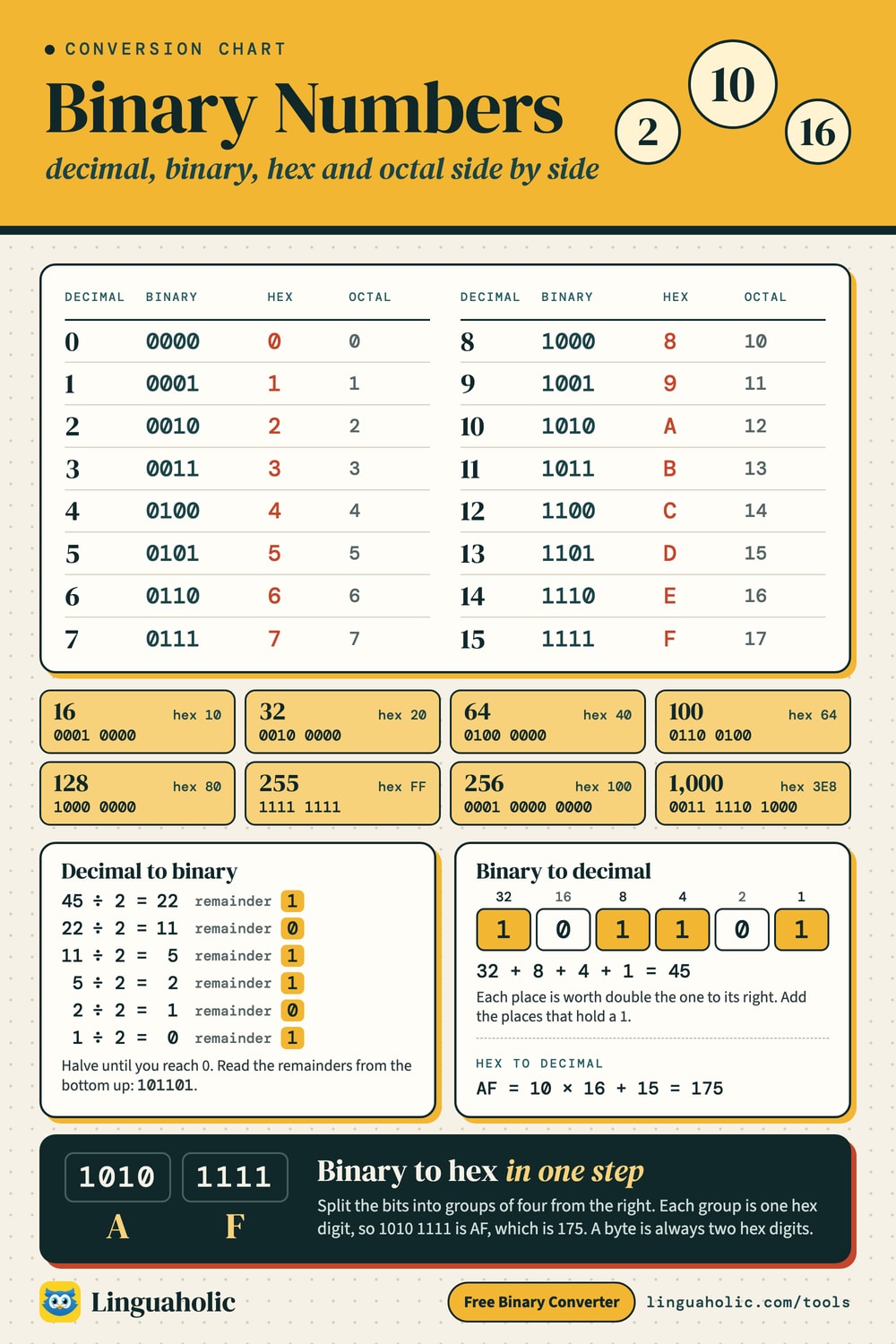
To convert binary to decimal, write the place values over the bits — 1, 2, 4, 8, 16 … from right to left — and add the place values wherever there’s a 1. Example: 101101 = 32 + 8 + 4 + 1 = 45. The converter shows this sum for every number you type.
Binary, decimal and hex conversion chart

Decimal to binary
To convert decimal to binary, divide by 2 again and again and write down the remainders: 45 ÷ 2 = 22 r 1, 22 ÷ 2 = 11 r 0, 11 ÷ 2 = 5 r 1, 5 ÷ 2 = 2 r 1, 2 ÷ 2 = 1 r 0, 1 ÷ 2 = 0 r 1. Reading the remainders from the bottom up gives 101101. The division table appears under the converter.
Binary to hex and hex to binary
Hexadecimal (base 16) is a shorthand for binary: every hex digit is exactly four bits. To convert binary to hex, split the bits into groups of four from the right and replace each group: 1010 1111 = AF. To go from hex to binary, expand each digit into four bits: 3C = 0011 1100. Tick Group binary in 4s to see the groups.
Binary to octal
Octal (base 8) works the same way with groups of three bits: 110 101 = 65 in octal. It’s still used for Unix file permissions (for example 755).
How to count in binary
The numbers 0 to 16 in binary, octal, and hexadecimal:
| Decimal | Binary | Octal | Hex |
|---|---|---|---|
| 0 | 00000 | 0 | 0 |
| 1 | 00001 | 1 | 1 |
| 2 | 00010 | 2 | 2 |
| 3 | 00011 | 3 | 3 |
| 4 | 00100 | 4 | 4 |
| 5 | 00101 | 5 | 5 |
| 6 | 00110 | 6 | 6 |
| 7 | 00111 | 7 | 7 |
| 8 | 01000 | 10 | 8 |
| 9 | 01001 | 11 | 9 |
| 10 | 01010 | 12 | A |
| 11 | 01011 | 13 | B |
| 12 | 01100 | 14 | C |
| 13 | 01101 | 15 | D |
| 14 | 01110 | 16 | E |
| 15 | 01111 | 17 | F |
| 16 | 10000 | 20 | 10 |
Larger numbers that come up often — 255 is the biggest value that fits in one byte:
| Decimal | Binary | Octal | Hex |
|---|---|---|---|
| 32 | 100000 | 40 | 20 |
| 64 | 1000000 | 100 | 40 |
| 100 | 1100100 | 144 | 64 |
| 127 | 1111111 | 177 | 7F |
| 128 | 10000000 | 200 | 80 |
| 255 | 11111111 | 377 | FF |
| 256 | 100000000 | 400 | 100 |
| 1000 | 1111101000 | 1750 | 3E8 |
| 1024 | 10000000000 | 2000 | 400 |
Negative numbers: two’s complement
Computers store negative numbers using two’s complement. To find −5 in 8 bits: write 5 in binary (00000101), flip every bit (11111010), then add 1 (11111011). The first bit tells you the sign: 1 means negative. An 8-bit signed number holds −128 to 127; 16 bits hold −32,768 to 32,767. Type a negative decimal number and choose a bit width to see it.
Bits and bytes
A bit is one binary digit; a byte is 8 bits and holds 0–255. The converter shows how many bits and bytes your number needs — 255 fits in one byte, 256 needs two.
The binary clock
The live binary clock under the converter shows the current hours, minutes, and seconds in binary — a fun way to practice reading binary numbers every day.
More binary tools
Translate words and sentences with the Binary Translator, do sums with the Binary Calculator, and test yourself with the Binary Game. Everything runs in your browser — nothing is uploaded.
For teachers, bloggers & clubs
Put the Binary Converter on your website
Give your readers this tool right on your page. Copy the code, paste it into your site, done: no sign-up, no account.
- Free for any website
- No ads, no cookies
- Fits phones and sidebars
- Always up to date
Please keep the small credit line under the tool; you may add rel="nofollow" to its link. How it works & the rules

› Show the code
Frequently asked questions
- How do I convert binary to decimal?
- Type the binary number in the Binary box and the decimal value appears instantly. By hand: add the place values (1, 2, 4, 8, 16 …) wherever there's a 1 — 101101 = 32 + 8 + 4 + 1 = 45. The converter shows this sum for you.
- How do I convert decimal to binary?
- Type the number in the Decimal box. By hand, divide by 2 repeatedly and read the remainders from bottom to top — the converter shows the full division table.
- How do I convert binary to hex?
- Split the bits into groups of four from the right and replace each group with a hex digit: 1010 1111 = AF. The converter does it instantly in both directions.
- What is two's complement?
- It's how computers store negative numbers. Flip all the bits of the positive number and add 1: −5 in 8 bits is 11111011. Choose 8, 16, 32 or 64 bits to see any value.
- How large a number can it convert?
- Any size — the converter uses exact arithmetic, so 64-bit values and much larger numbers are converted without rounding.
- Is anything uploaded?
- No. Everything runs in your browser — nothing you type is uploaded or stored.
About this page
The Binary Converter is a free tool from Linguaholic, made by Marcel Iseli. It runs in your browser, with no sign-up. Last updated .
Keep exploring
More free tools
 Morse Code TranslatorTranslate text to Morse code and back, hear it as sound at any speed, and see the full Morse alphabet chart.
 Roman Numeral ConverterNumbers to Roman numerals and back — plus dates, a chart, and a calculator.
 Binary TranslatorConvert text to binary code and binary back to text.
 Binary CalculatorAdd, subtract, multiply and divide binary with every carry, borrow and two's complement shown.
 NATO Phonetic AlphabetSpell any name in Alpha, Bravo, Charlie — with audio and a printable chart.
 Braille TranslatorText to braille and back (UEB grade 1), with dot numbers, name cards and a printable chart.