
Converters & translators
Binary Translator — Text to Binary & Binary to Text
Translate text to binary and binary code back to text — auto-detects what you paste, works with every language and emoji (UTF-8), shows each character's code, decimal, hex and binary, and includes a full binary alphabet chart.
Updated · Free, no sign-up
Binary: 44 characters.
Tip: tap any byte in the result to see how to read it.
Text to Binary
Binary to text
Send a secret message
Type a message in the box above or pick one. Your friend gets a link that opens the message as binary, with a “Decode it” button.
Your name in binary: bead pattern (printable)
Character by character · tap a character to read its byte
| Char | Code point | Decimal | Hex | Binary (UTF-8) |
|---|---|---|---|---|
| U+0048 | 72 | 48 | 01001000 | |
| U+0065 | 101 | 65 | 01100101 | |
| U+006C | 108 | 6C | 01101100 | |
| U+006C | 108 | 6C | 01101100 | |
| U+006F | 111 | 6F | 01101111 |
Share this tool
Know someone who’d love it?
What is a binary translator?
A binary translator converts text into binary code — the 0s and 1s computers use — and binary code back into readable text. Every letter, number, and symbol is stored as a number, and binary is the base-2 way of writing those numbers. This translator works in both directions, detects what you pasted automatically, and handles every language and emoji.
How to use the binary translator
- Type or paste into the box. Auto-detect recognizes binary (only 0s and 1s) and decodes it to text; anything else is translated to binary.
- Choose how to separate the bytes — spaces (the usual way), nothing, commas, new lines, dashes, or a 0b prefix in front of each byte. When decoding, both spaced and unspaced binary work.
- Tap Swap to turn the result around, or Copy to save it.
- Check the character-by-character table to see each letter’s code point, decimal, hex, and binary value.
- Tap any byte or letter in the result to see how to read it: eight bit cards with their place values, the sum, and the letter it stands for.
- Switch the format to decimal, hex, octal, or Base64 to write the same text another way, or to decode those formats back to text.
- In the Send a secret message box, tap Send as a secret to get a link that opens your message as binary, with a “Decode it” button for whoever you send it to.
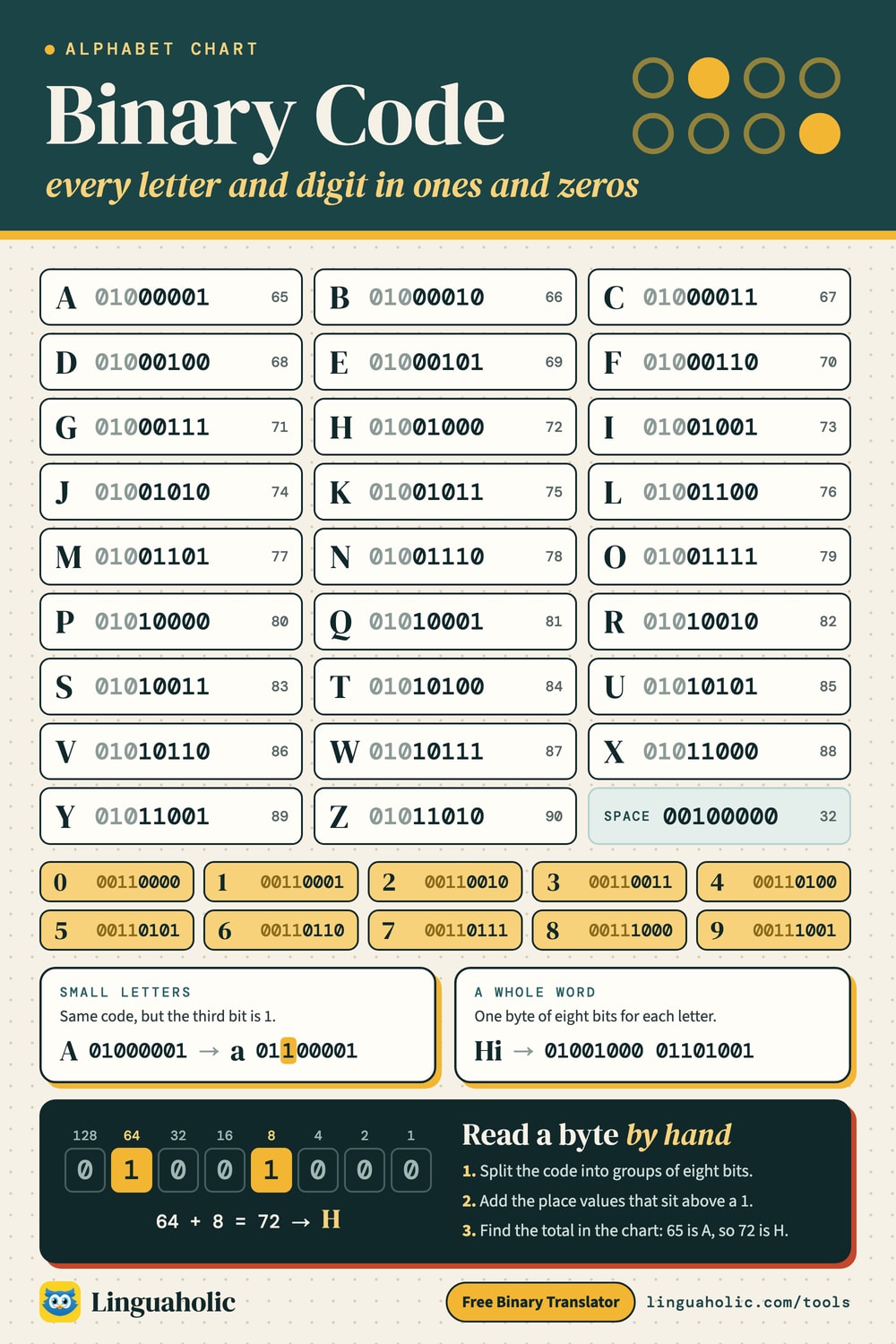
Binary alphabet chart

Binary to English (and every other language)
This translator uses UTF-8, the encoding used by almost every website and app. Plain English letters take one byte (8 bits) each, with the same numbers as the classic ASCII table (ASCII codes are 7 bits, so the byte starts with a 0). Accented letters, other alphabets, and emoji take two to four bytes — so they translate correctly instead of turning into question marks:
| Character | Binary (UTF-8) |
|---|---|
| é (French, Spanish) | 11000011 10101001 |
| ñ (Spanish) | 11000011 10110001 |
| ü (German) | 11000011 10111100 |
| € (euro sign) | 11100010 10000010 10101100 |
| 中 (Chinese) | 11100100 10111000 10101101 |
| 😊 (emoji) | 11110000 10011111 10011000 10001010 |
Want one number per character instead of bytes? Switch Encoding to Unicode code points: each character becomes its Unicode number in binary (é is 11101001 instead of the two UTF-8 bytes). That is handy for teaching, but files and websites store text as UTF-8 bytes. ASCII (7-bit) writes 7 digits per letter, and UTF-16 uses 16 digits per character, the way JavaScript, Java and Windows hold text in memory.
How binary code works
Binary is a base-2 number system: each digit (a bit) is 0 or 1, and the place values double from right to left — 1, 2, 4, 8, 16, 32, 64, 128. Eight bits make one byte, which can store 256 values (0–255). Text is turned into numbers by a standard such as ASCII or UTF-8, and those numbers are written in binary. The letter H is number 72, which is 01001000: 64 + 8 = 72.
How to read binary code, step by step
- Split the binary into bytes — groups of 8 bits:
01001000 01101001. - Write the place values above each byte: 128, 64, 32, 16, 8, 4, 2, 1.
- Add up the place values wherever there’s a 1:
01001000= 64 + 8 = 72, and01101001= 64 + 32 + 8 + 1 = 105. - Look the numbers up in the ASCII table (or the chart below): 72 = H and 105 = i — the message is “Hi”.
Want to get fast at it? Practice with the Binary Game.
Every letter, digit and symbol in binary
Every uppercase and lowercase letter, digit, and common punctuation mark in binary. These are the ASCII codes, which need 7 bits, written as 8-bit bytes with a leading 0, the way UTF-8 stores them. Uppercase letters start at 65 (A = 01000001) and lowercase letters are exactly 32 higher (a = 01100001) — only the third bit changes.
Letters A–Z in binary
| Character | Binary byte |
|---|---|
| A | 01000001 |
| B | 01000010 |
| C | 01000011 |
| D | 01000100 |
| E | 01000101 |
| F | 01000110 |
| G | 01000111 |
| H | 01001000 |
| I | 01001001 |
| J | 01001010 |
| K | 01001011 |
| L | 01001100 |
| M | 01001101 |
| N | 01001110 |
| O | 01001111 |
| P | 01010000 |
| Q | 01010001 |
| R | 01010010 |
| S | 01010011 |
| T | 01010100 |
| U | 01010101 |
| V | 01010110 |
| W | 01010111 |
| X | 01011000 |
| Y | 01011001 |
| Z | 01011010 |
Lowercase letters a–z in binary
| Character | Binary byte |
|---|---|
| a | 01100001 |
| b | 01100010 |
| c | 01100011 |
| d | 01100100 |
| e | 01100101 |
| f | 01100110 |
| g | 01100111 |
| h | 01101000 |
| i | 01101001 |
| j | 01101010 |
| k | 01101011 |
| l | 01101100 |
| m | 01101101 |
| n | 01101110 |
| o | 01101111 |
| p | 01110000 |
| q | 01110001 |
| r | 01110010 |
| s | 01110011 |
| t | 01110100 |
| u | 01110101 |
| v | 01110110 |
| w | 01110111 |
| x | 01111000 |
| y | 01111001 |
| z | 01111010 |
Digits 0–9 in binary
| Character | Binary byte |
|---|---|
| 0 | 00110000 |
| 1 | 00110001 |
| 2 | 00110010 |
| 3 | 00110011 |
| 4 | 00110100 |
| 5 | 00110101 |
| 6 | 00110110 |
| 7 | 00110111 |
| 8 | 00111000 |
| 9 | 00111001 |
Space and punctuation in binary
| Character | Binary byte |
|---|---|
| space | 00100000 |
| ! | 00100001 |
| , | 00101100 |
| . | 00101110 |
| ? | 00111111 |
| ' | 00100111 |
| " | 00100010 |
| - | 00101101 |
| : | 00111010 |
| ; | 00111011 |
| ( | 00101000 |
| ) | 00101001 |
| @ | 01000000 |
| # | 00100011 |
| & | 00100110 |
What does this binary mean?
These are the binary strings people paste most often. Each one is 8 digits per letter, decoded with UTF-8. Tap “Open” to load one into the translator and read it byte by byte.
| Binary | Means | Try it |
|---|---|---|
| 01001000 01101001 | Hi | Open “Hi” in the tool |
| 01001000 01100101 01101100 01101100 01101111 | Hello | Open “Hello” in the tool |
| 01001000 01100101 01101100 01101100 01101111 00100000 01010111 01101111 01110010 01101100 01100100 | Hello World | Open “Hello World” in the tool |
| 01001001 00100000 01101100 01101111 01110110 01100101 00100000 01111001 01101111 01110101 | I love you | Open “I love you” in the tool |
| 01001000 01000101 01001100 01010000 | HELP | Open “HELP” in the tool |
| 01001100 01000101 01000001 01010110 01000101 | LEAVE | Open “LEAVE” in the tool |
| 01100010 01101111 01110100 | bot | Open “bot” in the tool |
| 01101100 01101111 01101100 | lol | Open “lol” in the tool |
So 01001000 01101001 means Hi: 01001000 is 72, the letter H, and 01101001 is 105, a lowercase i.
Why does my binary come out as gibberish?
Almost always it is one of these, and the translator now tells you which:
- A missing or extra digit. Every letter is 8 digits. A group of 7 or 9 digits shifts the meaning, or every letter after it if there are no spaces. The tool names the group that is the wrong length.
- 7 bits instead of 8. Some sites write ASCII with 7 digits per letter (
1001000for H). That is fine: the tool reads 7-bit groups too, with or without spaces. - Spaces in the wrong places. Binary split into groups of 4 (
0100 1000) or 16 is still readable: the tool reads the bits 8 at a time, or splits long groups into bytes. - Code points instead of bytes. Binary made from Unicode code points (one long group per character) decodes to the wrong letters as UTF-8. Switch Encoding to Unicode code points.
- Stray characters. A letter O instead of a zero, a 2, quotes, or a word pasted along with the code. The tool points at it and offers to remove it (or to read the O as 0) with one tap.
Common words and phrases in binary
Popular for gifts, cards, jewelry, and secret messages — here’s how they look in binary:
| Phrase | Binary |
|---|---|
| I love you | 01001001 00100000 01101100 01101111 01110110 01100101 00100000 01111001 01101111 01110101 |
| Hello | 01001000 01100101 01101100 01101100 01101111 |
| Hello world | 01001000 01100101 01101100 01101100 01101111 00100000 01110111 01101111 01110010 01101100 01100100 |
| Hi | 01001000 01101001 |
| Help | 01001000 01100101 01101100 01110000 |
| Yes | 01011001 01100101 01110011 |
| No | 01001110 01101111 |
| Thank you | 01010100 01101000 01100001 01101110 01101011 00100000 01111001 01101111 01110101 |
| Happy birthday | 01001000 01100001 01110000 01110000 01111001 00100000 01100010 01101001 01110010 01110100 01101000 01100100 01100001 01111001 |
| Good night | 01000111 01101111 01101111 01100100 00100000 01101110 01101001 01100111 01101000 01110100 |
More words, names and holiday messages in binary
| Words | Binary |
|---|---|
| non binary | 01101110 01101111 01101110 00100000 01100010 01101001 01101110 01100001 01110010 01111001 |
| love | 01101100 01101111 01110110 01100101 |
| mom | 01101101 01101111 01101101 |
| dad | 01100100 01100001 01100100 |
| Happy Valentine's Day | 01001000 01100001 01110000 01110000 01111001 00100000 01010110 01100001 01101100 01100101 01101110 01110100 01101001 01101110 01100101 00100111 01110011 00100000 01000100 01100001 01111001 |
| Merry Christmas | 01001101 01100101 01110010 01110010 01111001 00100000 01000011 01101000 01110010 01101001 01110011 01110100 01101101 01100001 01110011 |
| Happy New Year | 01001000 01100001 01110000 01110000 01111001 00100000 01001110 01100101 01110111 00100000 01011001 01100101 01100001 01110010 |
| best friends | 01100010 01100101 01110011 01110100 00100000 01100110 01110010 01101001 01100101 01101110 01100100 01110011 |
How to write your name in binary
- Type your name in the box above. Capital and small letters have different codes, so type it the way you want it.
- Each letter becomes one byte. For Emma: E =
01000101, m =01101101, m =01101101, a =01100001. - For a bracelet or a cross-stitch, use one color for 0 and another for 1: 8 beads per letter, 32 beads for Emma. Leave a gap or a spacer bead between letters so the bytes stay readable.
Digits as characters vs. numbers
Typing the digit 2 into a text translator gives the character “2”, which is ASCII code 50: 00110010. The number 2 in binary is just 10. Both are correct; they answer different questions.
| You type | As text characters (this tool) | As a number |
|---|---|---|
| 2 | 00110010 | 10 |
| 7 | 00110111 | 111 |
| 10 | 00110001 00110000 | 1010 |
| 42 | 00110100 00110010 | 101010 |
| 2026 | 00110010 00110000 00110010 00110110 | 11111101010 |
For numbers, use the Binary Converter, which also shows the working.
Other formats: decimal, hex, octal and Base64
Binary is one way to write the bytes of a text. The format switch writes the same bytes in other bases, and decodes them back. Here is Hi! in each one:
| Format | “Hi!” | How it works |
|---|---|---|
| Binary | 01001000 01101001 00100001 | base 2: 8 digits per byte |
| Decimal | 72 105 33 | base 10: 0 to 255 per byte |
| Hex | 48 69 21 | base 16: 2 digits per byte |
| Octal | 110 151 041 | base 8: 3 digits per byte |
| Base64 | SGkh | 64 safe characters for 6 bits each |
Hex is the shortest readable form, which is why programmers use it (Hex to Text has more on it). Base64 isn’t a number system for people: it packs every 3 bytes into 4 characters so binary data can travel through email and web addresses.
Binary text vs. binary numbers
“Binary” can mean two different things. Translating text gives one byte per character (as above). Converting a number is base conversion: the number 42 is simply 101010 — use the Binary Converter for decimal, hex, and octal, and the Binary Calculator to add, subtract, multiply, and divide binary numbers.
A short history of binary code
- 1703: Gottfried Wilhelm Leibniz describes base-2 arithmetic, with only 0 and 1, in Explication de l’Arithmétique Binaire.
- 1854: George Boole publishes An Investigation of the Laws of Thought, an algebra of true and false that became Boolean logic.
- 1937: Claude Shannon’s master’s thesis at MIT shows that switching circuits can carry out Boolean logic, the idea every digital computer is built on.
- 1947–1948: John Tukey shortens “binary digit” to bit, and Shannon’s 1948 paper on information theory makes the word standard.
- 1963: the first ASCII standard gives the capital letters, digits and punctuation marks a 7-bit number (lowercase letters were added in 1967).
- 1992: Ken Thompson and Rob Pike design UTF-8, which keeps ASCII’s codes and adds every other script and emoji in two to four bytes. Today it is the encoding of almost every web page.
Related tools
Also try the Hex to Text converter, the Morse Code Translator, and the ASCII Art Generator.
Is anything uploaded?
No. The binary translator runs entirely in your browser — nothing you type is uploaded or stored, and it works offline.
For teachers, bloggers & clubs
Put the Binary Translator on your website
Give your readers this tool right on your page. Copy the code, paste it into your site, done: no sign-up, no account.
- Free for any website
- No ads, no cookies
- Fits phones and sidebars
- Always up to date
Please keep the small credit line under the tool; you may add rel="nofollow" to its link. How it works & the rules

› Show the code
Frequently asked questions
- How do I translate binary to text?
- Paste the binary into the box — with or without spaces. Auto-detect recognizes it and decodes it to text instantly. Each group of 8 bits is one byte; the translator reads the bytes as UTF-8, so English and every other language come out correctly.
- How do I convert text to binary?
- Type your text and the binary code appears immediately. Choose whether to separate the bytes with spaces, nothing, commas, new lines, dashes, or a 0b prefix, then tap Copy.
- Does it work with accents, other languages, and emoji?
- Yes. The translator uses UTF-8, the standard encoding of the web: English letters take one byte each, while letters like é or ñ, other alphabets, and emoji take two to four bytes — and they decode back perfectly.
- How do you read binary code by hand?
- Split it into groups of 8 bits, add up the place values (128, 64, 32, 16, 8, 4, 2, 1) wherever there's a 1, and look the number up in the ASCII table: 01001000 = 72 = H.
- What is 'I love you' in binary?
- 01001001 00100000 01101100 01101111 01110110 01100101 00100000 01111001 01101111 01110101. Type any phrase to get its binary code.
- What's the difference between binary text and binary numbers?
- Translating text gives one byte per character. Converting a number is base conversion (42 = 101010) — use the Binary Converter for decimal, hex, and octal.
- Is anything uploaded?
- No. Everything runs in your browser — nothing you type is uploaded or stored.
- What does 01001000 01101001 mean?
- It means “Hi”. The first byte, 01001000, is 64 + 8 = 72, the letter H; the second, 01101001, is 64 + 32 + 8 + 1 = 105, a lowercase i. Paste any binary into the translator and tap a byte to see it worked out.
- Why does my binary translate to gibberish?
- Usually a digit is missing or extra (every letter is 8 digits), the binary was made with 7 bits per letter, the spaces are in the wrong places, or it was made from Unicode code points instead of UTF-8 bytes. The translator handles 7-bit and oddly spaced binary on its own and tells you which group is the wrong length.
- Is binary code 7 or 8 bits per letter?
- ASCII, the original code for English letters, uses 7 bits, but computers store text in 8-bit bytes, so the letter is written with a leading 0: H is 1001000 in 7-bit ASCII and 01001000 as a byte. The translator reads both.
- Can I send someone a secret message in binary?
- Yes. Type your message, then tap “Send as a secret” in the “Send a secret message” box. The link opens the message as binary with a “Decode it” button. The message travels inside the link after the #, so it never reaches our server.
- Can it convert text to hex, decimal, octal, or Base64?
- Yes. Switch the format from Binary to Decimal, Hex, Octal, or Base64 to write the same bytes another way, and paste any of those formats to decode it back to text. You can also pick UTF-8, 7-bit ASCII, UTF-16, or Unicode code points.
About this page
The Binary Translator is a free tool from Linguaholic, made by Marcel Iseli. It runs in your browser, with no sign-up. Last updated .
Keep exploring
More free tools
 Morse Code TranslatorTranslate text to Morse code and back, hear it as sound at any speed, and see the full Morse alphabet chart.
 Roman Numeral ConverterNumbers to Roman numerals and back — plus dates, a chart, and a calculator.
 Binary ConverterConvert between binary, decimal, hex, and octal as you type.
 Binary CalculatorAdd, subtract, multiply and divide binary with every carry, borrow and two's complement shown.
 NATO Phonetic AlphabetSpell any name in Alpha, Bravo, Charlie — with audio and a printable chart.
 Braille TranslatorText to braille and back (UEB grade 1), with dot numbers, name cards and a printable chart.