
Converters & translators
Hex to Text Converter
Decode hex to text and convert text to hex, with auto-detect, UTF-8, ASCII or Latin-1, any hex format, invalid bytes highlighted and every byte in decimal and binary.
Updated · Free, no sign-up
Character encoding
The web’s standard: every character, 1 to 4 bytes each.
Hex layout
Share this tool
Know someone who’d love it?
How to convert hex to text
This hex to text converter turns hexadecimal codes back into readable text, and text into hex. Paste or type into the box and the result appears as you type. You don’t need to pick a direction: with Auto-detect on, the converter recognizes hex such as 48 65 6C 6C 6F and decodes it, and treats anything else as text to encode. If it guesses wrong (a short word made only of the letters A to F, for example), tap Hex → Text or Text → Hex to choose.
- Paste your hex. It can be spaced (
48 65), continuous (4865), written with0xprefixes, as\x48\x65escapes, as a comma list, URL-style (%48%65) or split by colons or dashes. Upper and lower case both work. - Check the encoding. UTF-8 is the default and right for almost everything made in the last twenty years. Switch to ASCII, Latin-1 or Unicode code points if your hex came from somewhere older or different (see below).
- Read the result. Bytes that cannot be decoded are highlighted in red with their hex, and invisible control characters such as a tab or a null byte show up as small labels, so nothing is hidden.
- Open “Byte by byte” to see every character with its hex, decimal and binary values, and the reason any byte failed.
- Copy the result, or tap Swap to convert it straight back the other way.
How to convert text to hex
Type or paste your text and the hex appears below. Three options shape the output:
- Character encoding: UTF-8 gives the bytes a web page or file would really contain. ASCII and Latin-1 give one byte per character, and leave out (and list) any character they have no code for. Code points give each character’s Unicode number instead of bytes.
- Hex layout: spaced (
48 69 21), continuous (486921), 0x prefix (0x48 0x69 0x21), \x escapes (\x48\x69\x21), comma list (0x48, 0x69, 0x21). The 0x, escape and comma layouts are ready to paste into code. - Letter case: uppercase (
6C) or lowercase (6c). They mean the same; it is only a matter of style.
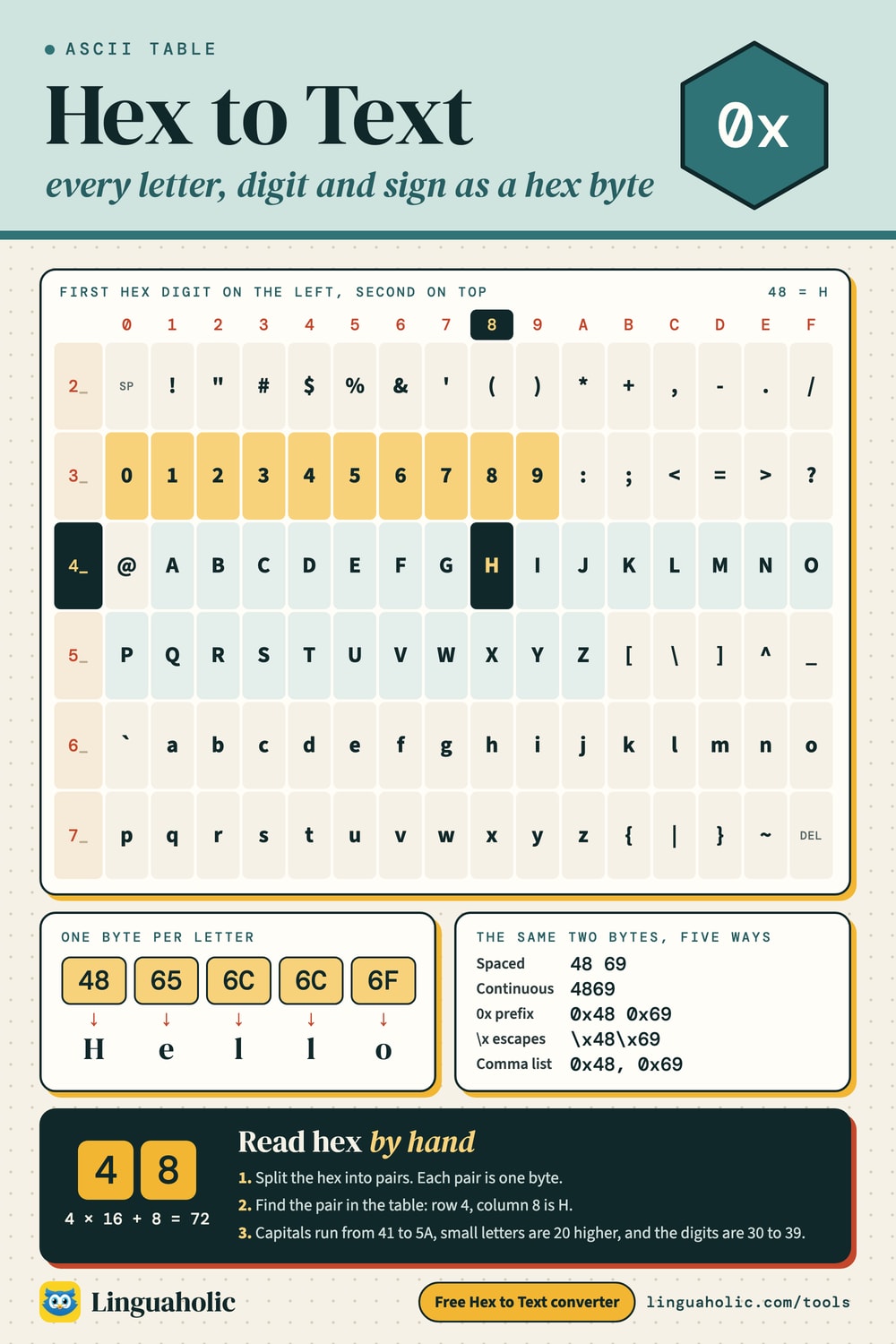
Hex to text chart (ASCII table)

Worked example: “Hello” in hex
Every character has a number, and hex is just a short way to write that number. In UTF-8 (and in ASCII) the word “Hello” becomes 48 65 6C 6C 6F:
| Character | Hex | Decimal | Binary |
|---|---|---|---|
| H | 48 | 72 | 01001000 |
| e | 65 | 101 | 01100101 |
| l | 6C | 108 | 01101100 |
| l | 6C | 108 | 01101100 |
| o | 6F | 111 | 01101111 |
To decode one byte by hand, multiply the first hex digit by 16 and add the second. For 48: 4 × 16 + 8 = 72, and character number 72 is the capital letter H. The letters A to F stand for the values 10 to 15:
| Hex digit | Decimal | Binary |
|---|---|---|
| 0 | 0 | 0000 |
| 1 | 1 | 0001 |
| 2 | 2 | 0010 |
| 3 | 3 | 0011 |
| 4 | 4 | 0100 |
| 5 | 5 | 0101 |
| 6 | 6 | 0110 |
| 7 | 7 | 0111 |
| 8 | 8 | 1000 |
| 9 | 9 | 1001 |
| A | 10 | 1010 |
| B | 11 | 1011 |
| C | 12 | 1100 |
| D | 13 | 1101 |
| E | 14 | 1110 |
| F | 15 | 1111 |
Because one hex digit is exactly four bits, two hex digits are exactly one byte, from 00 (0) to FF (255). That neat fit is why programmers write bytes in hex rather than in binary or decimal. To see the binary on its own, use the Binary Translator; to convert single numbers between hex, binary and decimal, use the Binary Converter.
UTF-8, ASCII and Latin-1: which encoding?
Hex is only a way of writing bytes. Which characters those bytes stand for depends on the encoding, so the same text gives different hex in different encodings. Here is “Café ☕” in each one:
| Encoding | Hex | Note |
|---|---|---|
| UTF-8 | 43 61 66 C3 A9 20 E2 98 95 | every character included |
| ASCII | 43 61 66 20 | é ☕ left out: no code for it |
| Latin-1 | 43 61 66 E9 20 | ☕ left out: no code for it |
| Code points | 43 61 66 E9 20 2615 | every character included |
- ASCII is the original 7-bit code from the 1960s: 128 characters, hex
00to7F, covering English letters, digits, punctuation and control codes. Any byte above7Fis not ASCII, and the converter marks it. - Latin-1 (ISO-8859-1) keeps ASCII and uses
A0toFFfor Western European letters such as é, ñ and ü. Every byte is exactly one character, so Latin-1 never fails, though it can show the wrong letters. - UTF-8 also keeps ASCII unchanged, and writes every other Unicode character as 2, 3 or 4 bytes. It is the standard on the web, so it is the default here.
- Code points are not bytes at all, but each character’s Unicode number, as in U+00E9 for é. Use this when your hex looks like
U+2615or comes from a list of characters.
How many bytes does a character take in UTF-8?
| Character | Code point | UTF-8 hex | Bytes |
|---|---|---|---|
| A | U+0041 | 41 | 1 |
| é | U+00E9 | C3 A9 | 2 |
| € | U+20AC | E2 82 AC | 3 |
| 😀 | U+1F600 | F0 9F 98 80 | 4 |
You can tell the length from the first byte: 00–7F is a whole character on its own, C2–DF starts a 2-byte character, E0–EF a 3-byte one and F0–F4 a 4-byte one. The bytes that follow are always between 80 and BF. The converter checks all of these rules, which is how it can point to the exact byte that is wrong.
Why does my text look like “Café”?
That is UTF-8 read as Latin-1. In UTF-8, é is two bytes, C3 A9; read one byte at a time as Latin-1, those become the two characters à and ©. So if decoded text is full of à and similar pairs, switch the encoding to UTF-8. The opposite mix-up gives the replacement character �: the Latin-1 byte for é, E9, is not valid UTF-8 on its own. Decoding 43 61 66 E9 as UTF-8 gives “Caf�”, while as Latin-1 it gives “Café”.
Invalid hex and how errors are shown
Instead of refusing the whole input or quietly producing nonsense, the converter decodes everything it can and highlights the rest:
- Letters that are not hex. Only 0–9 and A–F are hex digits. In
48 65 6G 6C 6Fthe piece6Gis marked, and the rest still reads “Helo” around it. - An odd number of digits. A byte needs two hex digits, so a run such as
48656leaves a lone6at the end, which is flagged. In spaced input a single digit such asAis read as0A. - Bytes the encoding cannot use. Anything above
7Fin ASCII, and broken sequences in UTF-8, are marked with the reason (“a continuation byte with no lead byte before it”, for example). Copying the result puts � in their place, as other programs do.
ASCII hex table
The printable ASCII characters, from the space (20) to the tilde (7E), with their hex, decimal and binary codes. These are the same in ASCII, Latin-1 and UTF-8. A handy pattern: capital letters run from 41 (A) to 5A (Z), small letters from 61 to 7A, exactly 20 higher, and the digits 0 to 9 are 30 to 39.
| Char | Hex | Dec | Binary |
|---|---|---|---|
| space | 20 | 32 | 00100000 |
| ! | 21 | 33 | 00100001 |
| " | 22 | 34 | 00100010 |
| # | 23 | 35 | 00100011 |
| $ | 24 | 36 | 00100100 |
| % | 25 | 37 | 00100101 |
| & | 26 | 38 | 00100110 |
| ' | 27 | 39 | 00100111 |
| ( | 28 | 40 | 00101000 |
| ) | 29 | 41 | 00101001 |
| * | 2A | 42 | 00101010 |
| + | 2B | 43 | 00101011 |
| , | 2C | 44 | 00101100 |
| - | 2D | 45 | 00101101 |
| . | 2E | 46 | 00101110 |
| / | 2F | 47 | 00101111 |
| 0 | 30 | 48 | 00110000 |
| 1 | 31 | 49 | 00110001 |
| 2 | 32 | 50 | 00110010 |
| 3 | 33 | 51 | 00110011 |
| 4 | 34 | 52 | 00110100 |
| 5 | 35 | 53 | 00110101 |
| 6 | 36 | 54 | 00110110 |
| 7 | 37 | 55 | 00110111 |
| 8 | 38 | 56 | 00111000 |
| 9 | 39 | 57 | 00111001 |
| : | 3A | 58 | 00111010 |
| ; | 3B | 59 | 00111011 |
| < | 3C | 60 | 00111100 |
| = | 3D | 61 | 00111101 |
| > | 3E | 62 | 00111110 |
| ? | 3F | 63 | 00111111 |
| @ | 40 | 64 | 01000000 |
| A | 41 | 65 | 01000001 |
| B | 42 | 66 | 01000010 |
| C | 43 | 67 | 01000011 |
| D | 44 | 68 | 01000100 |
| E | 45 | 69 | 01000101 |
| F | 46 | 70 | 01000110 |
| G | 47 | 71 | 01000111 |
| H | 48 | 72 | 01001000 |
| I | 49 | 73 | 01001001 |
| J | 4A | 74 | 01001010 |
| K | 4B | 75 | 01001011 |
| L | 4C | 76 | 01001100 |
| M | 4D | 77 | 01001101 |
| N | 4E | 78 | 01001110 |
| O | 4F | 79 | 01001111 |
| P | 50 | 80 | 01010000 |
| Q | 51 | 81 | 01010001 |
| R | 52 | 82 | 01010010 |
| S | 53 | 83 | 01010011 |
| T | 54 | 84 | 01010100 |
| U | 55 | 85 | 01010101 |
| V | 56 | 86 | 01010110 |
| W | 57 | 87 | 01010111 |
| X | 58 | 88 | 01011000 |
| Y | 59 | 89 | 01011001 |
| Z | 5A | 90 | 01011010 |
| [ | 5B | 91 | 01011011 |
| \ | 5C | 92 | 01011100 |
| ] | 5D | 93 | 01011101 |
| ^ | 5E | 94 | 01011110 |
| _ | 5F | 95 | 01011111 |
| ` | 60 | 96 | 01100000 |
| a | 61 | 97 | 01100001 |
| b | 62 | 98 | 01100010 |
| c | 63 | 99 | 01100011 |
| d | 64 | 100 | 01100100 |
| e | 65 | 101 | 01100101 |
| f | 66 | 102 | 01100110 |
| g | 67 | 103 | 01100111 |
| h | 68 | 104 | 01101000 |
| i | 69 | 105 | 01101001 |
| j | 6A | 106 | 01101010 |
| k | 6B | 107 | 01101011 |
| l | 6C | 108 | 01101100 |
| m | 6D | 109 | 01101101 |
| n | 6E | 110 | 01101110 |
| o | 6F | 111 | 01101111 |
| p | 70 | 112 | 01110000 |
| q | 71 | 113 | 01110001 |
| r | 72 | 114 | 01110010 |
| s | 73 | 115 | 01110011 |
| t | 74 | 116 | 01110100 |
| u | 75 | 117 | 01110101 |
| v | 76 | 118 | 01110110 |
| w | 77 | 119 | 01110111 |
| x | 78 | 120 | 01111000 |
| y | 79 | 121 | 01111001 |
| z | 7A | 122 | 01111010 |
| { | 7B | 123 | 01111011 |
| | | 7C | 124 | 01111100 |
| } | 7D | 125 | 01111101 |
| ~ | 7E | 126 | 01111110 |
ASCII control characters
Codes 00 to 1F, and 7F, are control characters: instructions rather than visible symbols. Only a few still matter in everyday text: tab (09), line feed (0A, the new line on Linux and macOS) and carriage return (0D, which Windows puts before the line feed). The converter shows the others as small labels such as NUL.
| Char | Hex | Dec | Binary | Meaning |
|---|---|---|---|---|
| NUL | 00 | 0 | 00000000 | Null |
| SOH | 01 | 1 | 00000001 | Start of Heading |
| STX | 02 | 2 | 00000010 | Start of Text |
| ETX | 03 | 3 | 00000011 | End of Text |
| EOT | 04 | 4 | 00000100 | End of Transmission |
| ENQ | 05 | 5 | 00000101 | Enquiry |
| ACK | 06 | 6 | 00000110 | Acknowledge |
| BEL | 07 | 7 | 00000111 | Bell |
| BS | 08 | 8 | 00001000 | Backspace |
| HT | 09 | 9 | 00001001 | Horizontal Tab |
| LF | 0A | 10 | 00001010 | Line Feed (new line) |
| VT | 0B | 11 | 00001011 | Vertical Tab |
| FF | 0C | 12 | 00001100 | Form Feed |
| CR | 0D | 13 | 00001101 | Carriage Return |
| SO | 0E | 14 | 00001110 | Shift Out |
| SI | 0F | 15 | 00001111 | Shift In |
| DLE | 10 | 16 | 00010000 | Data Link Escape |
| DC1 | 11 | 17 | 00010001 | Device Control 1 |
| DC2 | 12 | 18 | 00010010 | Device Control 2 |
| DC3 | 13 | 19 | 00010011 | Device Control 3 |
| DC4 | 14 | 20 | 00010100 | Device Control 4 |
| NAK | 15 | 21 | 00010101 | Negative Acknowledge |
| SYN | 16 | 22 | 00010110 | Synchronous Idle |
| ETB | 17 | 23 | 00010111 | End of Transmission Block |
| CAN | 18 | 24 | 00011000 | Cancel |
| EM | 19 | 25 | 00011001 | End of Medium |
| SUB | 1A | 26 | 00011010 | Substitute |
| ESC | 1B | 27 | 00011011 | Escape |
| FS | 1C | 28 | 00011100 | File Separator |
| GS | 1D | 29 | 00011101 | Group Separator |
| RS | 1E | 30 | 00011110 | Record Separator |
| US | 1F | 31 | 00011111 | Unit Separator |
| DEL | 7F | 127 | 01111111 | Delete |
Hex to text in code
If you need the same conversion inside a program, most languages have it built in. In Python, bytes.fromhex("48656c6c6f").decode("utf-8") gives 'Hello', and "Hello".encode("utf-8").hex() goes the other way. In JavaScript, a TextDecoder turns a Uint8Array of bytes into text and a TextEncoder turns text into bytes, which you then write with toString(16). Two things trip people up: the input usually has to be plain pairs of digits, without 0x prefixes, commas or escapes, and the encoding has to match the one the bytes were written in. The converter on this page takes care of both, so it is a quick way to check what a program should produce.
Where you meet hex text
- Hex dumps of files and network data, where each byte is shown as two hex digits next to the readable text.
- Code and data formats, where strings are written as escapes such as
\x41or as lists such as0x41, 0x42. - Web addresses, which write unsafe characters as a percent sign and two hex digits:
%20is a space. Paste a run of them here to read them. - Puzzles, escape rooms and treasure-hunt clues, where a message is hidden as a string of hex. If the result looks like more hex, or like 0s and 1s, decode it again, or try the Binary Translator, the Morse Code Translator or the Caesar Cipher for the next layer.
The same base-16 notation is used for colors on the web (#FF0000 is red), memory addresses and error codes, though those are numbers rather than text.
Is anything uploaded?
No. The converter runs entirely in your browser: nothing you paste is uploaded, stored or logged, and it keeps working offline once the page has loaded. It handles up to 100,000 characters at a time.
For teachers, bloggers & clubs
Put the Hex to Text on your website
Give your readers this tool right on your page. Copy the code, paste it into your site, done: no sign-up, no account.
- Free for any website
- No ads, no cookies
- Fits phones and sidebars
- Always up to date
Please keep the small credit line under the tool; you may add rel="nofollow" to its link. How it works & the rules

› Show the code
Frequently asked questions
- How do I convert hex to text?
- Paste the hex into the box, for example 48 65 6C 6C 6F, and the text (Hello) appears at once. Auto-detect recognizes hex by itself, and spaced, continuous, 0x, \x, comma and % layouts all work.
- How do I convert text to hex?
- Type or paste your text and the hex appears below. Choose UTF-8, ASCII, Latin-1 or code points, a layout (spaced, continuous, 0x, \x escapes or a comma list) and upper or lower case, then copy it.
- What is 48 65 6C 6C 6F in text?
- It spells Hello. 48 is H, 65 is e, 6C is l (twice) and 6F is o. Each pair of hex digits is one byte, and these bytes are the same in ASCII and UTF-8.
- How do you convert hex to text by hand?
- Split the hex into pairs, turn each pair into a number (first digit × 16 + second digit, with A to F meaning 10 to 15), and look the number up in an ASCII table. 48 is 4 × 16 + 8 = 72, which is the letter H.
- What is the difference between UTF-8, ASCII and Latin-1?
- ASCII has 128 characters (00 to 7F). Latin-1 adds Western European letters up to FF, one byte each. UTF-8 keeps ASCII and writes every other character as 2 to 4 bytes, so é is C3 A9 in UTF-8 but E9 in Latin-1.
- Why does my decoded text show � or é?
- The encoding doesn't match. é means UTF-8 bytes were read as Latin-1, so choose UTF-8. A � means a byte is not valid UTF-8, often a Latin-1 byte such as E9, so try Latin-1.
- Why is a byte highlighted as invalid?
- It is either not hex (only 0–9 and A–F are allowed), a lone digit without its pair, above 7F in ASCII, or a broken UTF-8 sequence. Open Byte by byte to see the exact reason for each one.
- Can it convert hex to decimal or binary?
- Yes. The Byte by byte table lists every character with its hex, decimal and binary values, in both directions.
- Is anything uploaded?
- No. The converter runs entirely in your browser, so nothing you paste is uploaded or stored, and it works offline once the page has loaded.
About this page
The Hex to Text is a free tool from Linguaholic, made by Marcel Iseli. It runs in your browser, with no sign-up. Last updated .
Keep exploring
More free tools
 Binary TranslatorConvert text to binary code and binary back to text.
 Binary ConverterConvert between binary, decimal, hex, and octal as you type.
 Binary CalculatorAdd, subtract, multiply and divide binary with every carry, borrow and two's complement shown.
 Morse Code TranslatorTranslate text to Morse code and back, hear it as sound at any speed, and see the full Morse alphabet chart.
 Caesar CipherShift letters to encode or decode, or crack a Caesar message without knowing the key.
 Roman Numeral ConverterNumbers to Roman numerals and back — plus dates, a chart, and a calculator.