
Converters & translators
Binary Calculator — Add, Subtract, Multiply & Divide with Steps
Add, subtract, multiply and divide binary numbers with every carry and borrow shown, plus two’s complement, AND, OR, XOR, NOT and shifts, and answers in four bases.
Updated · Free, no sign-up
Numbers are in
Operation
Add
Bit width for negative answers, NOT and overflow
1011 + 110 = 10001
Hex 11 · read as unsigned 17 · read as signed 17
Fits in 8 bits either way (unsigned 0 to 255, signed −128 to 127).
Step by step
| carries | 1 | 1 | 1 | ||
|---|---|---|---|---|---|
| 1 | 0 | 1 | 1 | ||
| + | 0 | 1 | 1 | 0 | |
| = | 1 | 0 | 0 | 0 | 1 |
Explain every column
- 1st (1s) column: 1 + 0 = 1: write 1.
- 2nd (2s) column: 1 + 1 = 10: write 0, carry 1.
- 3rd (4s) column: 0 + 1 + 1 = 10: write 0, carry 1.
- 4th (8s) column: 1 + 0 + 1 = 10: write 0, carry 1.
- The last carry becomes a new 1 at the front.
In decimal: 11 + 6 = 17
Share this tool
Know someone who’d love it?
How to use the binary calculator
This binary calculator adds, subtracts, multiplies and divides binary numbers, and it also does the bitwise operations AND, OR, XOR and NOT, two’s complement, and left and right shifts. Under every answer it shows the working step by step, the way you would write it on paper, so you can check homework or learn the method rather than just copy a result.
- Choose how you type the numbers. Binary is the default. Switch to decimal, hex or octal and the numbers already in the boxes are converted for you, so nothing is lost.
- Type the first number, pick an operation, type the second. Spaces and underscores are ignored (
1011 0110is fine), a0bor0xprefix is accepted, and a minus sign makes a number negative. NOT and two’s complement use only the first number. - Pick a bit width of 8, 16, 32 or 64 bits. It decides how a negative answer is written in two’s complement, how many bits NOT flips, and whether an answer overflows.
- Read the answer in binary, decimal, hexadecimal and octal, each with a Copy button, plus the exact bit pattern a register of your chosen width would hold.
- Follow the steps. Addition shows the carry row, subtraction the borrows and the two’s complement method, multiplication the shifted rows, and division a long division table, with a decimal check at the end.
The calculator works with whole numbers of any size. It uses exact integer arithmetic, so even a 64-bit number multiplied by itself comes out right to the last digit: 18446744073709551615 squared is 340282366920938463426481119284349108225. Everything runs in your browser and nothing you type is sent anywhere.
Binary addition
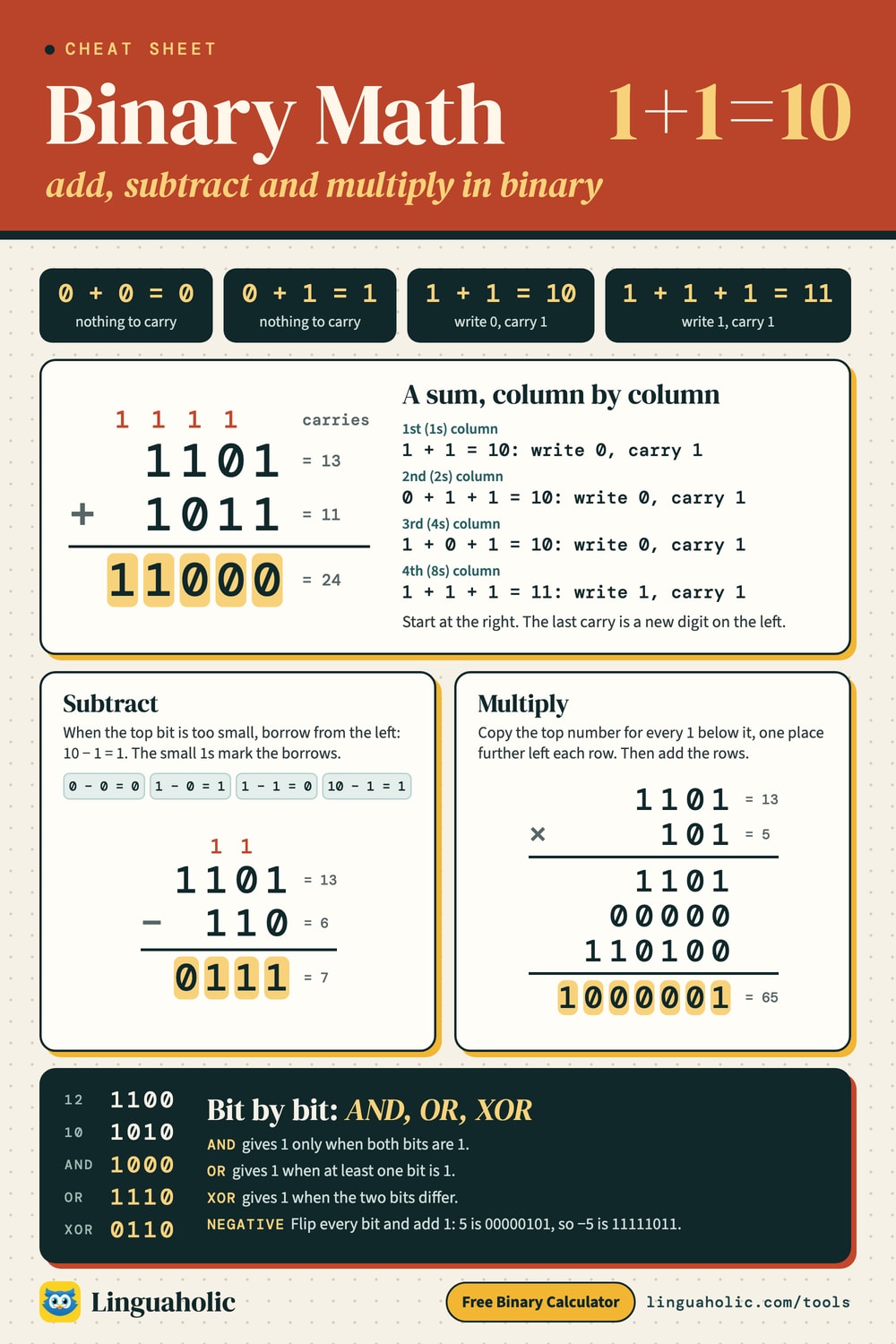
Binary addition works exactly like the column addition you learned at school, except that each column can only hold 0 or 1. As soon as a column adds up to 2, you write 0 and carry 1 to the next column, just as you carry at 10 in decimal. There are only four cases to remember:
| Sum | Result in binary | Write | Carry |
|---|---|---|---|
| 0 + 0 | 0 | 0 | 0 |
| 0 + 1 | 1 | 1 | 0 |
| 1 + 1 | 10 | 0 | 1 |
| 1 + 1 + 1 | 11 | 1 | 1 |
Worked example: 1011 + 110
Line the numbers up on the right and add one column at a time, starting with the ones column. The carries are written above the next column:
carry 111
       1011
    +  0110
      -----
10001- Column 1: 1 + 0 = 1, so write 1.
- Column 2: 1 + 1 = 10, so write 0 and carry 1.
- Column 3: 0 + 1 + 1 = 10, so write 0 and carry 1.
- Column 4: 1 + 0 + 1 = 10, so write 0 and carry 1.
- The last carry has no column to go into, so it becomes a new 1 at the front.
A run of 1s makes a chain of carries. Adding 1 to 1111 carries all the way along and gives 10000: 15 + 1 = 16. That is why 1111…1 plus one is always a 1 followed by zeros.
Overflow in binary addition
On paper a sum can always grow by one digit. Inside a computer, numbers live in a fixed number of bits, and an answer that needs more bits than that overflows. With 8 bits, 11001000 (200) + 1100100 (100) should be 100101100 (300), which needs 9 bits. An 8-bit register keeps only the lowest 8 bits, 00101100, and reads it as 44. The calculator always gives the true answer, and the “In 8 bits” box shows what the register would hold and says when an answer overflows.
Binary arithmetic cheat sheet

Binary subtraction
Subtraction also goes column by column from the right. Three of the four cases are easy: 0 − 0 = 0, 1 − 0 = 1 and 1 − 1 = 0. The fourth, 0 − 1, needs a borrow: take 1 from the next column to the left, which is worth 2 in this column, and work out 2 − 1 = 1. The column you borrowed from is then one smaller.
Worked example with borrowing: 1100 − 101
borrow  111
       1100
     −  101
       ----
0111The first column is 0 − 1, so it borrows. The second column now has to give 1 away but holds 0, so it borrows too, and so does the third. The fourth column pays the last borrow: 1 − 0 − 1 = 0. If the second number is bigger than the first, subtract the other way round and put a minus sign in front of the answer; the calculator does this for you and says so in the steps.
Binary subtraction using two’s complement
Computers don’t borrow. They subtract by adding the two’s complement of the second number: flip every bit, add 1, add that to the first number, and drop any carry out of the top bit. Here is 5 − 9 in 8 bits:
          9 = 00001001
flip the bits 11110110
        add 1 11110111
              --------
          5 = 00000101
     + (−9) = 11110111
              --------
11111100The result starts with a 1, so as a signed number it is negative: flip it and add 1 to find its size, 100, which is 4. So 5 − 9 = −4. The calculator shows this method under every subtraction, next to the borrowing method, for whichever bit width you pick.
Binary multiplication
Multiplying by a single binary digit is trivial: anything times 0 is 0 and anything times 1 is itself. So long multiplication in binary comes down to shift and add. For every 1 in the second number, write the first number shifted left by that digit’s position; for every 0, write a row of zeros. Then add the rows.
    1011
×    101
  ------
    1011
+  00000
+ 101100
  ------
110111This is exactly how simple processors multiply, one shift and one addition per bit. The calculator draws these rows for any product where the second number has up to 32 bits, and grays out the rows of zeros.
Binary division with remainder
Binary long division is easier than decimal long division, because at each step the divisor either fits once or not at all. Bring down the next bit of the dividend; if the running value is at least the divisor, write 1 in the quotient and subtract; otherwise write 0. Here is 11011 ÷ 101 (27 ÷ 5):
| Bring down | Value | Does 101 fit? | Quotient bit | Left over |
|---|---|---|---|---|
| 1 | 1 | no | 0 | 1 |
| 1 | 11 | no | 0 | 11 |
| 0 | 110 | yes, subtract | 1 | 1 |
| 1 | 11 | no | 0 | 11 |
| 1 | 111 | yes, subtract | 1 | 10 |
The quotient bits read 00101, which is 101 (5), and the remainder is 10 (2). Check: 5 × 5 + 2 = 27. The calculator always gives both the quotient and the remainder. With negative numbers it rounds the quotient toward zero and gives the remainder the sign of the first number, as most programming languages do.
Negative binary numbers and two’s complement
Binary on paper can simply put a minus sign in front: −101 is minus five. Computers have no minus sign, only bits, so they use two’s complement. In a fixed number of bits, the top bit counts as negative: in 8 bits it is worth −128 instead of +128. To write a negative number, take the positive one, flip every bit and add 1:
          5 = 00000101
flip the bits 11111010
add 1 11111011Some 8-bit values, computed by the calculator:
| Decimal | 8-bit two’s complement | Hex |
|---|---|---|
| 1 | 00000001 | 01 |
| −1 | 11111111 | FF |
| 5 | 00000101 | 05 |
| −5 | 11111011 | FB |
| 100 | 01100100 | 64 |
| −100 | 10011100 | 9C |
| 127 | 01111111 | 7F |
| −128 | 10000000 | 80 |
A neat property: −1 is always all ones, whatever the width. The bit width sets the range of numbers you can store:
| Bits | Unsigned range | Signed range (two’s complement) |
|---|---|---|
| 8-bit | 0 to 255 | −128 to 127 |
| 16-bit | 0 to 65535 | −32768 to 32767 |
| 32-bit | 0 to 4294967295 | −2147483648 to 2147483647 |
| 64-bit | 0 to 18446744073709551615 | −9223372036854775808 to 9223372036854775807 |
One’s complement and two’s complement
Flipping every bit on its own gives the one’s complement, which is what the NOT button does. Adding 1 to that gives the two’s complement, which is what the 2’s button does. In 8 bits, NOT 101 is 11111010, which reads as 250 unsigned or −6 signed, while the two’s complement of 5 is 11111011, which is −5. Most computers use two’s complement because the same adding circuit then works for positive and negative numbers alike, and there is only one zero.
Bitwise AND, OR, XOR and NOT
Bitwise operations compare two numbers one bit at a time, with no carrying between columns. They are the basic tools for masks, flags, permissions and colors in programming. The rules for each pair of bits:
| A | B | A AND B | A OR B | A XOR B |
|---|---|---|---|---|
| 0 | 0 | 0 | 0 | 0 |
| 0 | 1 | 0 | 1 | 1 |
| 1 | 0 | 0 | 1 | 1 |
| 1 | 1 | 1 | 1 | 0 |
Applied to 1100 (12) and 1010 (10): AND gives 1000 (8), OR gives 1110 (14), XOR gives 0110 (6). AND keeps the bits that are on in both, so it is used to test or clear bits with a mask. OR switches bits on. XOR flips the bits where the mask has a 1, and XOR-ing twice with the same mask gives back the original number. NOT flips every bit within the chosen width.
Left shift and right shift
A shift moves every bit sideways. Shifting left by one place adds a 0 on the right and doubles the number: 101 << 3 = 101000, which is 5 × 8 = 40. Shifting right drops bits off the end and halves the number, rounding down: 1101 >> 1 = 110, which is 13 ÷ 2 = 6 with the remainder lost. For negative numbers the calculator does an arithmetic shift, which keeps the sign.
Binary, decimal, hex and octal
Every answer is shown in four number systems. Hexadecimal (base 16) is the most compact way to write binary, because each hex digit stands for exactly four bits; octal (base 8) uses three bits per digit. That makes it easy to convert by hand: split the binary number into groups of four from the right and replace each group with its hex digit. The first sixteen numbers:
| Decimal | Binary | Hex | Octal |
|---|---|---|---|
| 0 | 0000 | 0 | 0 |
| 1 | 0001 | 1 | 1 |
| 2 | 0010 | 2 | 2 |
| 3 | 0011 | 3 | 3 |
| 4 | 0100 | 4 | 4 |
| 5 | 0101 | 5 | 5 |
| 6 | 0110 | 6 | 6 |
| 7 | 0111 | 7 | 7 |
| 8 | 1000 | 8 | 10 |
| 9 | 1001 | 9 | 11 |
| 10 | 1010 | A | 12 |
| 11 | 1011 | B | 13 |
| 12 | 1100 | C | 14 |
| 13 | 1101 | D | 15 |
| 14 | 1110 | E | 16 |
| 15 | 1111 | F | 17 |
For conversions on their own, without a calculation, use the Binary Converter, which also shows the division-by-2 method. To turn words into binary code, use the Binary Translator, and for hex codes of letters see the Hex to Text converter.
Tips for checking binary arithmetic
- Convert to decimal and back. The last line of the steps repeats the sum in decimal. If the decimal sum is right, the binary one is too.
- Look at the last bit. An odd number ends in 1 and an even number in 0, so odd + odd must end in 0, and anything times an even number ends in 0.
- Count the digits. A sum is at most one digit longer than the longer number. A product has at most as many digits as the two numbers together.
- Line up on the right. Most mistakes on paper come from columns that slipped. Pad the shorter number with zeros on the left, as the calculator does.
- Group in fours. Long binary numbers are easier to read as
1011 0110; the result box does this for you, and copying gives the digits without spaces.
Want to get quicker at reading binary in your head? The Binary Game turns place values into a card game, with levels from 4 to 8 bits and a 60-second challenge.
A short history of binary arithmetic
Gottfried Wilhelm Leibniz described arithmetic with only the digits 0 and 1 in a paper published in 1703. In the 1840s and 1850s George Boole worked out an algebra of logic, the system of true and false values that AND, OR and NOT come from. In 1937 Claude Shannon showed in his master’s thesis that Boolean algebra could describe electrical switching circuits, and the computers that followed did their arithmetic in binary with exactly the carries, borrows and two’s complement shown above.
For teachers, bloggers & clubs
Put the Binary Calculator on your website
Give your readers this tool right on your page. Copy the code, paste it into your site, done: no sign-up, no account.
- Free for any website
- No ads, no cookies
- Fits phones and sidebars
- Always up to date
Please keep the small credit line under the tool; you may add rel="nofollow" to its link. How it works & the rules

› Show the code
Frequently asked questions
- How do you add binary numbers?
- Add column by column from the right: 0 + 0 = 0, 0 + 1 = 1, 1 + 1 = 10 (write 0, carry 1) and 1 + 1 + 1 = 11 (write 1, carry 1). For example, 1011 + 110 = 10001, which is 11 + 6 = 17. The calculator draws the carry row and explains every column.
- What is 1 + 1 in binary?
- 1 + 1 = 10 in binary, which is two. You write 0 in that column and carry 1 to the next one. Three ones, 1 + 1 + 1, make 11 (three).
- How do you subtract binary numbers?
- Subtract column by column from the right. When you need 0 − 1, borrow from the next column to the left, which is worth 2 in this column, so 2 − 1 = 1. The calculator marks every borrow and also shows the two's complement method computers use.
- How do you multiply binary numbers?
- Use shift and add: for every 1 in the second number, write the first number shifted left by that position, write zeros for every 0, then add the rows. 1011 × 101 = 110111 (11 × 5 = 55). The calculator shows all the rows.
- How do you divide binary numbers?
- Use long division: bring down one bit at a time, and if the divisor fits, write 1 in the quotient and subtract; otherwise write 0. The calculator gives the quotient and the remainder, for example 11011 ÷ 101 = 101 remainder 10 (27 ÷ 5 = 5 remainder 2).
- What is two's complement?
- It is how computers store negative numbers in a fixed number of bits: flip every bit of the positive number and add 1. In 8 bits, −5 is 11111011. Pick 8, 16, 32 or 64 bits and the calculator shows any negative answer in two's complement.
- What is overflow in binary?
- Overflow happens when an answer needs more bits than the register has. 200 + 100 = 300 needs 9 bits, so an 8-bit register keeps only 00101100 (44). The calculator gives the true answer and warns when it overflows the bit width you chose.
- What do AND, OR, XOR and NOT do?
- They work bit by bit: AND gives 1 where both bits are 1, OR where either is 1, and XOR where they differ. NOT flips every bit (the one's complement). Shifts move all bits left, which doubles the number, or right, which halves it.
- Can I enter decimal, hex or octal numbers?
- Yes. Switch the input to decimal, hex or octal and the numbers you typed are converted automatically. Every answer is shown in binary, decimal, hex and octal, each with a copy button.
- How large can the numbers be?
- Any size. The calculator uses exact whole-number arithmetic, so 64-bit values and far larger numbers come out right to the last digit. Everything runs in your browser and nothing is uploaded.
About this page
The Binary Calculator is a free tool from Linguaholic, made by Marcel Iseli. It runs in your browser, with no sign-up. Last updated .
Keep exploring
More free tools
 Binary ConverterConvert between binary, decimal, hex, and octal as you type.
 Binary TranslatorConvert text to binary code and binary back to text.
 Binary GameFlip bit cards to hit the number, race the 60-second clock, five levels from 4 to 8 bits.
 Hex to TextDecode hex to text or text to hex in UTF-8, ASCII or Latin-1, with bad bytes highlighted.
 Roman Numeral ConverterNumbers to Roman numerals and back — plus dates, a chart, and a calculator.
 Morse Code TranslatorTranslate text to Morse code and back, hear it as sound at any speed, and see the full Morse alphabet chart.