
Converters & translators
Braille Translator
Translate English to braille and braille back to text in Unified English Braille, with dot numbers for every cell, a name-in-braille maker and printable charts.
Updated · Free, no sign-up
Each cell with its dot numbers
- 6capital
- 1-2-5H
- 1-5e
- 1-2-3l
- 1-2-3l
- 1-3-5o
Share this tool
Know someone who’d love it?
A braille translator that follows the rules
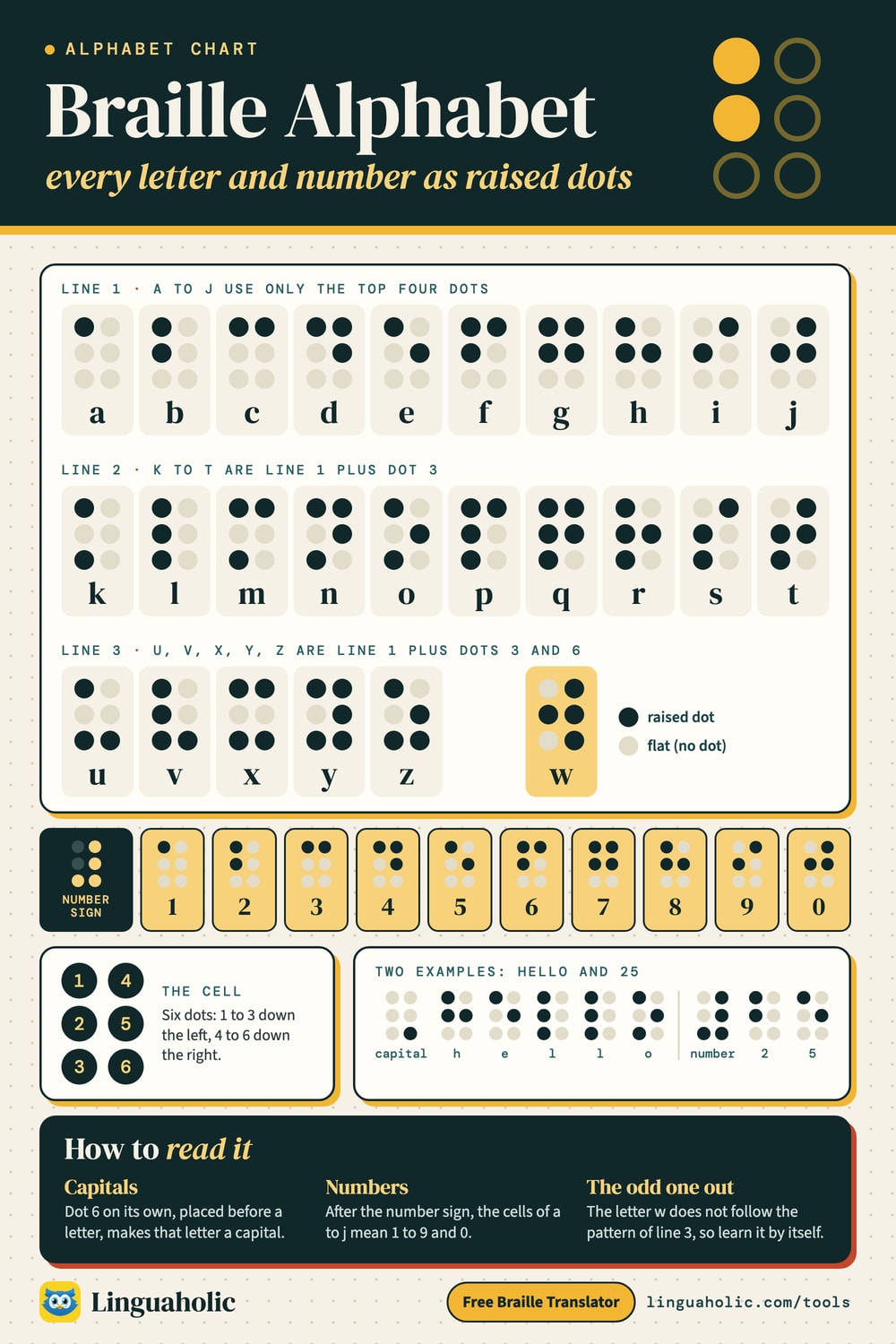
This braille translator turns English text into braille and reads braille back into text. It writes Unified English Braille (UEB), the code used in the United States and most other English-speaking countries, in its uncontracted form (grade 1): every letter gets its own cell, with the capital signs, number signs and punctuation the rules call for. Each cell is shown with its dot numbers, so you can check it, copy it by hand or learn from it. For example, Hello is ⠠⠓⠑⠇⠇⠕, which is the capital sign (dot 6) followed by h, e, l, l, o.
Every symbol the translator writes was checked against the official rulebook of Unified English Braille. When you type a character it has no confirmed braille for, it leaves that character out and tells you, instead of guessing. Everything runs in your browser; nothing you type is uploaded or saved.
How to use the braille translator
- Translate: choose Text → Braille and type, or tap an example such as I love you. The braille appears as you type. Copy braille copies the Unicode braille characters, which you can paste into a message or document; Copy dot numbers copies a plain list such as 6 1-2-5 1-5. Open Each cell with its dot numbers to see what every cell stands for.
- Braille → Text: paste braille characters (⠓⠑⠇⠇⠕), or type dot numbers with a space between cells and a slash between words, like 1-2-5 1-5 1-2-3 1-2-3 1-3-5. Both 1-2-5 and 125 work.
- Name in braille: shows a name or short message in big cells with the letter under each one, ready to print. Turn on Mirror if you will press the dots through from the back of the paper.
- Dot builder: tap the six dots to raise them and see what that cell means: a letter, a digit, a punctuation mark or a sign. Add cells one by one to build a word and read it back.
- Print a chart: prints the braille alphabet, numbers and punctuation as large dot diagrams, or saves them as a PDF.
Braille alphabet chart

How braille works: the six-dot cell
Braille is read by touch. Every character is a cell of six dot positions in two columns of three. The positions are numbered 1, 2, 3 down the left column and 4, 5, 6 down the right column, and a character is named by its raised dots: the letter h is dots 1-2-5.
Six positions give 64 possible patterns, counting the blank cell that serves as a space. That is not enough for every letter, digit, capital and symbol, so braille reuses cells and adds indicators: cells that change how the next cells are read. The number sign turns letters into digits, the capital sign makes the next letter a capital, and some symbols take two or three cells.
Readers move their fingertips along each line from left to right, often using both hands. Writing by hand is done with a slate and stylus, which presses the dots in from the back, so the writer works from right to left in mirror image. A braille writer is a machine with six keys, one for each dot, pressed together to make a cell.
Braille alphabet chart
These are the 26 letters of the braille alphabet. Each card shows the letter, its cell and its dot numbers. The cells are the same for capital and small letters; a capital simply gets the capital sign in front.
| Letter | Braille | Dots |
|---|---|---|
| A | ⠁ | 1 |
| B | ⠃ | 1-2 |
| C | ⠉ | 1-4 |
| D | ⠙ | 1-4-5 |
| E | ⠑ | 1-5 |
| F | ⠋ | 1-2-4 |
| G | ⠛ | 1-2-4-5 |
| H | ⠓ | 1-2-5 |
| I | ⠊ | 2-4 |
| J | ⠚ | 2-4-5 |
| K | ⠅ | 1-3 |
| L | ⠇ | 1-2-3 |
| M | ⠍ | 1-3-4 |
| N | ⠝ | 1-3-4-5 |
| O | ⠕ | 1-3-5 |
| P | ⠏ | 1-2-3-4 |
| Q | ⠟ | 1-2-3-4-5 |
| R | ⠗ | 1-2-3-5 |
| S | ⠎ | 2-3-4 |
| T | ⠞ | 2-3-4-5 |
| U | ⠥ | 1-3-6 |
| V | ⠧ | 1-2-3-6 |
| W | ⠺ | 2-4-5-6 |
| X | ⠭ | 1-3-4-6 |
| Y | ⠽ | 1-3-4-5-6 |
| Z | ⠵ | 1-3-5-6 |
The pattern behind the alphabet
The braille alphabet is built in rows of ten, which makes it easier to learn than it looks:
- a to j use only the top four positions (dots 1, 2, 4 and 5). Learn these ten first: they are also the digits.
- k to t are a to j with dot 3 added. For example, a is dot 1 and k is dots 1-3; a → k, b → l, c → m, d → n, e → o.
- u, v, x, y and z are a to e with dots 3 and 6 added: u is 1-3-6, z is 1-3-5-6.
- w is the odd one out (2-4-5-6). Braille was created for French, which rarely used w at the time, so w has no place in the pattern.
Braille numbers
Braille has no separate cells for digits. Instead, the numeric indicator ⠼ (dots 3-4-5-6) says that the cells after it are numbers, and the letters a to j stand for 1 to 9 and 0.
| Number | Braille | Dots |
|---|---|---|
| 1 | ⠼⠁ | 3-4-5-6 · 1 |
| 2 | ⠼⠃ | 3-4-5-6 · 1-2 |
| 3 | ⠼⠉ | 3-4-5-6 · 1-4 |
| 4 | ⠼⠙ | 3-4-5-6 · 1-4-5 |
| 5 | ⠼⠑ | 3-4-5-6 · 1-5 |
| 6 | ⠼⠋ | 3-4-5-6 · 1-2-4 |
| 7 | ⠼⠛ | 3-4-5-6 · 1-2-4-5 |
| 8 | ⠼⠓ | 3-4-5-6 · 1-2-5 |
| 9 | ⠼⠊ | 3-4-5-6 · 2-4 |
| 0 | ⠼⠚ | 3-4-5-6 · 2-4-5 |
The rules for numbers in Unified English Braille:
- One numeric indicator covers the whole number, including commas and decimal points: 1,000 is ⠼⠁⠂⠚⠚⠚ and 3.14 is ⠼⠉⠲⠁⠙.
- A space, hyphen, slash, colon or any other symbol ends the number, so the next number needs its own indicator: 9-10 is ⠼⠊⠤⠼⠁⠚ and 10:30 is ⠼⠁⠚⠒⠼⠉⠚.
- A small letter from a to j right after a number would be read as another digit, so it gets the grade 1 indicator ⠰ first: 3b is ⠼⠉⠰⠃. Letters from k to z need nothing (3m is ⠼⠉⠍), and neither does a capital (3B is ⠼⠉⠠⠃).
- A number that starts with a decimal point gets the indicator before the point: .5 is ⠼⠲⠑. Fractions such as ½ are written with a fraction line: ⠼⠁⠌⠃.
| Braille | Dots | |
|---|---|---|
| 2026 | ⠼⠃⠚⠃⠋ | 3-4-5-6 1-2 2-4-5 1-2 1-2-4 |
| 1,000 | ⠼⠁⠂⠚⠚⠚ | 3-4-5-6 1 2 2-4-5 2-4-5 2-4-5 |
| 3.14 | ⠼⠉⠲⠁⠙ | 3-4-5-6 1-4 2-5-6 1 1-4-5 |
| 9-10 | ⠼⠊⠤⠼⠁⠚ | 3-4-5-6 2-4 3-6 3-4-5-6 1 2-4-5 |
| 10:30 | ⠼⠁⠚⠒⠼⠉⠚ | 3-4-5-6 1 2-4-5 2-5 3-4-5-6 1-4 2-4-5 |
| 3b | ⠼⠉⠰⠃ | 3-4-5-6 1-4 5-6 1-2 |
| 1st | ⠼⠁⠎⠞ | 3-4-5-6 1 2-3-4 2-3-4-5 |
| $5.99 | ⠈⠎⠼⠑⠲⠊⠊ | 4 2-3-4 3-4-5-6 1-5 2-5-6 2-4 2-4 |
Capital letters in braille
Unified English Braille marks capitals with dot 6. How many dot 6 cells you write depends on how much of the text is in capitals:
| Braille | Indicator | What it does |
|---|---|---|
| ⠠6 | Capital letter indicator | The next letter is a capital. |
| ⠠⠠6 6 | Capitalized word indicator | The rest of the word (its letters) is in capitals. |
| ⠠⠠⠠6 6 6 | Capitals passage indicator | Three or more words in a row are all capitals. |
| ⠠⠄6 3 | Capitals terminator | Ends a capitals passage, or capitals partway through a word. |
| ⠼3-4-5-6 | Numeric indicator | The cells a–j that follow are the digits 1–9 and 0. |
| ⠰5-6 | Grade 1 indicator | Read the next cell as a letter, not a digit or a contraction. |
A word in capitals gets two dot 6 cells, and that lasts until the letters stop: an apostrophe or hyphen ends it, so DON'T needs a second capital sign before the T. When only part of a word is in capitals, the capitals terminator ⠠⠄ marks where the small letters start. Three or more words in capitals in a row get the capitals passage indicator at the start and the terminator after the last one.
| Braille | Dots | |
|---|---|---|
| Samone capital letter | ⠠⠎⠁⠍ | 6 2-3-4 1 1-3-4 |
| USAa word in capitals | ⠠⠠⠥⠎⠁ | 6 6 1-3-6 2-3-4 1 |
| DON'Tthe apostrophe ends the capitals word | ⠠⠠⠙⠕⠝⠄⠠⠞ | 6 6 1-4-5 1-3-5 1-3-4-5 3 6 2-3-4-5 |
| ABCscapitals end inside the word | ⠠⠠⠁⠃⠉⠠⠄⠎ | 6 6 1 1-2 1-4 6 3 2-3-4 |
| KEEP OUT NOWthree or more words: a capitals passage | ⠠⠠⠠⠅⠑⠑⠏ ⠕⠥⠞ ⠝⠕⠺⠠⠄ | 6 6 6 1-3 1-5 1-5 1-2-3-4 / 1-3-5 1-3-6 2-3-4-5 / 1-3-4-5 1-3-5 2-4-5-6 6 3 |
Braille punctuation
Most punctuation marks use the lower part of the cell, and brackets and some marks take two cells. One cell has two meanings: ⠦ (dots 2-3-6) is both the question mark and the opening double quotation mark. A reader can tell them apart because an opening quote comes at the start of a word and a question mark at the end. When a question mark starts a word, the translator puts the grade 1 indicator ⠰ in front so it is not read as a quote, as the rules require.
| Braille | Dots | Name | |
|---|---|---|---|
| , | ⠂ | 2 | comma |
| ; | ⠆ | 2-3 | semicolon |
| : | ⠒ | 2-5 | colon |
| . | ⠲ | 2-5-6 | period (full stop, decimal point) |
| ! | ⠖ | 2-3-5 | exclamation mark |
| ? | ⠦ | 2-3-6 | question mark |
| ' | ⠄ | 3 | apostrophe |
| - | ⠤ | 3-6 | hyphen |
| – | ⠠⠤ | 6 3-6 | dash (en or em dash) |
| … | ⠲⠲⠲ | 2-5-6 2-5-6 2-5-6 | ellipsis |
| / | ⠸⠌ | 4-5-6 3-4 | slash (forward slash) |
| \ | ⠸⠡ | 4-5-6 1-6 | backslash |
| _ | ⠨⠤ | 4-6 3-6 | underscore (low line) |
| “ | ⠦ | 2-3-6 | opening double quotation mark |
| ” | ⠴ | 3-5-6 | closing double quotation mark |
| ‘ | ⠠⠦ | 6 2-3-6 | opening single quotation mark |
| ’ | ⠠⠴ | 6 3-5-6 | closing single quotation mark |
| " | ⠠⠶ | 6 2-3-5-6 | nondirectional double quotation mark |
| « | ⠸⠦ | 4-5-6 2-3-6 | opening angle quotation mark |
| » | ⠸⠴ | 4-5-6 3-5-6 | closing angle quotation mark |
| ( | ⠐⠣ | 5 1-2-6 | opening parenthesis |
| ) | ⠐⠜ | 5 3-4-5 | closing parenthesis |
| [ | ⠨⠣ | 4-6 1-2-6 | opening square bracket |
| ] | ⠨⠜ | 4-6 3-4-5 | closing square bracket |
| { | ⠸⠣ | 4-5-6 1-2-6 | opening curly bracket |
| } | ⠸⠜ | 4-5-6 3-4-5 | closing curly bracket |
The dash is ⠠⠤ for both the short (en) and long (em) dash. The long-dash sign ⠐⠠⠤ is used only when a text has both kinds and they need to be told apart. Straight quotes typed on a keyboard are turned into opening and closing quotes from their position, and an apostrophe inside or at the end of a word (don't, the dogs') is written ⠄.
Symbols, money and math signs
| Braille | Dots | Name | |
|---|---|---|---|
| & | ⠈⠯ | 4 1-2-3-4-6 | ampersand |
| @ | ⠈⠁ | 4 1 | at sign |
| # | ⠸⠹ | 4-5-6 1-4-5-6 | number sign (hash) |
| % | ⠨⠴ | 4-6 3-5-6 | percent sign |
| * | ⠐⠔ | 5 3-5 | asterisk |
| † | ⠈⠠⠹ | 4 6 1-4-5-6 | dagger |
| ‡ | ⠈⠠⠻ | 4 6 1-2-4-5-6 | double dagger |
| • | ⠸⠲ | 4-5-6 2-5-6 | bullet |
| ^ | ⠈⠢ | 4 2-6 | caret |
| ~ | ⠈⠔ | 4 3-5 | tilde (swung dash) |
| ° | ⠘⠚ | 4-5 2-4-5 | degree sign |
| © | ⠘⠉ | 4-5 1-4 | copyright sign |
| ® | ⠘⠗ | 4-5 1-2-3-5 | registered sign |
| ™ | ⠘⠞ | 4-5 2-3-4-5 | trademark sign |
| § | ⠘⠎ | 4-5 2-3-4 | section sign |
| ¶ | ⠘⠏ | 4-5 1-2-3-4 | paragraph sign |
| $ | ⠈⠎ | 4 2-3-4 | dollar sign |
| ¢ | ⠈⠉ | 4 1-4 | cent sign |
| € | ⠈⠑ | 4 1-5 | euro sign |
| £ | ⠈⠇ | 4 1-2-3 | pound sign (sterling) |
| ¥ | ⠈⠽ | 4 1-3-4-5-6 | yen sign |
| + | ⠐⠖ | 5 2-3-5 | plus sign |
| − | ⠐⠤ | 5 3-6 | minus sign |
| × | ⠐⠦ | 5 2-3-6 | multiplication sign |
| ÷ | ⠐⠌ | 5 3-4 | division sign |
| = | ⠐⠶ | 5 2-3-5-6 | equals sign |
| < | ⠈⠣ | 4 1-2-6 | less-than sign (opening angle bracket) |
| > | ⠈⠜ | 4 3-4-5 | greater-than sign (closing angle bracket) |
Accented letters
An accent is written as a two-cell sign in front of its letter. That covers names and borrowed words such as José, Zoë, café and señor.
| Accent | Example | Braille | Dots |
|---|---|---|---|
| acute accent | é | ⠘⠌⠑ | 4-5 3-4 1-5 |
| grave accent | è | ⠘⠡⠑ | 4-5 1-6 1-5 |
| circumflex | ê | ⠘⠩⠑ | 4-5 1-4-6 1-5 |
| diaeresis (umlaut) | ü | ⠘⠒⠥ | 4-5 2-5 1-3-6 |
| tilde | ñ | ⠘⠻⠝ | 4-5 1-2-4-5-6 1-3-4-5 |
| cedilla | ç | ⠘⠯⠉ | 4-5 1-2-3-4-6 1-4 |
| ring | å | ⠘⠫⠁ | 4-5 1-2-4-6 1 |
| caron (háček) | š | ⠘⠬⠎ | 4-5 3-4-6 2-3-4 |
| macron | ā | ⠈⠤⠁ | 4 3-6 1 |
| breve | ă | ⠈⠬⠁ | 4 3-4-6 1 |
Grade 1 vs grade 2 braille
Grade 1 braille (uncontracted) spells every word letter by letter, as this translator does. Grade 2 braille (contracted) uses contractions: single cells or short groups of cells that stand for common words and letter groups. Grade 2 saves a lot of space and reading time, and it is what most braille books, magazines and signs use. Many beginners start with grade 1, and it is the clearest choice for names, labels, spelling and short messages.
For example, five cells in grade 2 stand for these words, and for the same letters inside longer words:
| Word | Grade 1 | Grade 2 | Grade 2 dots |
|---|---|---|---|
| and | ⠁⠝⠙ | ⠯ | 1-2-3-4-6 |
| for | ⠋⠕⠗ | ⠿ | 1-2-3-4-5-6 |
| of | ⠕⠋ | ⠷ | 1-2-3-5-6 |
| the | ⠞⠓⠑ | ⠮ | 2-3-4-6 |
| with | ⠺⠊⠞⠓ | ⠾ | 2-3-4-5-6 |
In grade 2, most single letters standing alone also mean a whole word: b = but, c = can, d = do, e = every, f = from, g = go, h = have, j = just, and so on. That is why a single letter on its own (other than a, i and o) needs a grade 1 indicator in contracted braille, and why a grade 1 reader would misread grade 2 text.
Grade 2 has many contractions, and rules about where each one may be used (at the start of a word, inside a word, standing alone) with exceptions. A translator that gets some of them wrong produces braille that is hard to read, so this tool does not write or read grade 2. If you paste contracted braille into the Braille → Text box, the tool reads the letters it can and lists the cells it cannot, instead of guessing.
Examples: common words and phrases in braille
Tap any example to open it in the translator with each cell explained.
| Braille | Dots | |
|---|---|---|
| I love you | ⠠⠊ ⠇⠕⠧⠑ ⠽⠕⠥ | 6 2-4 / 1-2-3 1-3-5 1-2-3-6 1-5 / 1-3-4-5-6 1-3-5 1-3-6 |
| Hello World | ⠠⠓⠑⠇⠇⠕ ⠠⠺⠕⠗⠇⠙ | 6 1-2-5 1-5 1-2-3 1-2-3 1-3-5 / 6 2-4-5-6 1-3-5 1-2-3-5 1-2-3 1-4-5 |
| Happy Birthday | ⠠⠓⠁⠏⠏⠽ ⠠⠃⠊⠗⠞⠓⠙⠁⠽ | 6 1-2-5 1 1-2-3-4 1-2-3-4 1-3-4-5-6 / 6 1-2 2-4 1-2-3-5 2-3-4-5 1-2-5 1-4-5 1 1-3-4-5-6 |
| Thank you | ⠠⠞⠓⠁⠝⠅ ⠽⠕⠥ | 6 2-3-4-5 1-2-5 1 1-3-4-5 1-3 / 1-3-4-5-6 1-3-5 1-3-6 |
| Mom | ⠠⠍⠕⠍ | 6 1-3-4 1-3-5 1-3-4 |
| Love | ⠠⠇⠕⠧⠑ | 6 1-2-3 1-3-5 1-2-3-6 1-5 |
| Exit | ⠠⠑⠭⠊⠞ | 6 1-5 1-3-4-6 2-4 2-3-4-5 |
| Room 4B | ⠠⠗⠕⠕⠍ ⠼⠙⠠⠃ | 6 1-2-3-5 1-3-5 1-3-5 1-3-4 / 3-4-5-6 1-4-5 6 1-2 |
| Café | ⠠⠉⠁⠋⠘⠌⠑ | 6 1-4 1 1-2-4 4-5 3-4 1-5 |
Tips for learning the braille alphabet
- Learn the dot numbers along with the letters. Braille teachers and readers describe cells by their dots, as in "h is 1-2-5", so the numbers are worth knowing by heart.
- Start with a to j, then add dot 3 for k to t, and dots 3 and 6 for u, v, x, y and z. Once the first ten are solid, most of the alphabet follows from the pattern.
- Practice both ways: use the Dot builder to quiz yourself on single cells, and write short words with Name in braille before checking them with the translator.
- Learn the capital sign and the number sign early, since almost every sentence and every number needs one.
- If you are learning to read by touch, practice on real raised braille. Recognizing dots by sight and by touch are different skills, and a braille teacher can help with the second.
How to write your name in braille
- Open Name in braille above and type the name. A name starts with the capital sign ⠠, so a five-letter name takes six cells.
- Leave Show dot numbers on and copy the dots cell by cell, or press Print for a sheet with big cells.
- For a card or craft, mark the dots with a pencil and add glue dots, beads or puffy paint. To make raised dots with a pen or a blunt point, switch on Mirror, press from the back of the paper, and the front will read correctly.
A printed chart is for sighted learners and crafts. Braille meant to be read by touch has a standard dot size and spacing, so labels and signs for blind readers should be made with a braille writer, a slate and stylus or an embosser.
What this translator does not cover
- Contracted (grade 2) braille, as explained above.
- Characters with no symbol in its tables, such as emoji, letters of other alphabets, and some signs like the vertical bar. They are left out and listed under the result.
- Braille codes for other languages, braille for math and science layouts, music braille, and 8-dot computer braille.
- Page layout: line length, page numbers and headings, which a braille transcriber sets for each book.
For anything that will be printed or posted for blind readers, such as a sign, a menu or a school assignment, ask a qualified braille transcriber to check it.
A short history of braille
Braille is named after Louis Braille, who was born on January 4, 1809, in Coupvray, France. An accident in his father's leather workshop when he was three led to the loss of his sight. As a student at the Royal Institute for Blind Youth in Paris, he took a system of raised dots invented by Charles Barbier, which used cells of up to twelve dots, and reworked it into the six-dot cell that fits under a fingertip. He published his system in 1829, and he died in 1852.
Braille has since been adapted to many languages, and English used several codes over the years. Unified English Braille was developed by the International Council on English Braille to bring them together into one code, and the United States switched to it in 2016. January 4, Louis Braille's birthday, is observed as World Braille Day.
More codes and alphabets
If you like codes made of dots and signals, try the Morse code translator and the tap code, which also spell letters with simple patterns. The NATO phonetic alphabet spells words out loud, and the binary translator shows how computers store text. The blank braille cell ⠀ (U+2800) is also one of the characters on our invisible character page.
For teachers, bloggers & clubs
Put the Braille Translator on your website
Give your readers this tool right on your page. Copy the code, paste it into your site, done: no sign-up, no account.
- Free for any website
- No ads, no cookies
- Fits phones and sidebars
- Always up to date
Please keep the small credit line under the tool; you may add rel="nofollow" to its link. How it works & the rules

› Show the code
Frequently asked questions
- How do I translate English to braille?
- Type or paste your text in the Text → Braille box. The translator writes Unified English Braille grade 1 as you type, adds the capital and number signs the rules call for, and shows the dot numbers for every cell.
- How do I translate braille back to English?
- Choose Braille → Text and paste braille characters, or type dot numbers such as 1-2-5 1-5 with a slash between words. Any cells it cannot read are listed, which usually means the braille is contracted (grade 2).
- How many dots are in a braille cell?
- Six, in two columns of three. They are numbered 1, 2, 3 down the left and 4, 5, 6 down the right, which gives 64 patterns counting the blank cell.
- How are numbers written in braille?
- With the numeric indicator ⠼ (dots 3-4-5-6) followed by the letters a to j, which stand for 1 to 9 and 0. One indicator covers the whole number, including its commas and decimal point.
- How do you show capital letters in braille?
- Dot 6 before a letter makes it a capital. Two dot 6 cells put a whole word in capitals, three start a passage of three or more capitalized words, and the terminator (dots 6, 3) ends it.
- What is the difference between grade 1 and grade 2 braille?
- Grade 1 (uncontracted) spells every word letter by letter. Grade 2 (contracted) uses contractions, cells that stand for common words and letter groups, such as ⠮ for “the”. This translator writes grade 1.
- Can this tool translate grade 2 (contracted) braille?
- No. Contractions follow detailed rules about where each one may be used, and a partial version would produce wrong braille. The tool writes and reads uncontracted braille only and lists any cells it cannot read.
- How do I write my name in braille?
- Open Name in braille and type the name. You get big cells with the letter and dot numbers under each one, ready to print, plus a mirror option for pressing the dots through from the back of the paper.
- What is Unified English Braille (UEB)?
- UEB is the braille code for English developed by the International Council on English Braille. The United States switched to it in 2016, and this translator follows its rules.
- Who invented braille?
- Louis Braille, who lost his sight as a young child, developed the six-dot system while he was a student in Paris and published it in 1829. He based it on an earlier raised-dot code by Charles Barbier.
About this page
The Braille Translator is a free tool from Linguaholic, made by Marcel Iseli. It runs in your browser, with no sign-up. Last updated .
Keep exploring
More free tools
 Morse Code TranslatorTranslate text to Morse code and back, hear it as sound at any speed, and see the full Morse alphabet chart.
 Tap CodeTurn text into the 5×5 knock code prisoners tapped through walls, and decode taps back to text.
 NATO Phonetic AlphabetSpell any name in Alpha, Bravo, Charlie — with audio and a printable chart.
 Binary TranslatorConvert text to binary code and binary back to text.
 Invisible CharacterCopy blank text and invisible characters, or find and remove hidden ones.
 Roman Numeral ConverterNumbers to Roman numerals and back — plus dates, a chart, and a calculator.