
Converters & translators
Tap Code Translator
Translate text to tap code and back: the 5×5 knock code American prisoners of war tapped through cell walls, with the full chart and how to tap it.
Updated · Free, no sign-up
Share this tool
Know someone who’d love it?
What is tap code?
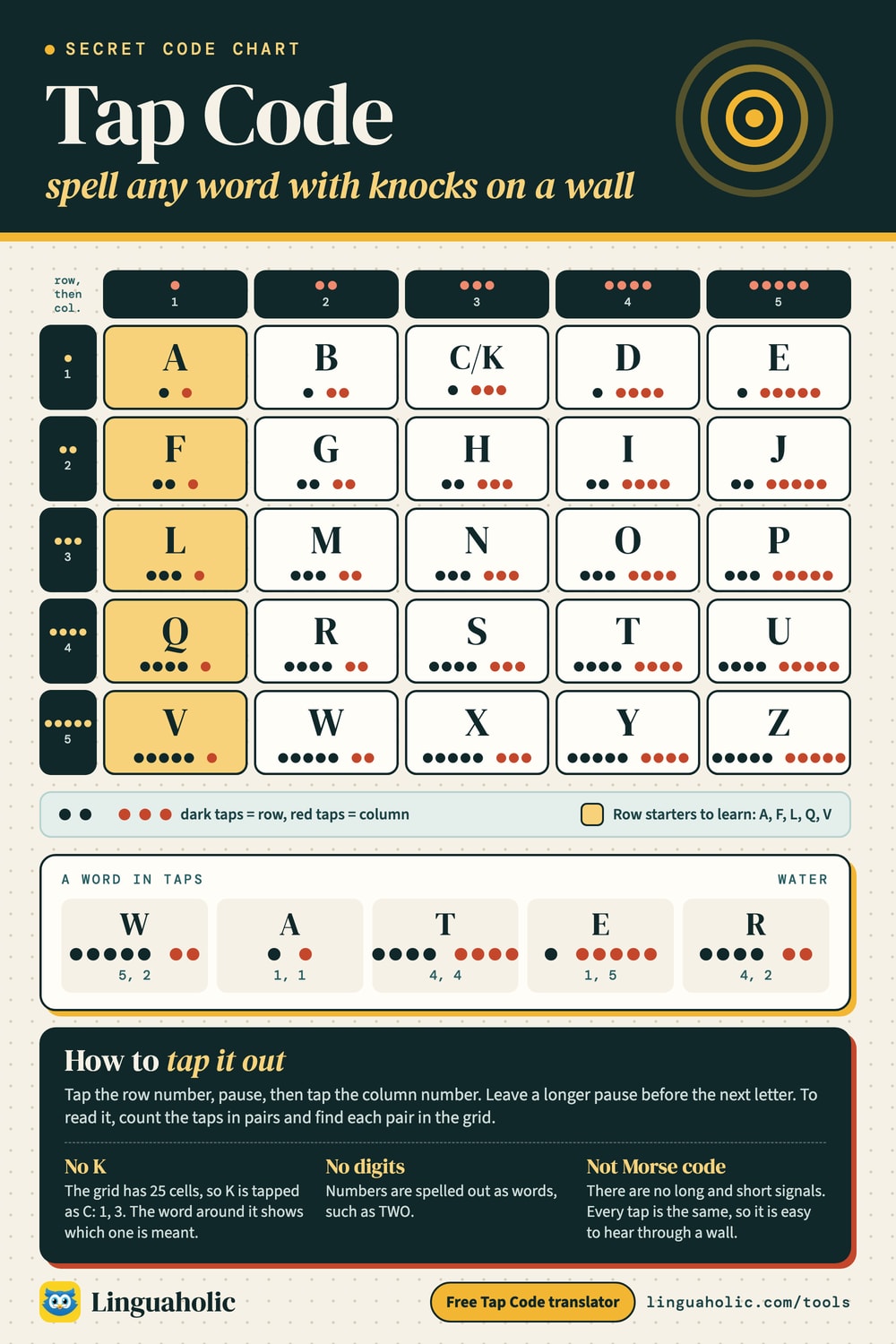
Tap code is a way to spell out words with nothing but knocks. The letters sit in a 5×5 grid. To send a letter you tap its row number, pause, then tap its column number: two taps and then three taps mean row 2, column 3, which is H. Because the grid has only 25 cells, the letter K is dropped and tapped as C.
It is also called the knock code, and it is famous as the code American prisoners of war tapped through the walls of their cells in Vietnam. All you need is something to tap on and the ability to count to five, which is exactly why it worked there.
How to use the tap code translator
- Choose Encode to turn text into taps, or Decode to turn taps back into text.
- When encoding, each letter appears as two groups of dots: the row and then the column. HELLO is
.. ... / . ..... / ... . / ... . / ... ..... - To decode, paste dot groups in the same layout: a space between the two groups of a letter and a slash between letters. Two slashes mark a new word, which is how the tool writes word breaks. Row-column numbers such as
2-3 1-5work too, with a single slash between words. - Tap Copy to save the result. The grid view in the tool shows which row and column each letter comes from.
Since K becomes C, a decoded message may show C where you expect K: KICK comes back as CICC. Real tap code readers fix that from context, and so should you.
Tap code chart

Tap code chart
The tap code grid has rows down the side and columns across the top. The first group of taps picks the row, the second picks the column.
| Row | 1 | 2 | 3 | 4 | 5 |
|---|---|---|---|---|---|
| 1 | A | B | C/K | D | E |
| 2 | F | G | H | I | J |
| 3 | L | M | N | O | P |
| 4 | Q | R | S | T | U |
| 5 | V | W | X | Y | Z |
To memorize it, you only need the first letter of each row: A, F, L, Q, V. Every other letter is counted from there in alphabetical order, skipping K. That is the whole system, and why prisoners could teach it to a newcomer in a few minutes.
Why is K missing from tap code?
Twenty-six letters do not fit in 25 cells, so one letter has to go. Tap code drops K because C already makes the same hard sound in many words (think of CAT and KIT), so a reader understands a C in its place at once, and K is one of the less common letters in English. The classic Polybius square solves the same problem differently: it keeps K and lets I and J share a cell. That is the one difference between the two grids, so make sure you know which one a puzzle uses.
Tap code alphabet: every letter with its taps
| Letter | Taps | Row-column | Total taps |
|---|---|---|---|
| A | . . | 1-1 | 2 |
| B | . .. | 1-2 | 3 |
| C | . ... | 1-3 | 4 |
| D | . .... | 1-4 | 5 |
| E | . ..... | 1-5 | 6 |
| F | .. . | 2-1 | 3 |
| G | .. .. | 2-2 | 4 |
| H | .. ... | 2-3 | 5 |
| I | .. .... | 2-4 | 6 |
| J | .. ..... | 2-5 | 7 |
| K | . ... | 1-3 (as C) | 4 |
| L | ... . | 3-1 | 4 |
| M | ... .. | 3-2 | 5 |
| N | ... ... | 3-3 | 6 |
| O | ... .... | 3-4 | 7 |
| P | ... ..... | 3-5 | 8 |
| Q | .... . | 4-1 | 5 |
| R | .... .. | 4-2 | 6 |
| S | .... ... | 4-3 | 7 |
| T | .... .... | 4-4 | 8 |
| U | .... ..... | 4-5 | 9 |
| V | ..... . | 5-1 | 6 |
| W | ..... .. | 5-2 | 7 |
| X | ..... ... | 5-3 | 8 |
| Y | ..... .... | 5-4 | 9 |
| Z | ..... ..... | 5-5 | 10 |
How to tap a message
- Tap the row number, quickly and evenly.
- Pause briefly, then tap the column number.
- Pause a little longer before the next letter, so the listener knows a new letter is starting.
Here is HELLO tapped out:
| Letter | What you tap | Written |
|---|---|---|
| H | 2 taps, pause, 3 taps | .. ... |
| E | 1 tap, pause, 5 taps | . ..... |
| L | 3 taps, pause, 1 tap | ... . |
| L | 3 taps, pause, 1 tap | ... . |
| O | 3 taps, pause, 4 taps | ... .... |
That is 26 taps for a five-letter word. Many people write tap code as number pairs instead of dots, which is quicker on paper: HELLO is 2-3 1-5 3-1 3-1 3-4.
How to decode tap code
When you listen, count the first group of taps and write the number down, then count the second group and write it next to the first. After the long pause, start a new pair. Decode the pairs with the grid at the end, not while you listen, so you never lose count. Try 1-3 3-4 3-2 1-5 / 2-3 3-4 3-2 1-5:
| Pairs | Lookups | Word |
|---|---|---|
1-3 3-4 3-2 1-5 | 1-3 = C, 3-4 = O, 3-2 = M, 1-5 = E | COME |
2-3 3-4 3-2 1-5 | 2-3 = H, 3-4 = O, 3-2 = M, 1-5 = E | HOME |
If you get lost in the middle of a message, wait for a long pause and start counting again from there. A missed letter or two is usually easy to guess from the rest of the word.
Shortcuts tap code users relied on
Tapping is slow, so it pays to leave out every letter the listener can do without. Prisoners used short abbreviations for common phrases, such as the two below, and an X to mark the end of a sentence. The grid has no digits, so numbers are spelled out as words: TWO, not 2.
| Abbreviation | Meaning | Taps |
|---|---|---|
| GN | good night | 2-2 3-3 |
| GBU | God bless you | 2-2 1-2 4-5 |
Tap code vs Morse code
Both send letters with simple signals, but they work very differently. Morse code needs two kinds of signal, short and long, and a different pattern for every letter. Tap code needs only one kind of tap and the grid.
| Feature | Tap code | Morse code |
|---|---|---|
| Signals | One kind of tap, plus pauses | Dots and dashes (short and long), plus pauses |
| To learn | Five row letters and counting to five | A separate pattern for each letter and digit |
| HELLO | 2-3 1-5 3-1 3-1 3-4 (26 taps) | .... . .-.. .-.. --- (16 signals) |
| Best for | Knocking on walls, pipes or a table, where every tap sounds the same | Sound, light and radio, where long and short are easy to tell apart |
Tap code is slower, but it is much easier to learn and almost impossible to mishear, because a knock is a knock. If you want to tap out Morse code instead, you need two sounds people can tell apart, for example a quick knock for a dot and a longer press or a scrape for a dash, and the right timing between letters. The Morse code translator shows every letter and can play the code aloud so you can hear the rhythm.
History of tap code
The grid behind tap code is the Polybius square, described by the Greek historian Polybius more than two thousand years ago as a way to signal letters with torches. Knocking it through a wall is a much later idea. A version for the Russian alphabet is said to have been used by political prisoners in tsarist Russia, and Arthur Koestler’s novel Darkness at Noon shows prisoners talking through cell walls with a knock code.
The tap code’s best-known chapter is the Vietnam War. In June 1965, American prisoners of war in Hỏa Lò prison in Hanoi, which the prisoners called the “Hanoi Hilton”, began spreading it from cell to cell. It was introduced by four prisoners, among them Air Force Captain Carlyle “Smitty” Harris, who remembered it from an instructor during his training. Prisoners were often kept apart and forbidden to talk, and the code let them pass news, keep track of one another, and keep up morale for years. Where tapping was too risky, they even sent the numbers as coughs, sniffs and sneezes.
Tap code practice
Three short messages to decode, from easy to hard. Check your answer with the decoder above.
Puzzle 1 (Easy)
Written with dots, as the tool shows tap code.
.. ... / .. ....
Show the answer
HI
Puzzle 2 (Medium)
Written as row-column numbers. A slash separates the words.
4-3 1-5 1-5 / 5-4 3-4 4-5
Show the answer
SEE YOU
Puzzle 3 (Hard)
Numbers again, and remember what happens to K.
1-2 1-1 1-3 1-3 / 4-3 3-4 3-4 3-3
Show the answer
BACK SOON
Tap code in escape rooms, classrooms and games
- Escape rooms: play knocks from behind a wall or a speaker, or hide the grid on a poster and the taps in a recording. Players count the knocks, write the pairs and decode the next clue.
- Classrooms: tap code makes history lessons about prisoners of war concrete, and pairs well with a lesson on the Polybius square and coordinates. Students can tap messages on their desks to a partner.
- Camps and sleepovers: knock messages on a wall or a bunk after lights out, or flash them with a flashlight: a group of blinks for the row, a pause, a group for the column.
- Layered puzzles: tap out a word, then let players turn it into a lock code with A1Z26 (A=1, B=2 and so on) for a puzzle with several steps.
Free and private
This tap code translator runs entirely in your browser. It is free, needs no sign-up, and nothing you type is uploaded or stored.
For teachers, bloggers & clubs
Put the Tap Code on your website
Give your readers this tool right on your page. Copy the code, paste it into your site, done: no sign-up, no account.
- Free for any website
- No ads, no cookies
- Fits phones and sidebars
- Always up to date
Please keep the small credit line under the tool; you may add rel="nofollow" to its link. How it works & the rules

› Show the code
Frequently asked questions
- What is tap code?
- Tap code spells out letters with knocks using a 5×5 grid. You tap the row number, pause, then tap the column number, so two taps and then three taps mean H.
- How does tap code work?
- The letters A to Z, without K, fill a 5×5 grid in order. Each letter is sent as two groups of taps: the first for its row and the second for its column, with a longer pause between letters.
- Why is there no K in tap code?
- Twenty-six letters do not fit in 25 cells, so K is dropped and tapped as C, which often makes the same sound. Readers fix it from context.
- How do you learn the tap code alphabet?
- Remember the first letter of each row, A, F, L, Q and V, and count the rest in alphabetical order, skipping K. That is the whole grid.
- How do you decode tap code?
- Count each group of taps and write the numbers down in pairs, then look each pair up in the grid: row first, column second. In the tool, choose Decode and paste dot groups with a slash between letters.
- Who used tap code?
- It is best known from American prisoners of war in Vietnam, who began spreading it in Hanoi's Hoa Lo prison in June 1965. Prisoners in tsarist Russia are said to have used a similar knock code.
- Is tap code the same as Morse code?
- No. Morse code uses short and long signals with a different pattern for each letter. Tap code needs only one kind of tap and the grid, so it is slower but much easier to learn and to hear through a wall.
- How do you send numbers in tap code?
- The grid has no digits, so numbers are spelled out as words, such as TWO instead of 2.
- Is this tap code translator free and private?
- Yes. It runs entirely in your browser with no sign-up, and nothing you type is uploaded or stored.
About this page
The Tap Code is a free tool from Linguaholic, made by Marcel Iseli. It runs in your browser, with no sign-up. Last updated .
The code breaker's English letter frequencies and word checks come from Linguaholic’s English dictionary, built from the open ENABLE and SCOWL word lists. Licenses and notices.
Keep exploring
More free tools
 Morse Code TranslatorTranslate text to Morse code and back, hear it as sound at any speed, and see the full Morse alphabet chart.
 Polybius SquareTurn letters into row-column number pairs on the 5×5 grid and back, with keyword squares.
 A1Z26 CipherLetters to numbers and back: A=1 to Z=26, with a chart, decoder and puzzle ideas.
 Bacon CipherTurn text into Bacon's five-letter A/B code and back, and hide a message in plain sight.
 NATO Phonetic AlphabetSpell any name in Alpha, Bravo, Charlie — with audio and a printable chart.
 Roman Numeral ConverterNumbers to Roman numerals and back — plus dates, a chart, and a calculator.