
Word games & fun
ASCII Art Generator — Text & Image to ASCII
Turn text into ASCII art in 25 fonts — classic FIGlet styles plus 10 of our own, like Shadow 3D, Neon, and Mini Block — or convert any image or photo into ASCII art. Copy it as a code block or download it; everything runs in your browser.
Updated · Free, no sign-up
  _   _      _ _        __        __         _     _
 | | | | ___| | | ___   \ \      / /__  _ __| | __| |
 | |_| |/ _ \ | |/ _ \   \ \ /\ / / _ \| '__| |/ _` |
 |  _  |  __/ | | (_) |   \ V  V / (_) | |  | | (_| |
 |_| |_|\___|_|_|\___/     \_/\_/ \___/|_|  |_|\__,_|
Using this in a README or project? A link back to linguaholic.com/tools/ascii-art-generator is much appreciated — Copy for README adds one for you.
Share this tool
Know someone who’d love it?
What is an ASCII art generator?
An ASCII art generator draws pictures and lettering out of ordinary keyboard characters — slashes, underscores, pipes, and symbols — so the result is plain text you can paste almost anywhere. This one does both jobs: turn text into big ASCII lettering in 25 fonts, or turn any image or photo into ASCII art.
How to turn text into ASCII art
- Choose Text → ASCII and type a word or short phrase.
- Pick a font, or tap Preview all 25 fonts to see your text in every style at once.
- Set Wrap at so longer text fits your space, and choose an alignment.
- Optionally swap in a fill character (like # or █) and add a border.
- Copy it, copy as a code block, or download a .txt file.
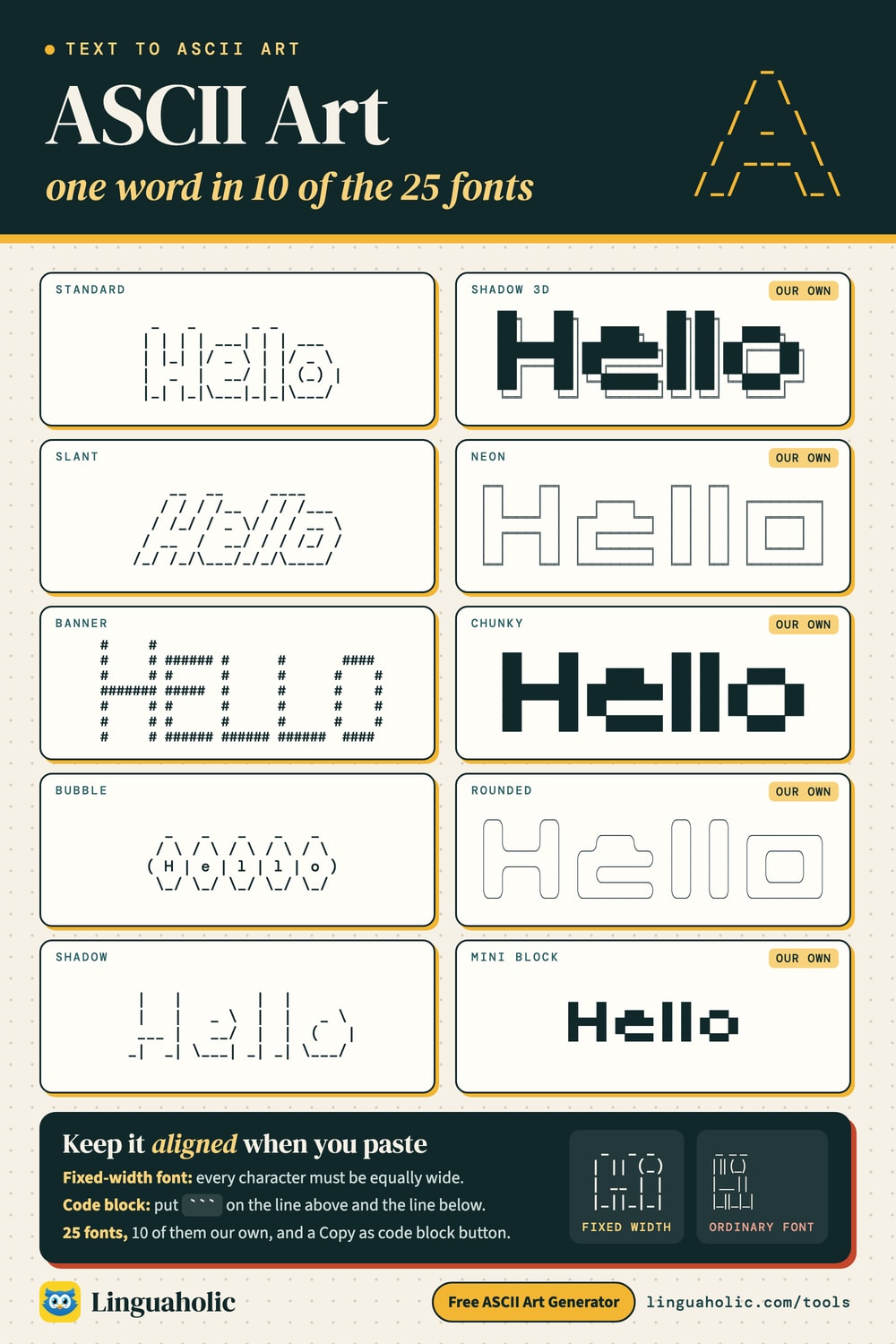
ASCII art fonts chart

How to convert an image to ASCII art
- Choose Image → ASCII.
- Drop an image onto the box, paste one with Ctrl/⌘+V, or choose a file — or tap Try a sample.
- Use Width to control detail: more characters means a sharper, larger picture.
- Pick a character set, then adjust contrast and brightness.
- Turn on Invert if you’ll paste it on a dark background, or Color preview for a colored version you can download as HTML.
How image-to-ASCII conversion works
The tool shrinks your image so that each output character covers one small area, then measures how bright that area is. Dark areas get dense characters like @ and #; light areas get sparse ones like . or a space. Because text characters are about twice as tall as they are wide, the image is squashed vertically first so your picture keeps its proportions. It all happens in your browser — your image is never uploaded.
Tips for great image results
- Pick high-contrast images. Logos, silhouettes, and portraits against a plain background convert best; busy photos turn to noise.
- Crop tight around your subject before converting.
- Raise the contrast if the result looks flat or washed out.
- Use Blocks (░▒▓█) for a bold, pixel-art look, or Detailed for the finest shading.
Where to paste ASCII art so it looks right
ASCII art only lines up in a fixed-width (monospace) font. Use Copy as code block for Discord, GitHub READMEs, Reddit, and any Markdown editor — the ``` fences switch the text to a monospace font. Code comments, terminals, and plain-text files work as-is. Keep Discord art under about 60 characters wide so it doesn’t wrap on phones.
About the fonts
Ten fonts are Linguaholic originals you won’t find anywhere else, each with full upper- and lowercase: Shadow 3D (bold blocks with a crisp box-line shadow — great for GitHub READMEs and terminal banners), Neon, Rounded, and Outline (hollow lettering), Mini Block (compact, just three lines tall — ideal for Discord and bios), Soft 3D, Slant, Chunky, Dots, and Echo (letters built from themselves, in plain characters that paste anywhere). The other fifteen come from the official distribution of FIGlet, the program that has drawn ASCII-art lettering since 1991 — including Standard, Big, Slant, Banner, Block, Shadow, Script, Bubble, and Digital. For ready-made pictures you can copy straight away, see our Text Art collection, or style normal text with the Fancy Text Generator and the Discord Text Formatter.
Download our fonts (free)
All ten Linguaholic originals are free to download as standard FIGlet font files (.flf), so you can use them with the figlet and toilet command-line tools, figlet.js, pyfiglet, and other FIGlet-compatible software:
- Download all 10 fonts (.zip) — includes a README and the license
- Shadow 3D
linguaholic-shadow3d.flf - Neon
linguaholic-neon.flf - Rounded
linguaholic-rounded.flf - Outline
linguaholic-outline.flf - Mini Block
linguaholic-miniblock.flf - Soft 3D
linguaholic-soft3d.flf - Slant
linguaholic-slant.flf - Chunky
linguaholic-chunky.flf - Dots
linguaholic-dots.flf - Echo
linguaholic-echo.flf
Use one from the command line with figlet -f linguaholic-shadow3d.flf "Hello". The fonts are released under the MIT license: use, modify and redistribute them freely — even commercially — as long as the copyright and license notice stays in the font files. The ASCII art you make with them is yours. A link back to this page is always appreciated.
Free and private
This ASCII art generator runs entirely in your browser — free, with no sign-up, and nothing you type or upload is stored or sent anywhere.
Credits and licenses
Text rendering uses the figlet.js library by Patrick Gillespie and fonts from the FIGlet distribution by Glenn Chappell, Ian Chai and contributors, used under their licenses below. The ten fonts marked “Original” are designed by Linguaholic.
FIGlet license (BSD 3-Clause)
Copyright (C) 1991, 1993, 1994 Glenn Chappell and Ian Chai
Copyright (C) 1996, 1997, 1998, 1999, 2000, 2001 John Cowan
Copyright (C) 2002 Christiaan Keet
Copyright (C) 2011 Claudio Matsuoka
All rights reserved.

Redistribution and use in source and binary forms, with or without
modification, are permitted provided that the following conditions
are met:

1. Redistributions of source code must retain the above copyright
   notice, this list of conditions and the following disclaimer.
2. Redistributions in binary form must reproduce the above copyright
   notice, this list of conditions and the following disclaimer in the
   documentation and/or other materials provided with the distribution.
3. Neither the name of the copyright holders nor the names of their
   contributors may be used to endorse or promote products derived
   from this software without specific prior written permission.

THIS SOFTWARE IS PROVIDED BY THE COPYRIGHT HOLDERS AND CONTRIBUTORS
"AS IS" AND ANY EXPRESS OR IMPLIED WARRANTIES, INCLUDING, BUT NOT
LIMITED TO, THE IMPLIED WARRANTIES OF MERCHANTABILITY AND FITNESS
FOR A PARTICULAR PURPOSE ARE DISCLAIMED. IN NO EVENT SHALL THE
COPYRIGHT HOLDERS OR CONTRIBUTORS BE LIABLE FOR ANY DIRECT, INDIRECT,
INCIDENTAL, SPECIAL, EXEMPLARY, OR CONSEQUENTIAL DAMAGES (INCLUDING,
BUT NOT LIMITED TO, PROCUREMENT OF SUBSTITUTE GOODS OR SERVICES; LOSS
OF USE, DATA, OR PROFITS; OR BUSINESS INTERRUPTION) HOWEVER CAUSED AND
ON ANY THEORY OF LIABILITY, WHETHER IN CONTRACT, STRICT LIABILITY, OR
TORT (INCLUDING NEGLIGENCE OR OTHERWISE) ARISING IN ANY WAY OUT OF THE
USE OF THIS SOFTWARE, EVEN IF ADVISED OF THE POSSIBILITY OF SUCH DAMAGE.
figlet.js license (MIT)
The MIT License (MIT)

Copyright (C) 2014-present Patrick Gillespie and other contributors

Permission is hereby granted, free of charge, to any person obtaining a copy
of this software and associated documentation files (the "Software"), to deal
in the Software without restriction, including without limitation the rights
to use, copy, modify, merge, publish, distribute, sublicense, and/or sell
copies of the Software, and to permit persons to whom the Software is
furnished to do so, subject to the following conditions:

The above copyright notice and this permission notice shall be included in
all copies or substantial portions of the Software.

THE SOFTWARE IS PROVIDED "AS IS", WITHOUT WARRANTY OF ANY KIND, EXPRESS OR
IMPLIED, INCLUDING BUT NOT LIMITED TO THE WARRANTIES OF MERCHANTABILITY,
FITNESS FOR A PARTICULAR PURPOSE AND NONINFRINGEMENT. IN NO EVENT SHALL THE
AUTHORS OR COPYRIGHT HOLDERS BE LIABLE FOR ANY CLAIM, DAMAGES OR OTHER
LIABILITY, WHETHER IN AN ACTION OF CONTRACT, TORT OR OTHERWISE, ARISING FROM,
OUT OF OR IN CONNECTION WITH THE SOFTWARE OR THE USE OR OTHER DEALINGS IN
THE SOFTWARE.
For teachers, bloggers & clubs
Put the ASCII Art Generator on your website
Give your readers this tool right on your page. Copy the code, paste it into your site, done: no sign-up, no account.
- Free for any website
- No ads, no cookies
- Fits phones and sidebars
- Always up to date
Please keep the small credit line under the tool; you may add rel="nofollow" to its link. How it works & the rules

› Show the code
Frequently asked questions
- How do I turn text into ASCII art?
- Choose Text → ASCII, type a word or short phrase, and pick one of 25 fonts — classic FIGlet styles or our own originals like Shadow 3D, Neon, and Mini Block. You can wrap long text to a set width, align it, swap in a fill character like # or █, and add a border. Then copy it or download it as a .txt file.
- How do I convert an image to ASCII art?
- Choose Image → ASCII and drop in a photo, paste one with Ctrl/⌘+V, or choose a file. Each tiny area of the image becomes a character based on its brightness. Adjust the width for more detail, pick a character set, and tweak contrast and brightness until it looks right.
- Is my image uploaded anywhere?
- No. The conversion happens entirely in your browser using the canvas built into it. Your image never leaves your device and nothing is stored.
- What is FIGlet?
- FIGlet is a classic program, first released in 1991, that draws large letters out of ordinary text characters. Its font format became the standard for ASCII-art lettering, and this generator uses the fonts from the official FIGlet distribution.
- Why does my ASCII art look broken when I paste it?
- ASCII art needs a fixed-width (monospace) font so the columns line up. Use Copy as code block for Discord, GitHub, Reddit, or any Markdown editor — the ``` fences switch the text to a monospace font. In a plain email or a proportional font, the letters will look uneven.
- What does the Invert option do in image mode?
- By default, dark parts of the image become dense characters, which looks right on a light background. On a dark background — like Discord's dark theme or most terminals — turn on Invert so bright areas become the dense characters instead.
- Can I download and use the Linguaholic fonts?
- Yes. All ten Linguaholic original fonts are free to download as FIGlet .flf files (individually or as a zip) and work with figlet, toilet, figlet.js, pyfiglet, and similar tools. They are released under the MIT license, so you can use, modify, and redistribute them — even commercially — as long as the copyright and license notice stays in the font files. The ASCII art you create with them is yours.
- Is it free?
- Yes — completely free with no sign-up. Everything runs in your browser.
About this page
The ASCII Art Generator is a free tool from Linguaholic, made by Marcel Iseli. It runs in your browser, with no sign-up. Last updated .
Keep exploring
More free tools
 Imposter Game Word GeneratorRandom secret words for the Imposter game, each with a hint for the imposter.
 HangmanThe classic word-guessing game, with 48 categories and a 2-player mode.
 Categories GameA random letter, a list of categories, and a timer — on one screen or every phone.
 Binary GameFlip bit cards to hit the number, race the 60-second clock, five levels from 4 to 8 bits.
 Never Have I EverMore than 1,000 clean statements in 13 categories, for any group.
 Truth or DareMore than 1,000 original truths and dares for friends, families, and sleepovers.