
Fancy text generators
Zalgo Text Generator
Turn any text into zalgo, with marks stacked above, through and below each letter. Set the strength from subtle to chaos, shuffle, then copy and paste, or paste zalgo to get the plain text back.
Updated · Free, no sign-up
Make it your own
60 characters, marks included. Fits in:
- TikTok bio (80): fits
- Instagram bio (150): fits
- Discord About Me (190): fits
- Discord message (2,000): fits
Share this tool
Know someone who’d love it?
What is zalgo text?
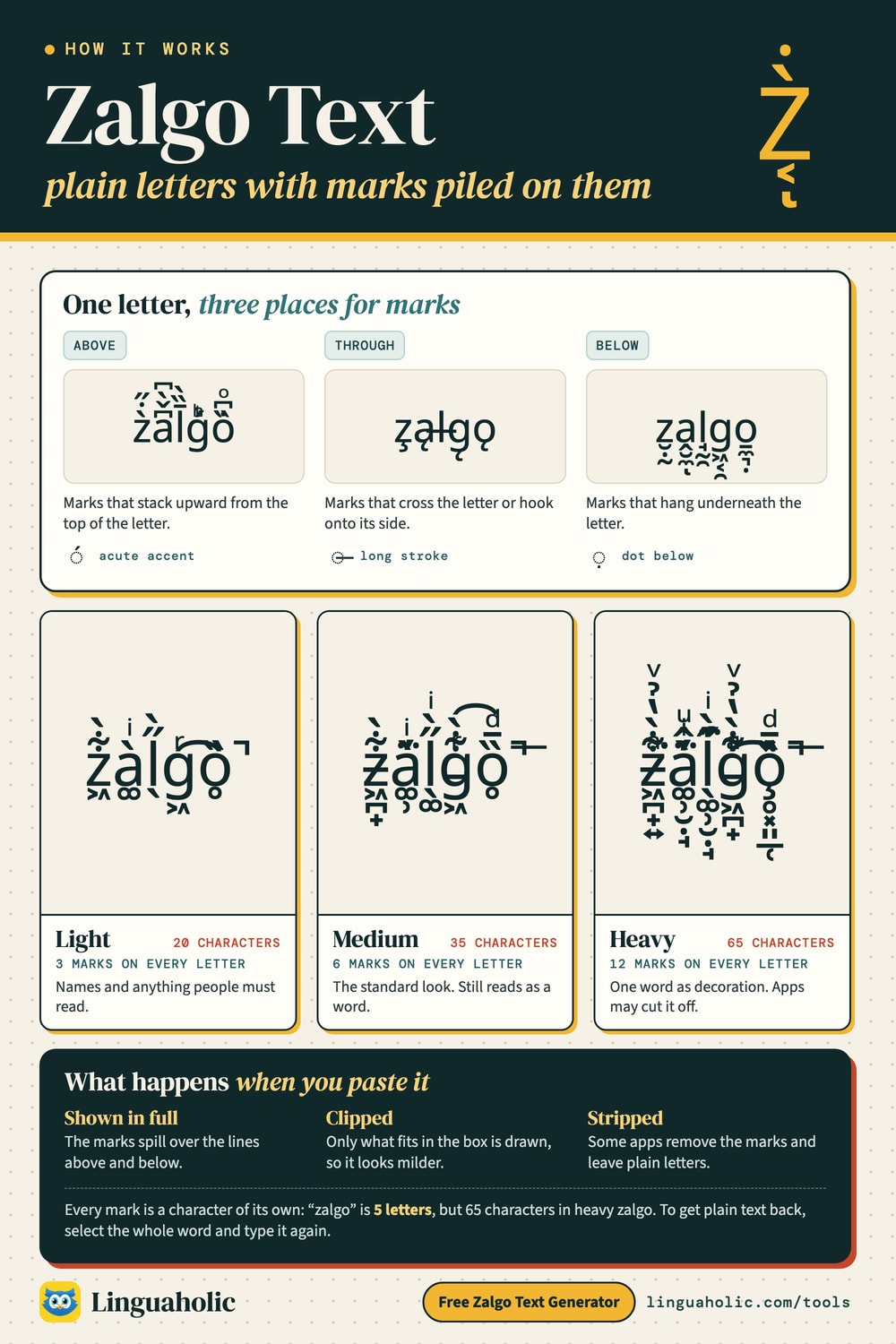
Zalgo text is normal text with accent marks piled onto every letter until the word looks like it is melting or crawling out of its line. In its light form it looks like this: z̗̽̀a̼͗͌l͇͛̚ǧ̳̌o͚͌̌ t͔̒̐e̝͗̇x̪̉̇t̩̋̄. Add more marks and they climb over the line above and hang into the line below.
It is not a font and it is not an image. Each letter is followed by a string of Unicode combining marks, the same kind of character that puts the accent on é. Because the result is plain text, you can copy and paste zalgo text into most places that let you type. The same effect also goes by glitch text, cursed text, corrupted text and void text.
How to use the zalgo text generator
- Type or paste your text into the box. It takes up to 1,000 characters.
- For a quick result, use the three ready-made rows: Light Glitch, Glitch and Heavy Glitch. Tap a row, or its Copy button, to copy it.
- For full control, use the Make it your own panel. Drag the How glitchy slider anywhere from 1 (subtle) to 20 (chaos). It starts at 6.
- Tick or untick Above, Through and Below to choose where the marks go.
- Pick a Shape: Even marks every letter alike, Grow starts calm and ends in chaos, Sprinkle hits about one letter in three, and First letters marks only the start of each word.
- Tap Shuffle to keep your settings but re-roll which marks are used, then tap Copy next to “Your glitch text.”
- Check the line under the result. It counts the characters, marks included, and shows whether the text fits in a Discord nickname, an X display name, a TikTok or Instagram bio and more. Tap Make it fit on a field that is too short, and the tool picks the strongest setting that fits.
- To send the cursed message itself, tap Send it as a link. Whoever opens the link sees exactly the same zalgo text, ready to copy.
Got zalgo you want to read? Tap Remove zalgo at the top of the tool, paste the text and copy the plain words. If you paste zalgo into the normal box, the tool switches for you.
The three ready-made rows always give the same result for the same text. Only the panel reacts to the slider, the checkboxes, the shapes and Shuffle.
How zalgo text works

Light, medium and heavy zalgo
The ready-made styles differ only in how many marks follow each letter. Every mark is a character of its own, so heavier zalgo eats through a character limit much faster.
| Setting | Marks per letter | “zalgo” becomes | Characters in total |
|---|---|---|---|
| Light Glitch | 3 | z̗̽̀a̼͗͌l͇͛̚ǧ̳̌o͚͌̌ | 20 |
| Glitch (medium) | 6 | z̵̦̞̾͂̔ả̲̝̇͐͘l̡̪͈̃̅̚g̨̭̱͗͐̅ò͈͍̐͘̚ | 35 |
| Heavy Glitch | 12 | z̵̖̘͚͖̪̄͗́̑̄̚ã̸̦̪͖͍͕̈̑̔̾̚ļ̣̲͍̮̰̃́͛̐̋̊g̨̹͕̪̞͔͋̈̆̎́͆o̡̙̝͙̰̯͊̇͗͆̊̆ | 65 |
| Slider at 20, all three boxes ticked | up to 45 | z̸̧̡̨͇̠̼̣͙̬̰͚̤̘̳͎̞̠͖͈͂͋̋͋̎̃͋̃͛̉͋͆̃̋̓͒̍ȧ̴̸̸̷̛͎̱̲͉̟̳͖̻̦͔̮͉̝̊̈̀̅̿̋̏̽̉͆̆̈̽̏l̸̨̢̧̨̮̰̯̣̙̜̙̰̳̘͍̽̑̈̽̍̎̈̉̔̏͆͋̃̚ͅg̵̷̡͖̗̭̜̖̪͇̹̞̦̹̖̰̭̘̯̘͙̏͒͑͌̄̌͊͛̎̓̃̽̔̃͂̑͂̊̌̚ͅo̸̢̭̮̪̙̘̼̝̹̫͎̖̥̊͂͒̐͌̃͛̉̍̇̏͑͘̚ | 176 |
The examples sit in boxes that cut off anything too tall. Many apps display zalgo the same way.
Zalgo text to copy and paste
Ready-made lines for a spooky caption, a Discord status or a horror story title. Tap one to copy it. To change the strength or the shape, type the words into the generator above.
Four shapes: even, grow, sprinkle and first letters
The shape decides which letters get marks and how many. Here is “he comes for you” at a strength of 8 with all three boxes ticked:
| Shape | Result |
|---|---|
| Even Every letter alike | ḩ̡̰̯̱͖̾̋͂͋̋͋ę҉̼̣͙̬̰̋̓͒̍̀̏ c̡͔̞͕͎̰̦̽̑̐͛̒̽̕o̢̪͎͇̥͎̅̿̋̏̽̉͆m̷̨͉̝͍̰͎̪̌͆́͑̾ȩ̩͓͍͇͖̮̰̟̽̑̈̽̍̎s̨͍̜̼͎͋͒̄̅̿͌̌ f҉̘͉̱͎͍̱̬̞͒͑͌̄̌͊̚o̢͇̹̞̦̾͆̎͊̅̍ͅr̨̪̥̪̬̤̠̰̯̄͌̄͆̑̐̕ y̸̪̙̘̼̝̹̏͑̑͊̕̚o̷͎̖̙͔͑́̍̏ͅu҉̦̠̰̼̱̻̥̟̃̍͒̒̀͛ |
| Grow Calm at the start, chaos at the end | hẽͅ c̯̘͋o͔̯͋̃m̖̺̃̋̓e̬̰͚̤̐́͒s̴̲͔̞͕̑̐͛̒ f̨̜̼͇̊̈̀ŏ̸̱̲͉̟̳̈̽̏͑r̵̰͎̪̩̬̫̾͊̓̑ y̢͖̮̰̟̮̰̍̎̈̉̔͘̚ǭ̡͍̜̼͎̅͌̌u҉̘͉̱͎͍̱̬̞͒͑͌̄̌͊̚ |
| Sprinkle About one letter in three | he c҉̸͇̠̼̣͙̬̰͆̃̋̓͒̍omes for y̡͔̞͕͎̰̦̽̑̐͛̒̽̕ou |
| First letters The first letter of each word | ḩ̡̰̯̱͖̾̋͂͋̋͋e c̨҉̼̣͙̬̰̋̓͒̍̀̏omes f̡͔̞͕͎̰̦̽̑̐͛̒̽̕or y̢̪͎͇̥͎̅̿̋̏̽̉͆ou |
Grow suits a line that builds up, such as “he comes”. Sprinkle and First letters keep a name or a title readable while still looking wrong, and they use far fewer characters.
Where does the name Zalgo come from?
Zalgo is an internet horror meme that began in 2004. It started with edited newspaper comic strips: familiar, cheerful panels altered so that the characters warp and stare in dread while something called Zalgo approaches. Zalgo itself is never clearly shown or explained.
The line that travels with the meme is “He comes.” As the meme spread, people began writing about Zalgo in text that looked corrupted too, with marks spilling off the letters, and the name moved from the monster to the writing style. That is why a search for “he comes zalgo” leads to text like this:
h̢̭̦͛̑̒e҉̝̼͆̑̚ c̡̺̪̍́̄ò͈͍̐͘̚m̦̻̽͐̕̚e҉̺͍̉̐̀s̮͍̊̏́̕
The Unicode behind it: combining marks
Unicode has two ways to write é. One is a single ready-made character. The other is a plain e followed by U+0301, the combining acute accent, which has no width of its own and attaches to the letter before it. The Combining Diacritical Marks block (U+0300–U+036F) holds 112 of these marks: accents, dots, tildes, rings, hooks and strokes used in real languages and in phonetic notation.
Unicode sets no limit on how many marks may follow one base letter. Zalgo text is built on that: a base letter, a handful of marks, then the next letter. The generator sorts the marks into three groups, one for each checkbox:
| Checkbox | What the marks do | One of the marks | Only this box ticked |
|---|---|---|---|
| Above | Stack upward from the top of the letter | U+0301, combining acute accent | z͋͒̃a̋͂͋̋l̎̃͋g͛̉͋õ̋̓͒ |
| Through | Cross the letter or hook onto its side | U+0336, combining long stroke overlay | z̧ąl̶g̨ǫ |
| Below | Hang underneath the letter | U+0323, combining dot below | z̮̣̰a̭̮̼ͅl̘̰̯g͖͔̯o̱̼͉̣ |
At a slider setting of 10, each letter gets between 5 and 10 marks above and the same range below. Through marks are used more sparingly: one per letter at settings 1 to 4, rising to between three and five at 20. The Through group also borrows one mark from outside the main block, U+0489, which rings the letter with small strokes.
Why zalgo text breaks out of its line
A text renderer places each combining mark relative to what is already there. The second mark above a letter goes on top of the first, the third on top of the second, and so on. Marks below stack downward the same way. The line usually does not grow taller to make room, because line height is set by the font and the app, not by the marks. So the pile is drawn outside the line and lands on whatever text sits above and below. That overlap is the whole effect.
The font matters as well. Some fonts stack marks neatly. Others put every mark in the same spot, so the same zalgo text looks tall on one device and flat on another.
Where zalgo text works, and where it gets cut off
A field that accepts Unicode text will usually accept zalgo, because to the app it is just letters followed by accent marks. What happens next varies:
- Shown in full. The marks spill over the neighboring lines. This is what a plain web page does by default.
- Clipped. The marks are still in the text, but the app only draws what fits inside the message or name box. Heavy zalgo then looks much milder than it did in the generator.
- Stripped or blocked. Some sites remove combining marks when you save, or reject names that contain them. Many chat communities also run moderation bots with an anti-zalgo filter that deletes such messages automatically.
- Not allowed in handles. Instagram and TikTok usernames only take plain letters, numbers, underscores and periods, X usernames only letters, numbers and underscores, and Discord usernames only lowercase letters, numbers, underscores and periods. Zalgo goes in the display name, bio, caption, post or Discord nickname instead.
Watch the length too. In heavy zalgo the five-letter word “zalgo” is 65 characters long, and a name field with a short limit will refuse it or cut it off partway.
Will it fit? Zalgo and character limits
Every mark is a character, so a short word in zalgo can hit a limit that plain text never would. The tool checks the common ones under your result. This table shows roughly how many letters of each ready-made style (Light Glitch, Glitch and Heavy Glitch) fit, since a space counts as one character too:
| Where | Limit | Light | Glitch | Heavy |
|---|---|---|---|---|
| Discord nickname | 32 | 8 | 4 | 2 |
| X display name | 50 | 12 | 7 | 3 |
| TikTok bio | 80 | 20 | 11 | 6 |
| Instagram bio | 150 | 37 | 21 | 11 |
| Discord About Me | 190 | 47 | 27 | 14 |
| Discord message | 2,000 | 500 | 285 | 153 |
Limits as of October 2026. A Discord nickname takes only eight letters of Light Glitch, so for names use the Sprinkle or First letters shape, or a low setting with only one box ticked. Make it fit does this for you.
Why Discord bots delete zalgo text
Many Discord servers run moderation bots, and many of them can catch zalgo. MEE6, for example, lists Zalgo among the automatic rules of its Moderator plugin, next to bad words, repeated text and excessive caps (the Moderator plugin is part of MEE6 Premium). When a server switches the rule on, zalgo messages can be deleted automatically and the sender can get a warning. Other bots offer the same kind of anti-zalgo filter.
If your messages keep vanishing on one server but not on another, that is usually why. The filters look for piles of marks on letters. Check the server's rules or ask a moderator, and on a server that bans zalgo, keep to plain text.
How to remove zalgo from text
If someone sends you zalgo and you need the plain words back, there are three ways:
- Use the remover. Tap Remove zalgo at the top of this tool and paste the text. The plain words appear at once, with real accents such as é and ñ kept. Untick “Keep real accents” to strip every mark. An accent that had zalgo piled on top of it goes with the zalgo.
- Delete and retype. Quickest for a word or a name. Select the whole word before deleting, because backspace often removes one mark at a time rather than one letter.
- Strip the combining marks. For longer text, remove every character in the mark range. In JavaScript that is
text.normalize("NFD").replace(/[\u0300-\u036f\u0489]/g, ""). It splits accented letters into letter plus mark, then deletes the marks.
The code method also removes real accents, so “café” becomes “cafe.” Check the result if the text is not in English.
Use zalgo sparingly
One zalgo word in a meme caption or a spooky title is fun. A chat full of heavy zalgo is not. It covers other people's messages and is hard to read, and moderators often treat it as spam. Keep it to a word or a short line, and stay with light or medium in shared spaces.
It is also unfriendly to screen readers, which may read the marks out one by one or skip the word entirely, and in-app search may not match a word that carries marks. Never put information people need inside zalgo.
Related tools
The Glitch Text Generator uses the same marks with a focus on readable names and titles, and the Cursed Text Generator mixes them with upside-down, mixed-case and spaced-out letters for spooky posts. For a single clean line through each letter, which is also a combining mark, use the Strikethrough Text Generator. The Weird Text Generator has more strange alphabets, and the Fancy Text Generator has every style in one place.
Is my text uploaded anywhere?
No. The generator runs entirely in your browser, so nothing you type is sent to a server. It is free and needs no sign-up.
For teachers, bloggers & clubs
Put the Zalgo Text Generator on your website
Give your readers this tool right on your page. Copy the code, paste it into your site, done: no sign-up, no account.
- Free for any website
- No ads, no cookies
- Fits phones and sidebars
- Always up to date
Please keep the small credit line under the tool; you may add rel="nofollow" to its link. How it works & the rules

› Show the code
Frequently asked questions
- Is zalgo text a font?
- No. Zalgo text is ordinary letters followed by Unicode combining marks, so the letters keep whatever font the app uses. That is why it can be copied and pasted as plain text.
- Can zalgo text damage my phone or computer?
- No. It is ordinary Unicode text and cannot run code or carry a virus. A long, heavy zalgo message can make a chat look broken until it scrolls out of view, but nothing is harmed.
- Why does my zalgo text look different after I paste it?
- Apps and fonts draw stacked marks differently. Some let them spill over other lines, some cut them off at the edge of the message, and some fonts put every mark in one spot instead of stacking them.
- How many marks can one letter have?
- Unicode sets no limit. In this generator the ready-made styles use 3, 6 or 12 marks per letter, and the slider at 20 with all three boxes ticked can add up to 45.
- Can I use zalgo text in a username?
- Not in the @handle. Instagram, TikTok and Discord usernames only accept plain letters, numbers, underscores and periods, and X usernames only letters, numbers and underscores. Zalgo text works in display names, bios, captions, posts and Discord nicknames, as long as the app does not strip the marks.
- Does zalgo work on numbers and emoji?
- Letters, numbers and punctuation all get marks. Spaces and emoji are left alone, flags and keycaps such as 1️⃣ included, because marks on an emoji show as empty boxes or break it apart. Thai, Hindi and similar scripts stay plain too, since their letters already carry marks of their own.
- Is zalgo text the same as glitch text or cursed text?
- Yes. All three names describe the same technique of stacking combining marks on letters. Zalgo is the name that comes from the 2004 internet horror meme.
- Does the Shuffle button change the Light, Glitch and Heavy rows?
- No. Shuffle only re-rolls the marks in the Make it your own panel. The three ready-made rows always give the same result for the same text.
- How do I remove zalgo text?
- Tap Remove zalgo at the top of the tool and paste the text, or just paste it into the box: the tool switches for you. The plain words appear at once, ready to copy. Real accents such as é and ñ are kept unless you untick Keep real accents; an accent that had zalgo piled on top of it goes with the zalgo.
- Is there a zalgo translator?
- Yes, both ways. Make zalgo turns English (or any text in Latin, Greek, Cyrillic and many other alphabets) into zalgo, and Remove zalgo translates zalgo back into readable text.
- Is there a zalgo keyboard?
- Not built into phones. The quickest way is to keep this page open or add it to your home screen, type your words, tap Copy and paste. Send it as a link saves your exact settings for next time.
- Will my zalgo text fit in a Discord nickname or a bio?
- The tool tells you. Under Your glitch text it counts the characters, marks included, and ticks off where the text fits: a Discord nickname (32), an X display name (50), a TikTok bio (80), an Instagram bio (150), a Discord About Me (190) and a Discord message (2,000). Tap Make it fit on any field it is too long for, and the tool finds the strongest setting that fits.
- Can I send zalgo text as a link?
- Yes. Tap Send it as a link under the result. The link opens this page with your words and settings, so the person you send it to sees exactly the same zalgo text and can copy it.
- Why does Discord delete my zalgo messages?
- The server probably runs a moderation bot with a zalgo filter. MEE6, for example, has a Zalgo rule in its Moderator plugin that can delete such messages and warn the sender. Check the server's rules or ask a moderator.
- What do the Grow, Sprinkle and First letters shapes do?
- Grow starts with few marks and ends in chaos, Sprinkle puts marks on about one letter in three, and First letters marks only the first letter of each word. Even, the default, treats every letter alike.
About this page
The Zalgo Text Generator is a free tool from Linguaholic, made by Marcel Iseli. It runs in your browser, with no sign-up. Last updated .
Keep exploring
More free tools
 Fancy Text GeneratorCopy-and-paste fonts for Instagram, TikTok, and Discord bios.
 Bold Text GeneratorCopy-and-paste bold letters for Instagram, Facebook, and Discord.
 Cursive Text GeneratorElegant cursive script letters to copy and paste, in normal and bold.
 Small Text GeneratorTiny small-caps letters to copy and paste into Instagram, TikTok, and Discord.
 Bubble Text GeneratorCircled bubble letters and squared letters to copy and paste into bios.
 Glitch Text GeneratorGlitchy, corrupted text to copy and paste into Discord and usernames.