
Fancy text generators
Italic Text Generator
Turn your text into slanted italic letters you can copy and paste into Instagram, X, LinkedIn and Facebook, where there is no italics button. Six styles.
Updated · Free, no sign-up
Share this tool
Know someone who’d love it?
What is an italic text generator?
An italic text generator replaces each letter you type with a slanted Unicode character. Type “I never said that” and you get 𝘐 𝘯𝘦𝘷𝘦𝘳 𝘴𝘢𝘪𝘥 𝘵𝘩𝘢𝘵. People also search for it as an italic font generator or italics font generator, but no font is involved. Every italic letter is a character of its own from the Mathematical Alphanumeric Symbols block, where italics are used for variables in formulas.
Because the slant is part of the character, it survives copy and paste. That is what makes italicized text possible in an Instagram bio, a post on X or a LinkedIn post, none of which has an italics button.
How to make italic text to copy and paste
- Type or paste your text in the box. Only type the words you want in italics.
- Pick one of the six styles. They all update as you type.
- Tap the style, or its Copy button.
- Paste it into your post, bio or message, next to your normal text.
When to use italics, with the italic alphabet

The six italic styles
| Style | Example and notes |
|---|---|
| Italic | 𝘪𝘵𝘢𝘭𝘪𝘤 𝘵𝘦𝘹𝘵Sans-serif italic. Blends in with the text of most apps. |
| Serif Italic | 𝑖𝑡𝑎𝑙𝑖𝑐 𝑡𝑒𝑥𝑡Serif italic, the kind used in books. Closest to classic italics. |
| Bold Italic | 𝙞𝙩𝙖𝙡𝙞𝙘 𝙩𝙚𝙭𝙩Sans-serif, bold and slanted, for stronger emphasis. |
| Serif Bold Italic | 𝒊𝒕𝒂𝒍𝒊𝒄 𝒕𝒆𝒙𝒕Serif, bold and slanted. |
| Cursive | 𝒾𝓉𝒶𝓁𝒾𝒸 𝓉ℯ𝓍𝓉Cursive letters modeled on handwriting, a step fancier than italic. |
| Italic + Underline | 𝘪̲𝘵̲𝘢̲𝘭̲𝘪̲𝘤̲ ̲𝘵̲𝘦̲𝘹̲𝘵̲Sans-serif italic with a line under every character. |
Sans-serif italic is mostly the upright letter tilted to the right. Serif italic has shapes of its own: look at the 𝑎, the 𝑓 and the 𝑣.
When to use italics in writing
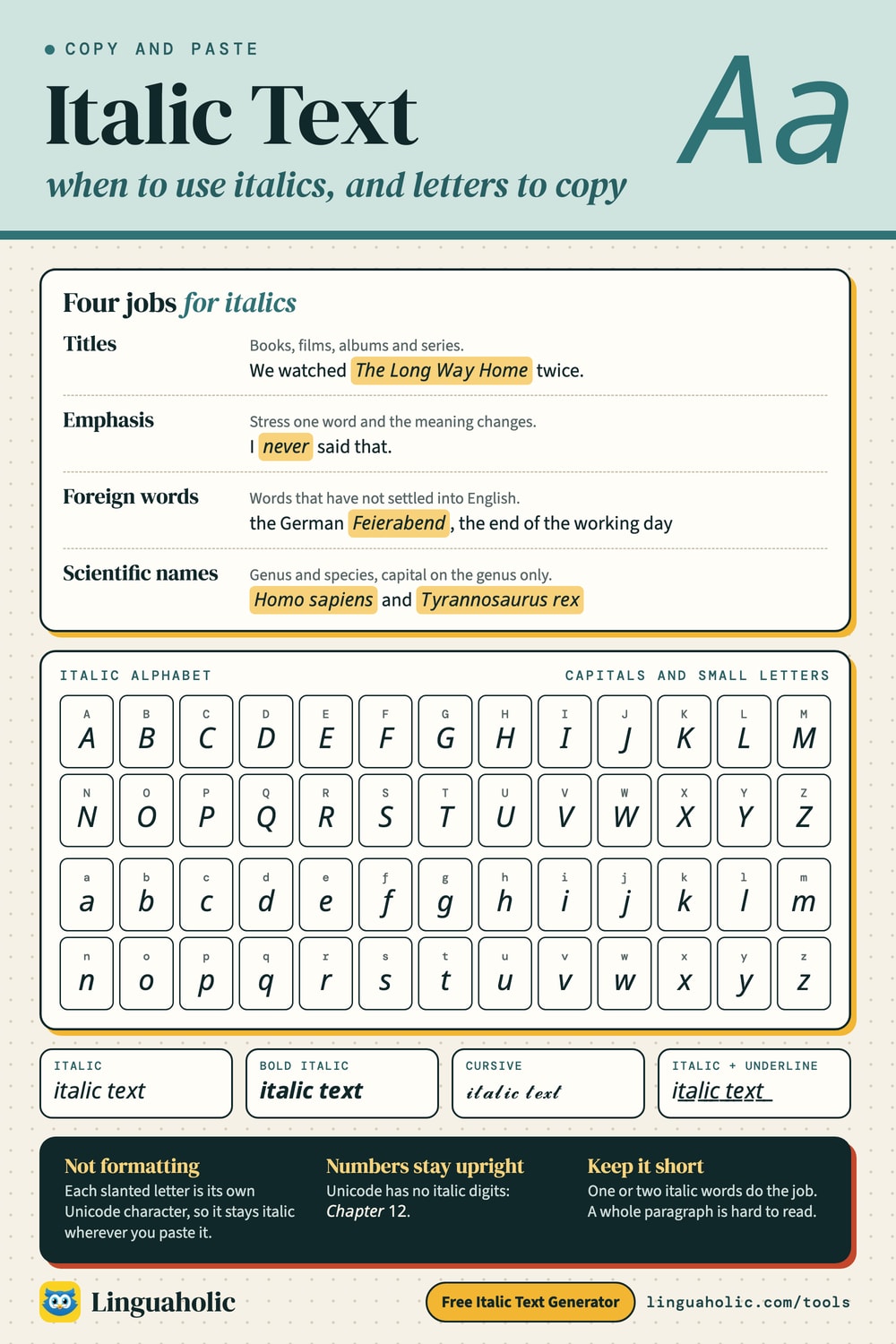
Italics have a few jobs that most style guides agree on:
- Titles of long works: books, films, TV series, albums, newspapers and magazines. 𝑀𝑜𝑏𝑦 𝐷𝑖𝑐𝑘, 𝐽𝑎𝑤𝑠. Short works such as songs, poems and articles usually go in quotation marks instead.
- Emphasis: stressing one word changes the meaning of a sentence. “I 𝘯𝘦𝘷𝘦𝘳 said that” is not the same as “I never said 𝘵𝘩𝘢𝘵”.
- Foreign words: words and phrases from another language that have not settled into English, such as the German 𝐹𝑒𝑖𝑒𝑟𝑎𝑏𝑒𝑛𝑑 (the end of the working day).
- Scientific names: genus and species are italicized, with a capital on the genus only: 𝐻𝑜𝑚𝑜 𝑠𝑎𝑝𝑖𝑒𝑛𝑠, 𝑇𝑦𝑟𝑎𝑛𝑛𝑜𝑠𝑎𝑢𝑟𝑢𝑠 𝑟𝑒𝑥.
One or two italic words in a sentence do the job. A whole paragraph of italics is harder to read and loses the emphasis.
Italic alphabet to copy and paste
Both italic alphabets in full. Tap a tile to copy a single italic letter, or Copy all to take the whole set.
Italic alphabet
Uppercase
| Letter | Italic |
|---|---|
| A | |
| B | |
| C | |
| D | |
| E | |
| F | |
| G | |
| H | |
| I | |
| J | |
| K | |
| L | |
| M | |
| N | |
| O | |
| P | |
| Q | |
| R | |
| S | |
| T | |
| U | |
| V | |
| W | |
| X | |
| Y | |
| Z |
Lowercase
| Letter | Italic |
|---|---|
| a | |
| b | |
| c | |
| d | |
| e | |
| f | |
| g | |
| h | |
| i | |
| j | |
| k | |
| l | |
| m | |
| n | |
| o | |
| p | |
| q | |
| r | |
| s | |
| t | |
| u | |
| v | |
| w | |
| x | |
| y | |
| z |
Serif Italic alphabet
Uppercase
| Letter | Serif Italic |
|---|---|
| A | |
| B | |
| C | |
| D | |
| E | |
| F | |
| G | |
| H | |
| I | |
| J | |
| K | |
| L | |
| M | |
| N | |
| O | |
| P | |
| Q | |
| R | |
| S | |
| T | |
| U | |
| V | |
| W | |
| X | |
| Y | |
| Z |
Lowercase
| Letter | Serif Italic |
|---|---|
| a | |
| b | |
| c | |
| d | |
| e | |
| f | |
| g | |
| h | |
| i | |
| j | |
| k | |
| l | |
| m | |
| n | |
| o | |
| p | |
| q | |
| r | |
| s | |
| t | |
| u | |
| v | |
| w | |
| x | |
| y | |
| z |
Why the serif italic h looks different
Look closely at the lowercase h in the Serif Italic chart. It is not from the same block as its neighbors. The serif italic letters run in alphabetical order from U+1D44E (a) to U+1D467 (z), but the slot where h should be, U+1D455, is empty. An italic h already existed in Unicode as ℎ (U+210E), the symbol for the Planck constant in physics. Unicode did not encode the same letter twice, so the slot was left unused and the Planck constant fills in. In most fonts you will not notice. In a few, the h is a slightly different size or weight from the letters around it, as in 𝑡ℎ𝑒 ℎ𝑜𝑏𝑏𝑖𝑡.
Why numbers stay upright
Unicode has no italic digits. The italic alphabets were made for mathematics, where variables are written in italics and numbers are always upright, so slanted digits were never needed. That is why “Chapter 12” comes out as 𝘊𝘩𝘢𝘱𝘵𝘦𝘳 12. Punctuation and accented letters such as é and ñ are left as typed for the same reason: there is no italic version to switch to.
How to italicize in Discord, WhatsApp, Google Docs and Word
These apps have real italics. Use them when they exist, because real italics stay searchable and screen readers handle them properly.
| App | How to italicize |
|---|---|
| Discord messages | *text* or _text_ (bold italic is ***text***) |
| WhatsApp messages | _text_ |
| Google Docs | Ctrl+I (Cmd+I on a Mac) |
| Microsoft Word | Ctrl+I (Cmd+I on a Mac) |
Discord's Markdown only works in messages. For an italic display name, server nickname or channel name, paste the characters from this page. The Discord Text Formatter handles the message side.
Where you need italic characters instead
- Instagram: name field, bio, captions and comments. Not the @username, which only allows plain letters, numbers, underscores and periods.
- TikTok: nickname, bio, captions and comments.
- X: display name, bio and posts. X counts most of these characters as two toward its limit.
- LinkedIn and Facebook: posts and comments, for example to set off a book title or a quote.
Keep hashtags and @mentions plain everywhere, or they stop working as links.
Limits and accessibility
Screen readers do not treat these characters as ordinary letters. They may spell a word out one character at a time, announce each letter as a mathematical symbol, or skip it. In-app search will not match them either, so an italicized name or keyword cannot be found by someone typing the plain word. On older devices without a font for these characters, readers see empty boxes. Italicize a title or a few words, and keep anything people need to read or find in plain text.
Related tools
The Bold Text Generator has eight bold styles with bold numbers, and the Cursive Text Generator goes further into handwriting styles. To cross words out, use the Strikethrough Text Generator. Every style in one list is on the Fancy Text Generator.
Is anything I type uploaded?
No. The italic text generator runs entirely in your browser, and nothing you type is sent to a server. It is free and needs no sign-up.
For teachers, bloggers & clubs
Put the Italic Text Generator on your website
Give your readers this tool right on your page. Copy the code, paste it into your site, done: no sign-up, no account.
- Free for any website
- No ads, no cookies
- Fits phones and sidebars
- Always up to date
Please keep the small credit line under the tool; you may add rel="nofollow" to its link. How it works & the rules

› Show the code
Frequently asked questions
- What is the difference between italic and cursive text?
- Italic is slanted type, like 𝑖𝑡𝑎𝑙𝑖𝑐 𝑡𝑒𝑥𝑡. Cursive imitates joined-up handwriting, like 𝒾𝓉𝒶𝓁𝒾𝒸 𝓉ℯ𝓍𝓉. This page has both, and the Cursive Text Generator has more handwriting styles.
- What is the difference between italic and oblique?
- Oblique letters are the upright shapes tilted to one side. True italics are drawn separately and often have different shapes, such as a single-story a. Serif typefaces usually have true italics, while many sans-serif typefaces use obliques.
- Should I italicize a title or put it in quotation marks?
- Most style guides italicize the titles of long, standalone works such as books, films, albums and newspapers, and use quotation marks for shorter works such as songs, poems, articles and episodes. If you write for a school or publication, follow its style guide.
- Can I italicize just one word?
- Yes. Type only that word in the generator, copy it, and paste it into your sentence in place of the plain word, as in "That was 𝘯𝘰𝘵 the plan".
- How do I get an italic name on Discord?
- Discord's Markdown italics (*text* or _text_) only work in messages. For an italic display name, server nickname or channel name, copy italic characters from this page and paste them into the name field.
- Why do accented letters like é stay upright?
- Unicode's italic alphabets only cover the 26 basic letters. Accented letters, digits and punctuation have no italic versions, so the generator leaves them as you typed them.
- Do italic characters work in hashtags?
- No. A hashtag written in italic characters is not recognized as a hashtag and will not appear in searches for the plain word. Keep hashtags, @mentions and links in normal letters.
About this page
The Italic Text Generator is a free tool from Linguaholic, made by Marcel Iseli. It runs in your browser, with no sign-up. Last updated .
Keep exploring
More free tools
 Fancy Text GeneratorCopy-and-paste fonts for Instagram, TikTok, and Discord bios.
 Bold Text GeneratorCopy-and-paste bold letters for Instagram, Facebook, and Discord.
 Cursive Text GeneratorElegant cursive script letters to copy and paste, in normal and bold.
 Small Text GeneratorTiny small-caps letters to copy and paste into Instagram, TikTok, and Discord.
 Bubble Text GeneratorCircled bubble letters and squared letters to copy and paste into bios.
 Glitch Text GeneratorGlitchy, corrupted text to copy and paste into Discord and usernames.