
Fancy text generators
Upside Down Text Generator
Type your text and copy it flipped upside down (uʍop ǝpᴉsdn), with mirror and backwards versions and a full chart of upside down letters and numbers.
Updated · Free, no sign-up
Share this tool
Know someone who’d love it?
What is upside down text?
Upside down text is ordinary writing turned 180°, as if you had spun the page around: Hello world becomes plɹoʍ ollǝH. People also call it flipped text or inverted text, and an upside down text generator (or text flipper) is the tool that makes it. Type in the box above and the flipped line appears as you type, ready to copy and paste.
It is not an upside down font. A font only changes how letters are drawn on your own screen, and it is lost the moment you paste somewhere else. This tool swaps every letter for a different Unicode character that happens to look like that letter turned over, so the effect is part of the text and travels with it.
Here “inverted” means turned upside down. Inverted colors (white text on black) are a display setting, not something an inverted text generator can do.
How to use the upside down text generator
- Type or paste your text in the box.
- Find the Upside Down row. The mirror, backwards, and underlined rows below it are there for comparison.
- Tap the row or its Copy button.
- Paste it into a bio, caption, comment, or message.
To check the result, turn your phone around. Lock the screen rotation first, or the screen will turn with you.
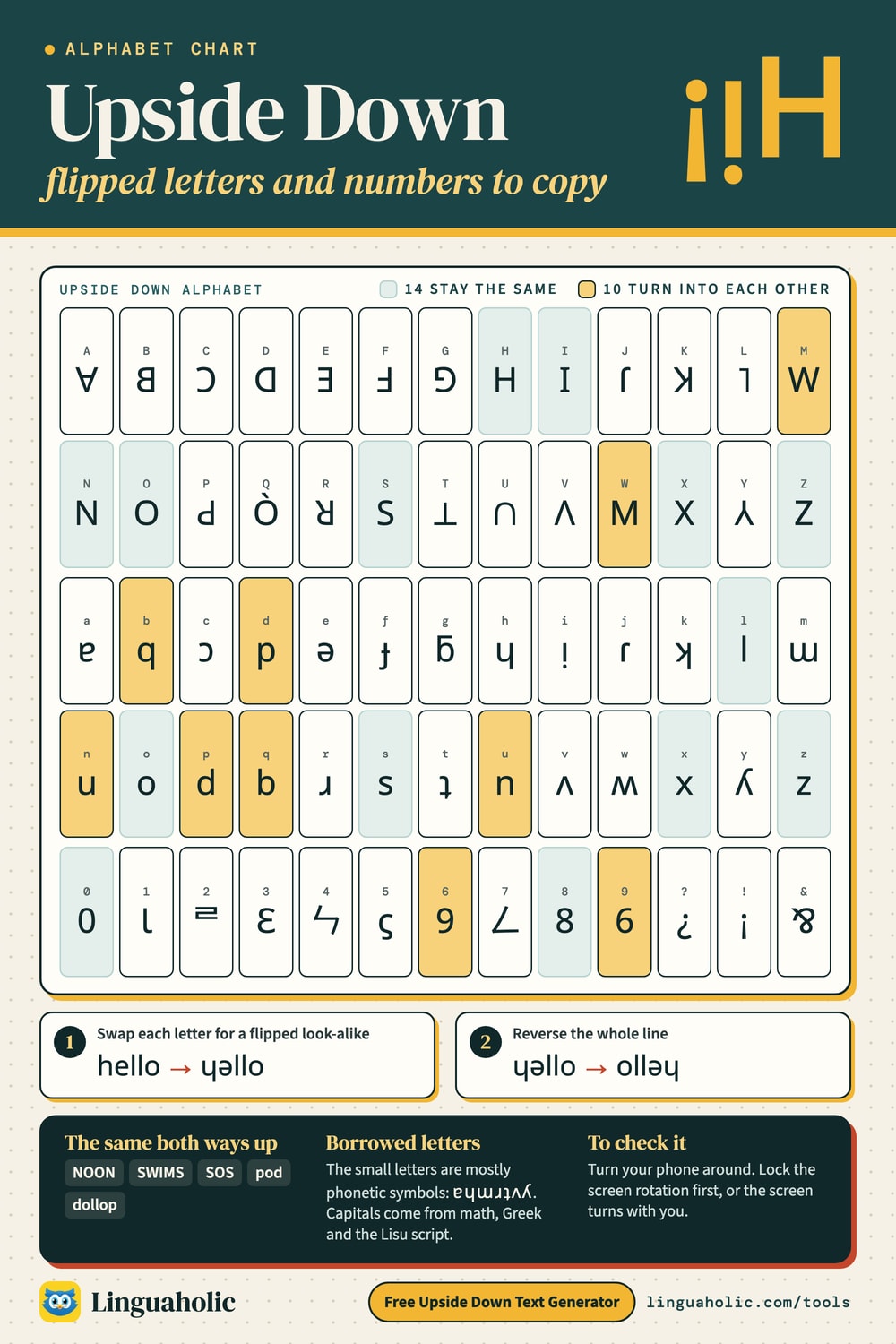
Upside down alphabet chart

How the generator flips text
It does two things, in this order:
- Swap each letter for a character that looks like it rotated: a → ɐ, e → ǝ, m → ɯ, h → ɥ. So
helloturns intoɥǝllo. - Reverse the whole line, giving
ollǝɥ. When you spin a line of text half a turn, the last letter ends up on the left. Without this step the letters would be upside down but in the wrong order once you turn the screen.
Most of the lowercase replacements come from the International Phonetic Alphabet (IPA), the symbols linguists use to write speech sounds. The IPA has a whole set of “turned” letters: ɐ, ɥ, ɯ, ɹ, ʇ, ʌ, ʍ, ʎ. They are real letters with real jobs: ɹ stands for the English r sound and ʌ is the vowel in “cup.” The capitals are borrowed from further afield: ∀ and ⊥ are math symbols, Λ is the Greek letter lambda, and ꓭ, ꓷ, ꓘ, and ꓤ are letters of the Lisu script.
Upside down letters: which ones are perfect?
Some upside down letters are exact, and some are only close.
- Unchanged: o, s, x, and z look the same after a half turn, and so do the capitals H, I, N, O, S, X, and Z. Lowercase l is left alone too.
- Perfect pairs: n and u, b and q, d and p, and capital M and W turn into each other.
- Good matches: the turned IPA letters, such as ɐ, ɯ, ɹ, and ʎ.
- Approximations: g becomes ƃ (really a b with a bar on top), j becomes ɾ, f becomes ɟ, and capital L, P, Q, and U become ˥, Ԁ, Ò, and ∩.
A word made only of unchanged letters and perfect pairs reads the same both ways up. Type NOON, SWIMS, SOS, pod, or dollop and the upside down row shows exactly what you typed. MOM turns into WOW.
Upside down alphabet to copy and paste
The chart flips one character at a time, so it stays in A to Z order. Tap a tile to copy a single upside down letter, or use Copy all.
Upside Down alphabet
Uppercase
| Letter | Upside Down |
|---|---|
| A | |
| B | |
| C | |
| D | |
| E | |
| F | |
| G | |
| H | |
| I | |
| J | |
| K | |
| L | |
| M | |
| N | |
| O | |
| P | |
| Q | |
| R | |
| S | |
| T | |
| U | |
| V | |
| W | |
| X | |
| Y | |
| Z |
Lowercase
| Letter | Upside Down |
|---|---|
| a | |
| b | |
| c | |
| d | |
| e | |
| f | |
| g | |
| h | |
| i | |
| j | |
| k | |
| l | |
| m | |
| n | |
| o | |
| p | |
| q | |
| r | |
| s | |
| t | |
| u | |
| v | |
| w | |
| x | |
| y | |
| z |
Numbers
| Number | Upside Down |
|---|---|
| 0 | |
| 1 | |
| 2 | |
| 3 | |
| 4 | |
| 5 | |
| 6 | |
| 7 | |
| 8 | |
| 9 |
Upside down numbers and punctuation
Unicode has no rotated digits, so the generator borrows lookalikes from other writing systems. Only 0, 6, 8, and 9 are exact.
| Number | Upside down | What the character really is |
|---|---|---|
| 0 | 0 | Same either way |
| 1 | Ɩ | Latin letter iota |
| 2 | ᄅ | A Korean letter |
| 3 | Ɛ | Latin open E |
| 4 | ㄣ | A Bopomofo letter (Mandarin phonetic script) |
| 5 | ϛ | Old Greek letter stigma |
| 6 | 9 | A 9 |
| 7 | ㄥ | A Bopomofo letter |
| 8 | 8 | Same either way |
| 9 | 6 | A 6 |
Common punctuation flips as well:
| You type | Upside down | Note |
|---|---|---|
| ? | ¿ | Spanish opening question mark |
| ! | ¡ | Spanish opening exclamation mark |
| . | ˙ | Raised dot |
| , | ' | Apostrophe |
| ' | , | Comma |
| " | ,, | Two commas |
| & | ⅋ | Turned ampersand |
| _ | ‾ | Overline |
| ( | ) | All brackets swap with their partner |
Anything else, such as @, #, hyphens, accented letters, and emoji, stays as typed and only moves to its new place in the line.
The upside down question mark and exclamation mark
The upside down question mark (¿) and upside down exclamation mark (¡) are not novelty characters. They are standard Spanish punctuation: Spanish opens a question with ¿ and an exclamation with ¡, as in ¿Cómo estás? and ¡Hola! You can copy them from the table, or type them directly:
- iPhone and Android: press and hold the ? or ! key.
- Mac: Option + Shift + ? for ¿, and Option + 1 for ¡.
- Windows: hold Alt and type 0191 (¿) or 0161 (¡) on the numeric keypad.
Upside down vs. mirror vs. backwards text
“Flip text” can mean three different things. A half turn flips the line top to bottom and left to right at once. Flip it left to right only and you get mirror writing. Leave the letters alone and only change their order, and you get backwards text.
| Effect | What happens | Hello world | How to read it |
|---|---|---|---|
| Upside down | Rotated 180° | plɹoʍ ollǝH | Turn the screen around |
| Mirror | Flipped left to right | blɿow ollɘH | Hold it up to a mirror |
| Backwards | Same letters, reverse order | dlrow olleH | Read from right to left |
The Mirror Text Generator has the full mirror alphabet, and the Backwards Text Generator can also reverse word order or spell each word backwards.
Where upside down text works, and where it doesn't
- Bios, captions, comments, and messages on Instagram, TikTok, X, Discord, and WhatsApp accept Unicode text, so the flipped line pastes in like any other text.
- Display names and nicknames are fine. @handles and usernames are not: Instagram, TikTok, X, and Discord only allow plain letters, numbers, underscores, and periods there.
- Older devices: what shows depends on the fonts on the reader's device. Lowercase is safest. The capitals ꓭ, ꓷ, ꓩ, ꓘ, and ꓤ are the most likely to appear as empty boxes.
- X character count: X counts some of the flipped characters, such as ᴉ, ∀, and ⊥, as two characters toward its limit.
- Screen readers and search: screen readers read the characters one by one or skip them, and search and hashtags will not match the original words. Keep it to a few decorative words.
How to turn text upside down in Word or Google Docs
For something you are going to print, real rotation looks better, because it works in any font. In Word, put the text in a text box and drag the round rotation handle half a turn. In Google Docs, choose Insert → Drawing → New, add a text box, and rotate it the same way. The catch: the result is a shape in that document. You cannot copy it into a bio or a chat, which is where the generator comes in.
What people use upside down text for
- Answers under a riddle or quiz question, like the answer keys printed upside down in puzzle books:
ᄅㄣ :ɹǝʍsu∀. - A bio or display name that stands out in a list of ordinary ones.
- Scavenger hunt clues that kids have to turn around to read.
Related tools
The Fancy Text Generator has bold, cursive, bubble, and dozens of other styles in one place. The Weird Text Generator and Glitch Text Generator go stranger still. Everything runs in your browser: it is free, there is no sign-up, and nothing you type is uploaded.
For teachers, bloggers & clubs
Put the Upside Down Text Generator on your website
Give your readers this tool right on your page. Copy the code, paste it into your site, done: no sign-up, no account.
- Free for any website
- No ads, no cookies
- Fits phones and sidebars
- Always up to date
Please keep the small credit line under the tool; you may add rel="nofollow" to its link. How it works & the rules

› Show the code
Frequently asked questions
- Can I turn upside down text back to normal?
- Only partly. If you paste flipped text back into the generator, the letter order is restored and pairs like n/u, b/q, and d/p turn back, but most other characters stay flipped. The simplest way to read it is to turn your phone around with screen rotation locked.
- Can I use upside down text in my Instagram or TikTok username?
- Not in the @handle. Handles on Instagram, TikTok, and X only allow plain letters, numbers, underscores, and periods. Upside down text does work in the display name, the bio, captions, and comments.
- Why do some upside down letters show up as empty boxes?
- The reader's device has no font that contains that character. Lowercase upside down letters are widely supported, while some flipped capitals, such as B, D, J, K, and R, use rarer characters and are more likely to fail on older phones and computers.
- Which words read the same upside down?
- Words made only of letters that survive a half turn, such as NOON, SWIMS, SOS, pod, and dollop. Lowercase o, s, x, and z and capital H, I, N, O, S, X, and Z stay the same, and n/u, b/q, d/p, and M/W turn into each other.
- Can I type upside down letters on my keyboard?
- No. Apart from ¿ and ¡, which you get by holding the ? or ! key on a phone, keyboards do not have upside down letters. Type normally in the generator and copy the result.
- Does the generator flip capital letters and numbers too?
- Yes. Capitals, digits, and common punctuation all have an upside down stand-in. A few, such as the flipped 2, 4, 5, and 7, are lookalikes borrowed from other writing systems and are less exact than the lowercase letters.
- Is upside down text the same as mirror text?
- No. Upside down text is rotated 180°, so you read it by turning the screen around. Mirror text is flipped left to right and reads correctly in a mirror. Backwards text keeps normal letters and only reverses their order.
- Is the upside down text generator free, and is my text saved?
- It is free with no sign-up. The flipping happens in your browser, so nothing you type is uploaded or stored.
About this page
The Upside Down Text Generator is a free tool from Linguaholic, made by Marcel Iseli. It runs in your browser, with no sign-up. Last updated .
Keep exploring
More free tools
 Fancy Text GeneratorCopy-and-paste fonts for Instagram, TikTok, and Discord bios.
 Bold Text GeneratorCopy-and-paste bold letters for Instagram, Facebook, and Discord.
 Cursive Text GeneratorElegant cursive script letters to copy and paste, in normal and bold.
 Small Text GeneratorTiny small-caps letters to copy and paste into Instagram, TikTok, and Discord.
 Bubble Text GeneratorCircled bubble letters and squared letters to copy and paste into bios.
 Glitch Text GeneratorGlitchy, corrupted text to copy and paste into Discord and usernames.