
Fancy text generators
Old English Font Generator
Write your text in real Old English (blackletter) fonts and download it as a PNG for tattoos, shirts, and logos — or copy and paste Old English letters into any app. Full alphabet and numbers included.
Updated · Free, no sign-up
These are Unicode letters, so they keep the Old English look in display names, bios, posts, and messages on Instagram, TikTok, Discord, and X — but not in @handles, which only take plain letters, numbers, and a few signs like the underscore. Unicode has no Old English numbers: type a number and pick bold or double-struck digits above the list.
Fit it and share it
11 characters you can see, which most apps count as 21. Fits in:
- Instagram name (30): fits
- TikTok name (30): fits
- Discord display name (32): fits
- X display name (50): fits
- TikTok bio (80): fits
- Instagram bio (150): fits
- Discord About Me (190): fits
Counted strictly, so a ✓ is safe: text boxes on the web count most gothic letters as two characters (ℭ ℌ ℑ ℜ ℨ as one), and X counts every fancy character and emoji as two. Some apps are more generous, so a ✗ may still fit there.
Works in display names and bios, not in @handles. Usernames on Instagram, TikTok, X, Discord, and Minecraft only take plain letters and numbers (plus _ and sometimes a period).
Single Old English letters and numbers to copy
Tap a letter to copy it — handy for an initial, a monogram, or fixing one letter.
Old English
Bold Old English
Bold numbers
Double-struck numbers
ℭ, ℌ, ℑ, ℜ, and ℨ (gothic C, H, I, R, Z) come from an older Unicode block, so in some fonts they look a little different from the other letters. Screen readers may read gothic letters oddly or skip them, and search boxes won’t find them — keep important words in plain text too.
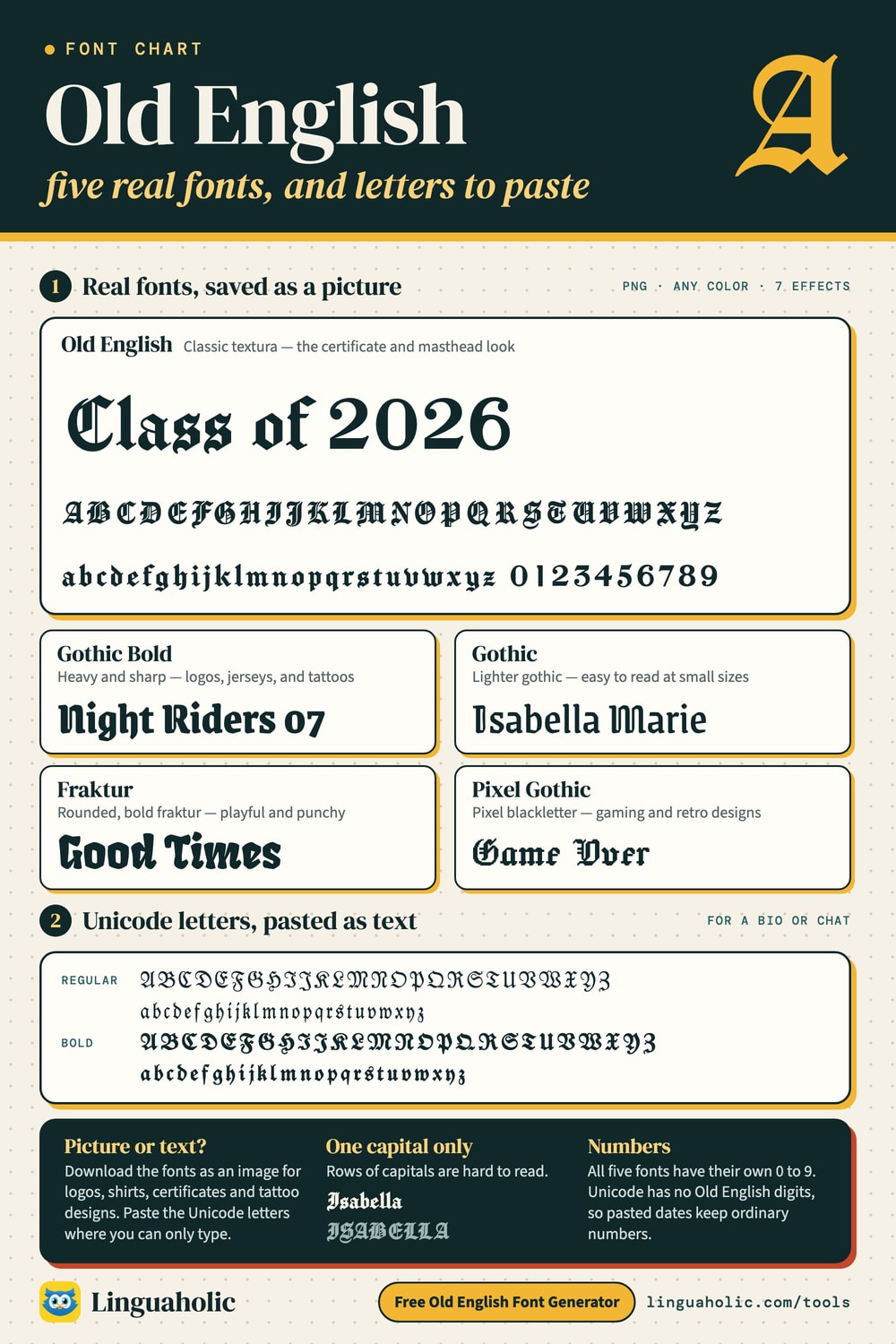
Old English · Classic textura — the certificate and masthead look
Gothic Bold · Heavy and sharp — logos, jerseys, and tattoos
Gothic · Lighter gothic — easy to read at small sizes
Fraktur · Rounded, bold fraktur — playful and punchy
Pixel Gothic · Pixel blackletter — gaming and retro designs
PNGs have a transparent background unless you pick one. They come out about 800 px wide — fine for screens, stickers, and a tattoo artist’s sketch; for print, shirts, or a big stencil, tick Large PNG for print under Size & tattoo (3,600 px wide). Long text wraps onto a new line; press Enter to choose where.
Share this tool
Know someone who’d love it?
What is an Old English font generator?
An Old English font generator writes your words in ornate blackletter — the dramatic medieval lettering you see on diplomas, newspaper mastheads, jerseys, and tattoos. This one gives you two kinds of results from the same text:
- Font images: your text set in five real blackletter fonts. Choose a color, a background, and an effect — outline, double line, shadow, 3D, glow, distressed, or split — and download a high-resolution PNG for printing, stencils, shirts, logos, and tattoo designs.
- Copy & paste: Old English letters made of Unicode characters, which keep their look when you paste them into Instagram, TikTok, Discord, or a bio — no font install needed.
How to use it
- Type a word, name, or short phrase. Press Enter for a second line.
- On Font images, compare the five styles, pick a color, background, and effect, and tap Download PNG. Tap A–Z sheet to download the whole alphabet in that font.
- On Copy & paste, tap Copy next to any of the 14 styles and paste it wherever you like.
Old English fonts and alphabet chart

The Old English alphabet
Every capital and small letter in the Old English font, plus the numbers. Blackletter capitals can be hard to recognize at first — the small label under each card tells you which letter it is.
| Letter | In Old English |
|---|---|
| A a | Aa |
| B b | Bb |
| C c | Cc |
| D d | Dd |
| E e | Ee |
| F f | Ff |
| G g | Gg |
| H h | Hh |
| I i | Ii |
| J j | Jj |
| K k | Kk |
| L l | Ll |
| M m | Mm |
| N n | Nn |
| O o | Oo |
| P p | Pp |
| Q q | |
| R r | Rr |
| S s | Ss |
| T t | Tt |
| U u | Uu |
| V v | Vv |
| W w | Ww |
| X x | Xx |
| Y y | Yy |
| Z z | Zz |
| Number | In Old English |
|---|---|
| 0 | 0 |
| 1 | 1 |
| 2 | 2 |
| 3 | 3 |
| 4 | 4 |
| 5 | 5 |
| 6 | 6 |
| 7 | 7 |
| 8 | 8 |
| 9 | 9 |
Want a printable version? Tap A–Z sheet on any font in the generator above to download the complete alphabet as an image.
Old English letters to copy and paste
These are the Unicode blackletter (fraktur) letters behind the copy-and-paste styles. Copy single letters straight from the table — for an initial, a monogram, or a username.
| Letter | Old English | small | Bold | bold small |
|---|---|---|---|---|
| A | 𝔄 | 𝔞 | 𝕬 | 𝖆 |
| B | 𝔅 | 𝔟 | 𝕭 | 𝖇 |
| C | ℭ | 𝔠 | 𝕮 | 𝖈 |
| D | 𝔇 | 𝔡 | 𝕯 | 𝖉 |
| E | 𝔈 | 𝔢 | 𝕰 | 𝖊 |
| F | 𝔉 | 𝔣 | 𝕱 | 𝖋 |
| G | 𝔊 | 𝔤 | 𝕲 | 𝖌 |
| H | ℌ | 𝔥 | 𝕳 | 𝖍 |
| I | ℑ | 𝔦 | 𝕴 | 𝖎 |
| J | 𝔍 | 𝔧 | 𝕵 | 𝖏 |
| K | 𝔎 | 𝔨 | 𝕶 | 𝖐 |
| L | 𝔏 | 𝔩 | 𝕷 | 𝖑 |
| M | 𝔐 | 𝔪 | 𝕸 | 𝖒 |
| N | 𝔑 | 𝔫 | 𝕹 | 𝖓 |
| O | 𝔒 | 𝔬 | 𝕺 | 𝖔 |
| P | 𝔓 | 𝔭 | 𝕻 | 𝖕 |
| Q | 𝔔 | 𝔮 | 𝕼 | 𝖖 |
| R | ℜ | 𝔯 | 𝕽 | 𝖗 |
| S | 𝔖 | 𝔰 | 𝕾 | 𝖘 |
| T | 𝔗 | 𝔱 | 𝕿 | 𝖙 |
| U | 𝔘 | 𝔲 | 𝖀 | 𝖚 |
| V | 𝔙 | 𝔳 | 𝖁 | 𝖛 |
| W | 𝔚 | 𝔴 | 𝖂 | 𝖜 |
| X | 𝔛 | 𝔵 | 𝖃 | 𝖝 |
| Y | 𝔜 | 𝔶 | 𝖄 | 𝖞 |
| Z | ℨ | 𝔷 | 𝖅 | 𝖟 |
Old English numbers
Unicode has blackletter letters but no blackletter numbers, so copy-and-paste text keeps ordinary digits (the bold styles swap in bold digits so they match better). If you need dates or numbers in true Old English style — for a tattoo, a jersey, or an anniversary design — use the Font images tab: every font there includes matching numbers 0–9, and 0–9 sheet downloads them all. In Copy & paste, type a number and pick bold (𝟐𝟎𝟐𝟔) or double-struck (𝟚𝟘𝟚𝟞) digits for every style.
Old English lettering for tattoos
- Avoid all capitals. Blackletter capitals are elaborate and hard to read in a row. Write names with one capital and small letters: “Isabella”, not “ISABELLA”.
- Go bigger for small details. The thin strokes in Old English need room — very small lettering blurs over time. The Gothic and Gothic Bold styles hold up better at small sizes.
- Use a transparent PNG. Download with the transparent background in black so your artist can size it and make a stencil.
- Try the tattoo options. On Font images, tap Size & tattoo for size and letter spacing, a clean Stencil outline, a Mirror switch for transfer paper, and a preview on light, medium, tan, or deep skin.
- Double-check the spelling letter by letter against the alphabet chart above, and pair dates with the Roman Numeral Converter if you want them in Roman numerals.
Old English Text MT and free alternatives
The classic “Old English” look most people know comes from Old English Text MT, a commercial typeface from Monotype that ships with Microsoft Office. The fonts in this generator are free, open-source blackletter designs with a similar feel: Old English (closest to the classic textura look), Gothic and Gothic Bold, the rounder Fraktur, and a Pixel Gothic style for gaming designs. You can use the images you make here for personal and commercial projects.
What “Old English” lettering really is
Despite the name, this lettering has nothing to do with the Old English language of Beowulf. It’s blackletter, the script used across medieval Europe from about the 12th century — Gutenberg printed his Bible in it in the 1450s. Its main styles are textura (tall, narrow, and woven-looking, like the Old English font), rotunda (rounder, from Italy and Spain), schwabacher, and fraktur, which stayed in everyday use in Germany until the 20th century. English printers called it “black letter” or “Old English” long after lighter roman type took over.
The real Old English language (Anglo-Saxon, about 450–1150) was written in a different, rounder script and used letters we no longer have, such as þ (thorn), ð (eth), æ (ash), and ƿ (wynn). This tool changes how your letters look — it doesn’t translate your words.
More lettering tools
For a heavier, darker look try the Gothic Text Generator. You can also make cursive text and bold text, or browse every style in the Fancy Text Generator.
Free and private
Everything happens in your browser — the images are drawn on your own device, and nothing you type is uploaded or stored.
Credits
Fonts: Manufacturing Consent (© 2019 The Manufacturing Consent Project Authors), Grenze Gotisch (© 2020 The Grenze Gotisch Project Authors), Fruktur (© 2022 The Fruktur Project Authors), and Jacquard 24 (© 2023 The Soft Type Project Authors), all used under the SIL Open Font License 1.1.
For teachers, bloggers & clubs
Put the Old English Font Generator on your website
Give your readers this tool right on your page. Copy the code, paste it into your site, done: no sign-up, no account.
- Free for any website
- No ads, no cookies
- Fits phones and sidebars
- Always up to date
Please keep the small credit line under the tool; you may add rel="nofollow" to its link. How it works & the rules

› Show the code
Frequently asked questions
- How do I write in an Old English font?
- Type your text and it appears in five real blackletter fonts. Pick a color and background and tap Download PNG — or switch to Copy & paste for Old English letters you can paste into Instagram, TikTok, Discord, and bios.
- Can I use the Old English font for a tattoo?
- Yes. Download a transparent PNG in black and give it to your tattoo artist. Write names with one capital and small letters — blackletter capitals in a row are hard to read — and keep fine lettering large enough not to blur.
- Are there Old English numbers?
- Not in copy-and-paste text: Unicode has blackletter letters but no blackletter digits. The Font images tab includes matching numbers 0–9 in every font, so use it for dates and numbers.
- Is this the same as the Old English Text MT font?
- Old English Text MT is a commercial Monotype font bundled with Microsoft Office. This generator uses free, open-source blackletter fonts with a similar look, and the images you make can be used in personal and commercial projects.
- Does it translate into the Old English language?
- No — it changes the letter shapes, not the language. The Old English language of Beowulf was written in a different script with letters like þ (thorn) and ð (eth).
- Why don't the copied letters show in some apps?
- Copy & paste styles use Unicode fraktur characters, which almost every modern app supports. A few older apps or fonts may miss some — try the bold style, or use a Font image instead.
About this page
The Old English Font Generator is a free tool from Linguaholic, made by Marcel Iseli. It runs in your browser, with no sign-up. Last updated .
Keep exploring
More free tools
 Fancy Text GeneratorCopy-and-paste fonts for Instagram, TikTok, and Discord bios.
 Bold Text GeneratorCopy-and-paste bold letters for Instagram, Facebook, and Discord.
 Cursive Text GeneratorElegant cursive script letters to copy and paste, in normal and bold.
 Small Text GeneratorTiny small-caps letters to copy and paste into Instagram, TikTok, and Discord.
 Bubble Text GeneratorCircled bubble letters and squared letters to copy and paste into bios.
 Glitch Text GeneratorGlitchy, corrupted text to copy and paste into Discord and usernames.