
Fancy text generators
Discord Fonts
Fonts for Discord names and messages: copy styles for your display name, server nickname, server and channel names, see the character limits, and add Markdown headers, small text or spoilers to a message.
Updated · Free, no sign-up
Tap any style to copy it, then paste it where you like.10 characters
Where will you paste it?
Preview (dark theme)
𝕹𝖎𝖌𝖍𝖙 𝕺𝖜𝖑𝖘 Today at 8:15 PM
10 / 32 fits the display name limit. Shown everywhere. Markdown does not work in names.
Bold, italic, spoilers, timestamps and colored text are Markdown: use the Discord Text Formatter.
The preview shows the last style you copied.
For names 8
Display names and server nicknames: 32 characters at most.
Servers & channels 8
Channel names turn spaces into hyphens.
For messages 6
Styles Markdown cannot make. For bold or italic, use Markdown.
Gaming & cool 7
Sharp alphabets and a little glitch for a gaming name.
Share this tool
Know someone who’d love it?
Discord fonts: fancy letters for names and messages
Discord has no font menu. Every name and message is shown in the app's own typeface, and Markdown can only make text bold, italic, underlined, crossed out or bigger. Discord fonts go further: they are Unicode letters that look like gothic, cursive, outline or bubble writing, such as 𝕹𝖎𝖌𝖍𝖙 𝕺𝖜𝖑𝖘 or 𝓝𝓲𝓰𝓱𝓽 𝓞𝔀𝓵𝓼. You paste them like any text, and they show up styled for everyone, in names as well as in messages.
Discord Fonts or the Discord Text Formatter?
Linguaholic has two Discord tools that do different jobs. Use the one that fits what you want to change:
| You want | Use |
|---|---|
| A gothic, cursive or bubble display name or nickname | Discord Fonts (this page) |
| A styled server or channel name | Discord Fonts (this page) |
| A message in letters Markdown cannot make (cursive, upside down, tiny) | Discord Fonts (this page) |
| Bold, italic, underline, strikethrough, spoilers, lists, code blocks | Discord Text Formatter |
| Timestamps that show in each reader's time zone | Discord Text Formatter |
| Colored text in a code block | Discord Text Formatter |
Real Markdown is the better choice whenever it can do the job: it stays searchable, and screen readers read it as normal words. Fancy letters are for the places Markdown does not reach, above all names.
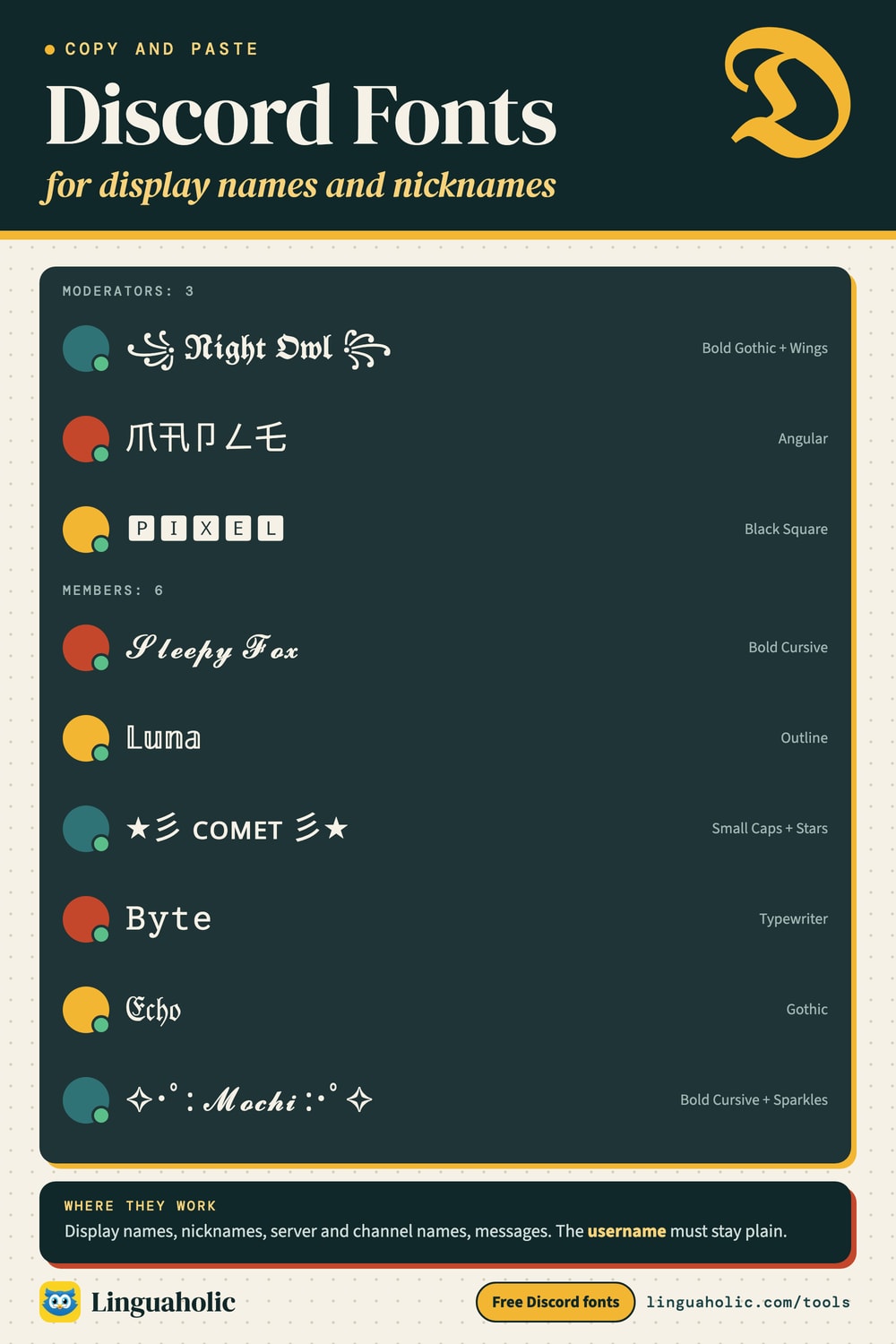
Discord fonts chart

How to change your font on Discord
- Type your name or message in the box above.
- Choose where it goes: Display, Nickname, Server, Channel, Message or About Me. The preview and the character counter follow your choice.
- Tap a style to copy it.
- For a display name, open your profile settings in Discord and paste it into the display name field. For a server nickname, open the server menu and choose Edit Server Profile. For a server or channel name, paste it into the name field of the server or channel settings.
Where fancy fonts work on Discord
| Place | Fancy fonts? | Limit and tip |
|---|---|---|
| Username | No | Lowercase letters, numbers, periods and underscores only. |
| Display name | Yes | 32 characters. Shown on every server. |
| Server nickname | Yes | 32 characters. Only on that one server. |
| Server name | Yes | 100 characters. |
| Channel name | Yes | 100 characters. Spaces become hyphens: Game Night Chat is saved as game-night-chat. |
| Role names | Yes | Keep them readable: members pick roles from a list. |
| Messages | Yes | 2,000 characters; Markdown works around fancy letters. |
| About Me and custom status | Yes | About Me holds about 190 characters. |
Every fancy letter is one character on its own, but it is stored in twice the space of a plain letter. When an app counts the stored size, a styled name can reach the limit sooner. The counter in the tool turns yellow when your name only fits if Discord counts each fancy letter once.
Combining Discord fonts with Markdown
Markdown works in messages, not in names. Choose Message and pick a Markdown option, and every style comes with it already in place. Here is the same line with each option:
| Markdown | What you paste |
|---|---|
| Big header (#) | # 𝓖𝓪𝓶𝓮 𝓷𝓲𝓰𝓱𝓽 |
| Medium header (##) | ## 𝓖𝓪𝓶𝓮 𝓷𝓲𝓰𝓱𝓽 |
| Small gray text (-#) | -# 𝓖𝓪𝓶𝓮 𝓷𝓲𝓰𝓱𝓽 |
| Quote (>) | > 𝓖𝓪𝓶𝓮 𝓷𝓲𝓰𝓱𝓽 |
| Spoiler (||) | ||𝓖𝓪𝓶𝓮 𝓷𝓲𝓰𝓱𝓽|| |
Bold Markdown (**text**) on top of fancy letters often changes little, because most fancy alphabets have only one weight. Use a bold style such as 𝗕𝗼𝗹𝗱 or 𝕭𝖔𝖑𝖉 𝕲𝖔𝖙𝖍𝖎𝖈 instead.
Discord name ideas in fancy fonts
- ꧁ 𝕹𝖎𝖌𝖍𝖙 𝕺𝖜𝖑 ꧂
- Ꮆ卄ㄖ丂ㄒ
- 🅿︎🅸🆇🅴🅻
- 𝓛𝓾𝓷𝓪
- ℕ𝕠𝕧𝕒
- ★彡 ꜱʟᴇᴇᴘʏ ꜰᴏx 彡★
- 𝙱𝚢𝚝𝚎
- S͙̒̚t̫͊̾a͔̋̃t̞͂̋ǐ̝̒c͈̾́
Need a name first? The Gamertag Generator and the Username Generator make plenty to choose from.
All 29 Discord fonts on this page
| Group | Example | Best for |
|---|---|---|
| For names (8) | 𝕹𝖎𝖌𝖍𝖙 𝕺𝖜𝖑𝖘 | Display names and server nicknames: 32 characters at most. |
| Servers & channels (8) | 𝗡𝗶𝗴𝗵𝘁 𝗢𝘄𝗹𝘀 | Channel names turn spaces into hyphens. |
| For messages (6) | 𝒩𝒾ℊ𝒽𝓉 𝒪𝓌𝓁𝓈 | Styles Markdown cannot make. For bold or italic, use Markdown. |
| Gaming & cool (7) | 几丨Ꮆ卄ㄒ ㄖ山ㄥ丂 | Sharp alphabets and a little glitch for a gaming name. |
Keep your name readable
A fancy name has one drawback on Discord: people cannot type it. Mentioning you with @ and finding you in the member list both need the plain letters, so friends may struggle to tag you. Many servers ask for names that can be read and typed, and moderators or bots sometimes rename members whose names use unusual characters. A good compromise is plain letters with a frame (꧁ Night Owl ꧂), or a styled server nickname while your display name stays plain.
What font does Discord use?
Discord draws its interface and messages in its own typeface, gg sans, which replaced Whitney in 2022. There is no setting to switch to another font, and the fonts on this page do not change it either: they are different characters, which gg sans or a fallback font on your device draws. A device that has no font for a character shows an empty box instead.
Discord fonts and screen readers
Screen readers read characters by their names, so a styled name may be spelled out letter by letter, announced as mathematical symbols or skipped. In a busy server that can make it hard for some members to follow who is talking. Keep long messages in plain text with Markdown, and use fancy fonts for names and short headings.
Discord is a trademark of Discord Inc. Linguaholic is not affiliated with Discord.
Is anything I type uploaded?
No. The styles are made in your browser and nothing is sent to a server. It is free, with no sign-up and no bot to add to your server.
For teachers, bloggers & clubs
Put the Discord Fonts on your website
Give your readers this tool right on your page. Copy the code, paste it into your site, done: no sign-up, no account.
- Free for any website
- No ads, no cookies
- Fits phones and sidebars
- Always up to date
Please keep the small credit line under the tool; you may add rel="nofollow" to its link. How it works & the rules

› Show the code
Frequently asked questions
- How do I get a fancy font in my Discord name?
- Type your name here, choose Display or Nickname, and copy a style. In Discord, open your profile settings (or Edit Server Profile for a nickname) and paste it into the display name or nickname field.
- Can I use fancy fonts in my Discord username?
- No. The username only allows lowercase letters, numbers, periods and underscores. Fancy letters work in the display name and in server nicknames, which is the name people see in chat.
- How long can a Discord name be?
- Display names and server nicknames can have up to 32 characters, server and channel names up to 100, and a message up to 2,000. The counter here checks your styled text against the limit of the place you choose.
- How do I change the font of my Discord messages?
- Discord has no font menu. For bold, italic, underline and strikethrough use Markdown such as **bold**. For looks Markdown cannot make, like cursive or bubble letters, paste styled characters from this page.
- Can I combine Discord fonts with Markdown?
- Yes, in messages. Choose Message and pick # Big, ## Medium, -# Small, > Quote or || Spoiler: every style then comes with the Markdown in front, ready to paste. Markdown does not work in names.
- Do fancy fonts work in Discord channel names?
- Yes. Discord turns spaces into hyphens and plain letters into lowercase in text channel names. Choose Channel to see the name the way Discord will save it.
- What font does Discord use?
- Discord draws its text in its own typeface, gg sans, and there is no setting to change it. Styled characters do not change that font; they are different characters that the same font, or a fallback font, draws.
- Is a Discord font generator against the rules?
- Pasting Unicode characters into a name is allowed, but server moderators may ask for names people can read and mention. Some servers rename members whose names cannot be typed, so pick a style that stays readable.
About this page
The Discord Fonts is a free tool from Linguaholic, made by Marcel Iseli. It runs in your browser, with no sign-up. Last updated .
Keep exploring
More free tools
 Discord Text FormatterDiscord markdown with a live preview, plus a timestamp generator and colored text.
 Fonts Copy and PasteA gallery of 72 font styles in 13 categories, ready to copy.
 Instagram FontsFonts for your bio, name and captions, with a preview and limits.
 Gamertag GeneratorGamertags in 11 styles for any kind of game, around your name, plus clan names and tags.
 Gothic Text GeneratorGothic letters in 14 copy-and-paste styles, or as a PNG in five real fonts.
 Invisible CharacterCopy blank text and invisible characters, or find and remove hidden ones.