
Word games & fun
Random Group Generator: Teams, Pairs and a Name Picker
Paste a list of names and split it into random groups or teams, by number of groups or people per group, or into random pairs. Keep people apart or together, mix by a tag or skill level, add roles, make several rounds with new groupmates, spin a name picker wheel, and show it all on a projector. Free, no sign-up, nothing uploaded.
Updated · Free, no sign-up
Paste from a spreadsheet or class list. Add a tag after a name with # (Ava #girls, Ben #3) to mix groups by it.
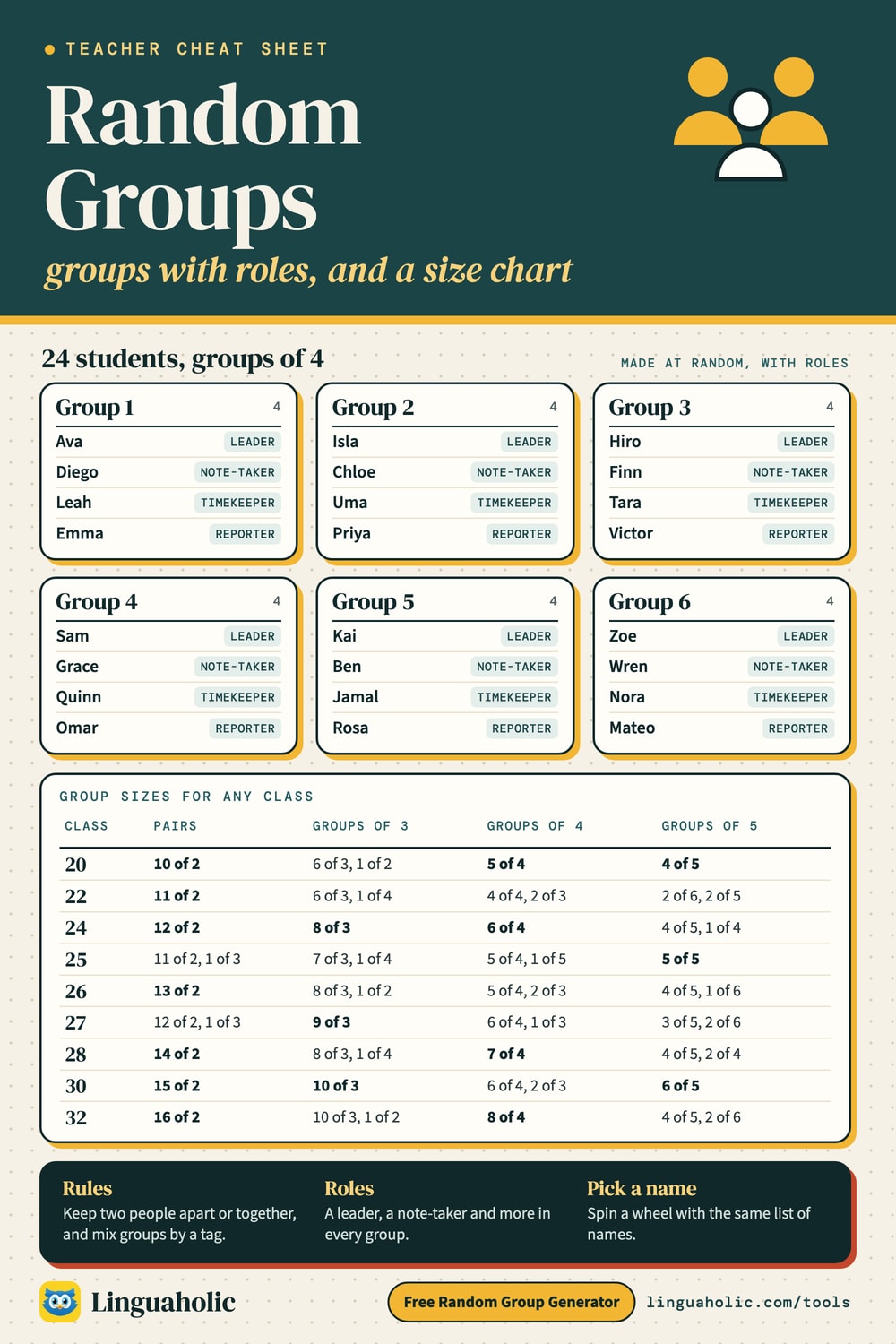
24 people → 6 groups of 4
Rules: keep apart, keep together, mix by tag
Group 1
4Group 2
4Group 3
4Group 4
4Group 5
4Group 6
4Tip: tap two names to swap them.
✓ No sign-up✓ Names stay on your device✓ Free
Share this tool
Know someone who’d love it?
How to use the random group generator
A random group generator splits a list of names into groups by chance, so nobody has to pick teams and nobody is picked last. Teachers use it for group work and lab partners, coaches for fair teams, and organizers for workshops, game nights and team building.
- Add the names. Type or paste them, one per line or separated by commas. A list copied from a spreadsheet, a class roster or a document works too; bullets and numbers are removed.
- Choose the split. Pick Number of groups (for example 5 teams) or People per group (for example groups of 4). The line under the settings shows the exact sizes before you start.
- Press Make groups. Press Shuffle again for a new mix, tap two names to swap them, or open the Projector view to show the groups to the whole room.
No sign-up, no app and no account: the tool runs in your browser, and the names you type never leave your device.
Groups, teams, pairs or one name
The three modes share the same list of names, so you can switch between them in class.
| You want | Use | Good to know |
|---|---|---|
| Groups for a project or a lab | Groups & teams, People per group | Add roles such as a leader and a note-taker. |
| Two or more teams for a game | Groups & teams, Number of groups | Call them Teams and name them by color. |
| Fair teams for sports or PE | Groups & teams with #skill tags | Tick Balance skill levels so team totals match. |
| Lab partners or reading buddies | Random pairs | An odd number makes one group of three. |
| Mentors with mentees | Random pairs, Match two lists | Each person in list A gets a partner from list B. |
| New partners every week | Random pairs, 2 to 6 rounds | Nobody gets the same partner twice while numbers allow. |
| Who answers next | Pick a name | Spin the wheel or draw names; picked names drop out. |
Random groups and group size chart

Group sizes when the numbers do not divide evenly
Class sizes rarely divide neatly. The generator always keeps groups within one person of each other. With People per group you choose how leftovers are handled: Closest (the default), Never more than your number (some groups are one smaller), or Never fewer than your number (some groups get one extra). This table shows what the default gives for common class sizes:
| Class | Pairs | Groups of 3 | Groups of 4 | Groups of 5 |
|---|---|---|---|---|
| 18 people | 9 pairs of 2 | 6 groups of 3 | 5 groups: 3 of 4, 2 of 3 | 4 groups: 2 of 5, 2 of 4 |
| 20 people | 10 pairs of 2 | 7 groups: 6 of 3, 1 of 2 | 5 groups of 4 | 4 groups of 5 |
| 22 people | 11 pairs of 2 | 7 groups: 6 of 3, 1 of 4 | 6 groups: 4 of 4, 2 of 3 | 4 groups: 2 of 6, 2 of 5 |
| 24 people | 12 pairs of 2 | 8 groups of 3 | 6 groups of 4 | 5 groups: 4 of 5, 1 of 4 |
| 25 people | 12 pairs: 11 of 2, 1 of 3 | 8 groups: 7 of 3, 1 of 4 | 6 groups: 5 of 4, 1 of 5 | 5 groups of 5 |
| 26 people | 13 pairs of 2 | 9 groups: 8 of 3, 1 of 2 | 7 groups: 5 of 4, 2 of 3 | 5 groups: 4 of 5, 1 of 6 |
| 27 people | 13 pairs: 12 of 2, 1 of 3 | 9 groups of 3 | 7 groups: 6 of 4, 1 of 3 | 5 groups: 3 of 5, 2 of 6 |
| 28 people | 14 pairs of 2 | 9 groups: 8 of 3, 1 of 4 | 7 groups of 4 | 6 groups: 4 of 5, 2 of 4 |
| 30 people | 15 pairs of 2 | 10 groups of 3 | 8 groups: 6 of 4, 2 of 3 | 6 groups of 5 |
| 32 people | 16 pairs of 2 | 11 groups: 10 of 3, 1 of 2 | 8 groups of 4 | 6 groups: 4 of 5, 2 of 6 |
For pairs, an odd number makes one group of three, so nobody works alone. Untick Odd number: make one group of three if you would rather pair the last person yourself.
Rules: keep apart, keep together, mix by tag
Pure chance sometimes puts the two most talkative students together. Open Rules to steer the result while keeping it random:
- Keep apart: two people never land in the same group. Add one rule per pair, as many as you need.
- Keep together: two people always share a group, for example a student and their language buddy, or siblings at a camp. Chains work too: A with B and B with C keeps all three together.
- Mix by tag: write a tag after a name with a #, such as
Ava #girls,Ben #boys,Kai #grade5orLeah #ELL. Each tag is spread as evenly as the numbers allow, so every group gets its share. - Balance skill levels: when the tags are numbers (
#1to#5), the generator balances the totals instead. Each card shows the total, so you can see the teams are fair.
If a rule cannot be kept, for example four friends kept together when the groups hold three, the generator says which rule it broke and why, and still makes the groups. A pasted spreadsheet with names in the first column and a tag in the second column works as well.
Group roles for cooperative learning
Roles give every member a job and stop one person from doing all the work. Choose A leader in each, the six Classroom roles, or type your own. Small groups get the first roles in the list, and Shuffle roles only hands the roles to other members without changing the groups.
| Role | What they do |
|---|---|
| Leader | Keeps the group on task and makes sure everyone has a say. |
| Note-taker | Writes down ideas, answers and decisions. |
| Timekeeper | Watches the clock and calls the next step. |
| Reporter | Shares the group's work with the class. |
| Materials manager | Collects and returns supplies, devices and handouts. |
| Encourager | Praises good ideas and invites quieter members in. |
Random pairs and partner rotation
The random pairs generator makes partners for think-pair-share, peer review, lab work, speed networking or a buddy system. Two extras make it more useful in a classroom:
- Match two lists: pair older readers with younger buddies, mentors with new staff, or speakers with listeners. Extra people from the longer list join a pair.
- Rounds: choose up to 6 rounds and each round gives everyone a new partner, a quick way to plan a partner rotation for the next weeks. The same works for groups: new groupmates every round.
Pick a name: wheel or draw
Pick a name turns the same list into a name picker wheel. Spin it to choose who answers, who presents first or who wins a prize. Draw names picks one to ten names at once, like names from a hat. With Remove names once picked, everyone gets a turn before anyone is picked twice, and the list of picked names shows who is left. The winner is drawn by the browser's secure random number generator before the wheel turns, so the animation never changes the odds. Visitors who turn on reduced motion see the result without the spin.
A random team generator for sports, PE and work
For a pickup game, PE class, a quiz night or an office event, choose Number of groups, call them Teams and name them by color (Red team, Blue team). For fair teams, tag each player with a skill level from 1 to 5 and tick Balance skill levels. Then give each team a name with the Team Name Generator, and start the game with a letter from the Random Letter Generator or a round of the Categories Game.
On the projector, on paper and saved for next time
- Projector view fills the screen with large names, readable from the back of the room, with bigger and smaller text and a Shuffle button. It also works on a smartboard or a TV.
- Print gives a clean page of group cards; Copy for spreadsheet and Download CSV put the groups into Excel, Google Sheets or your grade book.
- Save list keeps a class list in this browser, so next lesson you open it with one tap. Your saved lists also open in the Seating Chart Generator.
Tips for teachers
- Groups of 3 or 4 suit most group work: big enough for ideas, small enough that everyone talks.
- Use pairs for quick tasks and checking each other's work, and bigger groups for projects.
- Change the groups often. Rounds with new groupmates help a class get to know each other.
- Show the groups on the board, then give a clear first job, such as choosing who reads first.
- For a class with a seating plan, make the chart with the Seating Chart Generator and the groups here.
How random is it?
Without rules, every split is equally likely. There are many: a class of 24 can be split into 6 groups of 4 in 4,509,264,634,875 different ways, and into 12 pairs in 316,234,143,225 ways, so you will practically never see the same groups twice. With rules, the generator tries many random splits, improves them by swapping people, and keeps one that follows the rules.
Free and private
The group generator is free, with no sign-up and no limit. It works entirely in your browser: the names are not uploaded, and saved lists stay in your browser's storage on this device. Teachers can also put the tool on a class website or blog with the embed code below.
For teachers, bloggers & clubs
Put the Random Group Generator on your website
Give your readers this tool right on your page. Copy the code, paste it into your site, done: no sign-up, no account.
- Free for any website
- No ads, no cookies
- Fits phones and sidebars
- Always up to date
Please keep the small credit line under the tool; you may add rel="nofollow" to its link. How it works & the rules

› Show the code
Frequently asked questions
- How do I split a list of names into random groups?
- Paste or type the names, one per line or separated by commas. Choose Number of groups (for example 5 groups) or People per group (for example groups of 4), then press Make groups. Press Shuffle again for a new mix. Everything happens in your browser.
- What happens if the names do not divide evenly?
- The generator makes the groups as even as possible, so sizes never differ by more than one. With People per group you choose what happens to the leftovers: Closest to your number, Never more than it (some groups are one smaller), or Never fewer than it (some groups get one extra person). The line under the settings shows the sizes before you press the button, for example 25 people in 6 groups: 5 of 4 and 1 of 5.
- Can I keep two students apart or together?
- Yes. Open Rules, pick two names and choose Keep apart or Keep together. Add as many rules as you need. If a rule cannot be kept, for example three people kept together when groups only hold two, the generator tells you which rule it could not keep instead of failing silently.
- Can I make balanced groups of boys and girls or by skill level?
- Yes. Add a tag after each name with a #, such as Ava #girls and Ben #boys, then tick Mix by tag: each tag is spread as evenly as possible over the groups. Tags that are numbers, such as #1 to #5 for skill, are balanced by their total, which gives fair teams for sports and games.
- How do I make random pairs?
- Open Random pairs and press Make pairs. With an odd number, one group of three is made (or one person without a partner, if you untick that option). To pair two lists, such as mentors with mentees or readers with buddies, tick Match two lists and fill in both.
- Can I make new groups so students work with different classmates each time?
- Yes. Choose 2 to 6 rounds and every round gets new groupmates or new partners wherever the numbers allow. Shuffle again also avoids the groupmates of the last shuffle when that option is on.
- Can it give each group a leader or roles?
- Yes. Choose A leader in each, Classroom roles (Leader, Note-taker, Timekeeper, Reporter, Materials manager and Encourager), or type your own roles. Shuffle roles only gives the roles to other people without changing the groups.
- Is there a name picker wheel?
- Yes. Open Pick a name and spin the wheel, or choose Draw names to pick one or several names at once. Picked names can be removed so everyone gets a turn before anyone is picked twice. People who prefer less motion get the result without the spin.
- Can I show the groups on a projector or smartboard?
- Yes. Press Projector view for a full-screen display with large names, bigger or smaller text, and a Shuffle again button. Press Esc or Close to go back.
- Can I save my class lists?
- Yes. Press Save list and give it a name. Saved lists are kept in your own browser on this device, not on our server, and they also open in the Seating Chart Generator. You can also copy the groups, copy them for a spreadsheet, download a CSV file or print them.
- How many names can I use?
- From 2 up to 500 names, which covers a class, a whole grade, a sports club or a company event. Bullets and numbers pasted from a document are removed automatically.
- Is the random group generator really random?
- Yes. It uses your browser's secure random number generator, so every split is equally likely when there are no rules. With rules it searches many random splits and keeps one that follows them, so the result is still random among the splits that fit.
- Do I need to sign up or download an app?
- No. There is no account, no app and no sign-up. It is free, and the names you type never leave your device.
About this page
The Random Group Generator is a free tool from Linguaholic, made by Marcel Iseli. It runs in your browser, with no sign-up. Last updated .
Keep exploring
More free tools
 Seating Chart GeneratorRandom classroom seating charts in rows, pairs, tables or a U-shape. Drag to swap, print.
 Team Name GeneratorFunny team names for fantasy football, 10 sports, work, trivia and kids, or from your words.
 Random Letter GeneratorPick a random letter from A to Z or spin an alphabet wheel for word games.
 Categories GameA random letter, a list of categories, and a timer — on one screen or every phone.
 Charades GeneratorOver 2,000 original words and ideas to act out, with a team timer and printable cards.
 Random Word GeneratorRandom English words with definitions for Pictionary, charades, and writing.