
Word games & fun
Seating Chart Generator for Classrooms and Events
Make a random seating chart for your classroom or event: pick rows, pairs of desks, tables or a U-shape, paste your names, and get a chart in one tap. Keep students apart, give some a front seat, lock seats, drag names to swap them, then print it or show it on the projector. Free, no sign-up, nothing uploaded.
Updated · Free, no sign-up
One name per line, or separated by commas. Paste straight from your class list.
30 seats for 24 people, 6 empty
Rules: not next to each other, sit together, front seats
Front seats
✓ No sign-up✓ Names stay on your device✓ Free
Share this tool
Know someone who’d love it?
How to make a seating chart
- Choose the layout of your room: rows, pairs of desks, tables or a U-shape, and set how many desks or tables you have.
- Paste your names, one per line or separated by commas. Fit to class adds rows or tables until everyone has a seat.
- Press Shuffle seats for a random seating chart. Drag a name onto another seat, or tap two seats, to swap them. Tap a name and choose Lock seat to keep it in place when you shuffle again.
- Print it, copy it or show it on the board with Projector view.
No sign-up and nothing to install: the seating chart maker runs in your browser and your class list stays on your device.
Classroom seating arrangements compared
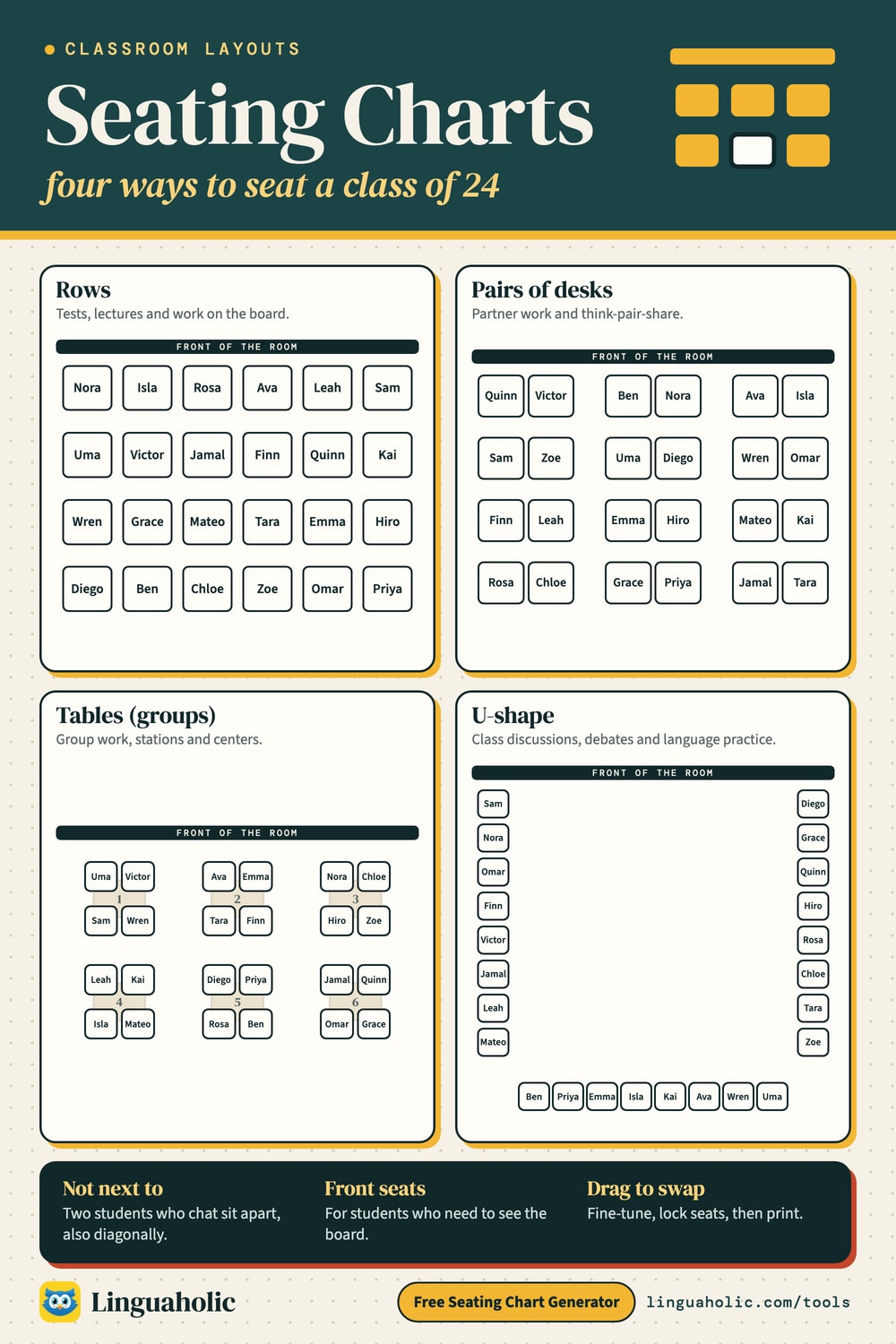
Each layout suits a different kind of lesson. The seat counts below are the generator's starting sizes; change the numbers to match your room. The last column shows what “next to each other” means for the Not next to each other rule.
| Layout | Seats | Good for | Counts as next to |
|---|---|---|---|
| Rows | 30 seats (6 across, 5 rows) | Tests, lectures, focus on the board | Desks touching on any side, also diagonally |
| Pairs of desks | 30 seats (3 pairs across, 5 rows) | Partner work, think-pair-share | Desks touching; the aisle between pairs breaks it |
| Tables (groups) | 24 seats (6 tables of 4) | Group work, stations, centers | Same table |
| U-shape | 16 seats (5 on each side, 6 along the back) | Discussions, debates, language classes | The seats beside you along the U |
Tables hold 2 to 12 seats. Up to 6 seats sit along the two long sides of a rectangle (with one at the end for an odd number); from 7 seats the tables are round, which also suits a party or a wedding.
Classroom seating arrangements

Seating rules
- Not next to each other keeps two students apart: no touching desks in rows and pairs, a different table at tables, not side by side in a U-shape.
- Sit together puts two people side by side or at the same table, for example a student and a classmate who translates for them.
- Front seats places students who need to see or hear well in the first row. If more students need the front than the first row holds, the second row counts too.
- Locked seats keep a student exactly where they are, for example next to the door or an outlet, while everyone else is shuffled.
When a rule cannot be kept, for example two students who must sit apart in a room with only one table, the chart is still made and the message names the rule it could not keep.
Random or planned seating?
A random seating chart is quick and feels fair: nobody can say the teacher put them at the back on purpose, and students meet classmates they would not pick themselves. A planned chart lets you separate friends who chat and put students who need help near you. This generator does both: random seats first, then rules and a few drags for the students you know need a special place.
- Start the year in a random chart, so you learn names in a fixed order.
- Change seats every few weeks, or at the start of each unit, to mix the class.
- Save the class list once and shuffle again with one tap next time.
- For group work on the same day, split the class with the Random Group Generator.
Teacher's view, projector and printing
The chart shows the room as students see it, with the board at the top. Tick Teacher's view to turn it around, so the front row is at the bottom, the way you see the class from your desk. Projector view shows the chart full screen for the first day in new seats, and Print gives a landscape page you can pin up or leave for a substitute teacher. Copy as text lists the chart row by row (or table by table), and Download CSV opens in a spreadsheet.
Seating charts for weddings and events
Choose Tables, set the number of tables and the seats per table, and paste the guest list. Use Sit together for couples and families, and Not next to each other for guests who should be at different tables. How many tables you need:
| Guests | Tables of 6 | Tables of 8 | Tables of 10 |
|---|---|---|---|
| 40 guests | 7 tables | 5 tables | 4 tables |
| 60 guests | 10 tables | 8 tables | 6 tables |
| 80 guests | 14 tables | 10 tables | 8 tables |
| 100 guests | 17 tables | 13 tables | 10 tables |
| 120 guests | 20 tables | 15 tables | 12 tables |
| 150 guests | 25 tables | 19 tables | 15 tables |
Free and private
The seating chart generator is free with no sign-up. Names are never uploaded: the chart is made in your browser, and saved lists stay in your browser's storage on this device. The same saved lists open in the Random Group Generator. Need team names for your groups? Try the Team Name Generator, and for a quick classroom game, the Categories Game.
For teachers, bloggers & clubs
Put the Seating Chart Generator on your website
Give your readers this tool right on your page. Copy the code, paste it into your site, done: no sign-up, no account.
- Free for any website
- No ads, no cookies
- Fits phones and sidebars
- Always up to date
Please keep the small credit line under the tool; you may add rel="nofollow" to its link. How it works & the rules

› Show the code
Frequently asked questions
- How do I make a seating chart?
- Choose a layout (rows, pairs of desks, tables or U-shape), set how many desks or tables you have, paste your names and press Make seating chart. Every student gets a random seat. Drag a name onto another seat, or tap two seats, to swap them.
- Can it keep two students from sitting next to each other?
- Yes. Under Rules, pick two names and choose Not next to each other. In rows and pairs that means no touching desks, also diagonally; at tables it means a different table. If it cannot keep a rule, it tells you which one.
- Can some students sit at the front?
- Yes. Add them under Front seats and they are placed in the front row, for example students who need to see the board well. Lock a seat to keep a student exactly where they are when you shuffle the rest.
- Which classroom layouts can I make?
- Rows of single desks, rows of desk pairs with aisles, tables or pods of 2 to 12 seats (round tables from 7 seats, also for weddings and events), and a U-shape or horseshoe. Use Fit to class to add rows or tables until everyone has a seat.
- What if I have more seats than students?
- Empty seats are left at the back when Fill the front first is on, or anywhere at random when it is off. With more students than seats, the chart lists who has no seat yet, and Fit to class adds room for them.
- Can I print the seating chart?
- Yes. Press Print for a landscape page with the front of the room marked. You can also copy the chart as text row by row, download a CSV file, or show it in Projector view.
- Is it a random seating chart generator?
- Yes. Seats are drawn with your browser's secure random number generator. Press Shuffle seats for a new chart; locked seats stay where they are.
- Can I save my class list?
- Yes. Save list keeps your names in your own browser on this device. The same saved lists open in the Random Group Generator.
- Can I use it for a wedding or event seating chart?
- Yes. Choose Tables, set the number of tables and seats per table, paste the guest list, and use Sit together for couples and Not next to each other for guests who should be at different tables. Drag names to fine-tune, then print the chart.
- Do I need to sign up or download an app?
- No. There is no account, no app and no sign-up. It is free, and the names stay on your device.
About this page
The Seating Chart Generator is a free tool from Linguaholic, made by Marcel Iseli. It runs in your browser, with no sign-up. Last updated .
Keep exploring
More free tools
 Random Group GeneratorSplit names into random groups, teams or pairs, with rules, roles and a name wheel.
 Team Name GeneratorFunny team names for fantasy football, 10 sports, work, trivia and kids, or from your words.
 Word Search MakerMake a printable word search from 48 themes or your own words, with an answer key.
 Random Letter GeneratorPick a random letter from A to Z or spin an alphabet wheel for word games.
 Categories GameA random letter, a list of categories, and a timer — on one screen or every phone.
 Charades GeneratorOver 2,000 original words and ideas to act out, with a team timer and printable cards.