
Converters & translators
Pigpen Cipher Translator & Decoder
Turn text into the pigpen (Masonic) cipher and back: the symbols are drawn for you, a tap-to-type symbol keyboard decodes, and you can print the key and a worksheet or save your message as PNG or SVG.
Updated · Free, no sign-up
Key layout
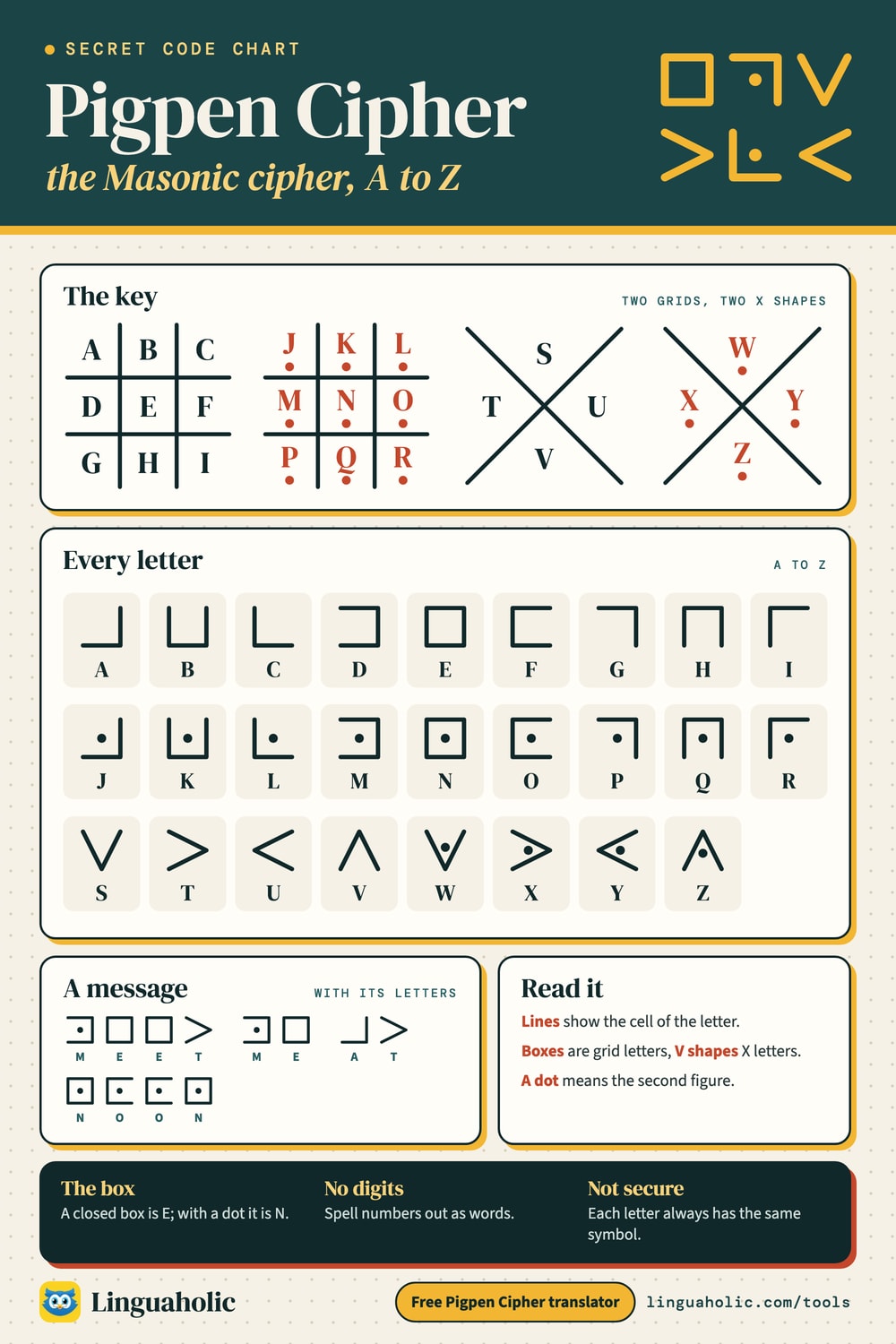
A to I in a grid, J to R in a grid with dots, S to V in an X, W to Z in an X with dots. The most common key.
The pigpen key (Classic)
Share this tool
Know someone who’d love it?
What is the pigpen cipher?
The pigpen cipher writes every letter as a little drawing instead of a letter. The alphabet is spread over two tic-tac-toe grids and two X shapes, and each letter is replaced by the shape of the cell, the “pen”, it sits in. The second grid and the second X carry a dot in every cell, so each of the 26 letters gets its own symbol. A square box is E; a box with a dot is N.
It is also known as the Masonic cipher or the Freemason’s cipher, because Freemasons used it in the 18th century, and sometimes as the tic-tac-toe cipher. It is one of the most loved codes for kids, escape rooms and treasure hunts: it looks mysterious, but anyone with the key can read it in a minute.
How to use the pigpen cipher translator
- Text to pigpen: type your message. The symbols appear as you type. Pick a color, add the letters underneath if you want a learning aid, then save it as a PNG picture or an SVG file, or print it as a worksheet.
- Pigpen to text: tap the symbols of a pigpen message on the symbol keyboard, in order, with Space between words. The decoded letters appear underneath, ready to copy.
- Key layout: if your message was written with a different key, switch the layout. Symbols you already tapped are read again with the new key.
Everything runs in your browser, free and with no sign-up. To decode a message in a cipher you do not know, paste it into our Cipher Decoder, which tries every cipher at once.
Pigpen cipher chart

The pigpen cipher key
This is the classic layout, the one most books and puzzles use: A to I in the first grid, J to R in the dotted grid, S to V in the X and W to Z in the dotted X. The letters of each grid are filled in row by row; the X is filled top, left, right, bottom.
Pigpen alphabet chart
| Letter | Symbol | What it looks like |
|---|---|---|
| A | a corner with lines on the right and bottom | |
| B | a box open at the top | |
| C | a corner with lines on the bottom and left | |
| D | a box open at the left | |
| E | a square box | |
| F | a box open at the right | |
| G | a corner with lines on the top and right | |
| H | a box open at the bottom | |
| I | a corner with lines on the top and left | |
| J | a corner with lines on the right and bottom, with a dot | |
| K | a box open at the top, with a dot | |
| L | a corner with lines on the bottom and left, with a dot | |
| M | a box open at the left, with a dot | |
| N | a square box, with a dot | |
| O | a box open at the right, with a dot | |
| P | a corner with lines on the top and right, with a dot | |
| Q | a box open at the bottom, with a dot | |
| R | a corner with lines on the top and left, with a dot | |
| S | a V shape (open at the top) | |
| T | an arrow pointing right, > | |
| U | an arrow pointing left, < | |
| V | an upside-down V (open at the bottom) | |
| W | a V shape (open at the top), with a dot | |
| X | an arrow pointing right, >, with a dot | |
| Y | an arrow pointing left, <, with a dot | |
| Z | an upside-down V (open at the bottom), with a dot |
How to write a message in pigpen
- Draw the key: a # grid with A to I, the same grid again with a dot in each cell for J to R, an X with S to V, and a dotted X for W to Z.
- Find the first letter of your message in the key.
- Draw only the lines that surround that letter’s cell. Add the dot if the letter is in a dotted figure.
- Leave a gap between words. Digits and punctuation have no symbols: spell numbers out (TWO), or keep them as they are.
Here is MEET ME AT NOON, with the letters underneath. Its 6 different letters are M (a box open at the left, with a dot), E (a square box), T (an arrow pointing right, >), A (a corner with lines on the right and bottom), N (a square box, with a dot) and O (a box open at the right, with a dot).
How to decode the pigpen cipher
Decoding works the other way round. Look at the shape of each symbol: which sides of a box are drawn, or which way a V points. That tells you the cell. Then check for a dot: no dot means the first grid or X, a dot means the second. A corner with lines on the right and bottom is the top-left cell, A; the same corner with a dot is J. Two quick tricks help:
- Boxes come from the grids, V shapes from the X. That halves the search straight away.
- The closed box (all four sides) is the middle cell: E, or N with a dot. Since E is the most common letter in English, a message with many plain boxes is almost certainly in the classic key.
In the tool, open Pigpen to text and tap the matching symbols; the keyboard is laid out exactly like the key, so you compare shapes rather than read a table.
Pigpen cipher variations
There is no single official key. Puzzle makers and old manuscripts arrange the letters in different ways, and a message only reads correctly with the key it was written in. The tool has the three layouts you are most likely to meet:
| Layout | How the letters are placed | HELLO |
|---|---|---|
| Classic | A to I in a grid, J to R in a grid with dots, S to V in an X, W to Z in an X with dots. The most common key. | |
| Grid, X, grid, X | A to I in a grid, J to M in an X, N to V in a grid with dots, W to Z in an X with dots. | |
| Two letters per pen | An older Masonic layout: each pen holds two letters, the second one marked with a dot. AB CD EF … in the grid, ST UV WX YZ in the X. |
Other versions you may see: keys that fill the grids with a keyword first (like a keyed Caesar alphabet), keys with the X before the grid, and the Rosicrucian cipher, a close relative that puts three letters in each cell of one grid and tells them apart by where the dot sits. If a message makes no sense with the classic key, try the other layouts in the tool before anything else.
Make your own pigpen key
For a club or a classroom, make a private key: write a keyword into the grids first (skipping repeated letters), then the rest of the alphabet in order. Only people who know the keyword can rebuild the key. It is still a simple substitution, so a determined code breaker can crack it by counting symbols, but it stops anyone who just looks up the standard chart.
History: the Masonic or Freemason’s cipher
The idea of letters in a grid of cells is old. A Hebrew version with nine chambers appears in Heinrich Cornelius Agrippa’s book on occult philosophy, printed in the 1530s, and grid ciphers turn up in several early books on secret writing. The form we know, with the # grid, the X and the dots, is linked above all with the Freemasons, who used it in the 1700s for private notes and records; that is where the names Masonic cipher and Freemason’s cipher come from.
Pigpen also appears outside the lodges. A gravestone from 1794 in the churchyard of Trinity Church in New York City carries an inscription in pigpen, and the cipher is reported to have been used by Union soldiers held in Confederate prisons during the American Civil War. Today it is mostly a puzzle code, found in children’s spy books, escape rooms, video games and geocaches.
A note on a similar phrase: a “Masonic cipher book” usually means something different, a printed ritual in which the words are shortened to their first letters or written in a private code, not a book of pigpen symbols.
Numbers and punctuation in pigpen
The classic pigpen cipher only covers the 26 letters. The usual ways to send a number are to spell it out (FOUR TWO for 42) or to agree on extra symbols, for example a third grid with dots on both sides. The tool keeps digits and punctuation as they are, so you can see exactly what is not enciphered, and warns you when your message contains some.
Pigpen in the classroom and in escape rooms
- Worksheets: type a message, tap Print worksheet, and you get the key, your message with answer boxes, three practice puzzles, a space to write a reply, and the answers printed upside down at the bottom.
- Escape rooms: hide the key as a clue (draw the grids on a poster, a chalkboard or the back of a map) and put the pigpen message somewhere else. The decoded words give the lock code or the next hiding place.
- Secret notes and invitations: save the message as a PNG and drop it into a card, a party invitation or a scavenger hunt sheet; the SVG stays sharp when printed large.
- Learning: pigpen is a gentle first step into cryptography. Once children see that each symbol always means the same letter, they are ready for the idea of codebreaking by counting, which is how the substitution cipher is cracked.
Pigpen cipher practice puzzles
Three messages in the classic key, from easy to hard. Decode them on paper or with the symbol keyboard above.
Puzzle 1 (Easy)
Show the answer
SECRET CLUB
Puzzle 2 (Medium)
Show the answer
LOOK UNDER THE MAT
Puzzle 3 (Hard)
Show the answer
THE TREASURE IS BY THE OLD WELL
Is the pigpen cipher secure?
No. Pigpen is a simple substitution cipher in disguise: every letter always becomes the same symbol, so a code breaker can count the symbols, guess that the most common one is E, and work outwards from short words like THE and AND. It keeps a message away from casual eyes, which is exactly what makes it fun for notes and puzzles, but it is not a way to protect real secrets.
Related codes worth trying next: the tap code and the Polybius square (letters as grid positions), and the scytale, which hides a message by winding it around a rod.
Free and private
This pigpen cipher translator runs entirely in your browser. It is free, needs no sign-up, and nothing you type is uploaded or stored. The symbols are drawn by the tool itself, not taken from a font, so your saved pictures are yours to use.
For teachers, bloggers & clubs
Put the Pigpen Cipher on your website
Give your readers this tool right on your page. Copy the code, paste it into your site, done: no sign-up, no account.
- Free for any website
- No ads, no cookies
- Fits phones and sidebars
- Always up to date
Please keep the small credit line under the tool; you may add rel="nofollow" to its link. How it works & the rules

› Show the code
Frequently asked questions
- What is the pigpen cipher?
- A substitution cipher that writes each letter as the shape of the 'pen' around it in a key of two tic-tac-toe grids and two X shapes. The letters in the second grid and the second X get a dot, so all 26 letters have their own symbol.
- How do you read the pigpen cipher?
- Find the symbol's shape in the key: the lines show which cell of a grid or which arm of an X the letter sits in, and a dot means the dotted grid or X. In the classic key, a square box is E and a box with a dot is N.
- How do I decode pigpen symbols with this tool?
- Open the Decode tab and tap the symbols on the keyboard in the order of your message. Each tap adds the letter; use the space and back buttons as you go.
- Why is it called the Masonic or Freemason's cipher?
- Freemasons used it in the 1700s to keep records and notes private, so it is also called the Masonic cipher or Freemason's cipher. The grid idea is older; similar letter grids appear in 16th-century books on secret writing.
- Are there different pigpen keys?
- Yes. The classic key puts A to I in a grid, J to R in a dotted grid, S to V in an X and W to Z in a dotted X. Other versions alternate grid and X, or put two letters in every pen. The tool has all three; both sides need the same key.
- How do you write numbers in pigpen?
- The classic pigpen cipher has no symbols for digits. Spell numbers out as words (SEVEN), or agree on your own symbols. The tool keeps digits and punctuation as they are.
- Can I print the pigpen key?
- Yes. The Print key button prints the key chart, and Print worksheet prints your message in pigpen with empty boxes to write the answer in, plus practice puzzles.
- Can I download my pigpen message as an image?
- Yes. Save it as a PNG picture or an SVG file that stays sharp at any size, with the color you choose.
- Is the pigpen cipher secure?
- No. Each letter always has the same symbol, so the code can be broken by counting symbols like any simple substitution. It is meant for puzzles, notes and escape rooms.
- Is this pigpen translator free?
- Yes. It is free, needs no sign-up and runs in your browser; nothing you type is uploaded.
About this page
The Pigpen Cipher is a free tool from Linguaholic, made by Marcel Iseli. It runs in your browser, with no sign-up. Last updated .
Keep exploring
More free tools
 Cipher DecoderPaste any coded message: every cipher is tried at once and the best English reading comes first.
 Tap CodeTurn text into the 5×5 knock code prisoners tapped through walls, and decode taps back to text.
 Polybius SquareTurn letters into row-column number pairs on the 5×5 grid and back, with keyword squares.
 A1Z26 CipherLetters to numbers and back: A=1 to Z=26, with a chart, decoder and puzzle ideas.
 Morse Code TranslatorTranslate text to Morse code and back, hear it as sound at any speed, and see the full Morse alphabet chart.
 Scytale CipherWind a strip around the Spartan rod, pick its size, decode, crack it, and print strips for class.