
Symbols & emoji
Text Art — Copy & Paste
A copy-and-paste collection of text art — hearts, stars, moons, cute characters, gifts, cakes, dividers, and classic one-line emoticons — ready to paste anywhere.
Updated · Free, no sign-up
359 pieces
   ##########  ##########
 ##########################
############################
############################
 ##########################
 ##########################
   ######################
    ####################
       ##############
         ##########
## ♥♥ ♥♥
♥♥♥♥♥♥♥♥♥♥♥♥♥♥♥
♥♥♥♥♥♥♥♥♥♥♥♥♥♥♥
♥♥♥♥♥♥♥♥♥♥♥♥♥
♥♥♥♥♥♥♥♥♥♥♥
♥♥♥♥♥ ┌──────────┐
│╲ ╱│
│ ╲ ╱ │
│ ╲ ♥ ╱ │
│ ╲──╱ │
└──────────┘ ||
||
\ || /
\\ //
\ @@@@ /
@@@@@@@@@@
@@@@@@@@@@@@
------ @@@@@@@@@@@@ ------
@@@@@@@@@@@@
@@@@@@@@@@
/ @@@@ \
// \\
/ || \
||
|| @@@@@@@@@@@@@@
@@@@@@@@
@@@@@@@
@@@@@@@
@@@@@@@
@@@@@@@
@@@@@@@@
@@@@@@@
@@@@@@@@
@@@@@@@@@
@@@@@@@@@@@@@@ **
**
****
******
******
************************
********************
**************
************
**************
****** ******
**** ****
* * ****
o*****
****o*****
*******o****
***********o****
o*********
*****o********
******************
*****o**
o*********o*
****o***********
********o********o**
***o********o*********o*
*******o********o********o**
****
**** ^
///
//// //
// ////// ////
/////////////////
///////////////////
/////////////////////
/////////////////////// ╱╲ ╱╲
│ ╲───╱ │
│ ● ● │
│ ▾ │
╲───────╱ ┌─┐
┌──┴─┴──┐
│ ● ● │
│ ═══ │
└┬─────┬┘
│ │ ┌────────────┐
│ ^ ^ │
│ \__/ │
└─────┬┬─────┘
───┴┴─── ╲ │ ╱
┌───┼───┐
├───┼───┤
│ │ │
│ │ │
└───┴───┘ ~ ~ ~
┌───────┐
│ ├──┐
│ ♥ │ │
│ ├──┘
└───────┘ ╱╲
╱ ╲
╱ ╲
╱ ╲
┌────────┐
│ ┌┐ ┌┐ │
│ └┘ └┘ │
│ ┌┐ │
└───┴┴───┘ ┌─────┬─────┐
│ ─── │ ─── │
│ ─── │ ─── │
│ ─── │ ─── │
└─────┴─────┘ ╻ ╻ ╻
┌─┸──┸──┸─┐
│ ~~~~~~~ │
┌┴─────────┴┐
│ ~~~~~~~~~ │
└───────────┘ ┌─────────┐
├┤ ★ ├┤
└┤ ├┘
╲ ╱
╲─────╱
│ │
┌─┴─┴─┐
└─────┘ ┌───┐
╱ ✦ ╲
│ │
╲ ╱
│ ≡ │
└───┘ ┌────────────┐
│██████████ ├┐
│██████████ ├┘
└────────────┘ ++++
++++++++
++++++++++++
++++++++++++++
++++++++++++++++++
++++++++++++++
++++++++++++
++++++++
++++·•·•·•·•·•·•·•·•·•·•·•·•·~ ~ ~ ~ ~ ~ ~ ~ ~ ~ ~ ~ ~─────────── ♥ ───────────═══════════ ✦ ═══════════✿ ✿ ✿ ✿ ✿ ✿ ✿ ✿◇─◇─◇─◇─◇─◇─◇─◇─◇─◇─◇▁▂▃▄▅▆▇█▇▆▅▄▃▂▁▂▃▄▅▆▇█▇▆▅▄▃▂▁╭────────────────────────╮
│ │
╰────────────────────────╯¯\_(ツ)_/¯(╯°□°)╯︵ ┻━┻┬─┬ノ( º _ ºノ)( ͡° ͜ʖ ͡°)ʕ•ᴥ•ʔಠ_ಠ(ノ◕ヮ◕)ノ*:・゚✧(づ。◕‿‿◕。)づShare this tool
Know someone who’d love it?
What is text art?
Text art (also called ASCII art or keyboard art) is a picture made entirely from text characters — letters, symbols, and lines — so it can be pasted anywhere plain text goes. This collection gathers ready-made pieces you can copy with one tap: hearts, stars and moons, cute characters, gifts and cakes for celebrations, decorative dividers, and the classic one-line emoticons.
How to use it
- Browse all pieces, or pick a category to narrow them down.
- Tap Copy on the piece you like.
- Paste it into your message, post, bio, or document.
Getting multi-line art to line up
Pictures that span several lines rely on every character being the same width, which only happens in a monospace font. When you paste into Discord, GitHub, Reddit, or any Markdown editor, use the Code block button: it wraps the art in ``` so it displays in a monospace font and stays aligned. One-line emoticons like ¯\_(ツ)_/¯ look right anywhere.
What’s in the collection
- Love & hearts — big and small hearts and a love letter for messages and cards.
- Nature & sky — sun, crescent moon, star, mountains, and a Christmas tree.
- Objects — gift box, birthday cake, coffee mug, trophy, house, book, and more.
- Characters — a cat face, a robot, and a happy computer.
- Dividers & frames — lines and borders to separate sections of a post or bio.
- One-line emoticons — the shrug, table flip, Lenny face, and other internet classics.
- Cats & animals — cats, bunnies, bears, pandas, dogs, owls, butterflies, fish and more, as dot art and emoji pictures.
- Faces — smiley, sad, winking and heart-eyed faces, plus a friendly ghost.
- Birthday & party — cakes, gifts, balloons, crowns and a trophy.
- Holidays — Christmas trees and snowmen, pumpkins, ghosts and bats, shamrocks, Easter eggs, and the stars and stripes.
- Big words — Love, Happy Birthday, Thank You, Good Morning and more in big dot letters and emoji letters.
- Sparkles — sparkle symbols, twinkling lines and sparkle frames for your own text.
- One-line art — a fish, a rose, a sword, a cat and other tiny drawings that fit on one line.
In total there are 359 pieces in 13 categories. Each one is marked Any app (it keeps its shape in chats, posts and bios) or Fixed-width font (it needs a code block to line up). Use the search box to find a subject, or the type filter to see only dot art, emoji art, ASCII art or one-liners.
Dot art
Dot art, also called braille art, is drawn with braille characters. Each character is a little grid of two by four dots, and any of the eight dots can be on or off, so a row of them works like a strip of pixels. All braille characters have the same width, including the empty one, which is why dot art stays lined up in places where ordinary ASCII art falls apart: text messages, Instagram, TikTok, Discord without a code block. Most dot pieces here come in three sizes (S, M and L); the small ones fit a phone screen with room to spare.
⢀⣴⣾⣿⣶⣦⣴⣶⣿⣷⣦⡀
⣿⣿⣿⣿⣿⣿⣿⣿⣿⣿⣿⣿
⣿⣿⣿⣿⣿⣿⣿⣿⣿⣿⣿⣿
⠘⣿⣿⣿⣿⣿⣿⣿⣿⣿⣿⠃
⠀⠈⠻⣿⣿⣿⣿⣿⣿⠟⠁
⠀⠀⠀⠈⠛⢿⡿⠛⠁⠀⣷⣄⠀⠀⠀⠀⠀⠀⣠⣾
⠀⣿⣿⣷⣶⣶⣶⣶⣾⣿⣿
⢸⣿⣿⣿⣿⣿⣿⣿⣿⣿⣿⡇
⢼⣿⣧⣀⣿⣿⣿⣿⣀⣼⣿⡧
⠸⣿⣿⣿⣿⡯⢽⣿⣿⣿⣿⠇
⠀⠈⠛⠿⣿⣾⣷⣿⠿⠛⠁⠀⢰⠿⡆⠀⠀⢰⠿⡆
⠀⢸⡀⢿⠀⠀⡿⢀⡇
⠀⠸⣇⣸⠀⠀⣇⣸⠇
⠀⣠⣿⣿⣿⣿⣿⣿⣄
⣸⣿⡟⢻⣿⣿⡟⢻⣿⣇
⢹⣿⣿⣿⣏⣹⣿⣿⣿⡏
⠀⠙⠿⣿⣿⣿⣿⠿⠋⠀⠀⠀⠀⠀⠀⣸⣇
⠀⠀⠀⠀⠀⢠⣿⣿⡄
⠲⣶⣶⣶⣶⣿⣿⣿⣿⣶⣶⣶⣶⠖
⠀⠈⠛⢿⣿⣿⣿⣿⣿⣿⡿⠛⠁
⠀⠀⠀⢠⣿⣿⣿⣿⣿⣿⡄
⠀⠀⠀⣾⣿⠟⠋⠙⠻⣿⣷
⠀⠀⠐⠋⠀⠀⠀⠀⠀⠀⠙⠂⢠⣾⣿⣿⣷⣌⡆⢰⣡⣾⣿⣿⣷⡄
⢼⣿⠋⠉⢻⣿⣿⣿⣿⡟⠉⠙⣿⡧
⠘⣿⣷⣶⣿⣿⣿⣿⣿⣿⣶⣾⣿⠃
⠀⠈⢻⣿⣿⣿⣹⣏⣿⣿⣿⡟⠁
⠀⠀⣿⡏⢉⣿⣿⣿⣿⡉⢹⣿
⠀⠀⠻⢿⡿⠟⠉⠉⠻⢿⡿⠟⠀⠀⣶⣿⣿⣶⣿⣿⣶
⢀⣴⣿⣿⡿⠿⢿⣿⣿⣦⡀
⢺⣿⣿⣿⡀⠀⢀⣿⣿⣿⡗
⠀⠙⣿⣿⣿⣿⣿⣿⣿⠋
⠀⠀⠻⠿⠿⣿⠿⠿⠟
⠀⠀⣀⡀⠀⣿⣀⣤⣶
⠀⠀⠛⠿⣷⣿⠛⠋
⠀⠀⠀⠀⠀⠛⠀⠀⢀⣤⣶⣿⣿⣿⣿⣶⣤⡀
⠀⣴⣿⣿⣿⣿⣿⣿⣿⣿⣿⣿⣦
⣼⣿⣿⣟⠉⢻⣿⣿⡟⠉⣻⣿⣿⣧
⣿⣿⣿⣿⣷⣿⣿⣿⣿⣾⣿⣿⣿⣿
⢻⣿⣿⣍⠹⢿⣿⣿⡿⠏⣩⣿⣿⡟
⠀⠻⣿⣿⣷⣤⣤⣤⣤⣾⣿⣿⠟
⠀⠀⠈⠛⠿⣿⣿⣿⣿⠿⠛⠁⠀⠀⣠⣴⡶⠛⠁⠀⠀⠀⢀
⢀⣾⣿⡿⠁⠀⠀⠀⠀⠘⠿⠃
⣾⣿⣿⡇
⣿⣿⣿⣧⠀⠀⠀⠀⠀⠀⠀⠠⣤
⠹⣿⣿⣿⣷⣄
⠀⠙⢿⣿⣿⣿⣿⣶⣶⣶⠖⠁
⠀⠀⠀⠈⠉⠛⠛⠋⠉See all 99 dot art pieces, or write your own words in dot letters with the maker.
Emoji art
Emoji art builds a picture out of emoji, one emoji per pixel. Square emoji in different colors make the cleanest pictures, like tiny pixel art, and because every emoji is the same width the picture cannot go crooked. Each picture here is at most 11 emoji wide, so a line never wraps on a phone.
⬜️🟥🟥⬜️⬜️⬜️🟥🟥⬜️
🟥🟥🟥🟥⬜️🟥🟥🟥🟥
🟥🟥🟥🟥🟥🟥🟥🟥🟥
🟥🟥🟥🟥🟥🟥🟥🟥🟥
⬜️🟥🟥🟥🟥🟥🟥🟥⬜️
⬜️⬜️🟥🟥🟥🟥🟥⬜️⬜️
⬜️⬜️⬜️🟥🟥🟥⬜️⬜️⬜️
⬜️⬜️⬜️⬜️🟥⬜️⬜️⬜️⬜️⬜️⬜️🟨🟨🟨🟨🟨⬜️⬜️
⬜️🟨🟨🟨🟨🟨🟨🟨⬜️
🟨🟨⬛️🟨🟨🟨⬛️🟨🟨
🟨🟨⬛️🟨🟨🟨⬛️🟨🟨
🟨🟨🟨🟨🟨🟨🟨🟨🟨
🟨⬛️🟨🟨🟨🟨🟨⬛️🟨
🟨🟨⬛️⬛️⬛️⬛️⬛️🟨🟨
⬜️🟨🟨🟨🟨🟨🟨🟨⬜️
⬜️⬜️🟨🟨🟨🟨🟨⬜️⬜️🟧⬜️⬜️⬜️⬜️⬜️⬜️⬜️🟧
🟧🟧⬜️⬜️⬜️⬜️⬜️🟧🟧
🟧🟧🟧🟧🟧🟧🟧🟧🟧
🟧🟧⬛️🟧🟧🟧⬛️🟧🟧
🟧🟧🟧🟧🟧🟧🟧🟧🟧
🟧🟧🟧🟧🟥🟧🟧🟧🟧
🟧🟧🟧⬛️🟧⬛️🟧🟧🟧
⬜️🟧🟧🟧🟧🟧🟧🟧⬜️🟦🟦🟦🟥🟥🟥🟥🟥🟦🟦🟦
🟦🟥🟥🟧🟧🟧🟧🟧🟥🟥🟦
🟥🟥🟧🟧🟨🟨🟨🟧🟧🟥🟥
🟥🟧🟧🟨🟨🟩🟨🟨🟧🟧🟥
🟥🟧🟨🟩🟩🟦🟩🟩🟨🟧🟥
🟥🟧🟨🟩🟦🟦🟦🟩🟨🟧🟥⬜️🟪🟪⬜️🟪🟪⬜️
🟪🟪🟪🟪🟪🟪🟪
⬜️🟪🟪🟨🟪🟪⬜️
🟪🟪🟪🟪🟪🟪🟪
⬜️🟪🟪⬜️🟪🟪⬜️
⬜️⬜️⬜️🟩⬜️⬜️⬜️
⬜️🟩⬜️🟩⬜️⬜️⬜️
⬜️⬜️🟩🟩⬜️⬜️⬜️
⬜️⬜️⬜️🟩⬜️⬜️⬜️⬜️⬜️🟨⬜️🟨⬜️🟨⬜️⬜️
⬜️⬜️🟦⬜️🟦⬜️🟦⬜️⬜️
⬜️🟪🟪🟪🟪🟪🟪🟪⬜️
⬜️🟫🟫🟫🟫🟫🟫🟫⬜️
🟪🟪🟪🟪🟪🟪🟪🟪🟪
🟫🟫🟫🟫🟫🟫🟫🟫🟫
🟫🟫🟫🟫🟫🟫🟫🟫🟫🤍❤️❤️🤍🤍🤍❤️❤️🤍
❤️❤️❤️❤️🤍❤️❤️❤️❤️
❤️❤️❤️❤️❤️❤️❤️❤️❤️
❤️❤️❤️❤️❤️❤️❤️❤️❤️
🤍❤️❤️❤️❤️❤️❤️❤️🤍
🤍🤍❤️❤️❤️❤️❤️🤍🤍
🤍🤍🤍❤️❤️❤️🤍🤍🤍
🤍🤍🤍🤍❤️🤍🤍🤍🤍⬛️⬜️⬜️🟥⬜️🟥⬜️⬜️⬛️⬜️⬛️
⬛️⬜️🟥🟥🟥🟥🟥⬜️⬛️⬜️⬛️
⬛️⬜️🟥🟥🟥🟥🟥⬜️⬛️⬜️⬛️
⬛️⬜️⬜️🟥🟥🟥⬜️⬜️⬛️⬜️⬛️
⬛️⬜️⬜️⬜️🟥⬜️⬜️⬜️⬛️⬛️⬛️See all 84 emoji pictures. In the maker you can redraw any of them with the emoji you like: a heart made of roses, a star made of sparkles.
Heart text art
Hearts are the most copied text art of all. Here is the same idea in every style: a classic ASCII heart for code blocks, dot hearts for chats, and emoji hearts for messages that should arrive in color.
⢀⣴⣾⣿⣶⣦⣴⣶⣿⣷⣦⡀
⣿⣿⣿⣿⣿⣿⣿⣿⣿⣿⣿⣿
⣿⣿⣿⣿⣿⣿⣿⣿⣿⣿⣿⣿
⠘⣿⣿⣿⣿⣿⣿⣿⣿⣿⣿⠃
⠀⠈⠻⣿⣿⣿⣿⣿⣿⠟⠁
⠀⠀⠀⠈⠛⢿⡿⠛⠁⢀⡴⠚⠛⠲⢦⡴⠖⠛⠓⢦⡀
⡟⠀⠀⠀⠀⠀⠀⠀⠀⠀⠀⢻
⣧⠀⠀⠀⠀⠀⠀⠀⠀⠀⠀⣼
⠘⣦⠀⠀⠀⠀⠀⠀⠀⠀⣴⠃
⠀⠈⠳⣄⠀⠀⠀⠀⣠⠞⠁
⠀⠀⠀⠈⠛⢦⡴⠛⠁⠀⠀⠀⠀⠀⠀⠀⠾⣿⣷⣿⣿⡆
⣴⣿⣿⣿⣾⣿⣿⣷⡌⣿⣿⣿⠃
⣿⣿⣿⣿⣿⣿⣿⣿⡇⠻⠛⠁
⠘⣿⣿⣿⣿⣿⣿⡟
⠀⠈⠛⢿⣿⠟⠋⠀⠀⣠⣶⣿⣷⣶⣤⣶⣾⣿⣶⣄⡽⡿
⠀⢸⣿⣿⣿⣿⣿⣿⣿⣿⣿⣿⣿⡇
⠀⢸⣿⣿⣿⣿⣿⣿⣿⣿⣿⣿⣿⡇
⠀⠀⢻⣿⣿⣿⣿⣿⣿⣿⣿⣿⡟
⡀⠀⣠⠟⢿⣿⣿⣿⣿⣿⡿⠋
⢷⣋⠀⠀⠀⠙⠻⣿⠟⠋ ♥♥ ♥♥
♥♥♥♥♥♥♥♥♥♥♥♥♥♥♥
♥♥♥♥♥♥♥♥♥♥♥♥♥♥♥
♥♥♥♥♥♥♥♥♥♥♥♥♥
♥♥♥♥♥♥♥♥♥♥♥
♥♥♥♥♥🤍💗💗🤍🤍🤍💗💗🤍
💗💗💗💗🤍💗💗💗💗
💗💗💗💗💗💗💗💗💗
💗💗💗💗💗💗💗💗💗
🤍💗💗💗💗💗💗💗🤍
🤍🤍💗💗💗💗💗🤍🤍
🤍🤍🤍💗💗💗🤍🤍🤍
🤍🤍🤍🤍💗🤍🤍🤍🤍⬛️✨✨⬛️⬛️⬛️✨✨⬛️
✨✨✨✨⬛️✨✨✨✨
✨✨✨✨✨✨✨✨✨
✨✨✨✨✨✨✨✨✨
⬛️✨✨✨✨✨✨✨⬛️
⬛️⬛️✨✨✨✨✨⬛️⬛️
⬛️⬛️⬛️✨✨✨⬛️⬛️⬛️
⬛️⬛️⬛️⬛️✨⬛️⬛️⬛️⬛️⬜️🟥⬜️🟥⬜️⬜️⬜️⬜️⬜️⬜️⬜️
🟥🟥🟥🟥🟥⬜️🟪⬜️🟪⬜️⬜️
🟥🟥🟥🟥🟥🟪🟪🟪🟪🟪⬜️
⬜️🟥🟥🟥⬜️🟪🟪🟪🟪🟪⬜️
⬜️⬜️🟥⬜️⬜️⬜️🟪🟪🟪⬜️⬜️
⬜️⬜️⬜️⬜️⬜️⬜️⬜️🟪⬜️⬜️⬜️All 27 love and heart pieces are in the collection. For single heart characters, see our heart symbols.
Cat and animal text art
Cats lead the animal kingdom of text art, followed by bunnies and bears. The animals here are drawn as faces, which stay recognizable even at small sizes.
⠀⣷⣄⠀⠀⠀⠀⠀⠀⣠⣾
⠀⣿⣿⣷⣶⣶⣶⣶⣾⣿⣿
⢸⣿⣿⣿⣿⣿⣿⣿⣿⣿⣿⡇
⢼⣿⣧⣀⣿⣿⣿⣿⣀⣼⣿⡧
⠸⣿⣿⣿⣿⡯⢽⣿⣿⣿⣿⠇
⠀⠈⠛⠿⣿⣾⣷⣿⠿⠛⠁⣴⠿⠿⣦⠀⢀⣀⡀⠀⣴⠿⠿⣦
⢿⣦⣴⣿⣿⣿⣿⣿⣿⣿⣦⣴⡿
⠀⢰⣿⡿⠿⣿⣿⣿⠿⢿⣿⡆
⠀⢾⣿⣷⣶⠿⠿⠿⣶⣾⣿⡷
⠀⠸⣿⣿⣇⠀⠛⠀⣸⣿⣿⠇
⠀⠀⠈⠻⢿⣷⣶⣾⡿⠟⠁⣴⣿⣿⣦⠀⢀⣀⡀⠀⣴⣿⣿⣦
⢿⣿⣿⣿⣿⣿⣿⣿⣿⣿⣿⣿⡿
⠀⢰⣿⠋⣉⢹⣿⡏⣉⠙⣿⡆
⠀⢾⣿⣀⣉⣼⣿⣧⣉⣀⣿⡷
⠀⠸⣿⣿⣿⡿⣤⢿⣿⣿⣿⠇
⠀⠀⠈⠻⢿⣿⣿⣿⡿⠟⠁⢰⣷⣦⣀⣠⣄⣀⣴⣾⡆
⠸⡻⠛⠛⢿⡿⠛⠛⢟⠇
⢰⡀⠺⠇⢸⡇⠸⠗⢀⡆
⣿⣿⣶⣶⣏⣹⣶⣶⣿⣿
⠸⣿⡛⢿⣿⣿⡿⢛⣿⠇
⠀⠙⢿⣷⣶⣶⣾⡿⠋
⠀⠀⠀⠉⠉⠉⠉⠀⣠⣾⣿⣿⣷⣄
⣸⣿⡤⢿⡿⢤⣿⣇
⣿⡿⠀⠈⠁⠀⢿⣿
⣿⡇⠀⠀⠀⠀⢸⣿
⢹⣧⠀⠀⠀⠀⣼⡏
⠀⢙⣦⣄⣠⣴⡋
⠀⠉⠋⠉⠉⠙⠉⠀⠀⢀⣾⣿⣆⣰⣿⣷⡀
⣠⣤⡀⠛⠛⠃⠘⠛⠛⢀⣤⣄
⢿⣿⠇⠀⣀⣤⣤⣀⠀⠸⣿⡿
⠀⠀⢠⣾⣿⣿⣿⣿⣷⡄
⠀⠀⠘⣿⣿⣿⣿⣿⣿⠃
⠀⠀⠀⠈⠙⠛⠛⠋⠁🟧⬜️⬜️⬜️⬜️⬜️⬜️⬜️🟧
🟧🟧⬜️⬜️⬜️⬜️⬜️🟧🟧
🟧🟧🟧🟧🟧🟧🟧🟧🟧
🟧🟧⬛️🟧🟧🟧⬛️🟧🟧
🟧🟧🟧🟧🟧🟧🟧🟧🟧
🟧🟧🟧🟧🟥🟧🟧🟧🟧
🟧🟧🟧⬛️🟧⬛️🟧🟧🟧
⬜️🟧🟧🟧🟧🟧🟧🟧⬜️🟦🟦🟦🟦🟦🟦🟦🟦🟦
🟦🟦⬜️🟦🟦🟦⬜️🟦🟦
🟦🟦⬜️🟦🟦🟦⬜️🟦🟦
🟦🟦⬜️🟦🟦🟦⬜️🟦🟦
🟦🟦⬜️⬜️🟦⬜️⬜️🟦🟦
🟦⬜️⬜️⬜️⬜️⬜️⬜️⬜️🟦
🟦⬜️⬛️⬜️⬜️⬜️⬛️⬜️🟦
🟦⬜️⬜️⬜️🟥⬜️⬜️⬜️🟦
🟦⬜️⬜️⬜️⬜️⬜️⬜️⬜️🟦
🟦🟦⬜️⬜️⬜️⬜️⬜️🟦🟦
🟦🟦🟦🟦🟦🟦🟦🟦🟦⬜️🟩🟩⬜️⬜️⬜️🟩🟩⬜️
🟩⬜️⬛️🟩⬜️🟩⬛️⬜️🟩
🟩🟩🟩🟩🟩🟩🟩🟩🟩
🟩🟩🟩🟩🟩🟩🟩🟩🟩
🟩⬛️🟩🟩🟩🟩🟩⬛️🟩
⬜️🟩⬛️⬛️⬛️⬛️⬛️🟩⬜️
⬜️⬜️🟩🟩🟩🟩🟩⬜️⬜️⬜️⬜️🟨🟨🟨⬜️⬜️
⬜️🟨⬛️🟨⬛️🟨⬜️
⬜️🟨🟨🟧🟨🟨⬜️
🟨🟨🟨🟨🟨🟨🟨
🟨🟨🟨🟨🟨🟨🟨
⬜️🟨🟨🟨🟨🟨⬜️
⬜️⬜️🟧⬜️🟧⬜️⬜️See all 21 animals. For cats in particular, the ASCII Cat Generator lets you build your own from 26 poses. For dogs, bunnies, bears, fish and 45 more, there is the ASCII Animal Generator.
Text dividers and borders
A divider is a decorative line that separates parts of a bio, a post or a server description. A border goes around your text: a line above and below it, a pair of ornaments on each side, or a box. Lines and side ornaments work in any app; boxes need a fixed-width font, because their corners only meet when every character has the same width.
──────── ✦ ────────⋆ ˚。⋆ ✩ ⋆。˚ ⋆ ˚。⋆ ✩ ⋆。˚ ⋆♡ ♥ ♡ ♥ ♡ ♥ ♡ ♥ ♡ ♥❀ ✿ ❀ ✿ ❀ ✿ ❀ ✿ ❀ ✿░▒▓█▓▒░░▒▓█▓▒░░▒▓█▓▒░☾ ⋆ ☽ ⋆ ☾ ⋆ ☽ ⋆ ☾ ⋆ ☽≪━─━─━─◈─━─━─━≫· · ─────── ❖ ─────── · ·✧ ── ✧ ── ✧ ── ✧ ── ✧╭──────── ✦ ────────╮
your text
╰──────── ✦ ────────╯♡ ─────────── ♡
your text
♡ ─────────── ♡╔══════════════╗
║ your text ║
╚══════════════╝┌──────────────┐
│ your text │
└──────────────┘All 83 dividers and borders are in the collection. To put a border around your own words, open Frame your text.
Sparkles
Sparkle lines are made of small star and dot characters. They are popular in bios and usernames because they are short, work in every app, and frame a name without competing with it.
✨ ✦ ✧ ⋆ ✩ ✪ ✫ ✬ ✭ ✮ ✯ ✰ ✶ ✷ ✸ ✹ ✺ ❇ ❈ ❉ ❊ ❋・゚✧ *:・゚✧ *:・゚✧☆ ⋆ ˚ 。 ⋆ ☾ ⋆ 。 ˚ ⋆ ☆⊹ ˚ ₊ ‧ ✦ ‧ ₊ ˚ ⊹✦•┈┈┈┈┈•✦•┈┈┈┈┈•✦⋆。°✩ your text ✩°。⋆See all 24 sparkles, or browse single star symbols.
One-line art
One-line art is the oldest kind of text art: a few characters that suggest a picture. It fits anywhere a single line fits, including usernames and status messages.
><(((º>@}->--o==[]::::::::::::::>=^..^=>>--♥-->♪┏(・o・)┛♪★★★★★▰▰▰▰▰▱▱▱▱▱ 50%──√\/──√\/──♡All 40 one-line pieces are in the collection. For faces made of text, see the Kaomoji collection.
Holiday and birthday text art
For greetings there are pictures and ready-made words for the main occasions of the year: Christmas, Halloween, Valentine’s Day, Easter, St. Patrick’s Day, the Fourth of July and birthdays.
⬜️⬜️⬜️⬜️🟨⬜️⬜️⬜️⬜️
⬜️⬜️⬜️⬜️🟩⬜️⬜️⬜️⬜️
⬜️⬜️⬜️🟩🟩🟩⬜️⬜️⬜️
⬜️⬜️🟩🟩🟥🟩🟩⬜️⬜️
⬜️⬜️⬜️🟩🟩🟩⬜️⬜️⬜️
⬜️⬜️🟩🟩🟩🟩🟩⬜️⬜️
⬜️🟩🟩🟨🟩🟩🟥🟩⬜️
🟩🟩🟩🟩🟩🟩🟩🟩🟩
⬜️⬜️⬜️⬜️🟫⬜️⬜️⬜️⬜️
⬜️⬜️⬜️⬜️🟫⬜️⬜️⬜️⬜️⬜️⬜️⬜️⬜️🟩⬜️⬜️⬜️⬜️
⬜️⬜️🟧🟧🟧🟧🟧⬜️⬜️
⬜️🟧🟧🟧🟧🟧🟧🟧⬜️
🟧🟧⬛️🟧🟧🟧⬛️🟧🟧
🟧🟧🟧🟧🟧🟧🟧🟧🟧
🟧⬛️🟧⬛️🟧⬛️🟧⬛️🟧
⬜️🟧🟧🟧🟧🟧🟧🟧⬜️
⬜️⬜️🟧🟧🟧🟧🟧⬜️⬜️⬜️⬜️🟨⬜️🟨⬜️🟨⬜️⬜️
⬜️⬜️🟦⬜️🟦⬜️🟦⬜️⬜️
⬜️🟪🟪🟪🟪🟪🟪🟪⬜️
⬜️🟫🟫🟫🟫🟫🟫🟫⬜️
🟪🟪🟪🟪🟪🟪🟪🟪🟪
🟫🟫🟫🟫🟫🟫🟫🟫🟫
🟫🟫🟫🟫🟫🟫🟫🟫🟫⬜️🟨🟨⬜️🟨🟨⬜️
⬜️⬜️🟨🟨🟨⬜️⬜️
🟥🟥🟥🟨🟥🟥🟥
🟨🟨🟨🟨🟨🟨🟨
🟥🟥🟥🟨🟥🟥🟥
🟥🟥🟥🟨🟥🟥🟥
🟥🟥🟥🟨🟥🟥🟥⬜️⬜️🟩🟩⬜️🟩🟩⬜️⬜️
⬜️🟩🟩🟩🟩🟩🟩🟩⬜️
⬜️🟩🟩🟩🟩🟩🟩🟩⬜️
🟩🟩⬜️🟩🟩🟩⬜️🟩🟩
🟩🟩🟩🟩🟩🟩🟩🟩🟩
🟩🟩🟩🟩🟩🟩🟩🟩🟩
⬜️🟩🟩⬜️🟩⬜️🟩🟩⬜️
⬜️⬜️⬜️⬜️🟩⬜️⬜️⬜️⬜️
⬜️⬜️⬜️🟩🟩⬜️⬜️⬜️⬜️⬜️⬜️🟪🟪🟪⬜️⬜️
⬜️🟪🟪🟪🟪🟪⬜️
⬜️🟨🟨🟨🟨🟨⬜️
🟪🟪🟪🟪🟪🟪🟪
🟦🟦🟦🟦🟦🟦🟦
🟪🟪🟪🟪🟪🟪🟪
⬜️🟨🟨🟨🟨🟨⬜️
⬜️🟪🟪🟪🟪🟪⬜️
⬜️⬜️🟪🟪🟪⬜️⬜️⣇⣀⡇⣎⣉⡆⣏⣉⠆⣏⣉⠆⠣⡠⠃
⠇⠀⠇⠇⠀⠇⠇⠀⠀⠇⠀⠀⠀⠇
⣏⣉⠆⢹⠁⣏⣉⠆⠉⡏⠁⣇⣀⡇⡏⠉⡆⣎⣉⡆⠣⡠⠃
⠧⠤⠃⠼⠄⠇⠑⠄⠀⠇⠀⠇⠀⠇⠧⠤⠃⠇⠀⠇⠀⠇⡗⡔⡇⣏⣉⠁⣏⣉⠆⣏⣉⠆⠣⡠⠃
⠇⠀⠇⠧⠤⠄⠇⠑⠄⠇⠑⠄⠀⠇
⡎⠉⠂⣇⣀⡇⣏⣉⠆⢹⠁⢎⣉⠁⠉⡏⠁⡗⡔⡇⣎⣉⡆
⠣⠤⠂⠇⠀⠇⠇⠑⠄⠼⠄⠤⠤⠃⠀⠇⠀⠇⠀⠇⠇⠀⠇
⢎⣉⠁
⠤⠤⠃⠀⠀⠀⠀⠀⢹⡏
⠀⠀⠀⠀⣠⣿⣿⣄
⠀⠀⠀⠾⣯⣽⣿⣿⠷
⠀⠀⢀⣴⣿⣿⣿⠿⣦⡀
⠀⠐⠛⣳⣿⣿⣿⣷⣟⠛⠂
⠀⣠⠾⣿⣿⣟⣻⣿⣿⢳⣄
⠚⠛⠛⠛⠛⣿⣿⠛⠛⠛⠛⠓
⠀⠀⠀⠀⠀⠉⠉⠀⣠⣶⣿⣿⣿⣿⣶⣄
⣼⣿⣿⢿⣿⣿⡿⣿⣿⣧
⣿⣿⡇⢀⣿⣿⡀⢸⣿⣿
⣿⣿⣿⣿⡟⢻⣿⣿⣿⣿
⣿⣿⣿⣿⣷⣾⣿⣿⣿⣿
⣿⣿⣿⣿⣿⣿⣿⣿⣿⣿
⠈⠉⠀⠉⠁⠈⠉⠀⠉⠁See the 23 holiday pieces, the 10 birthday and party pieces and the 40 big words.
Your name in big letters
Open Make your own and type a name or a short message. The maker writes it in dot letters (compact, for any app), emoji letters (each pixel is the emoji you choose; four letters go on a line, or three for small phones) or block letters (solid, for code blocks). Type <3 for a heart.
⡇⠀⠀⡎⠉⡆⡇⠀⡇⣏⣉⠁
⠧⠤⠄⠣⠤⠃⠑⠔⠁⠧⠤⠄⣇⣀⡇⣏⣉⠁⡇⠀⠀⡇⠀⠀⡎⠉⡆
⠇⠀⠇⠧⠤⠄⠧⠤⠄⠧⠤⠄⠣⠤⠃⠉⡏⠁⣇⣀⡇⣎⣉⡆⡗⢄⡇⣇⠔⠁
⠀⠇⠀⠇⠀⠇⠇⠀⠇⠇⠀⠇⠇⠑⠄
⠣⡠⠃⡎⠉⡆⡇⠀⡇
⠀⠇⠀⠣⠤⠃⠣⠤⠃🟥⬜️⬜️⬜️🟥🟥🟥⬜️🟥⬜️🟥⬜️🟥🟥🟥
🟥⬜️⬜️⬜️🟥⬜️🟥⬜️🟥⬜️🟥⬜️🟥⬜️⬜️
🟥⬜️⬜️⬜️🟥⬜️🟥⬜️🟥⬜️🟥⬜️🟥🟥⬜️
🟥⬜️⬜️⬜️🟥⬜️🟥⬜️🟥⬜️🟥⬜️🟥⬜️⬜️
🟥🟥🟥⬜️🟥🟥🟥⬜️⬜️🟥⬜️⬜️🟥🟥🟥🟦⬜️🟦⬜️🟦🟦🟦
🟦⬜️🟦⬜️⬜️🟦⬜️
🟦🟦🟦⬜️⬜️🟦⬜️
🟦⬜️🟦⬜️⬜️🟦⬜️
🟦⬜️🟦⬜️🟦🟦🟦Text art generator
The Make your own tab is a small text art generator for your own designs. It has three parts: Big letters turns any word into dot, emoji or block lettering, Emoji picture draws a picture with the emoji and background you pick, and Frame your text designs a border around your words. For big ASCII lettering in 25 fonts, use the ASCII Art Generator.
Small text art
Small text art is what fits in a chat bubble, a bio or a comment without wrapping: one-liners, dividers, and pictures of a few short lines. The dot art here has a small size (S) that is about 10 characters wide and 5 lines tall, and the small emoji heart is only 7 emoji wide.
⣰⣿⣿⣷⣾⣿⣿⣆
⢻⣿⣿⣿⣿⣿⣿⡟
⠀⠻⣿⣿⣿⣿⠟
⠀⠀⠈⠙⠋⠁⢸⣦⣀⣀⣀⣴⡇
⣿⡿⢿⣿⡿⢿⣿
⢿⣷⣿⠿⣿⣾⡿
⠀⠙⠛⠿⠛⠋⠀⠀⠀⣼⣧
⠲⣶⣾⣿⣿⣷⣶⠖
⠀⠀⣿⣿⣿⣿
⠀⠸⠋⠁⠈⠙⠇⠀⣠⣶⣾⣿⣷⣶⣄
⣸⣿⡟⢻⣿⡟⢻⣿⣇
⢿⣿⠿⣿⣿⣿⠿⣿⡿
⠘⢿⣷⣬⣭⣥⣾⡿⠃
⠀⠀⠉⠙⠛⠋⠉⠀⣤⡾⠋
⣼⣿⡇
⢻⣿⣧⡀
⠀⠛⢿⣿⣶⡶⠖⠀⣴⣿⣶⣿⣦
⢾⣿⣏⠀⣹⣿⡷
⠀⢻⣿⣿⣿⡟
⠀⣀⡀⢀⣤⠄
⠀⠈⠙⠋=^..^=@}->--♡ ♥ ♡ ♥ ♡ ♥ ♡ ♥ ♡ ♥Text art for WhatsApp and text messages
In WhatsApp, iMessage and ordinary text messages, use the pieces marked Any app: emoji pictures, dot art, big words and one-liners. They arrive looking the way they look here. An ASCII picture only lines up in WhatsApp if you put three backticks (```) before and after it, which switches that message to a fixed-width font; iMessage has no such option, so use the For chats button there.
🤍❤️❤️🤍🤍🤍❤️❤️🤍
❤️❤️❤️❤️🤍❤️❤️❤️❤️
❤️❤️❤️❤️❤️❤️❤️❤️❤️
❤️❤️❤️❤️❤️❤️❤️❤️❤️
🤍❤️❤️❤️❤️❤️❤️❤️🤍
🤍🤍❤️❤️❤️❤️❤️🤍🤍
🤍🤍🤍❤️❤️❤️🤍🤍🤍
🤍🤍🤍🤍❤️🤍🤍🤍🤍⬛️⬜️⬜️🟥⬜️🟥⬜️⬜️⬛️⬜️⬛️
⬛️⬜️🟥🟥🟥🟥🟥⬜️⬛️⬜️⬛️
⬛️⬜️🟥🟥🟥🟥🟥⬜️⬛️⬜️⬛️
⬛️⬜️⬜️🟥🟥🟥⬜️⬜️⬛️⬜️⬛️
⬛️⬜️⬜️⬜️🟥⬜️⬜️⬜️⬛️⬛️⬛️⬜️⬜️🟨🟨🟨🟨🟨⬜️⬜️
⬜️🟨🟨🟨🟨🟨🟨🟨⬜️
🟨🟨⬛️🟨🟨🟨⬛️🟨🟨
🟨🟨⬛️🟨🟨🟨⬛️🟨🟨
🟨🟨🟨🟨🟨🟨🟨🟨🟨
🟨⬛️🟨🟨🟨🟨🟨⬛️🟨
🟨🟨⬛️⬛️⬛️⬛️⬛️🟨🟨
⬜️🟨🟨🟨🟨🟨🟨🟨⬜️
⬜️⬜️🟨🟨🟨🟨🟨⬜️⬜️⬜️⬜️🟨⬜️🟨⬜️🟨⬜️⬜️
⬜️⬜️🟦⬜️🟦⬜️🟦⬜️⬜️
⬜️🟪🟪🟪🟪🟪🟪🟪⬜️
⬜️🟫🟫🟫🟫🟫🟫🟫⬜️
🟪🟪🟪🟪🟪🟪🟪🟪🟪
🟫🟫🟫🟫🟫🟫🟫🟫🟫
🟫🟫🟫🟫🟫🟫🟫🟫🟫⡎⣉⡂⡎⠉⡆⡎⠉⡆⡏⠉⡆
⠣⠤⠃⠣⠤⠃⠣⠤⠃⠧⠤⠃
⡗⡔⡇⡎⠉⡆⣏⣉⠆⡗⢄⡇⢹⠁⡗⢄⡇⡎⣉⡂
⠇⠀⠇⠣⠤⠃⠇⠑⠄⠇⠀⠇⠼⠄⠇⠀⠇⠣⠤⠃⡎⣉⡂⡎⠉⡆⡎⠉⡆⡏⠉⡆
⠣⠤⠃⠣⠤⠃⠣⠤⠃⠧⠤⠃
⡗⢄⡇⢹⠁⡎⣉⡂⣇⣀⡇⠉⡏⠁
⠇⠀⠇⠼⠄⠣⠤⠃⠇⠀⠇⠀⠇⡗⡔⡇⢹⠁⢎⣉⠁⢎⣉⠁⠀⠀⠣⡠⠃⡎⠉⡆⡇⠀⡇
⠇⠀⠇⠼⠄⠤⠤⠃⠤⠤⠃⠀⠀⠀⠇⠀⠣⠤⠃⠣⠤⠃⢎⣉⠁⡎⠉⡆⣏⣉⠆⣏⣉⠆⠣⡠⠃
⠤⠤⠃⠣⠤⠃⠇⠑⠄⠇⠑⠄⠀⠇Love text art
For someone you love there are hearts in every style, an “I love you” in emoji, two hearts, a heart with an arrow, a ring, a love letter, and the words Love, I ♥ U, Miss You, XOXO and Be Mine in big letters. They are all in the Love & hearts category and under Big words.
⡇⠀⠀⡎⠉⡆⡇⠀⡇⣏⣉⠁
⠧⠤⠄⠣⠤⠃⠑⠔⠁⠧⠤⠄⢹⠁⠀⠀⣾⣾⡆⠀⠀⡇⠀⡇
⠼⠄⠀⠀⠈⠋⠀⠀⠀⠣⠤⠃⠀⠀⣴⣿⣿⣿⣿⣦
⠀⢀⣼⡿⠿⠿⢿⣧⡀
⢰⡿⠁⠀⠀⠀⠀⠈⢿⡆
⢿⡇⠀⠀⠀⠀⠀⠀⢸⡿
⠘⣷⣄⠀⠀⠀⠀⣠⣾⠃
⠀⠈⠛⠿⠶⠶⠿⠛⠁⣮⣙⢿⣿⣿⡏⠉⢹⣿⣿⡿⣋⣵
⣿⣿⣷⣬⡻⢷⣶⡾⢟⣥⣾⣿⣿
⣿⣿⣿⣿⣿⣶⣭⣶⣿⣿⣿⣿⣿
⣿⣿⣿⣿⣿⣿⣿⣿⣿⣿⣿⣿⣿
⠉⠉⠉⠉⠉⠉⠉⠉⠉⠉⠉⠉⠉Text art from a photo
To turn a photo into text art, use the image mode of the ASCII Art Generator: choose a picture from your device and it is redrawn in characters, with controls for width, contrast and the set of characters used. The photo is converted in your browser and is not uploaded. Faces and objects with strong contrast against a plain background give the clearest results.
Text art for names and nicknames
For a username, a game nickname or a profile name, a single decorated line works best, because name fields do not allow line breaks. Frame your text has ornaments made for this: the Ornate, Royal and Wings frames, sparkles, stars and brackets. Type the name, pick a frame and copy. Keep in mind that some games and apps limit which characters a name may contain.
꧁ your name ꧂꧁༺ your name ༻꧂༺ your name ༻★彡 your text 彡★✧˖° your text °˖✧【 your text 】Where text art works: a guide by app
Whether a piece arrives intact depends on the font the app uses and on whether it offers a fixed-width (“code”) style. This table sums it up.
| App | Dot art, emoji art, one-liners | ASCII pictures | Good to know |
|---|---|---|---|
| iMessage and SMS | Yes | No fixed-width option | Art with emoji or dots is sent as a longer message than plain letters. |
| Yes | Yes, between three backticks | Type ``` before and after the art to get the fixed-width style. | |
| Discord | Yes | Yes, in a code block | The Code block button here adds the backticks. Messages hold up to 2,000 characters. |
| Yes | No fixed-width option | A bio holds 150 characters, so pick small pieces and one-liners. | |
| TikTok | Yes | No fixed-width option | A bio holds 80 characters: dividers, sparkles and one-liners fit best. |
| X | Yes | No fixed-width option | A standard post holds 280 characters; every emoji and dot character counts. |
| Yes | In posts and comments, as a code block | Reddit chat has no code block; use dot art there. | |
| Slack and Telegram | Yes | Yes, between three backticks | Both show text between ``` in a fixed-width font. |
Why text art looks broken after pasting
There are four usual causes, and each has a fix.
- The font is not fixed-width. In most apps an “i” is narrower than an “m”, so columns drift apart. Fix: paste ASCII pictures into a code block, or use the For chats button, which redraws the picture in dots.
- Spaces were removed. Some apps trim spaces at the start of a line or squeeze several into one. Dot art and emoji art contain no ordinary spaces, which is why they survive.
- Lines wrapped. A line that is wider than the screen breaks in two and the picture shears. Fix: choose a smaller size (S or M for dot art) or a narrower piece.
- Characters show as empty boxes. The device has no font for that symbol. The pieces here stick to characters that current phones and computers can show; very old devices may still miss some.
Make your own
Want your name or a photo as text art? The ASCII Art Generator turns any word into big ASCII lettering in 25 fonts and converts images into ASCII art. For single symbols, see our heart symbols, star symbols, and arrow symbols.
The Make your own tab above has three makers. Big letters writes your text in dot, emoji or block letters. Emoji picture redraws any of the pixel pictures with an emoji and a background of your choice. Frame your text puts sparkles, hearts, brackets, lines or a box around your words. Each result shows how many lines and characters it has, which helps with bio and post limits.
Free to use
Every multi-line piece here was created for Linguaholic, and you’re welcome to copy and use it in your own messages, posts, and projects. It all runs in your browser, with no sign-up.
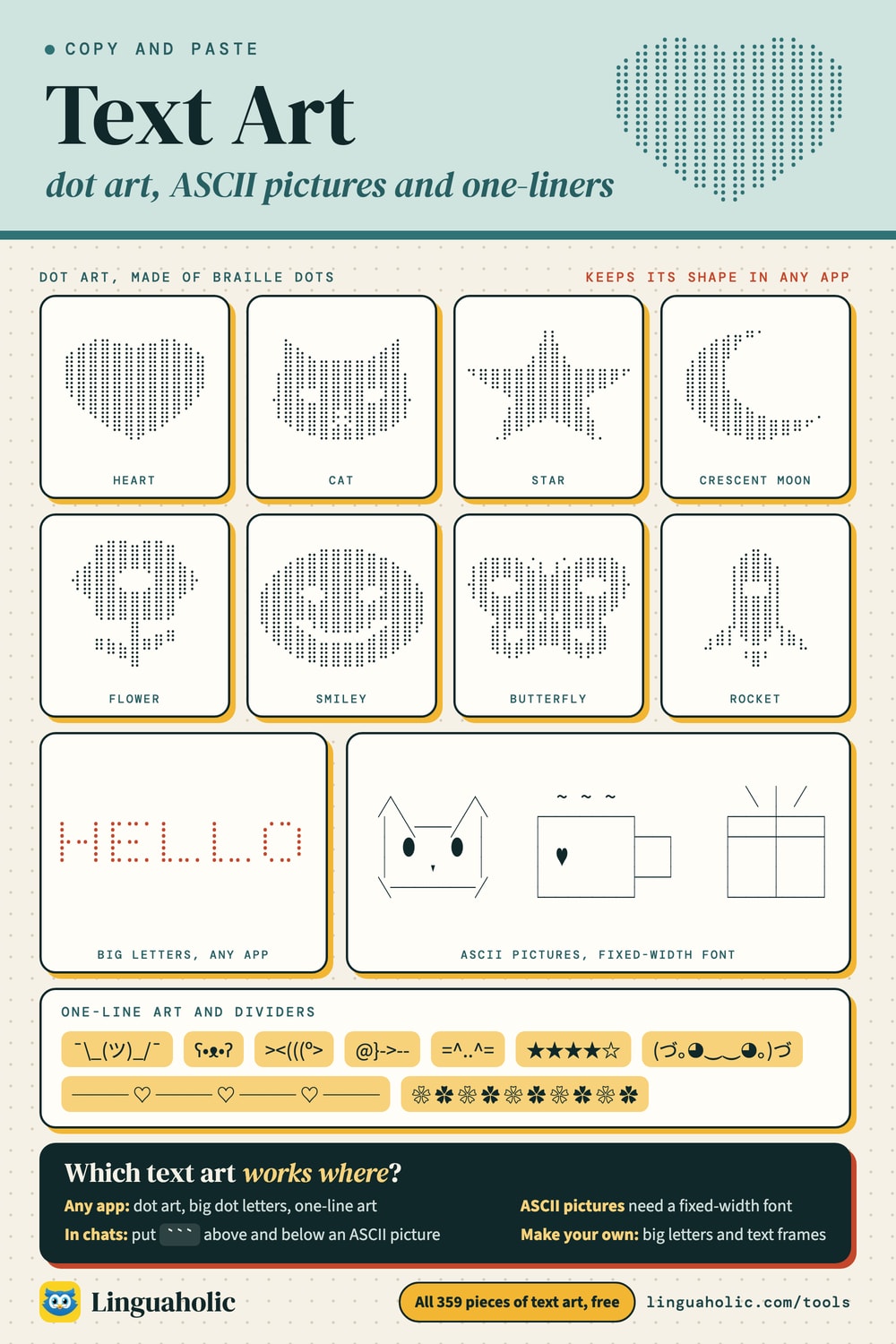
Text art sampler

Frequently asked questions
- How do I copy text art?
- Tap Copy on any piece and it goes straight to your clipboard, ready to paste into a message, post, bio, or document.
- Why does text art look messed up when I paste it?
- Multi-line text art needs a fixed-width (monospace) font to line up. Use the Code block button for Discord, GitHub, Reddit, or any Markdown editor — it wraps the art in ``` so it displays in a monospace font.
- Can I make my own text art?
- Yes. Use our ASCII Art Generator to turn any word into big ASCII lettering in 25 fonts, or to convert a photo into ASCII art.
- Is the text art free to use?
- Yes. The pieces in this collection were created for Linguaholic, and you're free to copy and use them in your own messages, posts, and projects.
- What is dot art?
- Dot art, or braille art, is a picture drawn with braille characters. Each character holds up to eight dots, and all of them have the same width, so the picture stays aligned in chats, posts and bios where ordinary ASCII art would not.
- Which text art works in iMessage, Instagram and TikTok?
- Pieces marked Any app: dot art, emoji art and one-liners. Those apps have no fixed-width font, so ASCII pictures made of letters and symbols go crooked there. Use the For chats button to get an ASCII picture as dot art.
- How do I paste text art in Discord?
- Dot art, emoji art and one-liners can be pasted as they are. For ASCII pictures, use the Code block button: it wraps the art in three backticks so Discord shows it in a fixed-width font.
- How do I write my name in emoji letters?
- Open Make your own, choose Big letters, type your name and pick Emoji letters. Choose the emoji to draw with and a background, then tap Copy. Four letters go on a line by default; choose three to be safe on a small phone.
- How do I put a border around my text?
- Open Make your own and choose Frame your text. Type your words and pick a frame: sparkles, hearts, brackets, a line above and below, or a box. Lines and ornaments work in any app; boxes need a fixed-width font.
- How small can text art be?
- One-liners and dividers are a single line. Most dot art here comes in three sizes; the small size is about 10 characters wide and 5 lines tall. Each maker shows the number of lines and characters, which helps with bio and post limits.
- Is there a text art generator on this page?
- Yes. The Make your own tab has three makers: Big letters turns your text into dot, emoji or block lettering, Emoji picture draws a picture with the emoji you choose, and Frame your text puts a border around your words.
- How do I send text art on WhatsApp?
- Copy a piece marked Any app (emoji pictures, dot art, big words, one-liners) and paste it into the chat. For an ASCII picture, type three backticks before and after it so WhatsApp shows it in a fixed-width font.
- How do I turn a photo into text art?
- Use the image mode of our ASCII Art Generator: pick a photo from your device and it is redrawn in characters in your browser, without being uploaded.
About this page
The Text Art is a free tool from Linguaholic, made by Marcel Iseli. It runs in your browser, with no sign-up. Last updated .
Keep exploring
More free tools
 Heart SymbolsCopy-and-paste heart symbols and heart emoji for bios, usernames, and messages.
 Star SymbolsTap to copy star symbols and star emoji for bios, captions, and ratings.
 Cross SymbolsCopy-and-paste cross symbols for bios, usernames, tributes, and messages.
 Infinity SymbolsTap to copy the infinity sign and its variations for bios and captions.
 Flower SymbolsCopy-and-paste flower symbols and flower emoji for aesthetic bios and captions.
 Arrow SymbolsTap to copy arrow symbols in every direction for documents and messages.